It is currently Thu Nov 26, 2026 7:44 pm


All times are UTC - 5 hours [ DST ]


Post new topic Reply to topic  [ 20 posts ] 
Author Message
 Post subject: Help with layers dialogue
PostPosted: Thu Aug 25, 2011 5:48 pm  (#1) 
Offline
GimpChat Member

Joined: May 04, 2011
Posts: 8
GIMP Version: 2.6.11
Operating System: Windows
OS Version: XP - SP3
GIMP Experience: Basic Level


I can't get my layers dialogue to work, even if the image is open. Suggestions?! :bawl


Share on Facebook Share on Twitter Share on Orkut Share on Digg Share on MySpace Share on Delicious Share on Technorati
Top
 Post subject: Re: Help with layers dialogue
PostPosted: Thu Aug 25, 2011 5:55 pm  (#2) 
Offline
GimpChat Member

Joined: Mar 14, 2011
Posts: 998
lisac1965 wrote:
GIMP Version: 2.6.11
Operating System: Windows
OS Version: XP - SP3
GIMP Experience: Basic Level


I can't get my layers dialogue to work, even if the image is open. Suggestions?! :bawl

can you be more specific than "it does not work"? Can you attach a screenshot of what you are seeing and what you are expecting to happen?

Partha


Top
 Post subject: Re: Help with layers dialogue
PostPosted: Thu Aug 25, 2011 6:06 pm  (#3) 
Offline
GimpChat Member

Joined: May 04, 2011
Posts: 8
It just doesn't work. I click the layers icon... or duplicate, or move layer... NOTHING! Opacity and layer modes don't work either. I've tried uninstalling and reinstalling and that didn't work either.


Top
 Post subject: Re: Help with layers dialogue
PostPosted: Thu Aug 25, 2011 6:28 pm  (#4) 
Offline
GimpChat Member
User avatar

Joined: Apr 18, 2011
Posts: 620
Location: New York
Attachment:
Screenshot-Layers, Channels, Paths, Undo - Brushes, Patterns, Gradients.png
Screenshot-Layers, Channels, Paths, Undo - Brushes, Patterns, Gradients.png [ 74.45 KiB | Viewed 2751 times ]
are you referring to these layer controls?


or do you mean when you right click on a layer in that window and the menu doesn't come up?

_________________
Ubuntu 24.04.1, Kernel i686, 6.8.0-52-generic
python3 v3.12.3 ----- GIMP - ver 2.10.38


Last edited by cecilia on Thu Aug 25, 2011 6:29 pm, edited 1 time in total.

Top
 Post subject: Re: Help with layers dialogue
PostPosted: Thu Aug 25, 2011 6:29 pm  (#5) 
Offline
GimpChat Member

Joined: May 04, 2011
Posts: 8
Yes!


Top
 Post subject: Re: Help with layers dialogue
PostPosted: Thu Aug 25, 2011 6:31 pm  (#6) 
Offline
GimpChat Member
User avatar

Joined: Apr 18, 2011
Posts: 620
Location: New York
lisac1965 wrote:
Yes!

do your tool icons work? :bucket :freesel :fuzzsel , and so on?

_________________
Ubuntu 24.04.1, Kernel i686, 6.8.0-52-generic
python3 v3.12.3 ----- GIMP - ver 2.10.38


Top
 Post subject: Re: Help with layers dialogue
PostPosted: Thu Aug 25, 2011 6:39 pm  (#7) 
Offline
GimpChat Member

Joined: May 04, 2011
Posts: 8
Yes.


Top
 Post subject: Re: Help with layers dialogue
PostPosted: Thu Aug 25, 2011 6:43 pm  (#8) 
Offline
GimpChat Member

Joined: Mar 14, 2011
Posts: 998
lisac1965 wrote:
It just doesn't work. I click the layers icon... or duplicate, or move layer... NOTHING! Opacity and layer modes don't work either. I've tried uninstalling and reinstalling and that didn't work either.

Can't help without some visual clue about what you are seeing. :(

Sorry,
Partha


Top
 Post subject: Re: Help with layers dialogue
PostPosted: Thu Aug 25, 2011 6:46 pm  (#9) 
Offline
Script Coder
User avatar

Joined: Oct 25, 2010
Posts: 4812
lisac1965 wrote:
It just doesn't work. I click the layers icon... or duplicate, or move layer... NOTHING! Opacity and layer modes don't work either. I've tried uninstalling and reinstalling and that didn't work either.
Better than reinstalling, exit Gimp, rename your Gimp profile, an restart Gimp (will be re-created fresh). Uninstalling Gimp doesn't remove the profile, which is reused by the next installation.

_________________
Image


Top
 Post subject: Re: Help with layers dialogue
PostPosted: Thu Aug 25, 2011 6:57 pm  (#10) 
Offline
GimpChat Member

Joined: May 04, 2011
Posts: 8
Sorry but I don't understand. What exactly is a GIMP profile and how to you rename it? I mean, it isn't like changing a profile name for a site.


Top
 Post subject: Re: Help with layers dialogue
PostPosted: Thu Aug 25, 2011 7:33 pm  (#11) 
Offline
Script Coder
User avatar

Joined: Oct 25, 2010
Posts: 4812
lisac1965 wrote:
Sorry but I don't understand. What exactly is a GIMP profile and how to you rename it? I mean, it isn't like changing a profile name for a site.

The "Gimp profile" is a folder (actually a folder tree) where Gimp keeps information that pertains to you, the user:

* your file history
* your windows and dialogs setup
* your settings for some tools
* your keyboard shortcuts
* your brushes, gradients, palettes, fonts, scripts, plugins (as opposed to those installed for the benefits of all users).

Since it is a personal folder, Gimp keeps it with others files that also belong to you, usually:

* In Windows XP: C:\Documents and Settings\{your_id}\.gimp-2.6 (ie, a "sibling" of "Application Data" and "My Documents")
* In Vista and Windows 7: C:\Users\{your_id}\.gimp-2.6 (ie, a "sibling" of "Application Data" and "My Documents")
* In Linux: /home/{your_id}/.gimp-2.6 (aka ~/.gimp-2.6)
* In OSX: (I don't know, likely quite similar to Linux)

.gimp-2.6 is of course version-dependent, so in the near future you may have to look for .gimp-2.7 or .gimp-2.8, depending on the version you run. If you run several versions, you'll have a profile for each.

_________________
Image


Top
 Post subject: Re: Help with layers dialogue
PostPosted: Thu Aug 25, 2011 8:15 pm  (#12) 
Offline
GimpChat Member

Joined: May 04, 2011
Posts: 8
So I just rename the folder?


Top
 Post subject: Re: Help with layers dialogue
PostPosted: Thu Aug 25, 2011 9:06 pm  (#13) 
Offline
GimpChat Member
User avatar

Joined: Apr 08, 2010
Posts: 5420
Location: Northwest Ohio
FYI, on my mac running snow leopard the tree is .....
macintosh HD/users/my id/library/application support/gimp


Top
 Post subject: Re: Help with layers dialogue
PostPosted: Thu Aug 25, 2011 10:20 pm  (#14) 
Offline
GimpChat Member

Joined: May 04, 2011
Posts: 8
Windows, here.


Top
 Post subject: Re: Help with layers dialogue
PostPosted: Fri Aug 26, 2011 1:04 am  (#15) 
Offline
Script Coder
User avatar

Joined: Apr 23, 2010
Posts: 1553
Location: not from Guildford after all
lisac1965 wrote:
So I just rename the folder?

Short answer: yes.

Long-winded and more than you ever wanted to know:
Let us presume you are the main user of your computer and have Administrator rights. Now let's say you wish to let your sister "Sarah" use your computer, so you add an account (so that she can keep her data and settings separate from yours).

Under Windows, a new directory will be created for her stuff to be stored, in "C:\Documents and Settings\Sarah\.gimp-2.6". Now the first time "Sarah" attempts to run GIMP, the program will notice she has never run the program before and therefore will prompt her for how she wants things set up. For example, even though you speak English, maybe "Sarah" wants the GIMP menus to be in French; or maybe she wants to use different colors and icons than you use.

What GIMP does at this point is create new 'profile' directory (as Ofnuts mentioned), "C:\Documents and Settings\Sarah\.gimp-2.6". Since GIMP doesn't know at this point what type of setup "Sarah" prefers, it fills that directory with some basic defaults (which Sarah can later change). These defaults may not be the same as yours (because you may have made some customizations to GIMP after you installed it) -- the defaults are determined by what the GIMP developers deem to be a good starting point ("Sarah" might also have been prompted for some of her preferences; typically just the language she speaks).

So why am I saying all this? Well, if you were to remove your "profile" folder ("C:\Documents and Settings\lisac1965\.gimp-2.6" or somesuch) then the next time you run GIMP, it will consider you a new user (just as it did "Sarah" the first time she ran the program) and create a new "profile" from scratch, using the default settings (GIMP may even prompt you for some things such as your preferred language).

So when Ofnuts suggests that you should just "rename your profile folder", what is really meant is delete your profile folder -- but keep a copy of it in case you need to restore some of the scripts, brushes, fonts, and so on that you may have previously customized. If you don't care about any of those things, you can just delete your "C:\Documents and Settings\lisac1965\.gimp-2.6" and start over again. Too often I see posts from Windows users suggesting a re-installation of GIMP when all they actually have to do (in most case), is delete their "profile folder". It is also important to understand the distinction between installing a script, font, plug-in, etc to your personal "profile folder" versus installing it to the 'system' folder (maybe "Sarah" doesn't want to have the same fonts you are using).


Feel free to ignore everything in the spoiler, but perhaps some will gain a better understanding of how GIMP works. It can be confusing for Windows users who are used to being the only user of their computer and not used to systems where different users are each permitted their own settings (though I've heard Microsoft has gotten better at this).

_________________
Any sufficiently primitive technology is indistinguishable from a rock.


Top
 Post subject: Re: Help with layers dialogue
PostPosted: Fri Aug 26, 2011 1:21 am  (#16) 
Offline
Global Moderator
User avatar

Joined: May 16, 2010
Posts: 16317
Yes the only real time you my want to re-install Gimp is if you have added something to its actual directory.And now it will not work and you have no idea why.
Never add anything like DLL files, brushes, scripts, and/or plug-ins to the Gimp program directory sub folders.
Always add new resources to those user folders Saul referred to.In most cases new DLL files that may come with a new plug-in you download can be placed in the plugins folder in your user directory sub-folders.Just check for duplicates in Gimps path first for the same DLL.Usually Gimps bin folder.

This alone can cause problems down the road (adding extras to Gimps program directory sub folders)

_________________
Image


Top
 Post subject: Re: Help with layers dialogue
PostPosted: Fri Aug 26, 2011 1:40 am  (#17) 
Offline
Global Moderator
User avatar

Joined: May 16, 2010
Posts: 16317
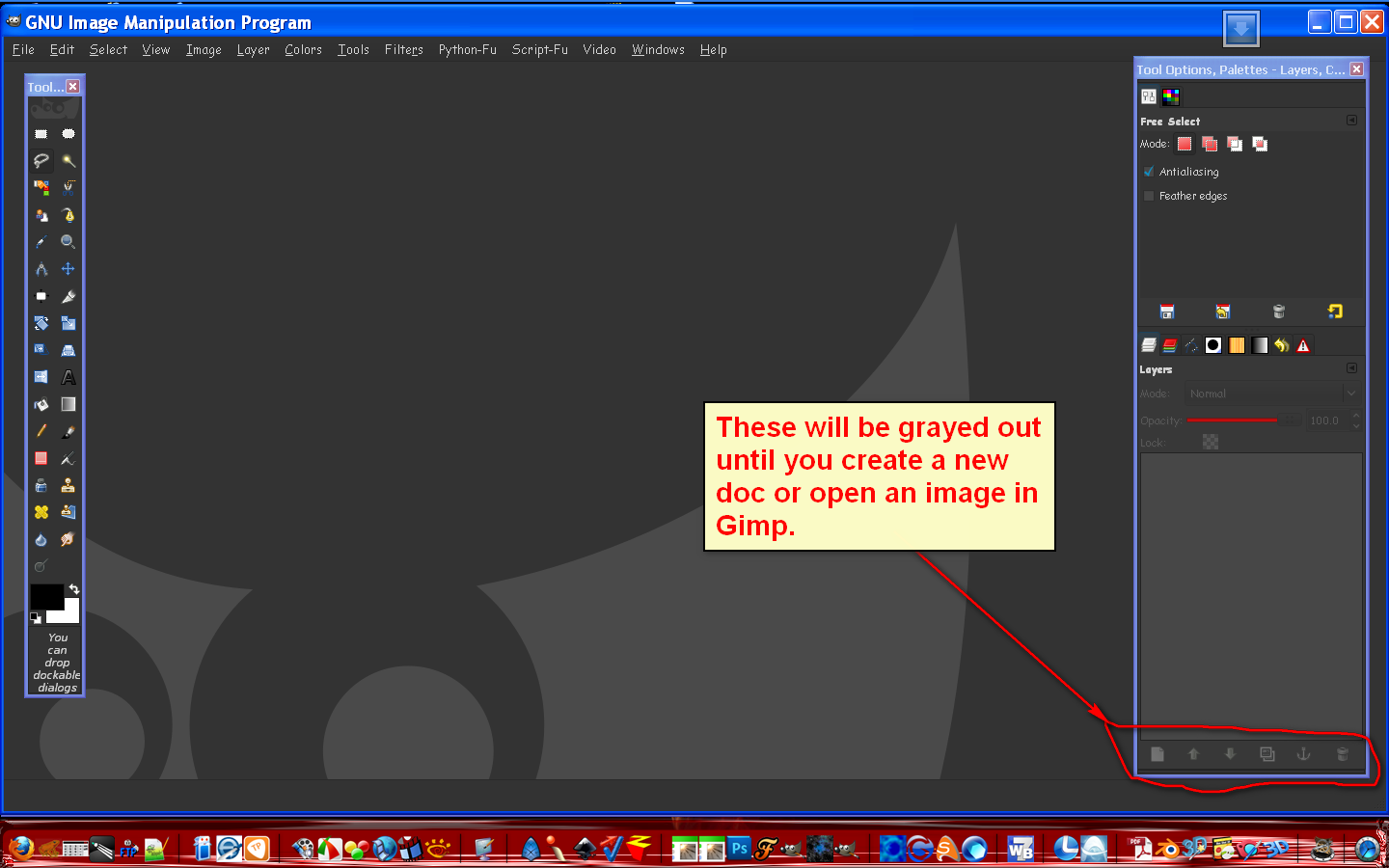
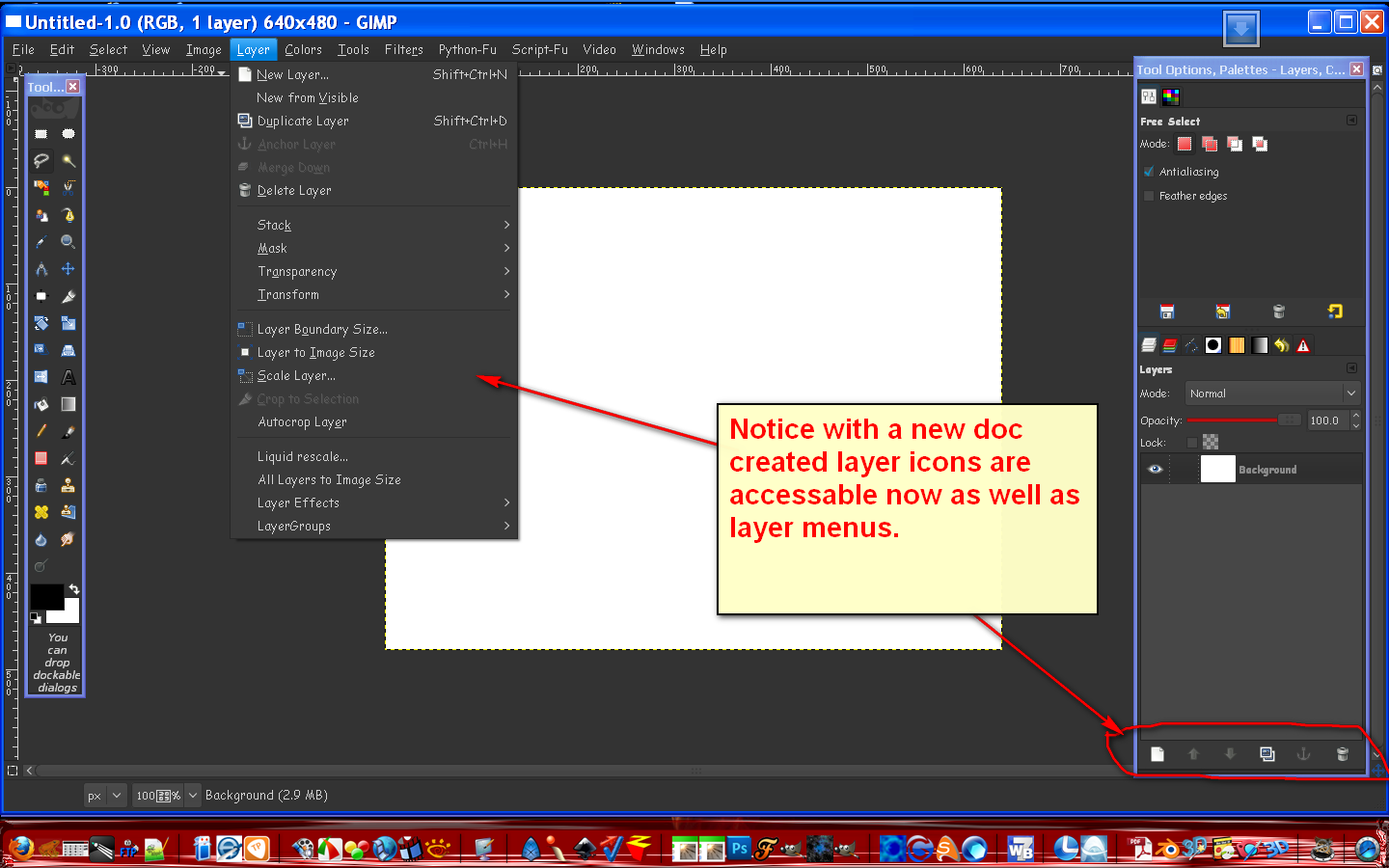
Please post a screen shot of your open image window so we can help you further.
You say you open a image?Do you mean you actually have a layer there with a image on it?
Also try the Layer menu at the top instead of right clicking the layer.

Bottom line is you have to have a layer present for the layer icons to work.

Image

Image

_________________
Image


Top
 Post subject: Re: Help with layers dialogue
PostPosted: Fri Aug 26, 2011 2:41 am  (#18) 
Offline
Script Coder
User avatar

Joined: Oct 25, 2010
Posts: 4812
saulgoode wrote:
Feel free to ignore everything in the spoiler, but perhaps some will gain a better understanding of how GIMP works. It can be confusing for Windows users who are used to being the only user of their computer and not used to systems where different users are each permitted their own settings (though I've heard Microsoft has gotten better at this).
With XP things have evolved a bit. The "family PC" is a typical use of several users on the same PC.

_________________
Image


Top
 Post subject: Re: Help with layers dialogue
PostPosted: Fri Aug 26, 2011 11:24 am  (#19) 
Offline
GimpChat Member

Joined: May 04, 2011
Posts: 8
I have already tried all that. I even tried the layer menu at the top. It won't work.


Top
 Post subject: Re: Help with layers dialogue
PostPosted: Fri Aug 26, 2011 1:23 pm  (#20) 
Offline
Global Moderator
User avatar

Joined: May 16, 2010
Posts: 16317
Can you post a screen shot of your Gimp open with a layer present?

_________________
Image


Top
Post new topic Reply to topic  [ 20 posts ] 

All times are UTC - 5 hours [ DST ]


* Login  


Powered by phpBB3 © phpBB Group