It is currently Fri Nov 13, 2026 1:34 pm


All times are UTC - 5 hours [ DST ]


Post new topic Reply to topic  [ 35 posts ]  Go to page 1, 2  Next
Author Message
 Post subject: Need help to format path tool
PostPosted: Sat Sep 03, 2011 7:22 am  (#1) 
Offline
GimpChat Member
User avatar

Joined: Apr 07, 2010
Posts: 14182
GIMP Version: 2.6.11
Operating System: Windows
OS Version: Windows 7 (64)
GIMP Experience: Intermediate Level


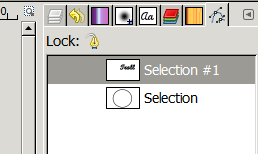
I am trying to make text around path. I was trying to follow a tutorial and it shows text to path in his path dialog. I don't have anything under mine, except an empty space. Is there a way for me to do that? :gaah
Image

_________________
Image


Share on Facebook Share on Twitter Share on Orkut Share on Digg Share on MySpace Share on Delicious Share on Technorati
Top
 Post subject: Re: Need help to format path tool
PostPosted: Sat Sep 03, 2011 8:24 am  (#2) 
Offline
Script Coder
User avatar

Joined: Apr 23, 2010
Posts: 1553
Location: not from Guildford after all
Your screenshot is showing the Paths Dialog, whereas I suspect the tutorial you were following was referencing the Text Tool's Options dialog (this can be raised by double-clicking on the Text Tool :text ). .

Kudos on including a screenshot. Noodles on not including a link to the tutorial being followed. ;)

_________________
Any sufficiently primitive technology is indistinguishable from a rock.


Last edited by saulgoode on Sat Sep 03, 2011 8:30 am, edited 1 time in total.

Top
 Post subject: Re: Need help to format path tool
PostPosted: Sat Sep 03, 2011 8:28 am  (#3) 
Offline
GimpChat Member
User avatar

Joined: Apr 07, 2010
Posts: 14182
It doesn't matter how many times I double click the text tool, I don't get the test along path dialog. I have been trying for 3 hours. grrrrr

http://gimp-tutorials.net/gimp-text-to-path-tutorial

Image

_________________
Image


Top
 Post subject: Re: Need help to format path tool
PostPosted: Sat Sep 03, 2011 12:40 pm  (#4) 
Offline
GimpChat Member

Joined: Aug 05, 2011
Posts: 606
Location: limestone,ny
I used the path tool (didn't close it ) and then added a new layer for the text and then clicked on text along path

Image

Image


Top
 Post subject: Re: Need help to format path tool
PostPosted: Sat Sep 03, 2011 12:59 pm  (#5) 
Offline
Global Moderator
User avatar

Joined: May 16, 2010
Posts: 16261
Molly create your text - create your path - and right click the text layer.

Image

_________________
Image


Top
 Post subject: Re: Need help to format path tool
PostPosted: Sat Sep 03, 2011 1:22 pm  (#6) 
Offline
GimpChat Member

Joined: Aug 05, 2011
Posts: 606
Location: limestone,ny
make a circular selection 2. select - to path (very bottom) 3. type your text then while its selected press text along path (in tool options) 4. go to the paths dialog and right click the selection that appears to be words in a circle and select path to selection (found at registry.gimp ) although i couldn't find #4, maybe because i used the ellipse tool instead of paths tool!?

Image


Top
 Post subject: Re: Need help to format path tool
PostPosted: Sat Sep 03, 2011 1:49 pm  (#7) 
Offline
Global Moderator
User avatar

Joined: May 16, 2010
Posts: 16261
alc59 wrote:
make a circular selection 2. select - to path (very bottom) 3. type your text then while its selected press text along path (in tool options) 4. go to the paths dialog and right click the selection that appears to be words in a circle and select path to selection (found at registry.gimp ) although i couldn't find #4, maybe because i used the ellipse tool instead of paths tool!?

Image

There is a script for this also.
File/Create/New/Logos/Text Circle

Image

_________________
Image


Top
 Post subject: Re: Need help to format path tool
PostPosted: Sat Sep 03, 2011 1:59 pm  (#8) 
Offline
GimpChat Member
User avatar

Joined: Apr 07, 2010
Posts: 14182
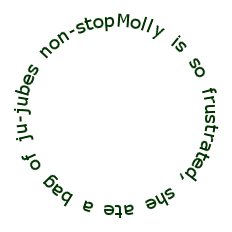
alc59 Thank you very much alc59 for the screenshots and the help. I am still having a heck of a time with it. I did everything I could to get rid of the original text but it keeps coming back, I even deleted the layer after I did the text along path. I couldn't select the new path cuz it also selected the original text. I tried to stroke it and it stroked both. Anyway, long story, been going on since around 5:30 am. I sulked, turned everything off, kicked the cat, SWORE and then some.

Rod, Thank you too. I think I will go back to using that text circle one before I really get in a hissy fit. I have done this thing umpteen times and this never happened.

Image

_________________
Image


Last edited by molly on Sat Sep 03, 2011 2:05 pm, edited 1 time in total.

Top
 Post subject: Re: Need help to format path tool
PostPosted: Sat Sep 03, 2011 2:03 pm  (#9) 
Offline
GimpChat Member

Joined: Aug 05, 2011
Posts: 606
Location: limestone,ny
Image

couple of cool things under "create"


Top
 Post subject: Re: Need help to format path tool
PostPosted: Sat Sep 03, 2011 6:22 pm  (#10) 
Offline
GimpChat Member

Joined: Mar 29, 2011
Posts: 346
Location: Wisconsin
Molly - Are you running GIMP 2.7?

I noticed the text tool options has a "Language" box and is missing the "Text along Path" and "Text to Path" buttons.

_________________
Image


Top
 Post subject: Re: Need help to format path tool
PostPosted: Sat Sep 03, 2011 7:04 pm  (#11) 
Offline
GimpChat Member
User avatar

Joined: Apr 07, 2010
Posts: 14182
Yes, I am running windows 7 64 bit.
The "Text along Path" was missing all day. I tried all kinds of tutes, including Jolie's but nothing worked. Finally after about 6 hours it just appeared. Thanks.

_________________
Image


Top
 Post subject: Re: Need help to format path tool
PostPosted: Sun Sep 04, 2011 11:12 am  (#12) 
Offline
GimpChat Member
User avatar

Joined: Oct 29, 2010
Posts: 711
Location: Netherlands
One thing I didn't like about the circular text script was that the bottom half of the characters are upside down.
I forgot where I found this,but you can use the "pan to bow" script too.
It is however more work.
This was done by setting the angle of pan to bow at 180.
By setting it lower,for instance 90 you can create an oval.
If anybody is interested I'll come back and explain how to do it.
I checked in my install of Gimp-2.7 and the script works although it complains about some syntax thingie.
Gerard.


Attachments:
circulartext.xcf [14.55 KiB]
Downloaded 85 times

_________________
Gentoo Linux always up-to-date.
Kernel-3.17.4 Python-2.7.8/3.3.5
Gimp-2.8.14

I use Linux only.
And Virtualbox with Win 7
Top
 Post subject: Re: Need help to format path tool
PostPosted: Sun Sep 04, 2011 11:45 am  (#13) 
Offline
GimpChat Member
User avatar

Joined: Apr 07, 2010
Posts: 14182
thanks gerard82, I am interested
I have the script , it is under Filters > theilr > pan to bow. (right under Will's Script) in mine.

_________________
Image


Last edited by molly on Sun Sep 04, 2011 12:46 pm, edited 1 time in total.

Top
 Post subject: Re: Need help to format path tool
PostPosted: Sun Sep 04, 2011 12:38 pm  (#14) 
Offline
GimpChat Member
User avatar

Joined: Oct 29, 2010
Posts: 711
Location: Netherlands
Open File New white background size sufficient to contain the text.
Add a transparent layer and select it.
With the text tool type the top half of the text and close it.
Then type the bottom half.
By moving the texts under each other check that the length is equal.
Add spaces to the shortest one if needed.
(In my example I added one space to the bottom one)
Select the top text and cut it (ctrl-x).
Go to Edit > Paste as > New Image and save it under somename.xcf.
Do the same with the bottom text.
Discard what is left.
Now open the file containing the top text.
Go to Filters > theilr > Pan to Bow and click it.
Choose angle of circle 180 ( or less if you want to make oval text) and hit OK.
Save the result.
The bottom part needs more work:
Open the bottom text and go to Image > Transform > Flip Vertically.
Then use pan to bow again.
Go back to Image > Transform > Flip Vertically again and save it.
Open the file where you want to have your circular text.
Open the bent texts as layers and then after selecting the right layer move it in position with the Move tool.
Please let me know if this is sufficiently clear.(English is not my native tongue)
Gerard.
Edit: I am a Linux only user,never used Gimp in Windows so I can't help you with installing the script.

_________________
Gentoo Linux always up-to-date.
Kernel-3.17.4 Python-2.7.8/3.3.5
Gimp-2.8.14

I use Linux only.
And Virtualbox with Win 7


Top
 Post subject: Re: Need help to format path tool
PostPosted: Sun Sep 04, 2011 12:50 pm  (#15) 
Offline
GimpChat Member
User avatar

Joined: Apr 07, 2010
Posts: 14182
thanks gerard.

_________________
Image


Top
 Post subject: Re: Need help to format path tool
PostPosted: Sun Sep 04, 2011 12:59 pm  (#16) 
Offline
GimpChat Member

Joined: Mar 04, 2011
Posts: 2629
I did a video demo of text onto a path some time ago.

http://www.youtube.com/watch?v=4ct4yDEX6Dw

might / might not help


Top
 Post subject: Re: Need help to format path tool
PostPosted: Sun Sep 04, 2011 1:01 pm  (#17) 
Offline
GimpChat Member
User avatar

Joined: Oct 29, 2010
Posts: 711
Location: Netherlands
My pleasure.
Gerard.

_________________
Gentoo Linux always up-to-date.
Kernel-3.17.4 Python-2.7.8/3.3.5
Gimp-2.8.14

I use Linux only.
And Virtualbox with Win 7


Top
 Post subject: Re: Need help to format path tool
PostPosted: Sun Sep 04, 2011 1:06 pm  (#18) 
Offline
GimpChat Member
User avatar

Joined: Apr 07, 2010
Posts: 14182
rich2005 wrote:
I did a video demo of text onto a path some time ago.

http://www.youtube.com/watch?v=4ct4yDEX6Dw

might / might not help


Was that you? I was trying to do that Video tute yesterday and I kept pausing and starting over and I messed up really bad so I gave up. It is a very well done video though. I was going to write it all out as text but I was too long to do that.

_________________
Image


Top
 Post subject: Re: Need help to format path tool
PostPosted: Sun Sep 04, 2011 2:38 pm  (#19) 
Offline
Script Coder
User avatar

Joined: Apr 23, 2010
Posts: 1553
Location: not from Guildford after all
gerard82, it is possible to re-orient the bottom text without resorting to additional scripts or plug-ins. The important step is to flip the path using the Flip Tool with the Affect option set to the active path. It is also useful to use the Rotate Tool (with the Affect option set to the active path) to position the text around the perimeter of the circle.

Here is a short video tutorial (no sound):

http://barn.kerosenecow.net/u/saul/m/flip-text/

_________________
Any sufficiently primitive technology is indistinguishable from a rock.


Last edited by saulgoode on Wed Aug 28, 2013 8:00 am, edited 2 times in total.

Top
 Post subject: Re: Need help to format path tool
PostPosted: Sun Sep 04, 2011 2:48 pm  (#20) 
Offline
GimpChat Member
User avatar

Joined: Apr 07, 2010
Posts: 14182
Wow, that is cool Saul

_________________
Image


Top
Post new topic Reply to topic  [ 35 posts ]  Go to page 1, 2  Next

All times are UTC - 5 hours [ DST ]


* Login  


Powered by phpBB3 © phpBB Group