molly wrote:
thanks Saul. I did this but I don't know how I got there. I will go over and over it until it sinks in.
All paths have an "interior" and an "exterior". For example, when we created our circular path (from the elliptical selection), the resulting path proceeds in a clockwise direction.
Attachment:
 cw-path.png [ 4.21 KiB | Viewed 1417 times ]
If you were to walk along the path following the arrows, the "interior" of the path would be toward your right, while the "exterior" of the path would be toward your left. Using this terminology, even a path which is straight line has an "interior" (to the right as you proceed from the start of the path to its end) and an "exterior" (to the left). The Text Along Path command will always place the text so that the bottom of the text is toward the "interior" of the path.
When you flip the above circular path, the direction of the path is reversed.
Attachment:
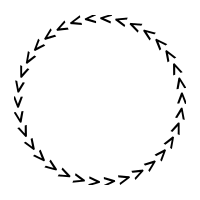 ccw-path.png [ 4.17 KiB | Viewed 1417 times ]
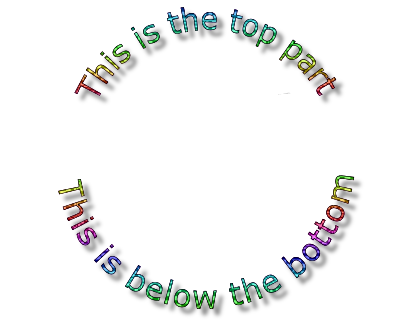
Now if your were to walk along the path following the arrows, you will note that the outside of the circle is to your right, while the inside is to your left. Because of our adopted definitions, the "interior" of this flipped path is the region outside the circle, while the path's "exterior" is actually the region within the circle. As we would expect, the Text Along Path operation orients the text so that the bottom of the text is toward the outside of the circle (i.e., its "interior").
 Login
Login Register
 Tweets
 FAQ
FAQ Advanced Search