It is currently Fri Jul 24, 2026 6:09 am


All times are UTC - 5 hours [ DST ]


Post new topic Reply to topic  [ 14 posts ] 
Author Message
 Post subject: Paintbrush fade-in, fade-out [SOLVED]
PostPosted: Mon Sep 12, 2011 10:03 am  (#1) 
Offline
Retired Staff
User avatar

Joined: May 22, 2008
Posts: 6946
Location: Somewhere in GIMP
GIMP Version: 2.6.11
Operating System: Linux
OS Version: Fedora 12
GIMP Experience: Intermediate Level

List any relevant plug-ins or scripts:
Paint Brush fade-out option
Circle brushes


Is there a quick and easy way to do this? The paintbrush fades out, is there a way to make it fade in then fade out?

I used the Circle brush and flipped layers to do these and used the Move tool to align them.

Image

_________________
Image
World War IV will be fought with sticks and stones. - Albert Einstein


Share on Facebook Share on Twitter Share on Orkut Share on Digg Share on MySpace Share on Delicious Share on Technorati
Top
 Post subject: Re: Paintbrush fade-in, fade-out
PostPosted: Mon Sep 12, 2011 11:25 am  (#2) 
Offline
GimpChat Member
User avatar

Joined: Oct 07, 2010
Posts: 439
Location: home/Nixnine/.gimp-2.0/scripts/nixnine.scm
Here's what I did to get kind of the effect you mentioned:
All are brush settings

1.Use color from gradient.
2. Use FG to transparent gradient FLIPPED.
3. Adjust length. I used 240 px.
4. Repeat set for triangular wave.
5. Keep your stroke to the length above.(Maybe not that great)


You can use the fade out option, but I found it is more balanced without it. The top two I did by hand -- as if that wasn't obvious -- and the bottom was a stoked path with the paintbrush.


Attachments:
fade inout.png
fade inout.png [ 25.5 KiB | Viewed 10028 times ]

_________________
I refuse to be confused, but am often confused at this refusal.
Top
 Post subject: Re: Paintbrush fade-in, fade-out
PostPosted: Mon Sep 12, 2011 11:50 am  (#3) 
Offline
GimpChat Member
User avatar

Joined: Oct 07, 2010
Posts: 439
Location: home/Nixnine/.gimp-2.0/scripts/nixnine.scm
Another quick note.

Depending on how much fade you want, you can create a gradient with more or less transparency. Here's an example with more.


Attachments:
fade inout2.png
fade inout2.png [ 47.33 KiB | Viewed 10005 times ]

_________________
I refuse to be confused, but am often confused at this refusal.
Top
 Post subject: Re: Paintbrush fade-in, fade-out
PostPosted: Mon Sep 12, 2011 12:03 pm  (#4) 
Offline
GimpChat Member
User avatar

Joined: Sep 06, 2011
Posts: 368
Location: US, Ohio
try messing with the brush dynamics. I wish I had gimp on the computer I'm typing this up on because I know you can do that effect by tweaking some settings in those dynamics.

Also, give the airbrush tool combined with brush dynamics a shot.


Top
 Post subject: Re: Paintbrush fade-in, fade-out
PostPosted: Mon Sep 12, 2011 12:47 pm  (#5) 
Offline
GimpChat Member

Joined: Mar 04, 2011
Posts: 2610
I was thinking along the lines of Ofnuts ribbon path plugin -> to selection -> apply a gradient.

as http://imgur.com/fOoNJ.jpg

nowhere near as convenient as the inkscape tools or Mypaint brushes.


Top
 Post subject: Re: Paintbrush fade-in, fade-out
PostPosted: Mon Sep 12, 2011 5:11 pm  (#6) 
Offline
Global Moderator
User avatar

Joined: May 16, 2010
Posts: 16130
You can also set the controller event for say...ctl...mouse scroll up...and get the airbrush tool. :)

_________________
Image


Top
 Post subject: Re: Paintbrush fade-in, fade-out
PostPosted: Mon Sep 12, 2011 5:21 pm  (#7) 
Offline
Global Moderator
User avatar

Joined: May 16, 2010
Posts: 16130
I tried that it doesn't work as well as i thought.
Never mind :)

_________________
Image


Top
 Post subject: Re: Paintbrush fade-in, fade-out
PostPosted: Mon Sep 12, 2011 6:57 pm  (#8) 
Offline
GimpChat Member
User avatar

Joined: Sep 06, 2011
Posts: 368
Location: US, Ohio
Try setting your brush settings like this:
Attachment:
Capture.PNG
Capture.PNG [ 13.45 KiB | Viewed 9943 times ]

The gradient causes the brush to fade in, and the fade out setting causes the brush to fade out.


Top
 Post subject: Re: Paintbrush fade-in, fade-out
PostPosted: Mon Sep 12, 2011 7:12 pm  (#9) 
Offline
GimpChat Member
User avatar

Joined: Apr 08, 2010
Posts: 5420
Location: Northwest Ohio
That does work pretty well, just some trial and error needed for the length sliders


Top
 Post subject: Re: Paintbrush fade-in, fade-out
PostPosted: Mon Sep 12, 2011 7:48 pm  (#10) 
Offline
GimpChat Member
User avatar

Joined: Oct 06, 2010
Posts: 4050
I covered this a while back at the Registry. Pretty much what Alex suggested:

http://registry.gimp.org/node/25122

_________________
"In order to attain the impossible, one must attempt the absurd."
~ Miguel de Cervantes


Top
 Post subject: Re: Paintbrush fade-in, fade-out
PostPosted: Mon Sep 12, 2011 8:41 pm  (#11) 
Offline
GimpChat Member

Joined: Mar 29, 2011
Posts: 346
Location: Wisconsin
Oregonian wrote:
Is there a quick and easy way to do this? The paintbrush fades out, is there a way to make it fade in then fade out?

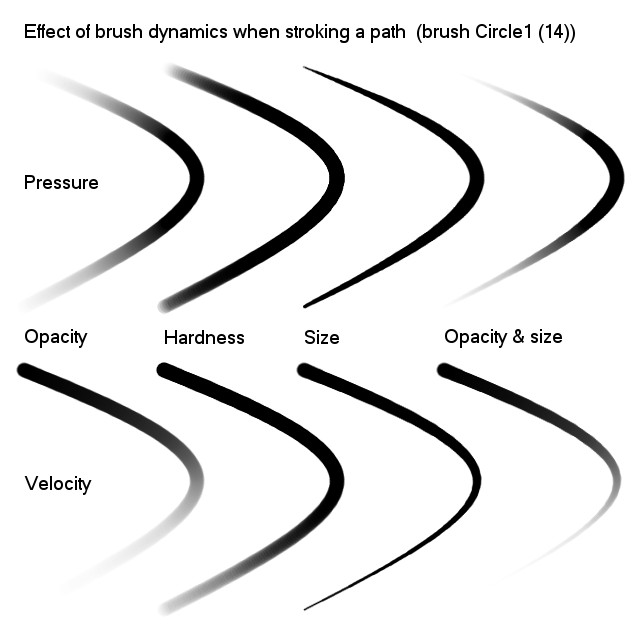
I use the brush dynamics for fade in and fade out.
Here's a crib sheet I made last year.
Image
The lines were drawn by stroking a path with the paintbrush tool and a hard round brush 14 px in diameter (7 px radius, 100% hardness). The stroke starts at the top and ends at the bottom.
The top row shows the effect of the various check boxes for pressure
The middle legend is the boxes that were checked.
The bottom row shows the effect with the various velocity options.
The pressure and velocity options can be combined for more pronounced effects.

_________________
Image


Last edited by bkh1914 on Mon Sep 12, 2011 8:58 pm, edited 1 time in total.

Top
 Post subject: Re: Paintbrush fade-in, fade-out
PostPosted: Mon Sep 12, 2011 8:58 pm  (#12) 
Offline
GimpChat Member
User avatar

Joined: Oct 07, 2010
Posts: 439
Location: home/Nixnine/.gimp-2.0/scripts/nixnine.scm
Groovy. Learn something new everyday in gimpchat. Love the variety on how to do things. There is nothing spicier than Gimp.

_________________
I refuse to be confused, but am often confused at this refusal.


Top
 Post subject: Re: Paintbrush fade-in, fade-out
PostPosted: Tue Sep 13, 2011 6:48 am  (#13) 
Offline
GimpChat Member
User avatar

Joined: Sep 06, 2011
Posts: 368
Location: US, Ohio
bkh1914 wrote:
Oregonian wrote:
Is there a quick and easy way to do this? The paintbrush fades out, is there a way to make it fade in then fade out?

I use the brush dynamics for fade in and fade out.
Here's a crib sheet I made last year.
Image
The lines were drawn by stroking a path with the paintbrush tool and a hard round brush 14 px in diameter (7 px radius, 100% hardness). The stroke starts at the top and ends at the bottom.
The top row shows the effect of the various check boxes for pressure
The middle legend is the boxes that were checked.
The bottom row shows the effect with the various velocity options.
The pressure and velocity options can be combined for more pronounced effects.


That's a great reference image!


Top
 Post subject: Re: Paintbrush fade-in, fade-out
PostPosted: Tue Sep 13, 2011 9:42 am  (#14) 
Offline
Retired Staff
User avatar

Joined: May 22, 2008
Posts: 6946
Location: Somewhere in GIMP
Wow, thank you everyone. What a cool bunch of tips for doing what I requested help for.
BKH, that's a great chart. Snatched your picture.

I appreciate everyone taking the time to help me out. Now to settle down and put them to work.

:tyspin

_________________
Image
World War IV will be fought with sticks and stones. - Albert Einstein


Top
Post new topic Reply to topic  [ 14 posts ] 

All times are UTC - 5 hours [ DST ]


* Login  


Powered by phpBB3 © phpBB Group