It is currently Thu Nov 26, 2026 8:10 pm


All times are UTC - 5 hours [ DST ]


Post new topic Reply to topic  [ 66 posts ]  Go to page Previous  1, 2, 3, 4  Next
Author Message
 Post subject: Re: Frames
PostPosted: Fri Sep 16, 2011 3:08 pm  (#21) 
Offline
Retired Staff
User avatar

Joined: May 22, 2008
Posts: 6946
Location: Somewhere in GIMP
Here is a link to where we were playing with frames with wrapmap. Perhaps we should have a separate thread about using wrap map for frames. viewtopic.php?p=5217#p5217

_________________
Image
World War IV will be fought with sticks and stones. - Albert Einstein


Top
 Post subject: Re: Frames
PostPosted: Fri Sep 16, 2011 5:44 pm  (#22) 
Offline
GimpChat Member
User avatar

Joined: Apr 07, 2010
Posts: 14182
:gaah :hoh I have spent since this afternoon to find this script in Gimp. (mats-and-frames.scm) I have looked in every dropdown in Script-Fu. I have looked in every dropdown in FX-Foundry. It says in the download site that it should be in ScriptFu/Decor/Add mat. Well, do you know what? There is no such a place in my Gimp. It does show in my Gimp folders 2.6 and 2.7 so I do have it. Has anyone else been able to find it? grrrrrrrrr


_________________
Image


Top
 Post subject: Re: Frames
PostPosted: Fri Sep 16, 2011 5:49 pm  (#23) 
Offline
GimpChat Member
User avatar

Joined: Oct 06, 2010
Posts: 4050
Ok, just so I know what you are referring to, are we talking about the existing script before the one posted today or today's script?

_________________
"In order to attain the impossible, one must attempt the absurd."
~ Miguel de Cervantes


Top
 Post subject: Re: Frames
PostPosted: Fri Sep 16, 2011 5:58 pm  (#24) 
Offline
GimpChat Member
User avatar

Joined: Apr 07, 2010
Posts: 14182
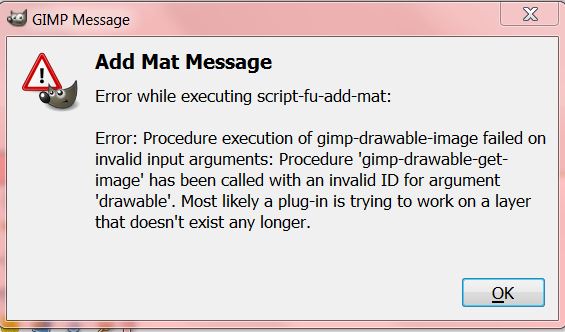
I tried your mats-and-frames.scm, I could't find it anywhere in Gimp, then I deleted it out of my gimp 2.6 and 2.7 folders, I then downloaded the one in the post above by Rod. I tried one in FX-Foundry that says add map and here is the message I get.Image

_________________
Image


Last edited by molly on Fri Sep 16, 2011 6:03 pm, edited 1 time in total.

Top
 Post subject: Re: Frames
PostPosted: Fri Sep 16, 2011 6:00 pm  (#25) 
Offline
GimpChat Member
User avatar

Joined: Oct 06, 2010
Posts: 4050
Ok, the mat one where is it located in the FX menu?

_________________
"In order to attain the impossible, one must attempt the absurd."
~ Miguel de Cervantes


Top
 Post subject: Re: Frames
PostPosted: Fri Sep 16, 2011 6:01 pm  (#26) 
Offline
GimpChat Member
User avatar

Joined: Oct 07, 2010
Posts: 439
Location: home/Nixnine/.gimp-2.0/scripts/nixnine.scm
Mine shows up in <Image>Script-fu/Edges/ Add frame and /Add matte.

Open the .scm in your text editor and see where it's supposed to be.

_________________
I refuse to be confused, but am often confused at this refusal.


Top
 Post subject: Re: Frames
PostPosted: Fri Sep 16, 2011 6:03 pm  (#27) 
Offline
GimpChat Member
User avatar

Joined: Oct 06, 2010
Posts: 4050
If you add mine, it will show up in Filters/Decor. But it might not if another script resides on your computer using the same procedure name "script-fu-add-mat".

_________________
"In order to attain the impossible, one must attempt the absurd."
~ Miguel de Cervantes


Top
 Post subject: Re: Frames
PostPosted: Fri Sep 16, 2011 6:05 pm  (#28) 
Offline
GimpChat Member
User avatar

Joined: Apr 07, 2010
Posts: 14182
Mahv, there is no such place as Filters?Decor. I do not have another script by that name in my scms.

_________________
Image


Top
 Post subject: Re: Frames
PostPosted: Fri Sep 16, 2011 6:06 pm  (#29) 
Offline
GimpChat Member
User avatar

Joined: Oct 06, 2010
Posts: 4050
Molly, it wont show as a filename, but as a procedure in the script, that's my point. The file could be named just about anything.

_________________
"In order to attain the impossible, one must attempt the absurd."
~ Miguel de Cervantes


Top
 Post subject: Re: Frames
PostPosted: Fri Sep 16, 2011 6:12 pm  (#30) 
Offline
GimpChat Member
User avatar

Joined: Apr 07, 2010
Posts: 14182
nixnine wrote:
Mine shows up in <Image>Script-fu/Edges/ Add frame and /Add matte.

Open the .scm in your text editor and see where it's supposed to be.

Nixnine
It says it should be in ScriptFu/Decor/Add mat. there is no such place that I know of
I also can't find Image / Script-Fu / edges. There is nothing like that under images

_________________
Image


Top
 Post subject: Re: Frames
PostPosted: Fri Sep 16, 2011 6:15 pm  (#31) 
Offline
GimpChat Member
User avatar

Joined: Oct 06, 2010
Posts: 4050
Look under Filters.

_________________
"In order to attain the impossible, one must attempt the absurd."
~ Miguel de Cervantes


Top
 Post subject: Re: Frames
PostPosted: Fri Sep 16, 2011 6:19 pm  (#32) 
Offline
GimpChat Member
User avatar

Joined: Oct 07, 2010
Posts: 439
Location: home/Nixnine/.gimp-2.0/scripts/nixnine.scm
But are you reading the location in the .scm? If it says ScriptFu/Decor/Add mat it will create that location when the script is installed and gimp initiated/refreshed.

_________________
I refuse to be confused, but am often confused at this refusal.


Top
 Post subject: Re: Frames
PostPosted: Fri Sep 16, 2011 6:21 pm  (#33) 
Offline
GimpChat Member
User avatar

Joined: Oct 06, 2010
Posts: 4050
I think she is looking under Image in the menu.

_________________
"In order to attain the impossible, one must attempt the absurd."
~ Miguel de Cervantes


Top
 Post subject: Re: Frames
PostPosted: Fri Sep 16, 2011 6:25 pm  (#34) 
Offline
GimpChat Member
User avatar

Joined: Oct 07, 2010
Posts: 439
Location: home/Nixnine/.gimp-2.0/scripts/nixnine.scm
Try this one. It has a newer update.


Attachments:
mats-and-frames.scm [20.24 KiB]
Downloaded 122 times

_________________
I refuse to be confused, but am often confused at this refusal.
Top
 Post subject: Re: Frames
PostPosted: Fri Sep 16, 2011 6:26 pm  (#35) 
Offline
GimpChat Member
User avatar

Joined: Apr 07, 2010
Posts: 14182
mahvin I am looking under image, under Script-Fu, under FX-Foundry, under everything there is to look under. there is no Script-fu/decor. If there is, please show me me a screen shot.

_________________
Image


Top
 Post subject: Re: Frames
PostPosted: Fri Sep 16, 2011 6:28 pm  (#36) 
Offline
GimpChat Member
User avatar

Joined: Apr 07, 2010
Posts: 14182
nixnine wrote:
Try this one. It has a newer update.


ok, I will try that one but if it is the one Mahvin posted, I already tried that for 3 hrs. I will try it again after I take out Rod's

_________________
Image


Top
 Post subject: Re: Frames
PostPosted: Fri Sep 16, 2011 6:33 pm  (#37) 
Offline
GimpChat Member

Joined: Apr 12, 2010
Posts: 5870
The new version posted by Akky should add a new Script-Fu menu in the image windows and the script should go there
exactly in <Image(Windows)>/Script-Fu(MENU)/Edges/Add Matte )

If doesn't you should have a older version of the script or anyway a script using the same procedure name that conflict
Good chance that the clone is in the Filters/Decor menu

_________________
My 3D Gallery on Deviantart http://photocomix2.deviantart.com/
Main gallery http://www.flickriver.com/photos/photocomix-mandala/
Mandala and simmetry http://www.flickriver.com/photos/photocomix_mandala/

Image

Mrs Wilbress


Top
 Post subject: Re: Frames
PostPosted: Fri Sep 16, 2011 6:34 pm  (#38) 
Offline
GimpChat Member
User avatar

Joined: Oct 07, 2010
Posts: 439
Location: home/Nixnine/.gimp-2.0/scripts/nixnine.scm
It has different annotations than the earlier one and says it was revised in 2008. But it's the one I'm using and is in a different location in your menu.


Attachments:
Screenshot-1.png
Screenshot-1.png [ 1.56 MiB | Viewed 1934 times ]

_________________
I refuse to be confused, but am often confused at this refusal.
Top
 Post subject: Re: Frames
PostPosted: Fri Sep 16, 2011 6:35 pm  (#39) 
Offline
GimpChat Member

Joined: Apr 12, 2010
Posts: 5870
EVEN BETTER CHANCES that a conflicting script is in the FX-Foundry menu (if you have that)

_________________
My 3D Gallery on Deviantart http://photocomix2.deviantart.com/
Main gallery http://www.flickriver.com/photos/photocomix-mandala/
Mandala and simmetry http://www.flickriver.com/photos/photocomix_mandala/

Image

Mrs Wilbress


Top
 Post subject: Re: Frames
PostPosted: Fri Sep 16, 2011 6:36 pm  (#40) 
Offline
GimpChat Member
User avatar

Joined: Oct 06, 2010
Posts: 4050
Mine is in FX Foundry, but I have to find them to remove them before installing the one Rod posted today. It's not MY script, it's actually Rod's. I just converted it to scm for downloading.

_________________
"In order to attain the impossible, one must attempt the absurd."
~ Miguel de Cervantes


Top
Post new topic Reply to topic  [ 66 posts ]  Go to page Previous  1, 2, 3, 4  Next

All times are UTC - 5 hours [ DST ]


* Login  


Powered by phpBB3 © phpBB Group