It is currently Thu Nov 26, 2026 8:10 pm


All times are UTC - 5 hours [ DST ]


Post new topic Reply to topic  [ 66 posts ]  Go to page Previous  1, 2, 3, 4  Next
Author Message
 Post subject: Re: Frames
PostPosted: Fri Sep 16, 2011 6:39 pm  (#41) 
Offline
GimpChat Member
User avatar

Joined: Apr 07, 2010
Posts: 14182
Ok, Now that I have already had my nervous breakdown, your script worked Nixie. Here is where it is, not where you said but almost. thank you very much. I told ya'll that I am not crazy.
Image

_________________
Image


Top
 Post subject: Re: Frames
PostPosted: Fri Sep 16, 2011 6:42 pm  (#42) 
Offline
GimpChat Member
User avatar

Joined: Oct 07, 2010
Posts: 439
Location: home/Nixnine/.gimp-2.0/scripts/nixnine.scm
Groovy. Let's see what you come up with. :hehe

_________________
I refuse to be confused, but am often confused at this refusal.


Top
 Post subject: Re: Frames
PostPosted: Fri Sep 16, 2011 6:45 pm  (#43) 
Offline
GimpChat Member
User avatar

Joined: Apr 07, 2010
Posts: 14182
Image

I will do a better one when I calm down. thanks again guys.

_________________
Image


Top
 Post subject: Re: Frames
PostPosted: Fri Sep 16, 2011 6:49 pm  (#44) 
Offline
GimpChat Member
User avatar

Joined: Oct 06, 2010
Posts: 4050
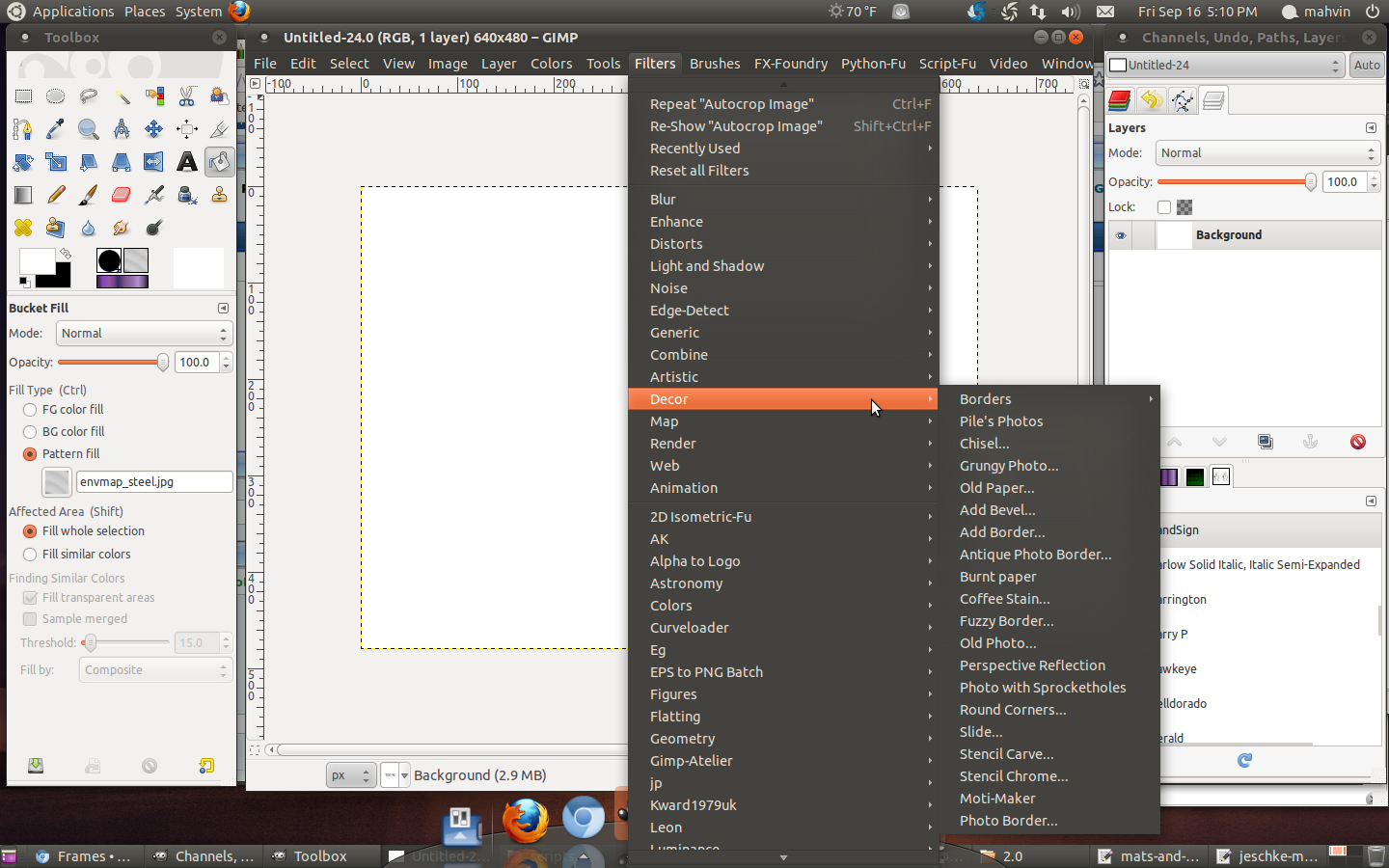
I know its pointless at this time, but I wasn't calling you crazy, Molly, I was merely pointing out that not all scripts go where they should. Consider that now, I have removed the FX Foundry version and installed Rod's version, and it showed up in Filters/Decor. The script has it in Script-Fu/Decor, but the reason it didn't go there? I have no clue.

(script-fu-register "script-fu-add-mat"
_"<Image>/Script-Fu/Decor/Add Mat..."

Image

_________________
"In order to attain the impossible, one must attempt the absurd."
~ Miguel de Cervantes


Last edited by mahvin on Fri Sep 16, 2011 6:58 pm, edited 1 time in total.

Top
 Post subject: Re: Frames
PostPosted: Fri Sep 16, 2011 6:56 pm  (#45) 
Offline
GimpChat Member
User avatar

Joined: Apr 07, 2010
Posts: 14182
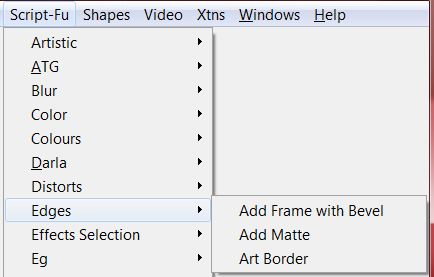
Its okay, long as you know that I know there is no such place as Script-Fu Decor and if anyone ever does see such a beast, please screen it and mail it to me. I will frame it. and also image, edges, add matte. :teeth

_________________
Image


Top
 Post subject: Re: Frames
PostPosted: Fri Sep 16, 2011 7:02 pm  (#46) 
Offline
GimpChat Member
User avatar

Joined: Oct 06, 2010
Posts: 4050
Just so anyone doesn't think I'm being overbearing on the matter, check the screenshot above, but also a question:

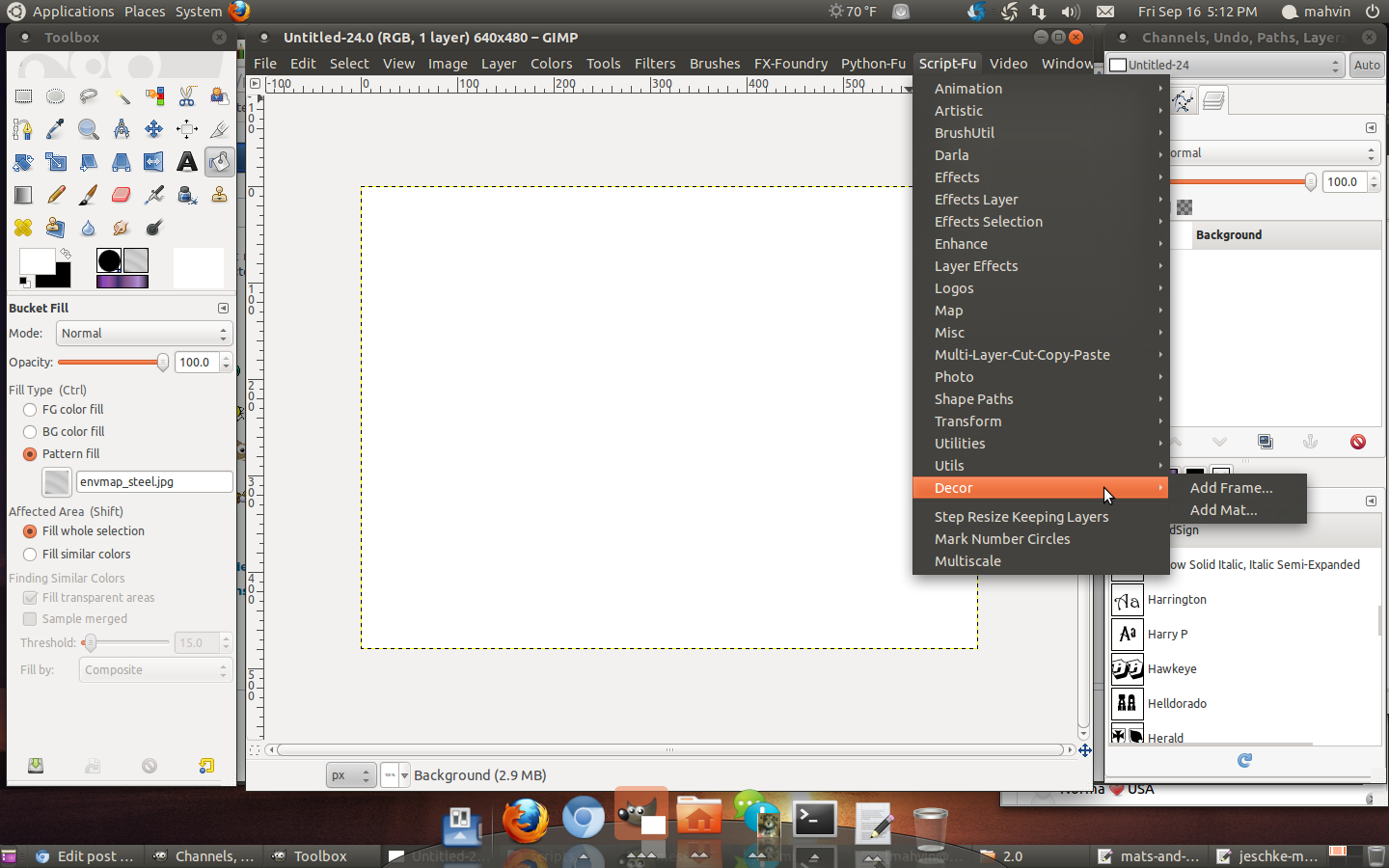
What is the underscore for before _<Image> in the script? I removed them and NOW they are in Script-Fu/Decor.

_________________
"In order to attain the impossible, one must attempt the absurd."
~ Miguel de Cervantes


Top
 Post subject: Re: Frames
PostPosted: Fri Sep 16, 2011 7:06 pm  (#47) 
Offline
GimpChat Member
User avatar

Joined: Apr 07, 2010
Posts: 14182
That is Filters > Decor > add mat and that is a different script, anyway no sweat, it is solved.

_________________
Image


Top
 Post subject: Re: Frames
PostPosted: Fri Sep 16, 2011 7:08 pm  (#48) 
Offline
GimpChat Member
User avatar

Joined: Oct 06, 2010
Posts: 4050
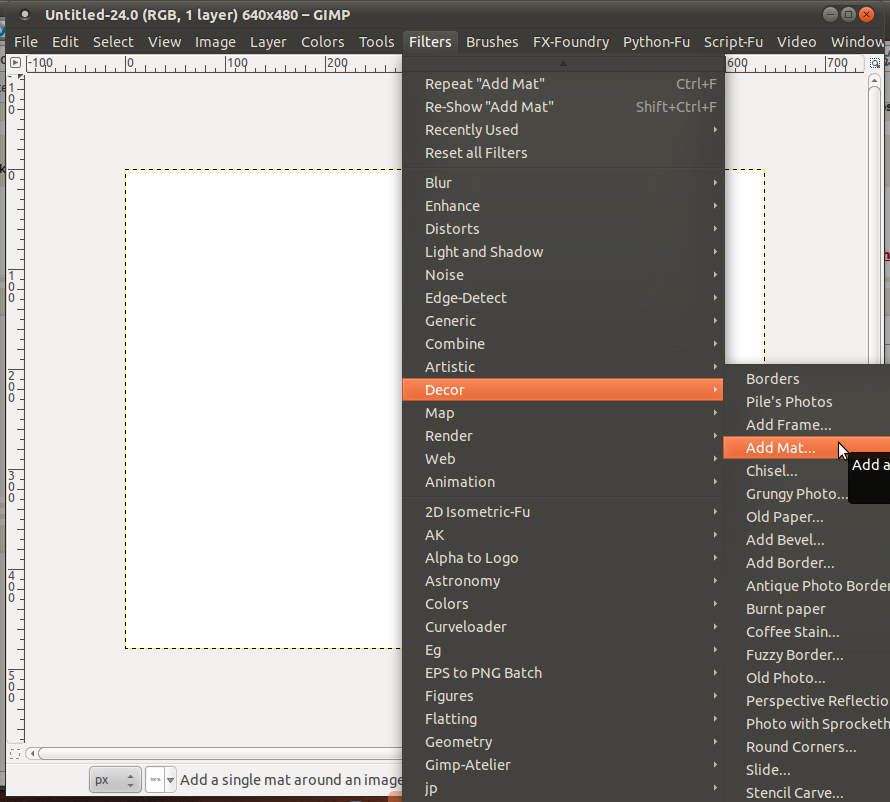
No, it's not. It's the same exact script. I have them opened side by side.

After making script changes, its not in Filters/Decor anymore:

Image

But now located here:

Image

_________________
"In order to attain the impossible, one must attempt the absurd."
~ Miguel de Cervantes


Top
 Post subject: Re: Frames
PostPosted: Fri Sep 16, 2011 7:21 pm  (#49) 
Offline
GimpChat Member
User avatar

Joined: Oct 06, 2010
Posts: 4050
Anyway, the whole point of my asking this question (about the _ ) is to prevent future incidents of this very awkward menu registration. It's kind of annoying to sincerely try and help someone but you don't understand why the file conventions aren't doing what the menu registration indicates.

It's why I kept telling you to check in Filters/Decor because whenever a script fails to show in the menus, its the first place I look, even though I do not understand why it failed to show in Script-Fu/Decor. No harm, no foul. But just keep in mind that you're not the only one who gets frustrated. Pretty much, we all do, at some point.

Since you have it working, it doesn't mean the script Rod posted was a failure and shouldn't be used. But I will be removing the scm from my earlier post because it has been a PITA.

_________________
"In order to attain the impossible, one must attempt the absurd."
~ Miguel de Cervantes


Top
 Post subject: Re: Frames
PostPosted: Fri Sep 16, 2011 7:43 pm  (#50) 
Offline
GimpChat Member
User avatar

Joined: Oct 07, 2010
Posts: 439
Location: home/Nixnine/.gimp-2.0/scripts/nixnine.scm
Mahvin, not to be nosy, well, sure I am. Anyway, I noticed a script you have called "Perspective Reflection." Did a search and lo and behold there it was. Been looking for something like that. G'mic has one but this one works faster and leaves the reflection on a separate. Cool.

_________________
I refuse to be confused, but am often confused at this refusal.


Top
 Post subject: Re: Frames
PostPosted: Fri Sep 16, 2011 7:47 pm  (#51) 
Offline
GimpChat Member
User avatar

Joined: Oct 06, 2010
Posts: 4050
Yeah, GMIC's version is wonky about how you align layers, I like the script much better.

_________________
"In order to attain the impossible, one must attempt the absurd."
~ Miguel de Cervantes


Top
 Post subject: Re: Frames
PostPosted: Fri Sep 16, 2011 8:21 pm  (#52) 
Offline
GimpChat Member
User avatar

Joined: Apr 08, 2010
Posts: 5420
Location: Northwest Ohio
linky to the perspective reflection????


Top
 Post subject: Re: Frames
PostPosted: Fri Sep 16, 2011 8:30 pm  (#53) 
Offline
GimpChat Member
User avatar

Joined: Oct 06, 2010
Posts: 4050
http://registry.gimp.org/node/15784

_________________
"In order to attain the impossible, one must attempt the absurd."
~ Miguel de Cervantes


Top
 Post subject: Re: Frames
PostPosted: Fri Sep 16, 2011 8:42 pm  (#54) 
Offline
GimpChat Member
User avatar

Joined: Oct 07, 2010
Posts: 439
Location: home/Nixnine/.gimp-2.0/scripts/nixnine.scm
The Hoffi fix runs great. Pretty fast too. Groovy man.


Attachments:
metal look perspected.png
metal look perspected.png [ 702.79 KiB | Viewed 2020 times ]

_________________
I refuse to be confused, but am often confused at this refusal.


Last edited by nixnine on Fri Sep 16, 2011 8:48 pm, edited 1 time in total.
Top
 Post subject: Re: Frames
PostPosted: Fri Sep 16, 2011 8:43 pm  (#55) 
Offline
GimpChat Member
User avatar

Joined: Apr 08, 2010
Posts: 5420
Location: Northwest Ohio
bee you tee full!!!! I love the shiny gold on the black!


Top
 Post subject: Re: Frames
PostPosted: Fri Sep 16, 2011 9:36 pm  (#56) 
Offline
GimpChat Member

Joined: Aug 05, 2011
Posts: 606
Location: limestone,ny
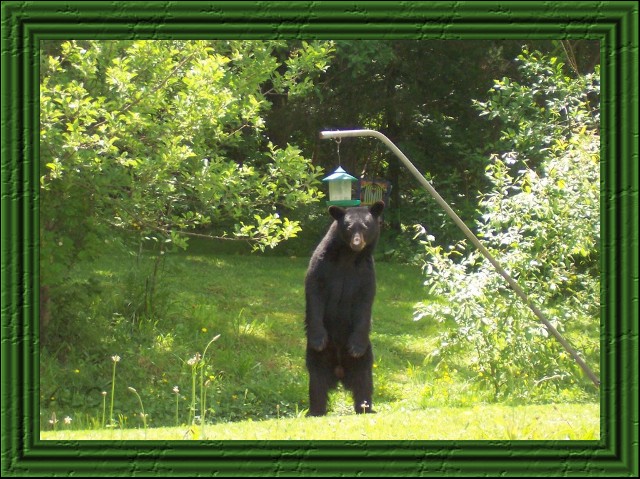
bear in my yard..
Image


Top
 Post subject: Re: Frames
PostPosted: Fri Sep 16, 2011 11:41 pm  (#57) 
Offline
GimpChat Member
User avatar

Joined: Oct 06, 2010
Posts: 4050
Good job, alc59!

_________________
"In order to attain the impossible, one must attempt the absurd."
~ Miguel de Cervantes


Top
 Post subject: Re: Frames
PostPosted: Sat Sep 17, 2011 8:14 am  (#58) 
Offline
GimpChat Member
User avatar

Joined: Apr 07, 2010
Posts: 14182
Very nice alc59, Your bear looks very friendly.

Nixnine, love what you did with the perspective reflection. How did you make it without the break or the shadows in between? Here is my try at it.
Image


mahvin, Very nice script, thanx

_________________
Image


Top
 Post subject: Re: Frames
PostPosted: Sat Sep 17, 2011 6:37 pm  (#59) 
Offline
GimpChat Member

Joined: Aug 05, 2011
Posts: 606
Location: limestone,ny
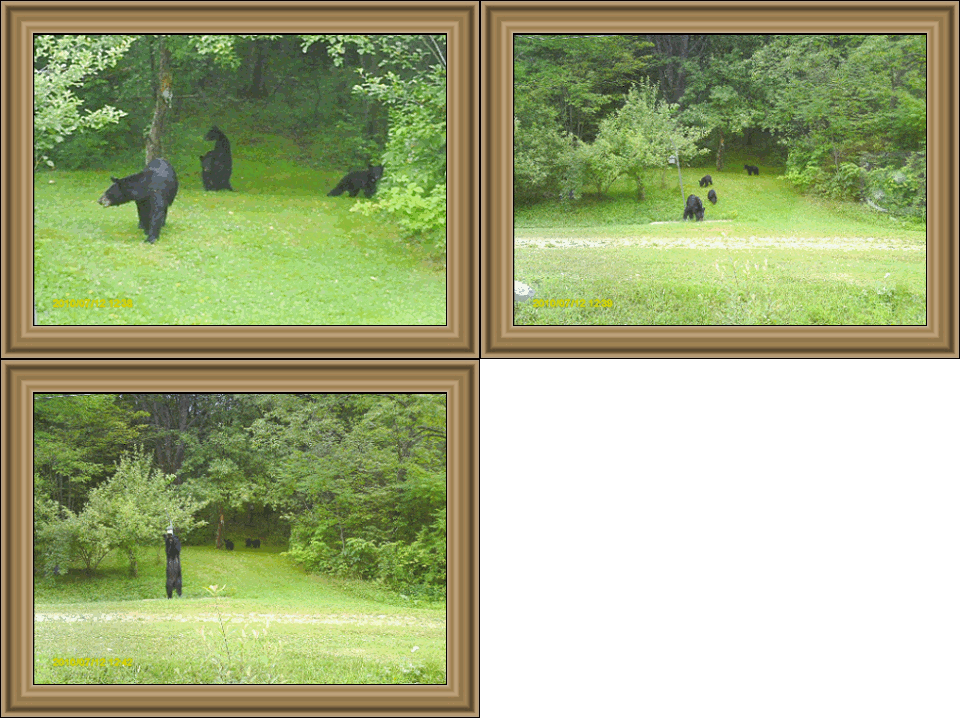
Had to try another one..nice script

Image


Top
 Post subject: Re: Frames
PostPosted: Sun Sep 18, 2011 10:23 am  (#60) 
Offline
GimpChat Member
User avatar

Joined: Sep 12, 2011
Posts: 377
Location: UK
I need some one who can tell, or link me how to make the frames of the above pictures please


Top
Post new topic Reply to topic  [ 66 posts ]  Go to page Previous  1, 2, 3, 4  Next

All times are UTC - 5 hours [ DST ]


* Login  


Powered by phpBB3 © phpBB Group