It is currently Tue Oct 27, 2026 11:49 am


All times are UTC - 5 hours [ DST ]


Post new topic Reply to topic  [ 17 posts ] 
Author Message
 Post subject: My First Rocket
PostPosted: Mon Sep 19, 2011 10:57 am  (#1) 
Offline
GimpChat Member

Joined: Sep 13, 2011
Posts: 32
Hi!

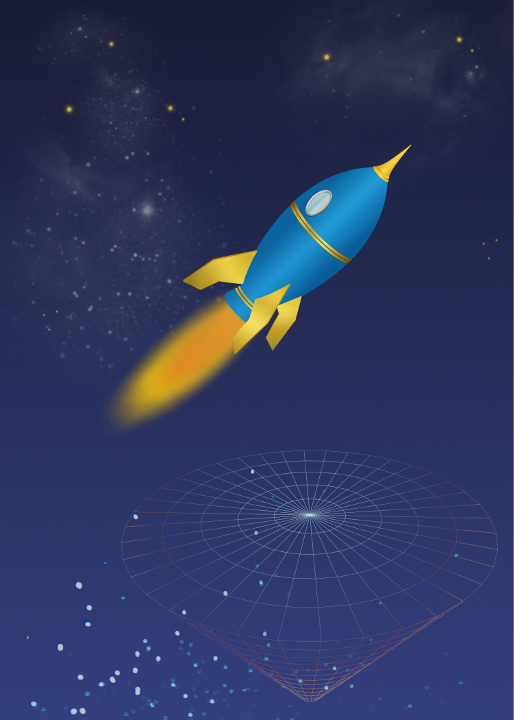
After seeing all the cool stuff you people make with GIMP, I just wanted to share my very first object (the rocket) I made from scratch using a PS tutorial. I had to adapt some of the steps but since I'm not proficient with either program, I made some of the steps up. ;)

Not happy with the gradients...I think they could be more intense but I can't figure out how to do that. I guess PS has a lot more settings available.

I saved the steps in layers so I should be able to go back and play with it a bit more.

Image


Share on Facebook Share on Twitter Share on Orkut Share on Digg Share on MySpace Share on Delicious Share on Technorati
Top
 Post subject: Re: My First Rocket
PostPosted: Mon Sep 19, 2011 10:59 am  (#2) 
Offline
Retired Staff
User avatar

Joined: May 22, 2008
Posts: 6946
Location: Somewhere in GIMP
That's very nice, oopsart!

_________________
Image
World War IV will be fought with sticks and stones. - Albert Einstein


Top
 Post subject: Re: My First Rocket
PostPosted: Mon Sep 19, 2011 11:03 am  (#3) 
Offline
GimpChat Member
User avatar

Joined: Aug 24, 2011
Posts: 1785
Location: Dallas, TX
As Molly would say "that's kewl" I like rockets. Here's a couple I made about 12 years ago but not with gimp.


Attachments:
Rocket01.jpg
Rocket01.jpg [ 240 KiB | Viewed 2643 times ]

_________________
Image
Top
 Post subject: Re: My First Rocket
PostPosted: Mon Sep 19, 2011 11:23 am  (#4) 
Offline
GimpChat Member

Joined: Sep 13, 2011
Posts: 32
Thanks, Oregonian!

And, Draconian...I think yours looks better. LOL!


Top
 Post subject: Re: My First Rocket
PostPosted: Mon Sep 19, 2011 11:40 am  (#5) 
Offline
GimpChat Member
User avatar

Joined: Sep 06, 2011
Posts: 368
Location: US, Ohio
oopsart wrote:
Hi!

After seeing all the cool stuff you people make with GIMP, I just wanted to share my very first object (the rocket) I made from scratch using a PS tutorial. I had to adapt some of the steps but since I'm not proficient with either program, I made some of the steps up. ;)

Not happy with the gradients...I think they could be more intense but I can't figure out how to do that. I guess PS has a lot more settings available.

I saved the steps in layers so I should be able to go back and play with it a bit more.

Image


Not bad! If you're trying to intensify the gradient, did you try creating your own gradient? You could move some sliders around and intensify the gradient quickly.


Top
 Post subject: Re: My First Rocket
PostPosted: Mon Sep 19, 2011 11:46 am  (#6) 
Offline
GimpChat Member

Joined: Sep 13, 2011
Posts: 32
tstandiford wrote:

Not bad! If you're trying to intensify the gradient, did you try creating your own gradient? You could move some sliders around and intensify the gradient quickly.


I'm so new to GIMP that I don't even know what that means. (off to find the sliders.....)


Top
 Post subject: Re: My First Rocket
PostPosted: Mon Sep 19, 2011 12:14 pm  (#7) 
Offline
GimpChat Member
User avatar

Joined: Sep 06, 2011
Posts: 368
Location: US, Ohio
oopsart wrote:
tstandiford wrote:

Not bad! If you're trying to intensify the gradient, did you try creating your own gradient? You could move some sliders around and intensify the gradient quickly.


I'm so new to GIMP that I don't even know what that means. (off to find the sliders.....)


Hehe, no sweat. Check the gradient's dockable dialog. For some information on how to find dockable dialogs check this video:
http://gimpedblog.blogspot.com/2011/09/ ... son-1.html


Top
 Post subject: Re: My First Rocket
PostPosted: Mon Sep 19, 2011 12:17 pm  (#8) 
Offline
GimpChat Founder
User avatar

Joined: May 22, 2008
Posts: 5241
Location: Gimpville
Nice work, oops! You next step would be to animate the rocket in a flyby and pulse the engine flames. :bigthup

That's one BIG rocket, Drac. How high would that puppy get?

_________________
“If you reach for the stars, you just might land on a decently sized hill.” - Stuart Hill


Top
 Post subject: Re: My First Rocket
PostPosted: Mon Sep 19, 2011 12:19 pm  (#9) 
Offline
GimpChat Member
User avatar

Joined: Oct 06, 2010
Posts: 4050
Do you have a link to the tutorial you used, oopsart?

_________________
"In order to attain the impossible, one must attempt the absurd."
~ Miguel de Cervantes


Top
 Post subject: Re: My First Rocket
PostPosted: Mon Sep 19, 2011 12:41 pm  (#10) 
Offline
GimpChat Member
User avatar

Joined: Aug 24, 2011
Posts: 1785
Location: Dallas, TX
GnuTux wrote:
Nice work, oops! You next step would be to animate the rocket in a flyby and pulse the engine flames. :bigthup

That's one BIG rocket, Drac. How high would that puppy get?


Lauched near Waco, Tx with staged engine ignition, altimeter deployment package. Weight - 64.8 lbs on the pad, Altitude was 1.273 miles with 24" drogue chute at apogee and 18' military cargo chute deployment at 500'. It took me about 6 months to build, cost me around $75.00 for the propellant reload package to fly it one time. Don't get me started, I tend to go off a bit when it comes to my favorite hobby(other than gimp of course) Besides....this aint my thread and I think he did a fine job on his first rocket. Kudos to you dude!


Attachments:
File comment: Under main boost
Rocket06.jpg
Rocket06.jpg [ 100.81 KiB | Viewed 2591 times ]
File comment: second stage engine ignition
Rocket09.jpg
Rocket09.jpg [ 43.61 KiB | Viewed 2591 times ]
File comment: Under canopy at 500'
Rocket1.0.jpg
Rocket1.0.jpg [ 31.3 KiB | Viewed 2591 times ]

_________________
Image
Top
 Post subject: Re: My First Rocket
PostPosted: Mon Sep 19, 2011 12:58 pm  (#11) 
Offline
GimpChat Member
User avatar

Joined: Sep 12, 2011
Posts: 377
Location: UK
looks rather cool I like it, it's got that cartoon effect :D You need to play about with gradients I love playing with them it's amazing what you can do with them. The cool thing I like about gradients is that you can make them your self you can use 2 or more combinations of colours.


Top
 Post subject: Re: My First Rocket
PostPosted: Mon Sep 19, 2011 3:16 pm  (#12) 
Offline
GimpChat Member

Joined: Mar 08, 2011
Posts: 155
I like it, it looks good!

For the gradients, if you just want the colors to be richer, you could duplicate the layer and set the top one to a different layer mode (like overlay for example). Brightness and contrast will also bring out the colors.

Nice work, oopsie!


Top
 Post subject: Re: My First Rocket
PostPosted: Mon Sep 19, 2011 3:24 pm  (#13) 
Offline
GimpChat Member

Joined: Sep 13, 2011
Posts: 32
Thanks! I didn't even know gradients have a dockable dialog.

tstandiford wrote:
oopsart wrote:
tstandiford wrote:

Not bad! If you're trying to intensify the gradient, did you try creating your own gradient? You could move some sliders around and intensify the gradient quickly.


I'm so new to GIMP that I don't even know what that means. (off to find the sliders.....)


Hehe, no sweat. Check the gradient's dockable dialog. For some information on how to find dockable dialogs check this video:
http://gimpedblog.blogspot.com/2011/09/ ... son-1.html


Top
 Post subject: Re: My First Rocket
PostPosted: Mon Sep 19, 2011 3:27 pm  (#14) 
Offline
GimpChat Member

Joined: Sep 13, 2011
Posts: 32
mahvin wrote:
Do you have a link to the tutorial you used, oopsart?

Hi mahvin!

Yes, although it's not specifically for the rocket but for a whole webpage.

Here is the link:
Rocket Tutorial


Top
 Post subject: Re: My First Rocket
PostPosted: Mon Sep 19, 2011 3:30 pm  (#15) 
Offline
GimpChat Member

Joined: Sep 13, 2011
Posts: 32
Amanda47 wrote:
I like it, it looks good!

For the gradients, if you just want the colors to be richer, you could duplicate the layer and set the top one to a different layer mode (like overlay for example). Brightness and contrast will also bring out the colors.

Nice work, oopsie!

Thanks!

You know, I thought about the duplicating the layers step AFTER I posted the image (I live by Murphy's Laws).

I will have to try that later when I get home.


Top
 Post subject: Re: My First Rocket
PostPosted: Mon Sep 19, 2011 3:33 pm  (#16) 
Offline
GimpChat Member

Joined: Sep 13, 2011
Posts: 32
Lorri wrote:
looks rather cool I like it, it's got that cartoon effect :D You need to play about with gradients I love playing with them it's amazing what you can do with them. The cool thing I like about gradients is that you can make them your self you can use 2 or more combinations of colours.

Hi Lorri,

Yeah, I wanted a 'cartoony' rocket for a poster for the school where I work.

I just found out about the gradients and will play with them later...I just hope I saved the files correctly.


Top
 Post subject: Re: My First Rocket
PostPosted: Tue Sep 20, 2011 2:17 am  (#17) 
Offline
GimpChat Member
User avatar

Joined: Sep 12, 2011
Posts: 377
Location: UK
I managed it thanks and it's lovely you managed to sort out yours to. You have fun with it oppsart


Top
Post new topic Reply to topic  [ 17 posts ] 

All times are UTC - 5 hours [ DST ]


* Login  


Powered by phpBB3 © phpBB Group