It is currently Sun Sep 27, 2026 5:39 pm


All times are UTC - 5 hours [ DST ]


Post new topic Reply to topic  [ 24 posts ]  Go to page 1, 2  Next
Author Message
 Post subject: Selection to New Layer problem
PostPosted: Sat Sep 24, 2011 9:00 pm  (#1) 
Offline
GimpChat Member

Joined: Sep 23, 2011
Posts: 5
GIMP Version: 2.7.4
Operating System: Windows
OS Version: Win 7 (64)
GIMP Experience: Basic Level

List any relevant plug-ins or scripts:
G'MIC

List any ERROR messages you received:
None


I haven't used Gimp in quite some time so maybe this is just me but this behavior seems odd regardless.

What I'm trying to do is simply make a freehand selection from the background layer into a new layer:
1. make selection
2. edit>copy
3. edit>paste as>new layer

The result is the selection being pasted into the upper left hand corner of the background layer as well as the selection pasted into the upper left hand corner of a new layer. I figured out how to make a selection-to-new-layer another way (edit>copy>paste into, floating selection to new layer) but shouldn't the simpler approach above work as well? What's with the selection being pasted back into the original layer and why is the selection always pasted into the upper left corner?

Thanks...Rick


Share on Facebook Share on Twitter Share on Orkut Share on Digg Share on MySpace Share on Delicious Share on Technorati
Top
 Post subject: Re: Selection to New Layer problem
PostPosted: Sat Sep 24, 2011 9:13 pm  (#2) 
Offline
GimpChat Member
User avatar

Joined: Oct 06, 2010
Posts: 4050
As long as you stay within a 512 px square, you can copy your selection and then use the paintbrush or airbrush tool at a scale of 1.0.

I tried to duplicate your problem, and my copy actually pasted to a new layer at the top-left. I do not know why it does that. I would prefer it copied centered to the image.

_________________
"In order to attain the impossible, one must attempt the absurd."
~ Miguel de Cervantes


Top
 Post subject: Re: Selection to New Layer problem
PostPosted: Sat Sep 24, 2011 9:28 pm  (#3) 
Offline
GimpChat Member
User avatar

Joined: Sep 24, 2010
Posts: 12849
Usually when I copy/paste, it centers the selection for me. Only when a drag a file from external source will it get out of alighnment (assume layer and the drag file have same dimention of course) unless I zoom out fully to see the layer as a whole. Not sure if there is a feature that will auto-align any of this but again, if I just do copy then paste (and that includes a file that is copied from even another application), it auto-aligns for me. Guess I'm lucky. lol

:)

_________________
Lyle

Psalm 109:8

Image


Top
 Post subject: Re: Selection to New Layer problem
PostPosted: Sat Sep 24, 2011 9:35 pm  (#4) 
Offline
GimpChat Member
User avatar

Joined: Oct 06, 2010
Posts: 4050
Quote:
3. edit>paste as>new layer


He's pasting as a new layer, Lyle. Whenever I use this option in any OS on GIMP, it pastes to the top left corner.

_________________
"In order to attain the impossible, one must attempt the absurd."
~ Miguel de Cervantes


Top
 Post subject: Re: Selection to New Layer problem
PostPosted: Sat Sep 24, 2011 9:46 pm  (#5) 
Offline
GimpChat Member

Joined: Sep 23, 2011
Posts: 5
mahvin wrote:
Quote:
3. edit>paste as>new layer


He's pasting as a new layer, Lyle. Whenever I use this option in any OS on GIMP, it pastes to the top left corner.


It also pastes the selection back onto the layer it was originally selected from (upper left corner also). I don't understand the purpose of that.

Also, the selection on the new layer should be located exactly where it was located on the image it was taken from. You should be able to merge the two layers back together seemlessly.


Top
 Post subject: Re: Selection to New Layer problem
PostPosted: Sat Sep 24, 2011 11:27 pm  (#6) 
Offline
Script Coder
User avatar

Joined: Apr 23, 2010
Posts: 1553
Location: not from Guildford after all
Rick wrote:
It also pastes the selection back onto the layer it was originally selected from (upper left corner also). I don't understand the purpose of that.

I'm not experiencing that.


Rick wrote:
Also, the selection on the new layer should be located exactly where it was located on the image it was taken from. You should be able to merge the two layers back together seemlessly.

If you install my Align Down1 Script-fu then you will be able to easily reposition the resulting new layer by running the script (menu command "Layer->Align Down") after performing your "Paste As->New Layer" (assuming you have not altered your original selection).


1 Align Down is my all-time favorite GIMP script. Though it was originally written before GIMP had an Align Tool, the script is still relevant and often much easier to use than either the new Tool or the "Image->Align Visible Layers" plug-in. I am continually finding new uses for the script -- and correcting this odd Paste As behavior is one that had not previously occurred to me (I have updated the wiki page to point this out).

Another script which might be of use (it is how I typically perform the operation described by Rick) is my Edit->Isolate. This very simple script merely deletes everything in a layer except within the selected region (it is equivalent to performing a "Select->Invert", "Edit->Clear", "Select->Invert"; though it will add an alpha channel if one does not exist).

If you make your selection, duplicate your layer, and then run "Edit->Isolate", the result will be much the same as "Edit->Copy", "Edit->Paste As->New Layer", and "Layer->Align Down" except that the new layer will be the same size as the original layer (not the original selection). Duplicating and then Isolate-ing is only two steps and the retention of the original layer's size is sometimes a desirable feature (especially when creating animated frames).

_________________
Any sufficiently primitive technology is indistinguishable from a rock.


Top
 Post subject: Re: Selection to New Layer problem
PostPosted: Sun Sep 25, 2011 9:58 am  (#7) 
Offline
GimpChat Member

Joined: Aug 05, 2011
Posts: 606
Location: limestone,ny
thanks Saul, i didn't know about those two scripts, they will come in handy


Top
 Post subject: Re: Selection to New Layer problem
PostPosted: Sun Sep 25, 2011 10:15 am  (#8) 
Offline
GimpChat Member

Joined: Sep 23, 2011
Posts: 5
saulgoode wrote:
Rick wrote:
It also pastes the selection back onto the layer it was originally selected from (upper left corner also). I don't understand the purpose of that.
I'm not experiencing that.


OK, I forgot to mention the part where I'm stupid. Of course the misaligned selection shows up on the original layer with the new layer still visible (duh). I'm just not used to making a selection to a new layer and having that selection moved to a new location on that new layer. That and the thing about me being stupid.

I'll try your scripts but as I stated in my OP I can do what I want by:
1. making selection
2. edit>copy
3. edit>paste into (makes a floating selection)
4. right click "floating selection" layer in layers dialog and click "To New Layer"

Still, I don't understand the logic with the "paste as new layer" method. When you make a selection into a new layer that selection should not move. It should remain aligned with where it was selected from. If you want to move it you can always use the Move Tool and move it.

Anyway, thanks for your help. :tyspin

Rick


Top
 Post subject: Re: Selection to New Layer problem
PostPosted: Sun Sep 25, 2011 1:37 pm  (#9) 
Offline
Script Coder
User avatar

Joined: Apr 23, 2010
Posts: 1553
Location: not from Guildford after all
Rick wrote:
I'll try your scripts but as I stated in my OP I can do what I want by:
1. making selection
2. edit>copy
3. edit>paste into (makes a floating selection)
4. right click "floating selection" layer in layers dialog and click "To New Layer"

The last step can also be accomplished by clicking on the New button :new at the bottom of the Layers Dialog. And note that the alternative approaches I suggested both result in the new layer being placed directly above the original in the layerstack, whereas a floating selection will become the topmost layer in the layerstack. This may not always be significant but if you are working on the middle layer in a stack of hundreds, moving that top layer back down to the middle can be tedious.


Rick wrote:
Still, I don't understand the logic with the "paste as new layer" method. When you make a selection into a new layer that selection should not move. It should remain aligned with where it was selected from.

To the extent that the Paste As->New Layer should behave the same as Paste, I would agree. If you care to submit a bug report, I imagine the issue would eventually be addressed. Though the developers are currently somewhat reluctant to incorporate significant changes because they want to get version 2.8 out in the not-to-distant future, and the entire issue of pasting and floated layers is expected to be addressed in version 3.

_________________
Any sufficiently primitive technology is indistinguishable from a rock.


Top
 Post subject: Re: Selection to New Layer problem
PostPosted: Sun Sep 25, 2011 1:45 pm  (#10) 
Offline
GimpChat Member
User avatar

Joined: May 27, 2011
Posts: 707
Speaking of copy/paste..
Why is it that when I copy paste an letter animation,it automatically sits in one place,and if I try to move it,it only moves one layer at a time?
If I select all,it still does the same thing,unless i leave it where it automatically pasted it itself


Top
 Post subject: Re: Selection to New Layer problem
PostPosted: Sun Sep 25, 2011 1:52 pm  (#11) 
Offline
GimpChat Member
User avatar

Joined: Apr 07, 2010
Posts: 14182
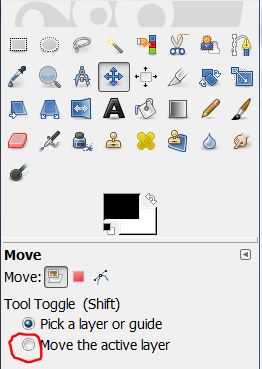
Were you trying to move this with the move tool? If so, make your you click where it says move the active layer.

_________________
Image


Top
 Post subject: Re: Selection to New Layer problem
PostPosted: Sun Sep 25, 2011 1:56 pm  (#12) 
Offline
GimpChat Member
User avatar

Joined: May 27, 2011
Posts: 707
Molly,
Yes i was trying the move tool..After that , You lost me :)
make what click?


Top
 Post subject: Re: Selection to New Layer problem
PostPosted: Sun Sep 25, 2011 2:14 pm  (#13) 
Offline
GimpChat Member
User avatar

Joined: Oct 06, 2010
Posts: 4050
The checkbox in the toolbox of the move tool, is what Molly was referring to.

_________________
"In order to attain the impossible, one must attempt the absurd."
~ Miguel de Cervantes


Top
 Post subject: Re: Selection to New Layer problem
PostPosted: Sun Sep 25, 2011 2:19 pm  (#14) 
Offline
GimpChat Member
User avatar

Joined: May 27, 2011
Posts: 707
the move layer or selection?I don't see anything else in the move icon


Top
 Post subject: Re: Selection to New Layer problem
PostPosted: Sun Sep 25, 2011 2:35 pm  (#15) 
Offline
GimpChat Member
User avatar

Joined: Apr 07, 2010
Posts: 14182
Image

_________________
Image


Top
 Post subject: Re: Selection to New Layer problem
PostPosted: Sun Sep 25, 2011 4:17 pm  (#16) 
Offline
GimpChat Member
User avatar

Joined: May 27, 2011
Posts: 707
got it,so that will keep the whole 150 frames animated layer move where i need it?


Top
 Post subject: Re: Selection to New Layer problem
PostPosted: Sun Sep 25, 2011 5:33 pm  (#17) 
Offline
GimpChat Member

Joined: Sep 23, 2011
Posts: 5
saul, thanks for all your help. Your Align Down script is exactly what I needed.


Top
 Post subject: Re: Selection to New Layer problem
PostPosted: Fri Sep 30, 2011 4:53 pm  (#18) 
Offline
GimpChat Member
User avatar

Joined: May 27, 2011
Posts: 707
ok,here's the animation I was talking about.I want to place it on the Italian lag,so when i paste it automatically sits one spot,and if i try to move it only create
a second marquis.Is there a way around this?
Image


Top
 Post subject: Re: Selection to New Layer problem
PostPosted: Fri Sep 30, 2011 5:03 pm  (#19) 
Offline
GimpChat Member
User avatar

Joined: Apr 07, 2010
Posts: 14182
Pirate, could you take a scrn shot of your layers or send your xcf file so someone could check it out... It looks to me like it should be on a path.

_________________
Image


Top
 Post subject: Re: Selection to New Layer problem
PostPosted: Fri Sep 30, 2011 5:07 pm  (#20) 
Offline
GimpChat Member
User avatar

Joined: May 27, 2011
Posts: 707
how do i take a screen shot of the layers?
and where do I send the file to?


Top
Post new topic Reply to topic  [ 24 posts ]  Go to page 1, 2  Next

All times are UTC - 5 hours [ DST ]


* Login  


Powered by phpBB3 © phpBB Group