It is currently Wed Sep 30, 2026 11:04 am


All times are UTC - 5 hours [ DST ]


Post new topic Reply to topic  [ 22 posts ]  Go to page 1, 2  Next
Author Message
 Post subject: [Solved] How do I use gradient in Gimp-2.7.x?
PostPosted: Wed Sep 28, 2011 9:43 am  (#1) 
Offline
GimpChat Member
User avatar

Joined: Oct 29, 2010
Posts: 711
Location: Netherlands
GIMP Version: 2.7.x
Operating System: Linux
OS Version: Gentoo Linux
GIMP Experience: Beginner Level


Hi all,
I have taken the plunge and installed gimp-2.7.x in my regular user install next to 2.6.11.
I am working on something where I need to change the angle of a brush and 2.6.11 can't do that.
I know I can rotate the image instead but with a lot of layers it takes lots of time.
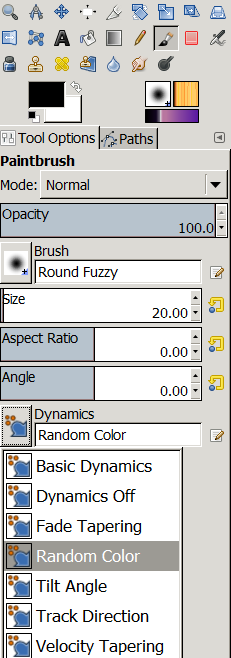
Please refer to the attached snapshot of my toolbox.
I have selected a gradient but how do I tell Gimp to use it instead of the foreground color?
Thanks in advance.
Gerard.


Attachments:
gimp27gradient.png
gimp27gradient.png [ 86.7 KiB | Viewed 2605 times ]

_________________
Gentoo Linux always up-to-date.
Kernel-3.17.4 Python-2.7.8/3.3.5
Gimp-2.8.14

I use Linux only.
And Virtualbox with Win 7


Last edited by gerard82 on Wed Sep 28, 2011 11:01 am, edited 3 times in total.
Share on Facebook Share on Twitter Share on Orkut Share on Digg Share on MySpace Share on Delicious Share on Technorati
Top
 Post subject: Re: How do I use gradient in Gimp-2.7.x?
PostPosted: Wed Sep 28, 2011 10:04 am  (#2) 
Offline
GimpChat Member

Joined: Apr 12, 2010
Posts: 5870
good question gimp 2.7 could do both easier than before

But remain the question here rephrased:
Where is a documentation of the NEW Gimp brush system ?

Obviously Help is not already updated but should be already something useful

_________________
My 3D Gallery on Deviantart http://photocomix2.deviantart.com/
Main gallery http://www.flickriver.com/photos/photocomix-mandala/
Mandala and simmetry http://www.flickriver.com/photos/photocomix_mandala/

Image

Mrs Wilbress


Top
 Post subject: Re: How do I use gradient in Gimp-2.7.x?
PostPosted: Wed Sep 28, 2011 10:24 am  (#3) 
Offline
GimpChat Member
User avatar

Joined: Apr 07, 2010
Posts: 14182
On Gimp 2.7, Click dynamics > Random color, choose gradient. There are also the tilting, fade etc. options there
Image

_________________
Image


Top
 Post subject: Re: How do I use gradient in Gimp-2.7.x?
PostPosted: Wed Sep 28, 2011 11:01 am  (#4) 
Offline
GimpChat Member
User avatar

Joined: Oct 29, 2010
Posts: 711
Location: Netherlands
Thanks a heap Molly that works.
But you loose pressure.
Gerard.

_________________
Gentoo Linux always up-to-date.
Kernel-3.17.4 Python-2.7.8/3.3.5
Gimp-2.8.14

I use Linux only.
And Virtualbox with Win 7


Top
 Post subject: Re: [Solved] How do I use gradient in Gimp-2.7.x?
PostPosted: Wed Sep 28, 2011 11:40 am  (#5) 
Offline
GimpChat Member
User avatar

Joined: Oct 29, 2010
Posts: 711
Location: Netherlands
I did the same thing in Gimp-2.6 but you can have gradient and pressure.
I would like to submit a bug,only I'll have to find out where.
Gerard.

_________________
Gentoo Linux always up-to-date.
Kernel-3.17.4 Python-2.7.8/3.3.5
Gimp-2.8.14

I use Linux only.
And Virtualbox with Win 7


Top
 Post subject: Re: [Solved] How do I use gradient in Gimp-2.7.x?
PostPosted: Wed Sep 28, 2011 12:18 pm  (#6) 
Offline
Global Moderator
User avatar

Joined: May 16, 2010
Posts: 16175
gerard82 wrote:
I did the same thing in Gimp-2.6 but you can have gradient and pressure.
I would like to submit a bug,only I'll have to find out where.
Gerard.


http://developer.gimp.org/bugs.html


Top
 Post subject: Re: [Solved] How do I use gradient in Gimp-2.7.x?
PostPosted: Wed Sep 28, 2011 12:22 pm  (#7) 
Offline
GimpChat Member
User avatar

Joined: Oct 29, 2010
Posts: 711
Location: Netherlands
Thanks Rod.
Gerard.

_________________
Gentoo Linux always up-to-date.
Kernel-3.17.4 Python-2.7.8/3.3.5
Gimp-2.8.14

I use Linux only.
And Virtualbox with Win 7


Top
 Post subject: Re: [Solved] How do I use gradient in Gimp-2.7.x?
PostPosted: Wed Sep 28, 2011 12:24 pm  (#8) 
Offline
Global Moderator
User avatar

Joined: May 16, 2010
Posts: 16175
You are very welcome. :)


Top
 Post subject: Re: [Solved] How do I use gradient in Gimp-2.7.x?
PostPosted: Wed Sep 28, 2011 2:09 pm  (#9) 
Offline
GimpChat Member
User avatar

Joined: Oct 29, 2010
Posts: 711
Location: Netherlands
Bug entered #660388.
Gerard.

_________________
Gentoo Linux always up-to-date.
Kernel-3.17.4 Python-2.7.8/3.3.5
Gimp-2.8.14

I use Linux only.
And Virtualbox with Win 7


Top
 Post subject: Re: [Solved] How do I use gradient in Gimp-2.7.x?
PostPosted: Thu Sep 29, 2011 8:32 am  (#10) 
Offline
Script Coder
User avatar

Joined: Jul 14, 2010
Posts: 697
You just need to create a new dynamics preset (I didn't have my tablet plugged in here but it does work). to match the old "colour from gradient" option:
Attachment:
2011-09-29_093023.jpg
2011-09-29_093023.jpg [ 115.08 KiB | Viewed 2480 times ]


-Rob A>

_________________
Image
Fantasy Cartography and Mapping by RobA


Top
 Post subject: Re: [Solved] How do I use gradient in Gimp-2.7.x?
PostPosted: Thu Sep 29, 2011 8:34 am  (#11) 
Offline
Global Moderator
User avatar

Joined: May 16, 2010
Posts: 16175
That new brush dynamics tool needs a manual on its own. :)


Top
 Post subject: Re: [Solved] How do I use gradient in Gimp-2.7.x?
PostPosted: Thu Sep 29, 2011 9:07 am  (#12) 
Offline
GimpChat Member
User avatar

Joined: Sep 06, 2011
Posts: 368
Location: US, Ohio
I fear that is one of those things that you just need to be "aware of" and figure out how it can work for you.


Top
 Post subject: Re: [Solved] How do I use gradient in Gimp-2.7.x?
PostPosted: Thu Sep 29, 2011 9:09 am  (#13) 
Offline
GimpChat Member
User avatar

Joined: Oct 29, 2010
Posts: 711
Location: Netherlands
Thanks for replying Rob.
I can't get what you have there.
I don't have "color from gradient".
Furthermore when I click on any of the Edit buttons I get a new window but everything is grayed out.
I am running the "snapshot" of yesterday from git.gnome.org.
Gerard.

_________________
Gentoo Linux always up-to-date.
Kernel-3.17.4 Python-2.7.8/3.3.5
Gimp-2.8.14

I use Linux only.
And Virtualbox with Win 7


Top
 Post subject: Re: [Solved] How do I use gradient in Gimp-2.7.x?
PostPosted: Thu Sep 29, 2011 10:37 am  (#14) 
Offline
GimpChat Member
User avatar

Joined: Oct 29, 2010
Posts: 711
Location: Netherlands
Solved again through a workaround.
Here a snippet of /opt/share/gimp/2.0/dynamics/RandomColor.gdyn:

# GIMP dynamics file

(name "Random Color")
(opacity-output
    (use-pressure no)
    (use-velocity no)
    (use-direction no)
    (use-tilt no)
    (use-random no)
    (use-fade no))
(hardness-output
    (use-pressure no)
    (use-velocity no)
    (use-direction no)
    (use-tilt no)
    (use-random no)
    (use-fade no))
(rate-output
    (use-pressure no)
    (use-velocity no)
    (use-direction no)
    (use-tilt no)
    (use-random no)
    (use-fade no))
(size-output
    (use-pressure no)
    (use-velocity no)
    (use-direction no)
    (use-tilt no)
    (use-random no)
    (use-fade no))
            .
            .
(jitter-output
    (use-pressure no)
    (use-velocity no)
    (use-direction no)
    (use-tilt no)
    (use-random no)
    (use-fade no))

# end of GIMP dynamics file

By changing "(opacity-output
(use-pressure no)"
to (use-pressure yes) I now have pressure with gradient.
Needless to say I'd much prefer Rob's way but alas that doesn't work here.
Gerard.

_________________
Gentoo Linux always up-to-date.
Kernel-3.17.4 Python-2.7.8/3.3.5
Gimp-2.8.14

I use Linux only.
And Virtualbox with Win 7


Top
 Post subject: Re: [Solved] How do I use gradient in Gimp-2.7.x?
PostPosted: Thu Sep 29, 2011 10:40 am  (#15) 
Offline
Script Coder
User avatar

Joined: Jul 14, 2010
Posts: 697
Here is a full walks through of the dymanic editor.

www.youtube.com Video from : www.youtube.com


-Rob A>

_________________
Image
Fantasy Cartography and Mapping by RobA


Top
 Post subject: Re: [Solved] How do I use gradient in Gimp-2.7.x?
PostPosted: Thu Sep 29, 2011 10:59 am  (#16) 
Offline
Retired Staff
User avatar

Joined: May 22, 2008
Posts: 6946
Location: Somewhere in GIMP
That is super cool, RobA. Thanks for posting it.

_________________
Image
World War IV will be fought with sticks and stones. - Albert Einstein


Top
 Post subject: Re: [Solved] How do I use gradient in Gimp-2.7.x?
PostPosted: Thu Sep 29, 2011 11:14 am  (#17) 
Offline
GimpChat Member
User avatar

Joined: Sep 06, 2011
Posts: 368
Location: US, Ohio
holy cow, thank you for sharing that video RobA.


Top
 Post subject: Re: [Solved] How do I use gradient in Gimp-2.7.x?
PostPosted: Thu Sep 29, 2011 2:11 pm  (#18) 
Offline
GimpChat Member
User avatar

Joined: Oct 29, 2010
Posts: 711
Location: Netherlands
Thanks Rob!
In the meantime all of a sudden I can edit everything like you showed earlier.
I copied the /dynamics files to my /home/ikke/.gimp-2.7 and enabled them in Preferences.
I also got my printer working.
Scanning still a problem. (see attached pic)
I am getting more and more impressed by the capabilities of 2.7 compared to 2.6.
One moment I thought that maybe I could do away with 2.6 but the plugins and scripts are still a problem.
Thanks again.
Gerard.


Attachments:
xsane.png
xsane.png [ 65.86 KiB | Viewed 1867 times ]

_________________
Gentoo Linux always up-to-date.
Kernel-3.17.4 Python-2.7.8/3.3.5
Gimp-2.8.14

I use Linux only.
And Virtualbox with Win 7
Top
 Post subject: Re: [Solved] How do I use gradient in Gimp-2.7.x?
PostPosted: Mon Jul 23, 2012 1:36 am  (#19) 
Offline
GimpChat Member
User avatar

Joined: Sep 24, 2010
Posts: 12849
RobA wrote:
Here is a full walks through of the dymanic editor.

www.youtube.com Video from : www.youtube.com


-Rob A>


Feature was missing in 2.8 too so had reason to create a color by fade using this info RobA and it worked like a champ. Sad that they didn't make this option as intuitive as it was in all previous versions in GIMP. Crazy (i.e., what were the developers thinking? lol). Thanks RobA. :)

_________________
Lyle

Psalm 109:8

Image


Top
 Post subject: Re: [Solved] How do I use gradient in Gimp-2.7.x?
PostPosted: Mon Jul 23, 2012 9:57 am  (#20) 
Offline
Global Moderator
User avatar

Joined: May 16, 2010
Posts: 16175
Thanks a bunch Rob this works really well in Sam and Parthas Portable Gimp-2.8.1 also. :)

Image

I would also like to add i tested it in the RGGJAN version (Gimp-2.7.3), and it works as well.


Top
Post new topic Reply to topic  [ 22 posts ]  Go to page 1, 2  Next

All times are UTC - 5 hours [ DST ]


* Login  


Powered by phpBB3 © phpBB Group