It is currently Fri Sep 04, 2026 11:09 pm


All times are UTC - 5 hours [ DST ]


Post new topic Reply to topic  [ 13 posts ] 
Author Message
 Post subject: Faery Chess
PostPosted: Thu Oct 06, 2011 11:06 pm  (#1) 
Offline
Retired Staff
User avatar

Joined: May 22, 2008
Posts: 6946
Location: Somewhere in GIMP
Image

_________________
Image
World War IV will be fought with sticks and stones. - Albert Einstein


Share on Facebook Share on Twitter Share on Orkut Share on Digg Share on MySpace Share on Delicious Share on Technorati
Top
 Post subject: Re: Faery Chess
PostPosted: Thu Oct 06, 2011 11:57 pm  (#2) 
Offline
GimpChat Member

Joined: Sep 13, 2011
Posts: 32
Oh...nice! And you just gave me an idea! Thanks, Oregonian!


Top
 Post subject: Re: Faery Chess
PostPosted: Fri Oct 07, 2011 12:49 am  (#3) 
Offline
Retired Staff
User avatar

Joined: May 22, 2008
Posts: 6946
Location: Somewhere in GIMP
oopsart wrote:
Oh...nice! And you just gave me an idea! Thanks, Oregonian!
I love it when someone gets ideas from my stuff. Thanks, oopsart!

_________________
Image
World War IV will be fought with sticks and stones. - Albert Einstein


Top
 Post subject: Re: Faery Chess
PostPosted: Fri Oct 07, 2011 1:49 am  (#4) 
Offline
GimpChat Member
User avatar

Joined: Sep 12, 2011
Posts: 377
Location: UK
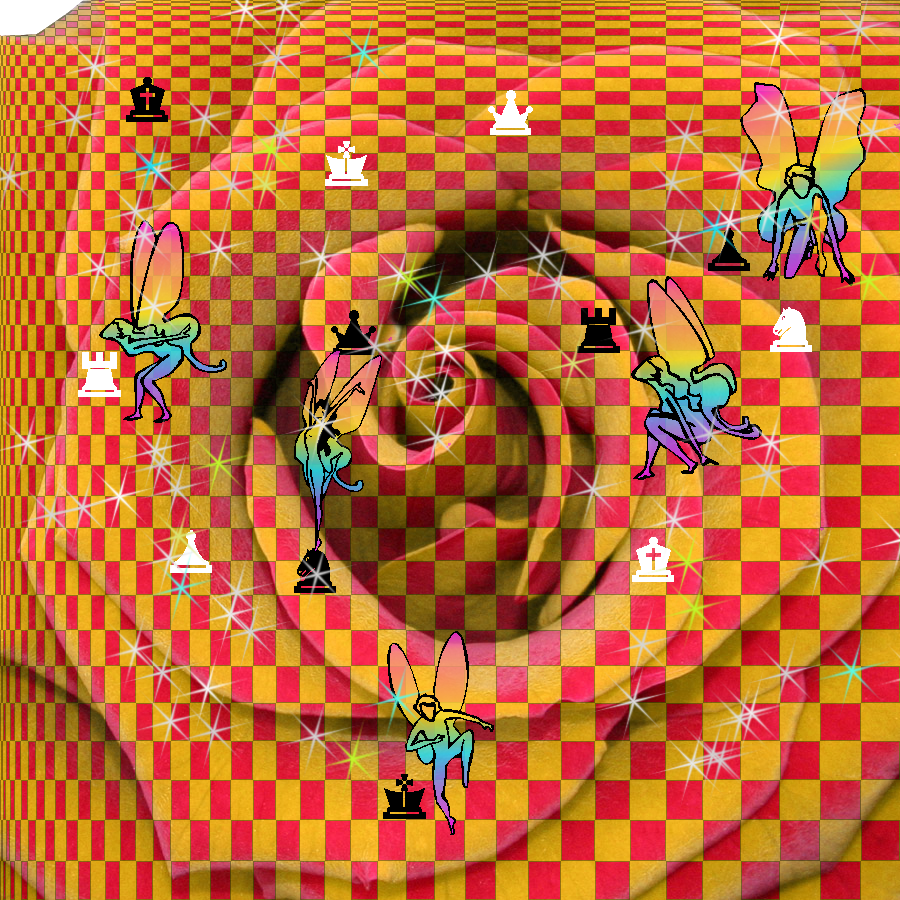
Is that a rose shape with the checked background Oregonian?

I love looking at other members art work they can be very inspirational


Top
 Post subject: Re: Faery Chess
PostPosted: Fri Oct 07, 2011 2:06 am  (#5) 
Offline
Script Coder
User avatar

Joined: Feb 18, 2011
Posts: 4826
Location: Bendigo Vic. Australia
'O' The fairy's are great, are they brushes.

_________________
Image
No matter how much you push the envelope, it'll still be stationery.


Top
 Post subject: Re: Faery Chess
PostPosted: Fri Oct 07, 2011 2:41 am  (#6) 
Offline
Retired Staff
User avatar

Joined: May 22, 2008
Posts: 6946
Location: Somewhere in GIMP
They are a font. SL Woodcut Faeries. http://www.dafont.com/sl-woodcut-faeries.font
Image

Lorri wrote:
Is that a rose shape with the checked background Oregonian?
I got the rose here: http://tinyurl.com/3uufeo3

_________________
Image
World War IV will be fought with sticks and stones. - Albert Einstein


Top
 Post subject: Re: Faery Chess
PostPosted: Fri Oct 07, 2011 2:48 am  (#7) 
Offline
GimpChat Member
User avatar

Joined: Sep 12, 2011
Posts: 377
Location: UK
So how did you get rid of the red and replaced it by the checked background?


Top
 Post subject: Re: Faery Chess
PostPosted: Fri Oct 07, 2011 3:35 am  (#8) 
Offline
Retired Staff
User avatar

Joined: May 22, 2008
Posts: 6946
Location: Somewhere in GIMP
Lorri wrote:
So how did you get rid of the red and replaced it by the checked background?

  1. Right-click the rose layer > Add Alpha Channel.
  2. Duplicate the rose layer.
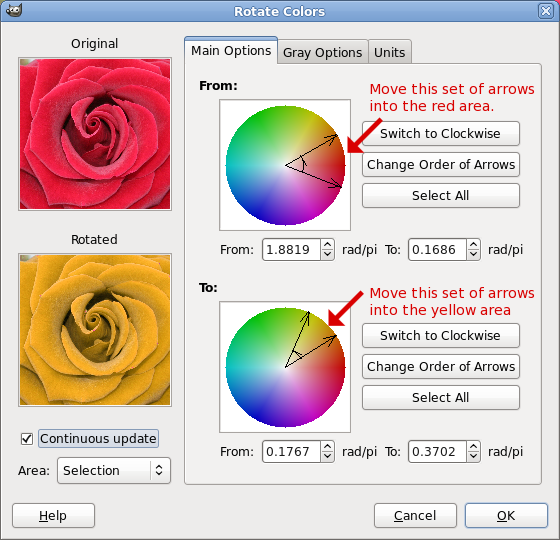
  3. Colors > Map > Rotate Colors to change that rose to a yellow one.
  4. Make a new transparent layer.
  5. Filters > Render > Pattern > Checkerboard. Check the Psychobilly box, then OK.
  6. Colors > Color to Alpha. Make sure the color box is white (ffffff) to get rid of the white. OK.
  7. Right-click the black checks layer > Alpha to Selection.
  8. Select > Shrink 1, press the Delete key.
  9. Select the yellow rose layer, press the Delete key.
  10. Select > None.

Rotate Colors Dialog
Image

_________________
Image
World War IV will be fought with sticks and stones. - Albert Einstein


Top
 Post subject: Re: Faery Chess
PostPosted: Fri Oct 07, 2011 4:58 am  (#9) 
Offline
GimpChat Member
User avatar

Joined: Sep 12, 2011
Posts: 377
Location: UK
Thanks O for showing how thats done I must have a go at it sometime today


Top
 Post subject: Re: Faery Chess
PostPosted: Fri Oct 07, 2011 5:10 am  (#10) 
Offline
GimpChat Member
User avatar

Joined: Sep 12, 2011
Posts: 377
Location: UK
For reason I right clicked on the rose layer and I can't use the add alpha channel as it's ghosted


Top
 Post subject: Re: Faery Chess
PostPosted: Fri Oct 07, 2011 5:28 am  (#11) 
Offline
Global Moderator
User avatar

Joined: May 16, 2010
Posts: 16169
Love it O! :)
Thanks for the tutorial on duplicating it too.

_________________
Image


Top
 Post subject: Re: Faery Chess
PostPosted: Fri Oct 07, 2011 5:55 am  (#12) 
Offline
GimpChat Member
User avatar

Joined: Sep 24, 2010
Posts: 12844
Good use of faeries O; ghouls are more in season though. lol

:)

_________________
Lyle

Psalm 109:8

Image


Top
 Post subject: Re: Faery Chess
PostPosted: Fri Oct 07, 2011 3:32 pm  (#13) 
Offline
GimpChat Member
User avatar

Joined: Apr 27, 2010
Posts: 1509
Location: Sweden
Fun idea and bright and friendly colours too; gives me a nearly psychedelic impression, as if the rose was trying to hypnotize me. :)
.
Griatch

_________________


Top
Post new topic Reply to topic  [ 13 posts ] 

All times are UTC - 5 hours [ DST ]


* Login  


Powered by phpBB3 © phpBB Group