It is currently Wed Nov 04, 2026 11:38 pm


All times are UTC - 5 hours [ DST ]


Post new topic Reply to topic  [ 142 posts ]  Go to page Previous  1 ... 3, 4, 5, 6, 7, 8  Next
Author Message
 Post subject: Re: Another try at Circlism.
PostPosted: Wed Oct 12, 2011 7:35 pm  (#101) 
Offline
GimpChat Member
User avatar

Joined: Sep 24, 2010
Posts: 12854
I'm not the only one who watches the Last Air Bender. lol

Looks good PC. :)

_________________
Lyle

Psalm 109:8

Image


Top
 Post subject: Re: Another try at Circlism.
PostPosted: Wed Oct 12, 2011 8:02 pm  (#102) 
Offline
GimpChat Member

Joined: Apr 12, 2010
Posts: 5870
the Magic Bus i was waiting never come
So i had to call another

Attachment:
El_Gouna_Bus_R01b.jpg
El_Gouna_Bus_R01b.jpg [ 670.76 KiB | Viewed 2933 times ]

_________________
My 3D Gallery on Deviantart http://photocomix2.deviantart.com/
Main gallery http://www.flickriver.com/photos/photocomix-mandala/
Mandala and simmetry http://www.flickriver.com/photos/photocomix_mandala/

Image

Mrs Wilbress


Top
 Post subject: Re: Another try at Circlism.
PostPosted: Wed Oct 12, 2011 8:07 pm  (#103) 
Offline
GimpChat Member
User avatar

Joined: Apr 07, 2010
Posts: 14182
lylejk wrote:
It works Molly; it may appear to lock up, but if you wait long enough (and I mean long) you will see a result. Like I told PC; the preview has been disabled (i.e., you won't get a preview with this preset). :)


thank.s..got it working woo hoo. :hi5 :jumpclap :clap

Image

_________________
Image


Last edited by molly on Thu Oct 13, 2011 4:05 am, edited 1 time in total.

Top
 Post subject: Re: Another try at Circlism.
PostPosted: Wed Oct 12, 2011 8:13 pm  (#104) 
Offline
GimpChat Member

Joined: Apr 12, 2010
Posts: 5870
wow... that is nice Molly a clever idea

before i cheat a bit with the Magic Bus this is more pure Circlism (i even made a Graphic Boost "Circlism" preset for the postwork.. :paint )

Attachment:
El_Gouna_Bus_R01b3.jpg
El_Gouna_Bus_R01b3.jpg [ 658.39 KiB | Viewed 2925 times ]

_________________
My 3D Gallery on Deviantart http://photocomix2.deviantart.com/
Main gallery http://www.flickriver.com/photos/photocomix-mandala/
Mandala and simmetry http://www.flickriver.com/photos/photocomix_mandala/

Image

Mrs Wilbress


Top
 Post subject: Re: Another try at Circlism.
PostPosted: Wed Oct 12, 2011 8:15 pm  (#105) 
Offline
Retired Staff
User avatar

Joined: May 22, 2008
Posts: 6946
Location: Somewhere in GIMP
Go Jimi!!! Cool, PhotoComix. Magic Bus is magical for sure. Good job!

I tried a black & white photo and I added a touch of color. Seemed to take much longer to process the b & w photo than colors. My microprocessor was macroworked.
Image

Image

_________________
Image
World War IV will be fought with sticks and stones. - Albert Einstein


Top
 Post subject: Re: Another try at Circlism.
PostPosted: Wed Oct 12, 2011 8:19 pm  (#106) 
Offline
GimpChat Member

Joined: Apr 12, 2010
Posts: 5870
Oregonian wrote:

I tried a black & white photo with a touch of color I added. Seemed to take much longer to process the b & w photo than colors. My microprocessor was macroworked.
Image

Image


But was worth !:clap :clap :clap
excellent on that image

_________________
My 3D Gallery on Deviantart http://photocomix2.deviantart.com/
Main gallery http://www.flickriver.com/photos/photocomix-mandala/
Mandala and simmetry http://www.flickriver.com/photos/photocomix_mandala/

Image

Mrs Wilbress


Top
 Post subject: Re: Another try at Circlism.
PostPosted: Wed Oct 12, 2011 8:29 pm  (#107) 
Offline
GimpChat Member
User avatar

Joined: Sep 24, 2010
Posts: 12854
Yeah; noticed that solid whites and blacks really slows the render down. :)

_________________
Lyle

Psalm 109:8

Image


Top
 Post subject: Re: Another try at Circlism.
PostPosted: Wed Oct 12, 2011 8:35 pm  (#108) 
Offline
GimpChat Member

Joined: Apr 12, 2010
Posts: 5870
Hy O i hope you don't mind if i use your last to show the effect of my postwork preset (is to ...de-flat the circles )

Attachment:
oregonian.png
oregonian.png [ 778.45 KiB | Viewed 2911 times ]


here 2 slightly different preset, the first i used for the Magic Bus, the second is adapted to "dark" black and white as from the last from O

{*GB*-circlism}{*GB*-carved}{gimp_graphic_boost3}{gimp_graphic_boost3}{1.62602}{0.06}{0}{0}{47.619}{0}{0}{0.5}{0.894309}{4.06504}{0}{1}{3}{0.428571}{1}{0.571429}{0.333333}{1}

{*GB*-circlism -2}{*GB*-circlism}{gimp_graphic_boost3}{gimp_graphic_boost3}{2.18182}{0.06}{0}{0.04}{114.545}{0}{1}{0.781818}{0.894309}{4.06504}{0}{1}{3}{0.428571}{1}{0.571429}{0.333333}{1}

_________________
My 3D Gallery on Deviantart http://photocomix2.deviantart.com/
Main gallery http://www.flickriver.com/photos/photocomix-mandala/
Mandala and simmetry http://www.flickriver.com/photos/photocomix_mandala/

Image

Mrs Wilbress


Top
 Post subject: Re: Another try at Circlism.
PostPosted: Wed Oct 12, 2011 8:48 pm  (#109) 
Offline
Retired Staff
User avatar

Joined: May 22, 2008
Posts: 6946
Location: Somewhere in GIMP
Molly! That is adorable. What a nice job you did on that.

PhotoComix wrote:
Hy O i hope you don't mind if i use your last to show the effect of my postwork preset (is to ...de-flat the circles )
My picture is your picture, PhotoComix. What is de-flat supposed to do? I see light gray circles in the regular circles.

_________________
Image
World War IV will be fought with sticks and stones. - Albert Einstein


Top
 Post subject: Re: Another try at Circlism.
PostPosted: Wed Oct 12, 2011 8:56 pm  (#110) 
Offline
GimpChat Member
User avatar

Joined: Apr 18, 2011
Posts: 620
Location: New York
Image

seems to work with ZZ top also!

_________________
Ubuntu 24.04.1, Kernel i686, 6.8.0-52-generic
python3 v3.12.3 ----- GIMP - ver 2.10.38


Top
 Post subject: Re: Another try at Circlism.
PostPosted: Wed Oct 12, 2011 9:14 pm  (#111) 
Offline
GimpChat Member

Joined: Apr 12, 2010
Posts: 5870
oh yes Cecilia , it workrd well with ZZtop

Quote:
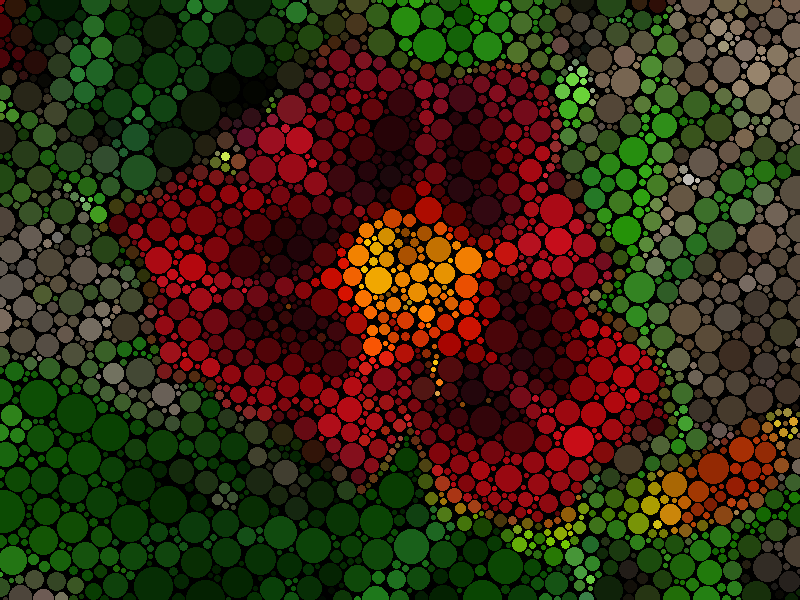
What is de-flat supposed to do? I see light gray circles in the regular circles.


i like the circles a bit more spheric... with a bit of depth , so with a slightly different shade of color in their center .
And also to smooth a bit without killing details (i mean without killing the most little circles )

_________________
My 3D Gallery on Deviantart http://photocomix2.deviantart.com/
Main gallery http://www.flickriver.com/photos/photocomix-mandala/
Mandala and simmetry http://www.flickriver.com/photos/photocomix_mandala/

Image

Mrs Wilbress


Top
 Post subject: Re: Another try at Circlism.
PostPosted: Thu Oct 13, 2011 12:22 am  (#112) 
Offline
GimpChat Founder
User avatar

Joined: May 22, 2008
Posts: 5241
Location: Gimpville
Excellent creativity using this filter. Mega-kudos!! :clap

_________________
“If you reach for the stars, you just might land on a decently sized hill.” - Stuart Hill


Top
 Post subject: Re: Another try at Circlism.
PostPosted: Thu Oct 13, 2011 1:23 am  (#113) 
Offline
GimpChat Member
User avatar

Joined: Sep 24, 2010
Posts: 12854
Wilber wanted in on the fun.

Anyway, what I like about this preset: Dynamic size and proper no touch placement of the dots.

What I'm a little sad about (very time consuming the bigger the source; even small source images can take more time then I wish, but I guess I shouldn't complaining too much. I did change the slider to 5/20 ratio for Wilber which took around 7 or so minutes to render. :)


Attachments:
wilbur.png
wilbur.png [ 46.62 KiB | Viewed 2809 times ]

_________________
Lyle

Psalm 109:8

Image
Top
 Post subject: Re: Another try at Circlism.
PostPosted: Thu Oct 13, 2011 1:26 am  (#114) 
Offline
Global Moderator
User avatar

Joined: May 16, 2010
Posts: 16241
:wow Pretty cool.
Took 27 minutes but well worth the wait. :bigthup

Image

:ninja

_________________
Image


Top
 Post subject: Re: Another try at Circlism.
PostPosted: Thu Oct 13, 2011 1:29 am  (#115) 
Offline
GimpChat Member
User avatar

Joined: Jan 03, 2011
Posts: 1656
Wow, one night after, there have been so much activities on this filter. Congrats all :)
Also I'm still wondering how this can be speed up, but believe me I'm out of ideas for now. This will probably stay one of the slower filter in G'MIC :)


Top
 Post subject: Re: Another try at Circlism.
PostPosted: Thu Oct 13, 2011 1:51 am  (#116) 
Offline
Global Moderator
User avatar

Joined: May 16, 2010
Posts: 16241
Oh one more...lol :)
Got the bug image to work.Thanks O for the great advice on flattening the image.Works every time now. :bigthup
Image

_________________
Image


Top
 Post subject: Re: Another try at Circlism.
PostPosted: Thu Oct 13, 2011 1:55 am  (#117) 
Offline
Global Moderator
User avatar

Joined: May 16, 2010
Posts: 16241
This is just as addicting as the Rodilius filter. :) :lol

_________________
Image


Top
 Post subject: Re: Another try at Circlism.
PostPosted: Thu Oct 13, 2011 2:32 am  (#118) 
Offline
GimpChat Member
User avatar

Joined: Sep 24, 2010
Posts: 12854
Hey David; I left a comment at the Flickr, but still will here too. Is there a command line G'MIC preset for this one? If so, how do you run it. Also, can you export a vector SVG within the command line (thought you could for some reason, but I might be wrong on this. Last time I even looked at the command line interface was during my gyroid binge; lol). If I could start with a much smaller image with smaller parameters then scale up, that would be cool. :)

_________________
Lyle

Psalm 109:8

Image


Top
 Post subject: Re: Another try at Circlism.
PostPosted: Thu Oct 13, 2011 4:18 am  (#119) 
Offline
GimpChat Member
User avatar

Joined: Jan 03, 2011
Posts: 1656
Another attempt :

Image


Top
 Post subject: Re: Another try at Circlism.
PostPosted: Thu Oct 13, 2011 4:35 am  (#120) 
Offline
GimpChat Member
User avatar

Joined: Oct 11, 2011
Posts: 55
Ronounours wrote:
Wow, one night after, there have been so much activities on this filter. Congrats all :)
Also I'm still wondering how this can be speed up, but believe me I'm out of ideas for now. This will probably stay one of the slower filter in G'MIC :)


Go buy:

http://www.newegg.com/Product/Product.a ... 6819115079

And 12 gigs of GOOD memory.

Overclock the CPU to around 3.8 ghz on a good air cooler. If you want to be cool like me you can spend a butt load on water cooling and hit 4.2-4.4 ghz.


For a little cheaper option, upgrade to an Intel 2600k cpu with 16g (4x4gb) of memory.

Rendering is all about CPU and Memory. Have a lot of both or get ready to wait.

_________________
Image


Top
Post new topic Reply to topic  [ 142 posts ]  Go to page Previous  1 ... 3, 4, 5, 6, 7, 8  Next

All times are UTC - 5 hours [ DST ]


* Login  


Powered by phpBB3 © phpBB Group