It is currently Thu Nov 26, 2026 4:03 pm


All times are UTC - 5 hours [ DST ]


Post new topic Reply to topic  [ 37 posts ]  Go to page 1, 2  Next
Author Message
 Post subject: Does anyone know what causes this?
PostPosted: Sat Aug 21, 2010 2:04 pm  (#1) 
Offline
Retired Staff
User avatar

Joined: May 22, 2008
Posts: 6946
Location: Somewhere in GIMP
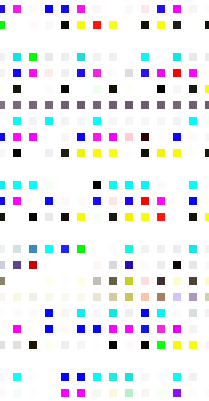
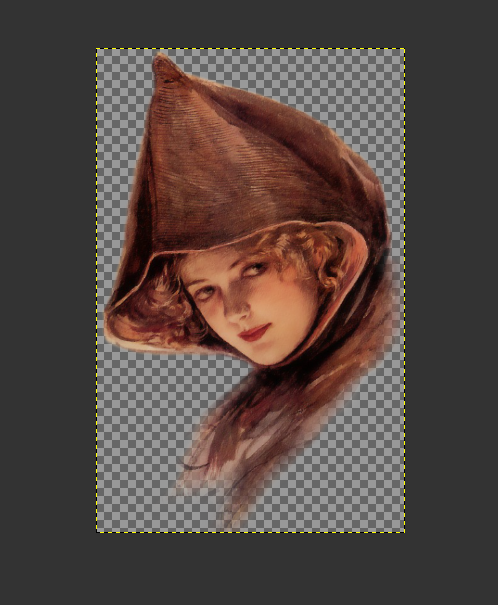
I got these png images from a newsgroup. They look fine in the newsgroup, look ok in the picture viewer and in Firefox, but when I open them in GIMP I get this strange, pixelated image.

Original image.
Image

What I get in GIMP. I put in a white bg layer so the weird stuff shows.
Image

_________________
Image
World War IV will be fought with sticks and stones. - Albert Einstein


Share on Facebook Share on Twitter Share on Orkut Share on Digg Share on MySpace Share on Delicious Share on Technorati
Top
 Post subject: Re: Does anyone know what causes this?
PostPosted: Sat Aug 21, 2010 2:23 pm  (#2) 
Offline
Global Moderator
User avatar

Joined: May 16, 2010
Posts: 16317
It looks like something i get from my printer when im out of ink. =)
What does it look like at greater magnification?

_________________
Image


Top
 Post subject: Re: Does anyone know what causes this?
PostPosted: Sat Aug 21, 2010 2:31 pm  (#3) 
Offline
Retired Staff
User avatar

Joined: May 22, 2008
Posts: 6946
Location: Somewhere in GIMP
I zoomed it to 800% and here's a chunk of it.

Image

_________________
Image
World War IV will be fought with sticks and stones. - Albert Einstein


Top
 Post subject: Re: Does anyone know what causes this?
PostPosted: Sat Aug 21, 2010 2:54 pm  (#4) 
Offline
GimpChat Member
User avatar

Joined: Apr 22, 2010
Posts: 126
Hi! Are you using a plug-in APNG? If so change on the PNG and try again.pogo..

_________________
Image


Top
 Post subject: Re: Does anyone know what causes this?
PostPosted: Sat Aug 21, 2010 3:35 pm  (#5) 
Offline
Retired Staff
User avatar

Joined: May 22, 2008
Posts: 6946
Location: Somewhere in GIMP
My apng plugin isn't working because an update in Fedora reverted the libpng back to the regular one and I can't fix it so I expect that the original one is in place.

_________________
Image
World War IV will be fought with sticks and stones. - Albert Einstein


Top
 Post subject: Re: Does anyone know what causes this?
PostPosted: Sat Aug 21, 2010 3:47 pm  (#6) 
Offline
Retired Staff
User avatar

Joined: May 22, 2008
Posts: 6946
Location: Somewhere in GIMP
OK here's the original png image attached. Could someone who doesn't have the apng plugin open it in gimp and see if they get the same results I do?


Attachments:
Art-01-png-TR-.png
Art-01-png-TR-.png [ 519.12 KiB | Viewed 3398 times ]

_________________
Image
World War IV will be fought with sticks and stones. - Albert Einstein
Top
 Post subject: Re: Does anyone know what causes this?
PostPosted: Sat Aug 21, 2010 3:56 pm  (#7) 
Offline
GimpChat Member
User avatar

Joined: Apr 30, 2010
Posts: 1937
Location: Missouri
I attached the file opened in Gimp then closed again. I like that graphic, it worked fine for me. I added a white background too.

_________________
Image
The last time I kept an open mind,
my brain fell out and the dog grabbed it.
Now it's full of dirt, toothmarks, and dog slobber.
No more open minds or dogs for me.


Top
 Post subject: Re: Does anyone know what causes this?
PostPosted: Sat Aug 21, 2010 4:01 pm  (#8) 
Offline
Global Moderator
User avatar

Joined: May 16, 2010
Posts: 16317
O i downloaded it as a PNG and opened it fine in Gimp 2.6.10 =) but i have the APNG plug-in.

Image

_________________
Image


Top
 Post subject: Re: Does anyone know what causes this?
PostPosted: Sat Aug 21, 2010 4:02 pm  (#9) 
Offline
Retired Staff
User avatar

Joined: May 22, 2008
Posts: 6946
Location: Somewhere in GIMP
Well dang. Now I don't know what to do.

_________________
Image
World War IV will be fought with sticks and stones. - Albert Einstein


Top
 Post subject: Re: Does anyone know what causes this?
PostPosted: Sat Aug 21, 2010 4:04 pm  (#10) 
Offline
Global Moderator
User avatar

Joined: May 16, 2010
Posts: 16317
did you try and reinstall the APNG package?

_________________
Image


Top
 Post subject: Re: Does anyone know what causes this?
PostPosted: Sat Aug 21, 2010 4:09 pm  (#11) 
Offline
Retired Staff
User avatar

Joined: May 22, 2008
Posts: 6946
Location: Somewhere in GIMP
The last time I tried I failed so it no longer works; tried it again same thing. Dunno what I did wrong, but I can't get it to work.

_________________
Image
World War IV will be fought with sticks and stones. - Albert Einstein


Top
 Post subject: Re: Does anyone know what causes this?
PostPosted: Sat Aug 21, 2010 4:17 pm  (#12) 
Offline
GimpChat Founder
User avatar

Joined: May 22, 2008
Posts: 5248
Location: Gimpville
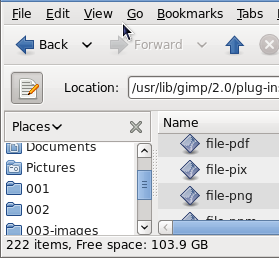
I suspect pogogogo is correct. Copy the original file-png back to the system's plug-in folder (/usr/lib/gimp/2.0/plug-ins) and use that to open the file. That will tell you if there is an issue with the apng-plugin.

_________________
Image


Top
 Post subject: Re: Does anyone know what causes this?
PostPosted: Sat Aug 21, 2010 4:20 pm  (#13) 
Offline
GimpChat Member
User avatar

Joined: Apr 07, 2010
Posts: 14182
The same thing is happening with me. I get the same results as O does. Just a bunch of pixels.....

_________________
Image


Top
 Post subject: Re: Does anyone know what causes this?
PostPosted: Sat Aug 21, 2010 4:35 pm  (#14) 
Offline
GimpChat Founder
User avatar

Joined: May 22, 2008
Posts: 5248
Location: Gimpville
That's /usr/lib/gimp/2.0/

No share in there..

I noticed that I now have the file-png in my plugins folder. Looks like it got re-installed during the last Gimp update. You probably have it there too.

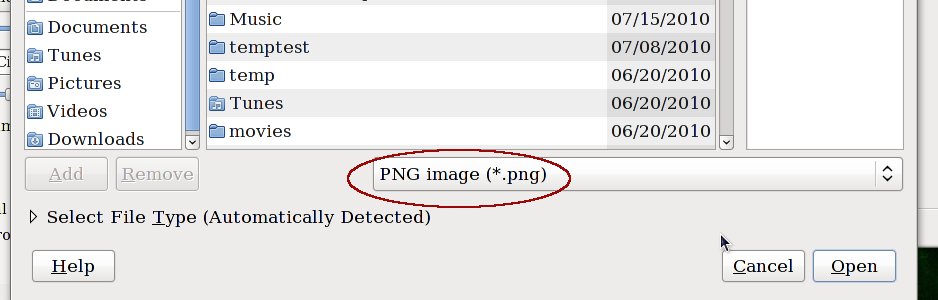
Try opening while specifying to use file-png..

Image

_________________
Image


Top
 Post subject: Re: Does anyone know what causes this?
PostPosted: Sat Aug 21, 2010 4:37 pm  (#15) 
Offline
GimpChat Member
User avatar

Joined: Apr 22, 2010
Posts: 126
ImageFROM O.ImageImage Try to open this image in your GIMP.
_________________
Image


Top
 Post subject: Re: Does anyone know what causes this?
PostPosted: Sat Aug 21, 2010 4:40 pm  (#16) 
Offline
Retired Staff
User avatar

Joined: May 22, 2008
Posts: 6946
Location: Somewhere in GIMP
Oops. I deleted my post. I looked in usr/lib/gimp/2.0/plug-ins and file-png is in it.

Image

_________________
Image
World War IV will be fought with sticks and stones. - Albert Einstein


Top
 Post subject: Re: Does anyone know what causes this?
PostPosted: Sat Aug 21, 2010 4:43 pm  (#17) 
Offline
Retired Staff
User avatar

Joined: May 22, 2008
Posts: 6946
Location: Somewhere in GIMP
pogogogo wrote:
Try to open this image in your GIMP.
That one works fine, pogo.

_________________
Image
World War IV will be fought with sticks and stones. - Albert Einstein


Top
 Post subject: Re: Does anyone know what causes this?
PostPosted: Sat Aug 21, 2010 4:47 pm  (#18) 
Offline
GimpChat Member
User avatar

Joined: Apr 22, 2010
Posts: 126
Yes you are right GnuTux APNG is fine.

_________________
Image


Top
 Post subject: Re: Does anyone know what causes this?
PostPosted: Sat Aug 21, 2010 4:49 pm  (#19) 
Offline
GimpChat Founder
User avatar

Joined: May 22, 2008
Posts: 5248
Location: Gimpville
I suspected as much pogogogo.

O, try opening while specifying to use file-png..

Image

_________________
Image


Top
 Post subject: Re: Does anyone know what causes this?
PostPosted: Sat Aug 21, 2010 5:07 pm  (#20) 
Offline
Retired Staff
User avatar

Joined: May 22, 2008
Posts: 6946
Location: Somewhere in GIMP
GnuTux wrote:

O, try opening while specifying to use file-png..

It opens fine that way.

_________________
Image
World War IV will be fought with sticks and stones. - Albert Einstein


Top
Post new topic Reply to topic  [ 37 posts ]  Go to page 1, 2  Next

All times are UTC - 5 hours [ DST ]


* Login  


Powered by phpBB3 © phpBB Group