It is currently Tue Aug 11, 2026 2:32 pm


All times are UTC - 5 hours [ DST ]


Post new topic Reply to topic  [ 104 posts ]  Go to page Previous  1, 2, 3, 4, 5, 6  Next
Author Message
 Post subject: Re: Logo Workshop - Release Candidate V.02
PostPosted: Wed Oct 19, 2011 12:49 pm  (#41) 
Offline
Global Moderator
User avatar

Joined: May 16, 2010
Posts: 16155
Oh i have fallen in love with this script. :)

Image

_________________
Image


Top
 Post subject: Re: Logo Workshop - Release Candidate V.02
PostPosted: Wed Oct 19, 2011 12:49 pm  (#42) 
Offline
GimpChat Founder
User avatar

Joined: May 22, 2008
Posts: 5241
Location: Gimpville
Thanks for the kind words, Rod. It's no G'MIC but it does have potential.

_________________
“If you reach for the stars, you just might land on a decently sized hill.” - Stuart Hill


Top
 Post subject: Re: Logo Workshop - Release Candidate V.02
PostPosted: Wed Oct 19, 2011 1:21 pm  (#43) 
Offline
Retired Staff
User avatar

Joined: May 22, 2008
Posts: 6946
Location: Somewhere in GIMP
This is fun. Need to roll up my sleeves really work with it to get the most out of it. Done with the Alpha to Logo filter.

Image

_________________
Image
World War IV will be fought with sticks and stones. - Albert Einstein


Top
 Post subject: Re: Logo Workshop - Release Candidate V.02
PostPosted: Wed Oct 19, 2011 2:12 pm  (#44) 
Offline
Retired Staff
User avatar

Joined: May 22, 2008
Posts: 6946
Location: Somewhere in GIMP
Having trouble with the Alpha to Logo. It strokes with the fill color instead of the stroke color. The rabbit up there, I stroked it after I made it as I thought I'd forgotten to use the stroke feature in the filter.

Image

Results
Image

_________________
Image
World War IV will be fought with sticks and stones. - Albert Einstein


Top
 Post subject: Re: Logo Workshop - Release Candidate V.02
PostPosted: Wed Oct 19, 2011 3:31 pm  (#45) 
Offline
GimpChat Member

Joined: Aug 27, 2010
Posts: 491
One more ... can't stop playing with this script.

Image


Top
 Post subject: Re: Logo Workshop - Release Candidate V.02
PostPosted: Wed Oct 19, 2011 6:39 pm  (#46) 
Offline
GimpChat Member
User avatar

Joined: Apr 07, 2010
Posts: 14182
Best toy I had in years. Just can't put it down.

Image

_________________
Image


Top
 Post subject: Re: Logo Workshop - Release Candidate V.02
PostPosted: Wed Oct 19, 2011 8:56 pm  (#47) 
Offline
GimpChat Founder
User avatar

Joined: May 22, 2008
Posts: 5241
Location: Gimpville
Mollly & Mike, looking good. I think y'all might be GIMP addicts. :hehe

Oregonian wrote:
Having trouble with the Alpha to Logo. It strokes with the fill color instead of the stroke color.]

I was wondering when someone would notice how strokes were being handled. Actually, there is no stroke "fill", per say, in this script. With a text layer, the stroke is achieved by creating the text with the stroke color, selection shrank by stroke width, then filled with a color, gradient or patten. The reason I chose this approach was to avoid the aliasing messiness of stroke fills.

Unfortunately, I can't use that approach with Alpha/Selection because the logo layer already exists. Currently with an alpha/selection, the existing layer color becomes the stroke color. The selection is simply shrank, and the fill occurs, while ignoring the selected stroke color. This approach has advantages and disadvantages.

I guess in the end I'll just go ahead and stoike the Alpha/Selection with the stroke color and try to correct for the aliasing that occurs. The code for stroking is already in place. I just need to settle on an approach for dealing with the aliasing.

_________________
“If you reach for the stars, you just might land on a decently sized hill.” - Stuart Hill


Top
 Post subject: Re: Logo Workshop - Release Candidate V.02
PostPosted: Wed Oct 19, 2011 10:01 pm  (#48) 
Offline
Retired Staff
User avatar

Joined: May 22, 2008
Posts: 6946
Location: Somewhere in GIMP
GnuTux wrote:
I was wondering when someone would notice how strokes were being handled. Actually, there is no stroke "fill", per say, in this script. With a text layer, the stroke is achieved by creating the text with the stroke color, selection shrank by stroke width, then filled with a color, gradient or patten. The reason I chose this approach was to avoid the aliasing messiness of stroke fills.
Aha! Actually that is a superior method for stroking. No yucky strokes that way. Now that I know what it's doing, I'll color my "stroked" object the color I want the stroke to be when using Alpha to Logo. Thanks! :mrgreen:

Image

_________________
Image
World War IV will be fought with sticks and stones. - Albert Einstein


Top
 Post subject: Re: Logo Workshop - Release Candidate V.02
PostPosted: Wed Oct 19, 2011 11:29 pm  (#49) 
Offline
GimpChat Founder
User avatar

Joined: May 22, 2008
Posts: 5241
Location: Gimpville
Oregonian wrote:
Now that I know what it's doing, I'll color my "stroked" object the color I want the stroke to be when using Alpha to Logo. Thanks!

Bingo. That's the way to go.

You started the cogs clanking around in my brain, O. The best approach for the script is to add a check box in the Alpha to Logo popup dialog, giving the user the option to use either stroke method. :idea:

Also, add on option called split, which would split off the selection into a new layer after the operation was complete. :idea: :idea:

_________________
“If you reach for the stars, you just might land on a decently sized hill.” - Stuart Hill


Top
 Post subject: Re: Logo Workshop - Release Candidate V.02
PostPosted: Thu Oct 20, 2011 12:01 am  (#50) 
Offline
Retired Staff
User avatar

Joined: May 22, 2008
Posts: 6946
Location: Somewhere in GIMP
GnuTux wrote:
You started the cogs clanking around in my brain, O.

The best approach for the script is to add a check box in the the Alpha to Logo popup dialog, giving the user the option to use either method. :idea:


That sounds good. :hehe

GnuTux wrote:
Also, add on option called split, which would split off the selection into a new layer after the operation was complete. :idea: :idea:
I really like that idea.

It was interesting when I was doing that image above using a black bg. I added the circles after I had merged the layers down to the black bg. There was a black filled circle layer for each circle and when I made those black circle layers invisible, there was a hole in the black background for each circle. I was thinking, "now what can I do to take advantage of those holes?" Will ponder on that awhile. Looks it could be utilized as a cool feature.

I'm attaching an xcf file so if my meaning is not clear, the layers will show you what I'm trying to explain. I started with a black layer, made the color-filled circles directly on that black layer and ended up with a neat, holey layer and black plugs to fill the holes. :coolthup


Attachments:
cutouts.xcf [26.88 KiB]
Downloaded 78 times

_________________
Image
World War IV will be fought with sticks and stones. - Albert Einstein
Top
 Post subject: Re: Logo Workshop - Release Candidate V.02
PostPosted: Thu Oct 20, 2011 12:47 am  (#51) 
Offline
GimpChat Founder
User avatar

Joined: May 22, 2008
Posts: 5241
Location: Gimpville
Here's a double pass through with the 1st time a color fill, bevel and stroke, then with gradient fill, bevel and stroke. It gives the image some depth. On a side note, you can see how bad the aliasing is when using a standard stroke fill without any smoothing.

Image

Image

_________________
“If you reach for the stars, you just might land on a decently sized hill.” - Stuart Hill


Top
 Post subject: Re: Logo Workshop - Release Candidate V.02
PostPosted: Thu Oct 20, 2011 11:41 am  (#52) 
Offline
Retired Staff
User avatar

Joined: May 22, 2008
Posts: 6946
Location: Somewhere in GIMP
Each time I use the alpha to logo, even though I turned off the drop shadow as much as I could, it still made a drop shadow layer (with nothing in it), is there a way for it NOT to make a drop shadow layer? This image I used the script to fill it but each time I did a fill there was an empty drop shadow layer.

Image

_________________
Image
World War IV will be fought with sticks and stones. - Albert Einstein


Top
 Post subject: Re: Logo Workshop - Release Candidate V.02
PostPosted: Thu Oct 20, 2011 2:41 pm  (#53) 
Offline
Retired Staff
User avatar

Joined: May 22, 2008
Posts: 6946
Location: Somewhere in GIMP
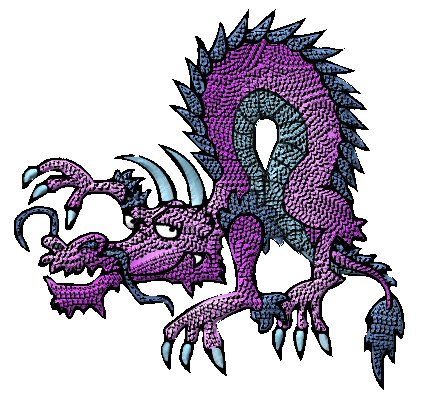
I wanted to add texture to this dragon image but wanted to keep the colors. I made a tranparent image, copied it to the clipboard and used the transparency as the pattern.

Alpha to selection on the dragon and shrink by 3 (to preserve the stroke).

I used the scales pattern for the bump map. After I ran the script, I selected things like the eyes, tooth, horns and claws from the original image layer, grew them by 1 and deleted them on the bump layer.

Original image
Image

Textured image
Image

_________________
Image
World War IV will be fought with sticks and stones. - Albert Einstein


Top
 Post subject: Re: Logo Workshop - Release Candidate V.02
PostPosted: Thu Oct 20, 2011 3:38 pm  (#54) 
Offline
Global Moderator
User avatar

Joined: May 16, 2010
Posts: 16155
Nice O! :)

_________________
Image


Top
 Post subject: Re: Logo Workshop - Release Candidate V.02
PostPosted: Thu Oct 20, 2011 5:17 pm  (#55) 
Offline
GimpChat Member
User avatar

Joined: Apr 07, 2010
Posts: 14182
I did another one woot, this thread might go on to 100 pages.
Image

_________________
Image


Top
 Post subject: Re: Logo Workshop - Release Candidate V.02
PostPosted: Thu Oct 20, 2011 5:31 pm  (#56) 
Offline
Global Moderator
User avatar

Joined: May 16, 2010
Posts: 16155
Oh i like that Molly! :)

_________________
Image


Top
 Post subject: Re: Logo Workshop - Release Candidate V.02
PostPosted: Thu Oct 20, 2011 5:54 pm  (#57) 
Offline
GimpChat Member
User avatar

Joined: Apr 07, 2010
Posts: 14182
Ban me or put me in handcuffs, I can't get stopped with this wonderful script.
Image

_________________
Image


Top
 Post subject: Re: Logo Workshop - Release Candidate V.02
PostPosted: Thu Oct 20, 2011 11:58 pm  (#58) 
Offline
GimpChat Founder
User avatar

Joined: May 22, 2008
Posts: 5241
Location: Gimpville
What a nice job of leveraging this script to help create those cool images, Molly & O.

O, you're right. There needs to be a toggle for the shadow layer in the A2L dialog. I'll add that to the next release candidate.

_________________
“If you reach for the stars, you just might land on a decently sized hill.” - Stuart Hill


Top
 Post subject: Re: Logo Workshop - Release Candidate V.03
PostPosted: Fri Oct 21, 2011 11:48 am  (#59) 
Offline
GimpChat Founder
User avatar

Joined: May 22, 2008
Posts: 5241
Location: Gimpville
Another update to Logo Workshop RC 0.03 is available.

The new file and other details have been added to the first page in this thread.

Enhancements include all generated items being placed on separate layers, new internal stroke routines utilizing paths, user can now specify stroke color on the "Alpha to logo" dialog and setting shadow opacity to zero results in no shadow layer generated. The Alpha to Logo dialog has been tweaked for clarity.

More to come soon...

_________________
“If you reach for the stars, you just might land on a decently sized hill.” - Stuart Hill


Top
 Post subject: Re: Logo Workshop - Release Candidate V.03
PostPosted: Fri Oct 21, 2011 12:13 pm  (#60) 
Offline
GimpChat Member

Joined: Aug 27, 2010
Posts: 491
Thank You for all the effort behind this script, Tux.


Top
Post new topic Reply to topic  [ 104 posts ]  Go to page Previous  1, 2, 3, 4, 5, 6  Next

All times are UTC - 5 hours [ DST ]


* Login  


Powered by phpBB3 © phpBB Group