It is currently Fri Sep 18, 2026 8:42 pm


All times are UTC - 5 hours [ DST ]


Post new topic Reply to topic  [ 11 posts ] 
Author Message
 Post subject: Duplicating many Frames
PostPosted: Tue Oct 25, 2011 3:27 am  (#1) 
Offline
GimpChat Member
User avatar

Joined: Oct 07, 2011
Posts: 180
GIMP Version: 2.6.11
Operating System: Windows
OS Version: Vista
GIMP Experience: Beginner Level


Image

I do this very often.
I am changing a static image into a animated image. So I need to take that one frame image and add 35 identically frames of it. So that means:
Rightclick on the frame > Duplicate Frame
and so on
and so on
35 times

Is there a way to duplicate frame x 35 times with just a couple clicks or so?
I doubt it but would be so nice if so.

Please and thankyou for any answer.

-------------------------------------------------------------------------------------------


Last edited by Barbie on Mon May 07, 2012 9:28 pm, edited 18 times in total.

Share on Facebook Share on Twitter Share on Orkut Share on Digg Share on MySpace Share on Delicious Share on Technorati
Top
 Post subject: Re: Duplicating many Frames
PostPosted: Tue Oct 25, 2011 9:02 am  (#2) 
Offline
GimpChat Member
User avatar

Joined: Oct 07, 2010
Posts: 439
Location: home/Nixnine/.gimp-2.0/scripts/nixnine.scm
Use the drawable multiplication script: http://registry.gimp.org/node/22383

Just change the number of copies. Leave the offsets at 0.

_________________
I refuse to be confused, but am often confused at this refusal.


Top
 Post subject: Re: Duplicating many Frames
PostPosted: Tue Oct 25, 2011 9:46 am  (#3) 
Offline
GimpChat Member
User avatar

Joined: Apr 07, 2010
Posts: 14182
I already have it but haven't used it cuz I can never figure what numbers to put in those x and y offset thangs. I hate math :teeth

_________________
Image


Top
 Post subject: Re: Duplicating many Frames
PostPosted: Tue Oct 25, 2011 9:55 am  (#4) 
Offline
GimpChat Founder
User avatar

Joined: May 22, 2008
Posts: 5241
Location: Gimpville
Bar wrote:
Rightclick on the frame > Duplicate Frame
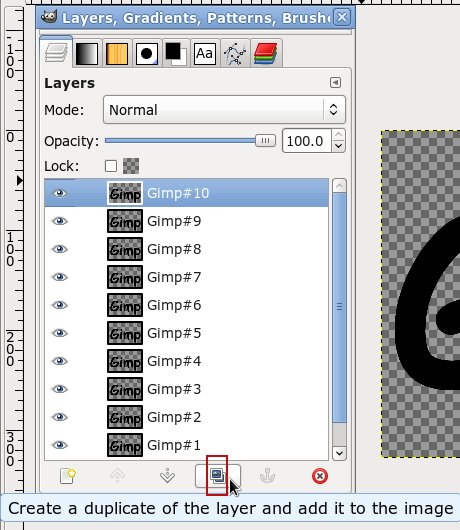
Don't forget about the duplicate layer button. It's lots faster than right clicking. :hehe

Image

_________________
“If you reach for the stars, you just might land on a decently sized hill.” - Stuart Hill


Top
 Post subject: Re: Duplicating many Frames
PostPosted: Tue Oct 25, 2011 10:08 am  (#5) 
Offline
GimpChat Member
User avatar

Joined: Apr 07, 2010
Posts: 14182
I tried it with three circles, changed it to replace and the speed to 150.
Image
Image

_________________
Image


Top
 Post subject: Re: Duplicating many Frames
PostPosted: Wed Oct 26, 2011 1:44 am  (#6) 
Offline
GimpChat Member
User avatar

Joined: Oct 07, 2011
Posts: 180
Thanks nixnine !
That looks pretty complicated...so I need more time to look through that.

Thanks GnuTUx!
I didn't notice that Duplicate Layer icon. That really speeds things up fast. Just a quick click for each added frame. Thankyou very much for telling me about that.
I am using that method for now.

This is the kind of stuff I am working on now. I am adding text to an image that I heavily edited and changed.
Image

Then I am animating it so that it looks like it is being typed in. I am doing a whole series of the typewriter animations. So I need to duplicate frames for as many text letters there are.
Image

Image


Top
 Post subject: Re: Duplicating many Frames
PostPosted: Wed Oct 26, 2011 3:06 am  (#7) 
Offline
Global Moderator
User avatar

Joined: May 16, 2010
Posts: 16173
Bar those are great animations you do.Perhaps you should look into GAP.
Gimp Animation Program
Lot's of cool stuff you can do with it. :)

_________________
Image


Top
 Post subject: Re: Duplicating many Frames
PostPosted: Wed Oct 26, 2011 3:12 am  (#8) 
Offline
GimpChat Member
User avatar

Joined: Apr 07, 2010
Posts: 14182
Very nice Bar, here is some info on Gap for your animations?
Gap
Also, here is a very good animated text tutorial by ccbarr, using Gap.
animated text using Gap

_________________
Image


Top
 Post subject: Re: Duplicating many Frames
PostPosted: Wed Oct 26, 2011 4:22 am  (#9) 
Offline
GimpChat Member
User avatar

Joined: Oct 07, 2011
Posts: 180
Rod. Thanks for all that info!
➤ Graphic Dictionary is good to keep for reference thanks.
➤ Gimp Rocks looks complicated and advanced but I will eventually check it out when I have more knowledge thanks.
➤ A lot of images in your gallery. I think I like this the most because it looks like you are on mars.
Image


Rod and Molly:
Gap: Scrolling text. That is something I really want to do. Will install that later and start learning it.
Thanks for that info and links Rod and Molly! Image


Top
 Post subject: Re: Duplicating many Frames
PostPosted: Wed Oct 26, 2011 4:46 am  (#10) 
Offline
GimpChat Member
User avatar

Joined: Apr 07, 2010
Posts: 14182
You are welcome Bar, This is a very good animated barber pole tutorial also by ccbarr. His tutorials are very well written and easy to follow.
animated pole

_________________
Image


Top
 Post subject: Re: Duplicating many Frames
PostPosted: Wed Oct 26, 2011 5:34 am  (#11) 
Offline
Global Moderator
User avatar

Joined: May 16, 2010
Posts: 16173
Thanks for checking out all those links in my Sig bar. :)
Gimp Rocks is just my Blog
The reference is always there present in my sig if you need it.
That image can easily be done with GMIC's Rodilius filter. :)
If you do not have the Gimp plug-in GMIC installed yet you can check it out here.
http://gmic.sourceforge.net/gimp.shtml
If you need help installing just ask someone here and they will help you out.

_________________
Image


Top
Post new topic Reply to topic  [ 11 posts ] 

All times are UTC - 5 hours [ DST ]


* Login  


Powered by phpBB3 © phpBB Group