It is currently Tue Jul 28, 2026 3:51 am


All times are UTC - 5 hours [ DST ]


Post new topic Reply to topic  [ 30 posts ]  Go to page 1, 2  Next
Author Message
 Post subject: Filter Effects
PostPosted: Thu Nov 10, 2011 4:08 pm  (#1) 
Offline
GimpChat Member
User avatar

Joined: Aug 24, 2011
Posts: 1785
Location: Dallas, TX
There are a couple of filters in Photoshop that I would like to immulate and can't seem to come up with the right combination.

First they render some clouds.
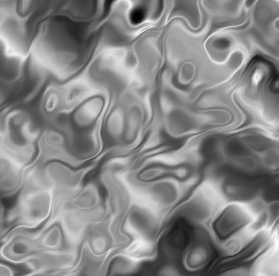
Second they apply the "watercolor" filter. (Gimp's watercolor filter looks like black worms)
Third they apply the "chrome" filter.

Anybody want to try and recreate this effect? Lyle? Mahvin? Anyone? I've tried every filter and combination I can think of that comes close and I just can't get there.


Attachments:
Graphic Effects.jpg
Graphic Effects.jpg [ 229.47 KiB | Viewed 3414 times ]

_________________
Image
Share on Facebook Share on Twitter Share on Orkut Share on Digg Share on MySpace Share on Delicious Share on Technorati
Top
 Post subject: Re: Filter Effects
PostPosted: Thu Nov 10, 2011 6:31 pm  (#2) 
Offline
GimpChat Member
User avatar

Joined: Oct 06, 2010
Posts: 4050
Link to the tutorial?

_________________
"In order to attain the impossible, one must attempt the absurd."
~ Miguel de Cervantes


Top
 Post subject: Re: Filter Effects
PostPosted: Thu Nov 10, 2011 6:34 pm  (#3) 
Offline
GimpChat Member

Joined: Apr 12, 2010
Posts: 5870
i don't think there is a tut but link for the filters or at least their exact name will help

_________________
My 3D Gallery on Deviantart http://photocomix2.deviantart.com/
Main gallery http://www.flickriver.com/photos/photocomix-mandala/
Mandala and simmetry http://www.flickriver.com/photos/photocomix_mandala/

Image

Mrs Wilbress


Top
 Post subject: Re: Filter Effects
PostPosted: Thu Nov 10, 2011 6:37 pm  (#4) 
Offline
GimpChat Member
User avatar

Joined: Oct 06, 2010
Posts: 4050
He mentioned 3 processes they use. I just wanted to see for myself in case something "clicked".

_________________
"In order to attain the impossible, one must attempt the absurd."
~ Miguel de Cervantes


Top
 Post subject: Re: Filter Effects
PostPosted: Thu Nov 10, 2011 7:51 pm  (#5) 
Offline
Script Coder
User avatar

Joined: Feb 18, 2011
Posts: 4826
Location: Bendigo Vic. Australia
For 'chrome' I used a greyscale image with a white background and a selection,(no alpha channel), go to Filters-Decor-Stencil_chrome,for this image, I used a selection from wilbur.
Image

_________________
Image
No matter how much you push the envelope, it'll still be stationery.


Top
 Post subject: Re: Filter Effects
PostPosted: Thu Nov 10, 2011 9:33 pm  (#6) 
Offline
GimpChat Member
User avatar

Joined: Oct 06, 2010
Posts: 4050
For PS Chrome, the closest I could get was using Difference Clouds (Turbulent) x and y at 2 each, then run G'MIC water filter and adjust amplitude, etc..

I'm sure with more testing you could get it even closer to the PS effect. I notice that in PS the difference clouds are spread out a great deal more than they are in GIMP, which could be the reason the outcome is so different.

Image

_________________
"In order to attain the impossible, one must attempt the absurd."
~ Miguel de Cervantes


Last edited by mahvin on Fri Nov 11, 2011 4:48 pm, edited 1 time in total.

Top
 Post subject: Re: Filter Effects
PostPosted: Fri Nov 11, 2011 6:48 am  (#7) 
Offline
GimpChat Member
User avatar

Joined: Aug 24, 2011
Posts: 1785
Location: Dallas, TX
mahvin wrote:
For PS Chrome, the closest I could get was using Difference Clouds (Turbulent) x and y at 2 each, then run G'MIC water filter and adjust amplitude, etc..

I'm sure with more testing you could get it even closer to the PS effect. I notice that in PS the difference clouds are spread out a great deal more than they are in GIMP, which could.

[ Image ]


That's pretty close for the chrome Mahvin. Maybe a curves/contrast adjustment to get the highlights to stand out more like in the PS example. It almost looks like a combination of the "Graphic Novel" filter and the two you used.

I found the link to the last one I was fooling around with. It's pretty long and the steps I am referring to are quite a ways down in the tut where they start decorating the top text layer.

http://textuts.com/3d-skyscraper-text-e ... s5-part-1/

The watercolor example really throws me. Surely there is a gmic solution. If not, we could definitely use a new filter that would do it.

_________________
Image


Top
 Post subject: Re: Filter Effects
PostPosted: Fri Nov 11, 2011 1:40 pm  (#8) 
Offline
GimpChat Member
User avatar

Joined: Oct 06, 2010
Posts: 4050
The closest I could get with the watercolor effect involved using Gentlemanbeggar's bokeh blur and the sponge filter in G'MIC. But it wasn't close enough for me to think of sharing the result.

_________________
"In order to attain the impossible, one must attempt the absurd."
~ Miguel de Cervantes


Top
 Post subject: Re: Filter Effects
PostPosted: Fri Nov 11, 2011 2:12 pm  (#9) 
Offline
Script Coder
User avatar

Joined: Apr 23, 2010
Posts: 1553
Location: not from Guildford after all
The following was done with GIMPressionist. Is it close to the watercolor effect?

Attachment:
pressionist.jpg
pressionist.jpg [ 26.86 KiB | Viewed 3250 times ]

_________________
Any sufficiently primitive technology is indistinguishable from a rock.


Top
 Post subject: Re: Filter Effects
PostPosted: Fri Nov 11, 2011 2:24 pm  (#10) 
Offline
Script Coder
User avatar

Joined: Jul 14, 2010
Posts: 697
saulgoode wrote:
The following was done with GIMPressionist. Is it close to the watercolor effect?


I was going to mention GIMPressionist. The most overlooked, undervalued and misunderstood plugin in Gimp...

So cryptic the comments in the code state they don't know what it does....

Nice examples can be found here:
http://commons.wikimedia.org/wiki/User: ... ressionist

-Rob A>

_________________
Image
Fantasy Cartography and Mapping by RobA


Top
 Post subject: Re: Filter Effects
PostPosted: Fri Nov 11, 2011 3:22 pm  (#11) 
Offline
GimpChat Member
User avatar

Joined: Oct 06, 2010
Posts: 4050
Good examples, Rob. Thanks for sharing.

Drac:

I am going to step out on a limb here and say, that even though the GIMP result of those actual filters used in PS will not be identical, the intended result of why those filters were used, will be very, very close. The author uses those filters to create lighting effects on the text surface. I am going to encourage you to try Saulgoode's GIMPressionist method for watercolor, and try the work-around Chrome effect and use them in the same fashion and then check your result to the tutorial. I'm confident you'll be pleased with the outcome.

_________________
"In order to attain the impossible, one must attempt the absurd."
~ Miguel de Cervantes


Top
 Post subject: Re: Filter Effects
PostPosted: Fri Nov 11, 2011 4:27 pm  (#12) 
Offline
GimpChat Member
User avatar

Joined: Aug 24, 2011
Posts: 1785
Location: Dallas, TX
saulgoode wrote:
The following was done with GIMPressionist. Is it close to the watercolor effect?

Attachment:
The attachment pressionist.jpg is no longer available


Looks a lot closer than what I came up with. Mind sharing a screenshot of the settings you used? Here they are side by side.

I tend to agree Mahvin. Now that we've sort of beat this horse to death, you guys did come up with closer results. I admit I never did try the Gimpressionist filter. I was working backwards with the chrome going with watercolor first then metalic look instead of vice versa. Thanks everyone!


Attachments:
comparrison.jpg
comparrison.jpg [ 133.68 KiB | Viewed 2004 times ]

_________________
Image
Top
 Post subject: Re: Filter Effects
PostPosted: Fri Nov 11, 2011 4:56 pm  (#13) 
Offline
GimpChat Member
User avatar

Joined: Aug 24, 2011
Posts: 1785
Location: Dallas, TX
Just tried something and got a little closer. I duplicated the Gimpressionist result that Saulgood did and did edge detection with Sobelmaxed out , then inverted the colors and made the mode overlay. I adjusted the opacity to about 50% and then went back to the original layer and adjusted the curve up just a tad.

I ended up running the edge detect again, overlay, opacity at 20% and adjusting the color balance to get the dark areas darker and then desaturate the luminance.

Somebody needs to make us a filter to do this. There's just too many steps to get to the same result.


Attachments:
Comparrison 2.jpg
Comparrison 2.jpg [ 159.46 KiB | Viewed 2002 times ]

_________________
Image
Top
 Post subject: Re: Filter Effects
PostPosted: Fri Nov 11, 2011 5:06 pm  (#14) 
Offline
Script Coder
User avatar

Joined: Apr 23, 2010
Posts: 1553
Location: not from Guildford after all
Draconian wrote:
Looks a lot closer than what I came up with. Mind sharing a screenshot of the settings you used?

Attached is the settings file (gzipped). Unzip it and place it in your .gimp-2.6/gimpressionist/Presets folder and then it should appear as "Watercolor" once you've refreshed your filter.

The one thing that caught me when first using GIMPressionist is that the "Darken edges" slider needs to be set to "0" if you don't want your brush edges to show; this even if you have the "Paint edges" checkbox unchecked.


Attachments:
Watercolor.gz [402 Bytes]
Downloaded 136 times

_________________
Any sufficiently primitive technology is indistinguishable from a rock.
Top
 Post subject: Re: Filter Effects
PostPosted: Fri Nov 11, 2011 6:43 pm  (#15) 
Offline
Script Coder
User avatar

Joined: Feb 18, 2011
Posts: 4826
Location: Bendigo Vic. Australia
Unzip it and place it in your .gimp-2.6/gimpressionist/Presets folder and then it should appear as "Watercolor" once you've refreshed your filter.
I did this but no sign of Watercolor in gimpressionist Presets.

Oops I did not create the Presets folder in gimpressionist now OK 'just senility'.

_________________
Image
No matter how much you push the envelope, it'll still be stationery.


Last edited by Graechan on Fri Nov 11, 2011 6:53 pm, edited 1 time in total.

Top
 Post subject: Re: Filter Effects
PostPosted: Fri Nov 11, 2011 6:47 pm  (#16) 
Offline
GimpChat Member
User avatar

Joined: Oct 06, 2010
Posts: 4050
Did you look at the top of the list under the Presets tab?

One other thing, if your single user location (.gimp-2.6/gimpressionist) doesn't have a Presets folder, you need to create one. I also created a Paper and Brushes folder as well.

_________________
"In order to attain the impossible, one must attempt the absurd."
~ Miguel de Cervantes


Top
 Post subject: Re: Filter Effects
PostPosted: Fri Nov 11, 2011 6:51 pm  (#17) 
Offline
GimpChat Member
User avatar

Joined: Apr 07, 2010
Posts: 14182
It worked for me. I just finished trying it. It will show up in artistic > gimpressionist > watercolor

_________________
Image


Top
 Post subject: Re: Filter Effects
PostPosted: Fri Nov 11, 2011 6:54 pm  (#18) 
Offline
GimpChat Member
User avatar

Joined: Aug 24, 2011
Posts: 1785
Location: Dallas, TX
Thanks for the preset Saulgoode. I'll give 'er a whirl next time I open gimp and start playin'.

_________________
Image


Top
 Post subject: Re: Filter Effects
PostPosted: Fri Nov 11, 2011 7:38 pm  (#19) 
Offline
GimpChat Member
User avatar

Joined: Oct 07, 2010
Posts: 439
Location: home/Nixnine/.gimp-2.0/scripts/nixnine.scm
I am using the preset, but the outer edge of the image is without the effect. It is more pronounced the smaller the image. Any ideas on how to correct this?


Attachments:
Screenshot.png
Screenshot.png [ 351.02 KiB | Viewed 1989 times ]

_________________
I refuse to be confused, but am often confused at this refusal.
Top
 Post subject: Re: Filter Effects
PostPosted: Fri Nov 11, 2011 8:45 pm  (#20) 
Offline
GimpChat Member
User avatar

Joined: Oct 06, 2010
Posts: 4050
Nixnine: I can't duplicate your problem. What filetype are the images?

_________________
"In order to attain the impossible, one must attempt the absurd."
~ Miguel de Cervantes


Top
Post new topic Reply to topic  [ 30 posts ]  Go to page 1, 2  Next

All times are UTC - 5 hours [ DST ]


* Login  


Powered by phpBB3 © phpBB Group