It is currently Tue Nov 17, 2026 12:08 pm


All times are UTC - 5 hours [ DST ]


Post new topic Reply to topic  [ 41 posts ]  Go to page 1, 2, 3  Next
Author Message
 Post subject: Can't get rid of FX-Foundry (Solved by the help of paynekj and others)
PostPosted: Tue Nov 15, 2011 9:57 am  (#1) 
Offline
GimpChat Member
User avatar

Joined: Apr 07, 2010
Posts: 14182
GIMP Version: 2.6.11
Operating System: Windows
OS Version: windows 7 (64-bit)
GIMP Experience: Basic Level


I have been trying for over a week now to get rid of FX-Foundry in Gimp 2.6.11

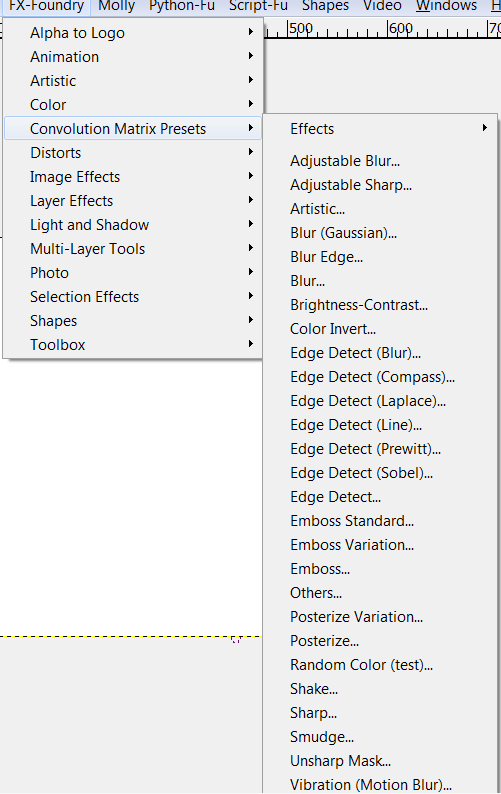
I am still getting errors saying I have dupes of several xtns, icci, and several more. I have deleted every single file that I think falls under the FX-Foundry Heading. I have 136 scripts there but they are NOT in my script folder. Attached below is a scrn shot of that heading and all the scripts show as active (not grayed out) but I already deleted them all.
I guess my questions is, where else can I look for these. I went into every place I know of on the C: drive.
I could produce a screen shot of my script folder but I would have to screen 10 pages to do that

Image

Help would be appreciated pleeeeze.

_________________
Image


Last edited by molly on Thu Nov 17, 2011 12:40 pm, edited 2 times in total.

Share on Facebook Share on Twitter Share on Orkut Share on Digg Share on MySpace Share on Delicious Share on Technorati
Top
 Post subject: Re: Can't get rid of FX-Foundry
PostPosted: Tue Nov 15, 2011 10:24 am  (#2) 
Offline
Script Coder
User avatar

Joined: Jun 22, 2010
Posts: 1171
Location: Here and there
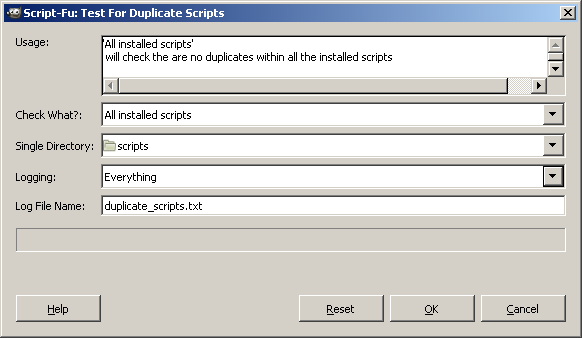
You could try using the latest version (1.4) of the test for duplicate scripts.

Run it checking "All Installed scripts" and Logging "Everything"
Image

Then open up the log file and search for "FX-Foundry" "Adjustable Blur". You should then be able to tell which file(s) they are coming from.

If it works you can thank mahvin for suggesting that the script logs everything.

Kevin


Last edited by paynekj on Tue Nov 15, 2011 10:30 am, edited 2 times in total.

Top
 Post subject: Re: Can't get rid of FX-Foundry
PostPosted: Tue Nov 15, 2011 10:28 am  (#3) 
Offline
GimpChat Member
User avatar

Joined: Apr 07, 2010
Posts: 14182
I did that already Kevin. I took your old script out and put in the new one and I did run that. It came up with 17 dupes I had already got rid of a week ago.

_________________
Image


Top
 Post subject: Re: Can't get rid of FX-Foundry
PostPosted: Tue Nov 15, 2011 10:33 am  (#4) 
Offline
Script Coder
User avatar

Joined: Jun 22, 2010
Posts: 1171
Location: Here and there
But this time you're not looking for duplicates, you're looking for the source of these scripts.

As an example, if you wanted to remove the script behind the Rounded Rectangle menu item, look in the log:
Rounded R_ectangle... , C:\Program Files\GIMP-2.0\share\gimp\2.0\scripts\selection-round.scm , script-fu-selection-rounded-rectangle , Sven Neumann , 2004/06/07

You can now see it's come from the file C:\Program Files\GIMP-2.0\share\gimp\2.0\scripts\selection-round.scm

And yes, I can now see the need for another version that strips the underscores out of the Menu item text.

Kevin


Last edited by paynekj on Tue Nov 15, 2011 10:35 am, edited 2 times in total.

Top
 Post subject: Re: Can't get rid of FX-Foundry
PostPosted: Tue Nov 15, 2011 10:33 am  (#5) 
Offline
Retired Staff
User avatar

Joined: May 22, 2008
Posts: 6946
Location: Somewhere in GIMP
I dislike the fact that Fx-Foundry had the arrogance to take up real estate and squat on my GIMP menu bar but I see with some of the newer scripts they put the Fx-Foundry folder in the File menu which is much more acceptable.

_________________
Image
World War IV will be fought with sticks and stones. - Albert Einstein


Top
 Post subject: Re: Can't get rid of FX-Foundry
PostPosted: Tue Nov 15, 2011 10:38 am  (#6) 
Offline
Script Coder
User avatar

Joined: Jun 22, 2010
Posts: 1171
Location: Here and there
Oregonian wrote:
I dislike the fact that Fx-Foundry had the arrogance to take up real estate and squat on my GIMP menu bar but I see with some of the newer scripts they put the Fx-Foundry folder in the File menu which is much more acceptable.


That's very much a personal preference. I intensely dislike scripts that bury themselves in the menu structure. I much prefer it to be upfront and then I can make the decision where to put it.


Top
 Post subject: Re: Can't get rid of FX-Foundry
PostPosted: Tue Nov 15, 2011 10:44 am  (#7) 
Offline
Retired Staff
User avatar

Joined: May 22, 2008
Posts: 6946
Location: Somewhere in GIMP
paynekj wrote:
That's very much a personal preference. I intensely dislike scripts that bury themselves in the menu structure. I much prefer it to be upfront and then I can make the decision where to put it.
Yes, there is that, but not everyone knows how to alter a script to put it where they want it.

_________________
Image
World War IV will be fought with sticks and stones. - Albert Einstein


Top
 Post subject: Re: Can't get rid of FX-Foundry
PostPosted: Tue Nov 15, 2011 10:47 am  (#8) 
Offline
GimpChat Member
User avatar

Joined: Apr 07, 2010
Posts: 14182
I am running the script again and I have Logging everything this time. I just noticed I left the default before when I ran it. I still want to know how to get rid of that FX-Foundry, it is annoying me big time.

Edit: Ok it just told me what I already know but I don't have any of them in my script folder. kward, phillips, thomas, trefftzs, xtns, iccii, death lomo, lowry-bsss, bsss, xtns-gutteridge-dracula, xtns-lankinen, mosteller, pippin, xenkov, and I might have missed a few. Somewhere in this computer these should show up somewhere. I can't think of anything else to try. I can post the list if it isn't too long.

I've attached an rar file.


Attachments:
test for duplicates.rar [752 Bytes]
Downloaded 120 times

_________________
Image
Top
 Post subject: Re: Can't get rid of FX-Foundry
PostPosted: Tue Nov 15, 2011 11:12 am  (#9) 
Offline
Script Coder
User avatar

Joined: Jun 22, 2010
Posts: 1171
Location: Here and there
One thought. I'm on XP and I tried making one of my scripts hidden:- i.e. set the hidden property. The script still found it. Does windows 7 file explorer have an option to show hidden files? because it's possible that's where they are.


Top
 Post subject: Re: Can't get rid of FX-Foundry
PostPosted: Tue Nov 15, 2011 11:24 am  (#10) 
Offline
GimpChat Member
User avatar

Joined: Apr 07, 2010
Posts: 14182
I have show hidden files checked.

_________________
Image


Top
 Post subject: Re: Can't get rid of FX-Foundry
PostPosted: Tue Nov 15, 2011 11:27 am  (#11) 
Offline
Script Coder
User avatar

Joined: Jul 14, 2010
Posts: 697
molly wrote:
I am running the script again and I have Logging everything this time. I just noticed I left the default before when I ran it. I still want to know how to get rid of that FX-Foundry, it is annoying me big time.

Edit: Ok it just told me what I already know but I don't have any of them in my script folder. kward, phillips, thomas, trefftzs, xtns, iccii, death lomo, lowry-bsss, bsss, xtns-gutteridge-dracula, xtns-lankinen, mosteller, pippin, xenkov, and I might have missed a few. Somewhere in this computer these should show up somewhere. I can't think of anything else to try. I can post the list if it isn't too long.

I tried sending them in a rar file but it won't accept it.


Scripts will be scm files and have to be in one of the folders listed under your data folders: http://docs.gimp.org/2.2/en/gimp-prefs- ... lders-data

For example, in my gimp, I have:
Attachment:
2011-11-15_112645.jpg
2011-11-15_112645.jpg [ 75.61 KiB | Viewed 2155 times ]


So any script loaded must be in one of these 4 folders, NOT subfolders, even.

-Rob A>

_________________
Image
Fantasy Cartography and Mapping by RobA


Top
 Post subject: Re: Can't get rid of FX-Foundry
PostPosted: Tue Nov 15, 2011 11:40 am  (#12) 
Offline
GimpChat Member
User avatar

Joined: Apr 07, 2010
Posts: 14182
wow, they are there. I was looking in the C:\Program Files (x86)\GIMP-2.6.11\share\gimp\2.0\scripts. Can I delete the ones I don't want in there?

I want to wipe out ALL FX-Foundry. I am not sure if I know all of them. There are around 136 in my gimp under the FX-Foundry tab.

_________________
Image


Top
 Post subject: Re: Can't get rid of FX-Foundry
PostPosted: Tue Nov 15, 2011 11:52 am  (#13) 
Offline
Script Coder
User avatar

Joined: Jun 22, 2010
Posts: 1171
Location: Here and there
If by "there" you mean C:\Program Files (x86)\GIMP-2.6.11\share\gimp\2.0\scripts

then I'll refer you back to this post:

viewtopic.php?f=8&t=3016&start=30#p38578

but ultimately, you can delete whatever you want, just be sure that what you are deleting isn't something you want to use. Anyway in that event, just ask and we will be able to find a replacement.


Top
 Post subject: Re: Can't get rid of FX-Foundry
PostPosted: Tue Nov 15, 2011 11:59 am  (#14) 
Offline
GimpChat Member
User avatar

Joined: Apr 07, 2010
Posts: 14182
I found all the scripts in GIMP preferences but I can't delete them from there Where else do I look for them where I can delete them?
This is where they all are.
Go to gimp, then edit > preferences. Folders > scripts > C:\program files > click little file selector folder >double click on scripts

_________________
Image


Top
 Post subject: Re: Can't get rid of FX-Foundry
PostPosted: Tue Nov 15, 2011 12:16 pm  (#15) 
Offline
Script Coder
User avatar

Joined: Jun 22, 2010
Posts: 1171
Location: Here and there
You have to do it using the Windows file explorer. There isn't any way using Gimp.


Top
 Post subject: Re: Can't get rid of FX-Foundry
PostPosted: Tue Nov 15, 2011 12:34 pm  (#16) 
Offline
GimpChat Member
User avatar

Joined: Apr 07, 2010
Posts: 14182
I can't find them in there. That just takes me here:
C:\Program Files (x86)\GIMP-2.6.11\share\gimp\2.0\scripts (no FX-files there)

All the xtns and all the FX-foundry can only be found in Gimp > properties > folders > scripts. So it looks like I am out of luck cuz I have been trying for a week to get at them.

All my Gimp 2.6.11 share, scripts in attachment below, and also my user/molly/.gimp scripts

To my knowledge there are no FX-Foundry ones in there.


Attachments:
use-rmolly-.gimp-script files.rar [269.06 KiB]
Downloaded 96 times
gimp--share-2.0-script-files.rar [421.89 KiB]
Downloaded 80 times

_________________
Image
Top
 Post subject: Re: Can't get rid of FX-Foundry
PostPosted: Tue Nov 15, 2011 2:21 pm  (#17) 
Offline
Script Coder
User avatar

Joined: Apr 23, 2010
Posts: 1553
Location: not from Guildford after all
The following four files in your system scripts directory are from the FX Foundry:

aurore-planet-render.scm:; Distributed by Gimp FX Foundry project
hall-smart-sharpen.scm:; Distributed by Gimp FX Foundry project
noclayto-fade-animator.scm:; Distributed by Gimp FX Foundry project
payne-graduated-filter.scm:; Distributed by Gimp FX Foundry project

_________________
Any sufficiently primitive technology is indistinguishable from a rock.


Top
 Post subject: Re: Can't get rid of FX-Foundry
PostPosted: Tue Nov 15, 2011 2:39 pm  (#18) 
Offline
GimpChat Member
User avatar

Joined: Apr 07, 2010
Posts: 14182
thank you Saul I will take care of those beasts right away.

Gone. If you see anymore I would be glad to extinguish them.

_________________
Image


Top
 Post subject: Re: Can't get rid of FX-Foundry
PostPosted: Tue Nov 15, 2011 4:48 pm  (#19) 
Offline
Script Coder
User avatar

Joined: Jun 22, 2010
Posts: 1171
Location: Here and there
I'd just like to clarify something.

molly wrote:
I have show hidden files checked.


When you said this, were you referring to the actual Windows 7 file explorer, or to that file explorer that's a part of Gimp that you couldn't use to delete the script files?

You might have a look at this page, that shows how to unhide the hidden files in the Windows 7 file explorer: http://www.bleepingcomputer.com/tutoria ... windows-7/

Kevin


Top
 Post subject: Re: Can't get rid of FX-Foundry
PostPosted: Tue Nov 15, 2011 5:35 pm  (#20) 
Offline
GimpChat Member
User avatar

Joined: Apr 07, 2010
Posts: 14182
I have my files unhidden in Windows 7 Kevin. I always keep them unhidden.

_________________
Image


Top
Post new topic Reply to topic  [ 41 posts ]  Go to page 1, 2, 3  Next

All times are UTC - 5 hours [ DST ]


* Login  


Powered by phpBB3 © phpBB Group