You're right Biggz, this is totally something I'd do lol.
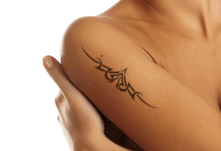
If your tattoo design is not in color essentially do what Rod did. Remember this though, layer masks are your friend here.
This works really well because it lets the layer mask define the edge, and will give you the best edge no matter what. You could even color bits of the tattoo in different colors using this method. I explain the theory behind why I do it this way instead of the color select in this
gimp logo tutorial.Here is, in my opinion, the best way to get the tattoo in the image.
Insert the tattoo you want into the body image, file>>>open as layers>>>select the tattoo file.
right-click on the tattoo layer and add a layer mask. Initilize it to grayscale copy of layer
delete the tattoo, and fill it's layer with black.
set the layer mode to whatever works for you.
Oh, one more thing. If you need to warp the tattoo, simply convert the image of the layer mask to a path and modify the path in little bits to warp around your body. Converting the mask to a path can be done like so:
right-click on the layer mask
switch to your paths dockable dialog and click on "selection to path." at the bottom of the dockable dialog
deselect all, select>>>none
warp to fit your body shape
duplicate your tattoo layer
hide the duplicated layer
fill your tattoo layer's layer mask with black to erase the tattoo.
right-click on the modified path, click "path to selection"
fill the selection with white.
 Login
Login Register
 Tweets
 FAQ
FAQ Advanced Search













 to scale an image or layer. You can go to Image > Scale Image, or Layer > Scale Layer. There will not be the "ghost" of the original image. All you will have is the dialog box.



