It is currently Fri Sep 18, 2026 10:16 am


All times are UTC - 5 hours [ DST ]


Post new topic Reply to topic  [ 6 posts ] 
Author Message
 Post subject: Export to gif animation
PostPosted: Mon Nov 21, 2011 5:01 am  (#1) 
Offline
GimpChat Member

Joined: Nov 21, 2011
Posts: 28
GIMP Version: 2.7.4
Operating System: Windows
OS Version: XP - SP3
GIMP Experience: Advanced Level


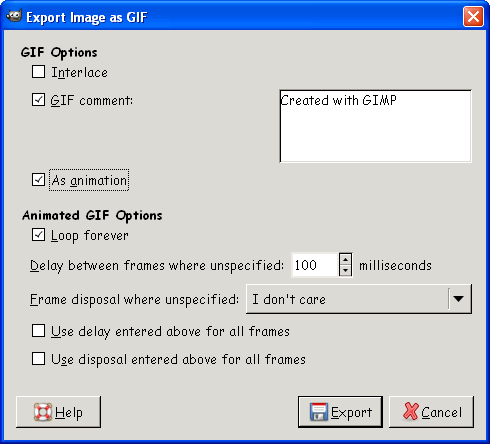
Unfortunately i don't get the correct dialogue to export a gif file as animation.
It can only be exported/saved as flat file even with a previously opened gif animation file.
Will that be changed in the future compilations at partha's place?

Michael


Share on Facebook Share on Twitter Share on Orkut Share on Digg Share on MySpace Share on Delicious Share on Technorati
Top
 Post subject: Re: Export to gif animation
PostPosted: Mon Nov 21, 2011 5:07 am  (#2) 
Offline
Global Moderator
User avatar

Joined: May 16, 2010
Posts: 16173
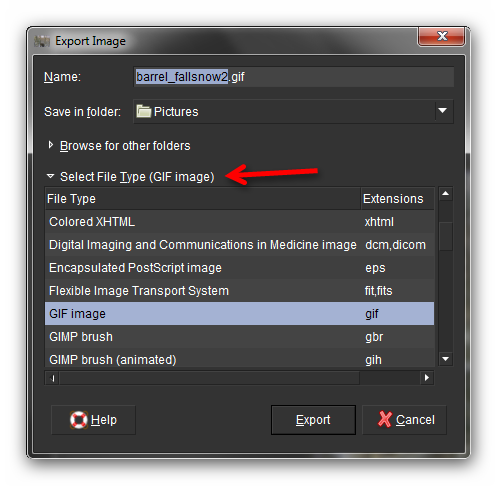
Make sure in Gimp-2.7 versions you select EXPORT as then select GIF.

Image

Save as, will only save as XCF format in Gimp-2.7.4.

_________________
Image


Top
 Post subject: Re: Export to gif animation
PostPosted: Mon Nov 21, 2011 1:53 pm  (#3) 
Offline
GimpChat Member

Joined: Nov 21, 2011
Posts: 28
That's what i did (EXPORT). But i don't get this dialogue where i can choose to save as animation.
I just can save it as a flat gif file.

Attachment:
ScreenShot247.jpg
ScreenShot247.jpg [ 8.9 KiB | Viewed 2023 times ]


Michael


Top
 Post subject: Re: Export to gif animation
PostPosted: Mon Nov 21, 2011 2:10 pm  (#4) 
Offline
GimpChat Member
User avatar

Joined: Apr 07, 2010
Posts: 14182
After you click export, Try naming your image first, name.gif, then click export, then the box should come up where you click animation. The gif box should be already checked. tic as animation then click export again, if anymore box's pop up just click ok.

_________________
Image


Top
 Post subject: Re: Export to gif animation
PostPosted: Mon Nov 21, 2011 2:13 pm  (#5) 
Offline
GimpChat Member

Joined: Aug 05, 2011
Posts: 606
Location: limestone,ny
MichaJo wrote:
That's what i did (EXPORT). But i don't get this dialogue where i can choose to save as animation.
I just can save it as a flat gif file.

Attachment:
ScreenShot247.jpg


Michael


what choices do you get when you click on the export button

when i create an animation i get 'export' and 'export as' under the file menu
if i open a gif and try and save it i only get 'export' under file menu, but it will still let me export it as an animation

Image
Image
Image


Top
 Post subject: Re: Export to gif animation
PostPosted: Thu Nov 24, 2011 1:32 pm  (#6) 
Offline
GimpChat Member

Joined: Nov 21, 2011
Posts: 28
I've just downloaded the most recent version of Partha's compilation. (Now the regular Gimp. Before that i've used the Portable Gimp).
Now it works and i get the correct/complete Export-dialogue.

Thanks for your help.

Michael


Top
Post new topic Reply to topic  [ 6 posts ] 

All times are UTC - 5 hours [ DST ]


* Login  


Powered by phpBB3 © phpBB Group