It is currently Tue Nov 24, 2026 12:16 pm


All times are UTC - 5 hours [ DST ]


Post new topic Reply to topic  [ 126 posts ]  Go to page Previous  1, 2, 3, 4, 5, 6, 7  Next
Author Message
 Post subject: Re: Ice Cold Text or anything else you want icy cold.
PostPosted: Thu Jul 14, 2011 6:14 am  (#81) 
Offline
GimpChat Member
User avatar

Joined: Mar 02, 2011
Posts: 1850
Location: Michigan
Wow nice texture!

_________________
Image
I'm back I think


Top
 Post subject: Re: Ice Cold Text or anything else you want icy cold.
PostPosted: Thu Jul 14, 2011 9:47 am  (#82) 
Offline
GimpChat Member
User avatar

Joined: Jul 08, 2011
Posts: 285
molly wrote:
You are catching on like a house on fire. Did you make your sig?


yes i did it myself
but i'm not quite satisfied with it

_________________
Image

My Flickr
http://anaplus.deviantart.com/


Top
 Post subject: Re: Ice Cold Text or anything else you want icy cold.
PostPosted: Thu Jul 14, 2011 9:48 am  (#83) 
Offline
GimpChat Member
User avatar

Joined: Jul 08, 2011
Posts: 285
Willy wrote:
Wow nice texture!


thanks Willy :)

_________________
Image

My Flickr
http://anaplus.deviantart.com/


Top
 Post subject: Re: Ice Cold Text or anything else you want icy cold.
PostPosted: Thu Jul 14, 2011 12:08 pm  (#84) 
Offline
GimpChat Member
User avatar

Joined: Apr 08, 2010
Posts: 5420
Location: Northwest Ohio
Oregonian wrote:
Do you still have your WindowsXP computer, 2-ton? You can install gimp portable on a USB flash drive. You can bold the fonts in it.
http://partha.com/

I'm assuming that the windows 7/32 bit will work on my old XP machine! Wish there was a Mac version!

* I see the newer G'mic on Partha's site...where would I put that in order to use it with gimp portable? or should I just put that into my regular gimp on XP(2.4)

**Drat. I put gimp portable onto a stick, and when I opened it I got a wizard to put it in my computer. I told it to put the folder on my desktop, but when I looked, it was empty. And Gimp portable will not actually open from the f drive. I guess I need a lesson on how to use portable. :gaah


Top
 Post subject: Re: Ice Cold Text or anything else you want icy cold.
PostPosted: Thu Jul 14, 2011 1:41 pm  (#85) 
Offline
GimpChat Member
User avatar

Joined: Apr 07, 2010
Posts: 14182
Did you actually install the Gimp Portable on your flash drive? If so, you should be able to run it from there. I have Gimp 2.7.3 installed on a flash drive. works fine..

_________________
Image


Top
 Post subject: Re: Ice Cold Text or anything else you want icy cold.
PostPosted: Thu Jul 14, 2011 1:53 pm  (#86) 
Offline
GimpChat Member
User avatar

Joined: Apr 08, 2010
Posts: 5420
Location: Northwest Ohio
Well, it is residing there but I don't know if it's "installed" there. The computer was behaving badly, IE was hogging resources. I downloaded portable and there was no choice where it went. I found it on my computer and moved it to the flash drive...so instead I should have opened it from the computer and "installed" it to my flash drive? Heh, can you tell I"ve never used a flash drive before, lol.


Top
 Post subject: Re: Ice Cold Text or anything else you want icy cold.
PostPosted: Thu Jul 14, 2011 2:27 pm  (#87) 
Offline
GimpChat Member
User avatar

Joined: Apr 07, 2010
Posts: 14182
If you double click the .exe (installer) it will install on to your flash drive. When you downloaded it, did it not ask you where to download it to?
Using a flash drive is the same as using an external drive, it just plugs into your usb port and thats what makes it portable.
I like the 2.7.3 version very much even tho it is still in the unofficial stage. It has python already in it plus all the other features that are in your Latest Gimp versions..

_________________
Image


Top
 Post subject: Re: Ice Cold Text or anything else you want icy cold.
PostPosted: Thu Jul 14, 2011 2:39 pm  (#88) 
Offline
GimpChat Member
User avatar

Joined: Apr 08, 2010
Posts: 5420
Location: Northwest Ohio
so the installer must be what is on my flash drive...time to start over. Boy do I hate having to work on that slow pc, lol. I sure would love to have portable for Mac...someone, anyone? I don't think I could ever learn how to compile.

*ok, so yes, the installer was on the drive...so I managed to get it installed on same flash drive and spent a minute playing with it, even stuck in the lycos font. Yay me, lol. I tried using the font tool, it works so different, and I could not figure out how to make the bold button work. I click it, it depresses, but then it pops back out when I try to type in the text box. I also tried out single window. It presents itself a wee bit too large and when I pull the edges in to fit inside my screen, the edges of the tool boxes are lost. I looked through preferences but didn't see a way to make the windows smaller both in single window or multiple windows.


Top
 Post subject: Re: Ice Cold Text or anything else you want icy cold.
PostPosted: Thu Jul 14, 2011 5:20 pm  (#89) 
Offline
GimpChat Member
User avatar

Joined: Apr 07, 2010
Posts: 14182
If you are in single window mode. You can adjust the width of your side bars by using your move too and clicking the handles to widen or shorten the width.
Image

_________________
Image


Top
 Post subject: Re: Ice Cold Text or anything else you want icy cold.
PostPosted: Thu Jul 14, 2011 5:22 pm  (#90) 
Offline
GimpChat Member
User avatar

Joined: Apr 07, 2010
Posts: 14182
With the Bold button, you have to hi-lite the text first then click the button.....

_________________
Image


Top
 Post subject: Re: Ice Cold Text or anything else you want icy cold.
PostPosted: Thu Jul 14, 2011 5:27 pm  (#91) 
Offline
GimpChat Member
User avatar

Joined: Apr 08, 2010
Posts: 5420
Location: Northwest Ohio
I did try highlighting, but it didn't bold. It works so different, it's like a whole new program...not sure I understand the text box with the weird squares on the corners.
Thanks for the hint on the sizing...are there spots that let the whole one window get shorter? The bottom edge is a wee bit too low so I can't see if there is something on the bottom of the toolboxes that I need to see.


Top
 Post subject: Re: Ice Cold Text or anything else you want icy cold.
PostPosted: Thu Jul 14, 2011 5:42 pm  (#92) 
Offline
Global Moderator
User avatar

Joined: May 16, 2010
Posts: 16309
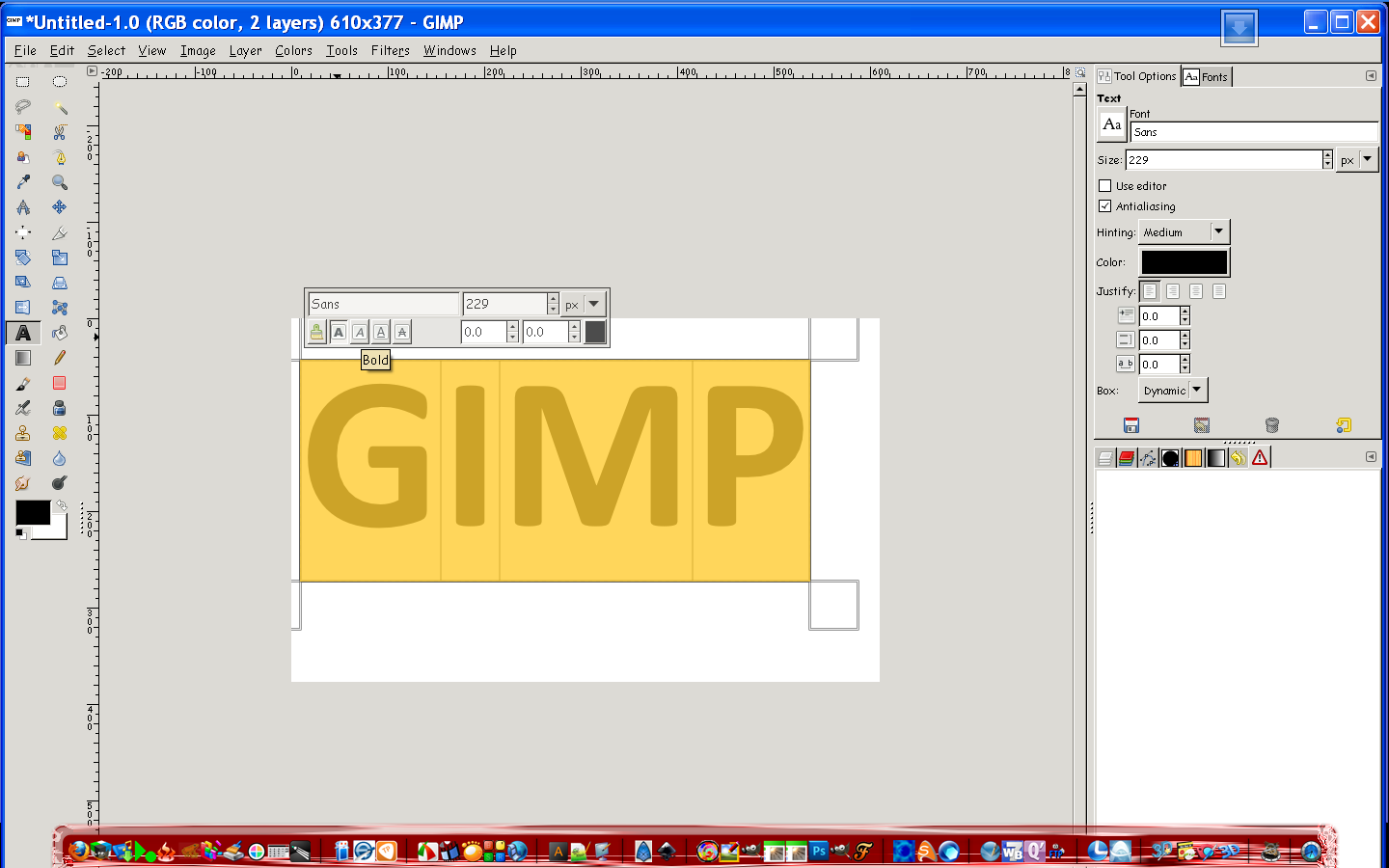
You have to click on the text itself and highlight it like you would any text tool. :)
Then you can select the options and change color,boldness,size.

Image


The 4 squares are to size the box when it has a lot of small text in it.
Sort of like auto wrapping as you size the text area.

_________________
Image


Top
 Post subject: Re: Ice Cold Text or anything else you want icy cold.
PostPosted: Thu Jul 14, 2011 5:47 pm  (#93) 
Offline
Global Moderator
User avatar

Joined: May 16, 2010
Posts: 16309
You should be able to re-size the window by dragging on the window edges. :)

_________________
Image


Top
 Post subject: Re: Ice Cold Text or anything else you want icy cold.
PostPosted: Sat Sep 03, 2011 1:40 pm  (#94) 
Offline
GimpChat Member
User avatar

Joined: Aug 24, 2011
Posts: 1785
Location: Dallas, TX
Nice use of the wind script. Makes it easy. I cheated and started with the "Modus Frigid" font and then tried the ripple on the reflection. Oh, Well, it was way more funner than the yard work.


Attachments:
ice cold.jpg
ice cold.jpg [ 137.79 KiB | Viewed 4972 times ]

_________________
Image
Top
 Post subject: Re: Ice Cold Text or anything else you want icy cold.
PostPosted: Sat Sep 03, 2011 1:53 pm  (#95) 
Offline
Global Moderator
User avatar

Joined: May 16, 2010
Posts: 16309
Very nice Draconian. :)
I agree i would much rather be drawing in Gimp than mowing the lawn. :lol

_________________
Image


Top
 Post subject: Re: Ice Cold Text or anything else you want icy cold.
PostPosted: Wed Jan 04, 2012 9:25 pm  (#96) 
Offline
Global Moderator
User avatar

Joined: May 16, 2010
Posts: 16309
I just love this effect. :)
It's so much fun to make. Font is free and called Moby Bold
Font Download Here - http://www.dafont.com/search.php?q=moby&text=ICE
Image

_________________
Image


Top
 Post subject: Re: Ice Cold Text or anything else you want icy cold.
PostPosted: Wed Jan 04, 2012 10:00 pm  (#97) 
Offline
GimpChat Member
User avatar

Joined: Sep 24, 2010
Posts: 12870
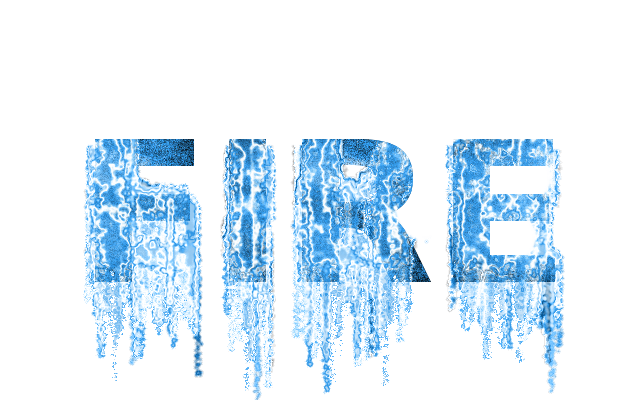
I'm Still a big fan of Ice Fire Script-fu for these. :)


Attachments:
icefire.png
icefire.png [ 449.7 KiB | Viewed 4907 times ]

_________________
Lyle

Psalm 109:8

Image
Top
 Post subject: Re: Ice Cold Text or anything else you want icy cold.
PostPosted: Wed Jan 04, 2012 11:14 pm  (#98) 
Offline
Global Moderator
User avatar

Joined: May 16, 2010
Posts: 16309
That is a cool logo script. I just installed it.
Image

_________________
Image


Top
 Post subject: Re: Ice Cold Text or anything else you want icy cold.
PostPosted: Wed Jan 04, 2012 11:28 pm  (#99) 
Offline
GimpChat Member
User avatar

Joined: Sep 24, 2010
Posts: 12870
Just wish it would go in the down direction; no issue to flip, run script, and then flip again. Also, play with the first slider; postive values will expand the ice. Again, I really like this script-fu too Rod. :)

_________________
Lyle

Psalm 109:8

Image


Top
 Post subject: Re: Ice Cold Text or anything else you want icy cold.
PostPosted: Thu Jan 05, 2012 7:13 pm  (#100) 
Offline
Global Moderator
User avatar

Joined: May 16, 2010
Posts: 16309
Thanks for the tips on it's use Lyle. :)
All i did was flip the resulting layer vertical and erased the top part.
I have to agree another look by the author into this script would be cool.Add a few more adjustments such as
fill and fill opacity with a drop down menu for fill type ..ie...plasma, color,gradient, or pattern.
Possibly add an outer and inner glow adjustment. Also add a flip value, and/or direction value.(rotation angle)
That would probably make the script very versatile for many textures.

_________________
Image


Top
Post new topic Reply to topic  [ 126 posts ]  Go to page Previous  1, 2, 3, 4, 5, 6, 7  Next

All times are UTC - 5 hours [ DST ]


* Login  


Powered by phpBB3 © phpBB Group