It is currently Sat Sep 19, 2026 2:00 pm


All times are UTC - 5 hours [ DST ]


Post new topic Reply to topic  [ 4 posts ] 
Author Message
 Post subject: Homemade brushes don't save selections
PostPosted: Wed Jan 11, 2012 3:44 pm  (#1) 
Offline
GimpChat Member
User avatar

Joined: Oct 29, 2010
Posts: 711
Location: Netherlands
GIMP Version: 2.6.11
Operating System: Linux
OS Version: XP - SP3
GIMP Experience: Beginner Level


Attachment:
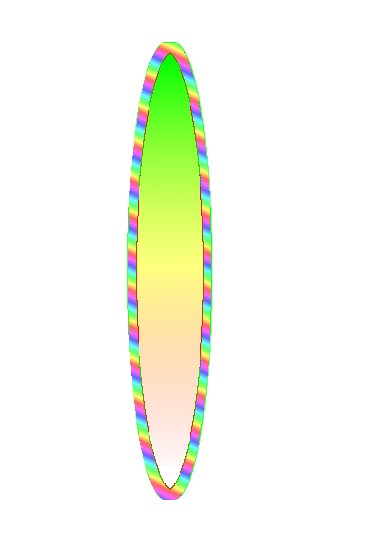
ellipsexperiment.jpg
ellipsexperiment.jpg [ 11.06 KiB | Viewed 1395 times ]

Attachment:
ellipsexperiment.jpg
ellipsexperiment.jpg [ 11.06 KiB | Viewed 1395 times ]


I am trying to make a logo for a kayak.
It will be a "stylized" (if that is the right word) bird.
I want to have stylized feathers on it in different colors.
I made something and first saved it with the selection as .xcf.
When I load this picture it still contains the selection.
When I load it as layers it doesn't have the selection anymore.
Then I saved it as .gbr but no more selection and thus no possibility of using different colors.
The first picture is a test gbr which I used on a white background.
I then removed the green with color select and replaced it with a gradient.
Then removed the red same way and replaced it with another gradient.
This way I'll be able to have multicolored "feathers" (which will not be elliptical).
Needless to say I would like to have something simpler than this.
Anyone have a better solution?
Many thanks in advance.
Gerard.
Edit:I don't know what I did wrong but the first 2 pics are the same and the result while the last one is the brush.


Attachments:
ellipsgbr.jpg
ellipsgbr.jpg [ 8.88 KiB | Viewed 1395 times ]

_________________
Gentoo Linux always up-to-date.
Kernel-3.17.4 Python-2.7.8/3.3.5
Gimp-2.8.14

I use Linux only.
And Virtualbox with Win 7
Share on Facebook Share on Twitter Share on Orkut Share on Digg Share on MySpace Share on Delicious Share on Technorati
Top
 Post subject: Re: Homemade brushes don't save selections
PostPosted: Wed Jan 11, 2012 3:55 pm  (#2) 
Offline
Retired Staff
User avatar

Joined: May 22, 2008
Posts: 6946
Location: Somewhere in GIMP
Keep the xcf file and with the selection active, do Select > to Path (Select in the image window menu). That way when you want the selection again, Select > From Path and your selection will be there.

I don't know what you saved the layers as; xcf files save all of the formatting in an image file.

After you have done the layers with the new brush, save the file as xcf again, then Save As whatever format you want it in: i.e., png, gif, jpg, and you will have a single layer image. Your intact xcf file will still be available to you with the layers and the path.

_________________
Image
World War IV will be fought with sticks and stones. - Albert Einstein


Top
 Post subject: Re: Homemade brushes don't save selections
PostPosted: Wed Jan 11, 2012 7:54 pm  (#3) 
Offline
Script Coder
User avatar

Joined: Oct 25, 2010
Posts: 4812
Oregonian wrote:
Keep the xcf file and with the selection active, do Select > to Path (Select in the image window menu). That way when you want the selection again, Select > From Path and your selection will be there.

I don't know what you saved the layers as; xcf files save all of the formatting in an image file.

After you have done the layers with the new brush, save the file as xcf again, then Save As whatever format you want it in: i.e., png, gif, jpg, and you will have a single layer image. Your intact xcf file will still be available to you with the layers and the path.
It's more efficient (and doesn't alter even so slightly the selection) to save to channel and restore from channel. And you can save a channel to disk, and restore it later:

  • In source image:
    • open Channels list, and select the saved selection
    • "File/Save as...", and save as PNG
    • You should get a warning that you are saving a channel and not a layer. Confirm.
  • In target image:
    • "File/Open as layers", and load your saved selection.
    • Make all layers invisible except the loaded selection
    • In channels dialog, duplicate any of the Red, Green or Blue channels (you can also directly use "Channel to selection")
    • Discard or hide the loaded layer, restore visibility of other layers

If you want to keep your selection aligned to other layers in the image you import, in the source image, create a transparent layer, and bucket fill the selection with any color. Save image. Import as layer on the other side. Move the imported layers together if needed. To restore the selection, go to the special layer, and "alpha-to selection".

_________________
Image


Top
 Post subject: Re: Homemade brushes don't save selections
PostPosted: Thu Jan 12, 2012 10:07 am  (#4) 
Offline
GimpChat Member
User avatar

Joined: Oct 29, 2010
Posts: 711
Location: Netherlands
Attachment:
ofnutssolution.png
ofnutssolution.png [ 6.19 KiB | Viewed 1324 times ]

Thanks for your time O and Ofnuts.
I loaded those files as jpg to save bandwidth.
I tried your solution Ofnuts but it doesn't accomplish what I want.
It selects just the "rim".
When you use Select ellips and then do stroke selection it paints on both sides of the "marching ants".
I also tried with converting the selection to a path but then only the inside gets painted.
I want to be able to change both the rim and what's inside.
Attachment:
chatellips.png
chatellips.png [ 4.89 KiB | Viewed 1324 times ]

With the stroked selection I can fill the inside.
It will paint over the inside of the stroke but I just make the stroke wider.
I tried this in both Gimp-2.6.11 and 2.7.5,same result.
Why does an .xcf image lose the selection when loaded as layers?
Anyway I think so far my solution works but it's tedious.
Gerard.

_________________
Gentoo Linux always up-to-date.
Kernel-3.17.4 Python-2.7.8/3.3.5
Gimp-2.8.14

I use Linux only.
And Virtualbox with Win 7


Top
Post new topic Reply to topic  [ 4 posts ] 

All times are UTC - 5 hours [ DST ]


* Login  


Powered by phpBB3 © phpBB Group
