It is currently Thu Nov 26, 2026 8:45 pm


All times are UTC - 5 hours [ DST ]


Post new topic Reply to topic  [ 14 posts ] 
Author Message
 Post subject: Totally blanking out apparently...
PostPosted: Fri Feb 03, 2012 12:10 pm  (#1) 
Offline
GimpChat Member
User avatar

Joined: Sep 29, 2011
Posts: 120
Location: Texas
GIMP Version: 2.6.11
Operating System: Windows
OS Version: XP - SP3
GIMP Experience: Intermediate Level

List any relevant plug-ins or scripts:
Paintbrush options


So...I admit, this week has been horrid creative wise, too many things going on. So I crank up gimp this morning and it continues... lol

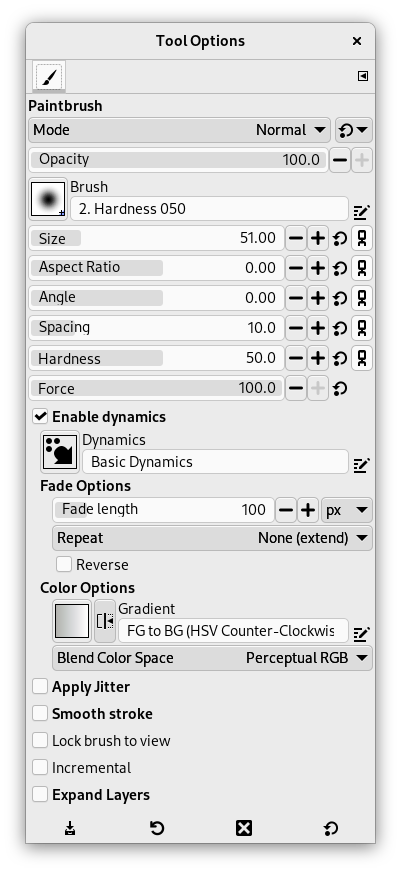
I used to be able when using paintbrush, I swear, be able to have a repetitive random brush size in the brush dynamics. Or these three rows of brush options as seen here (this image is from the gimp.org manual)Image

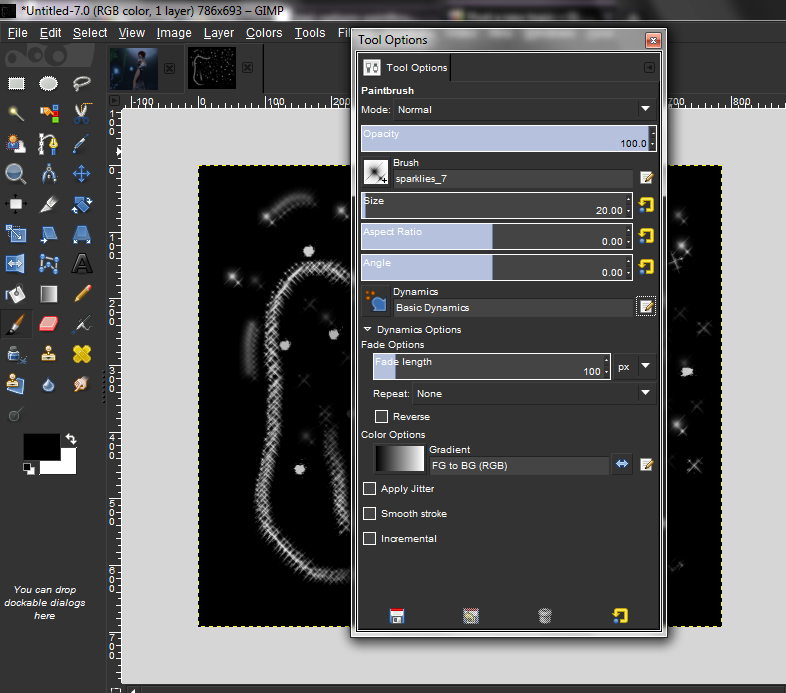
But I have now spent an hour trying to find it again. my tool options when I have paintbrush selected don't show the three rows of options anymore... see below, (this is my tool options image)
Image

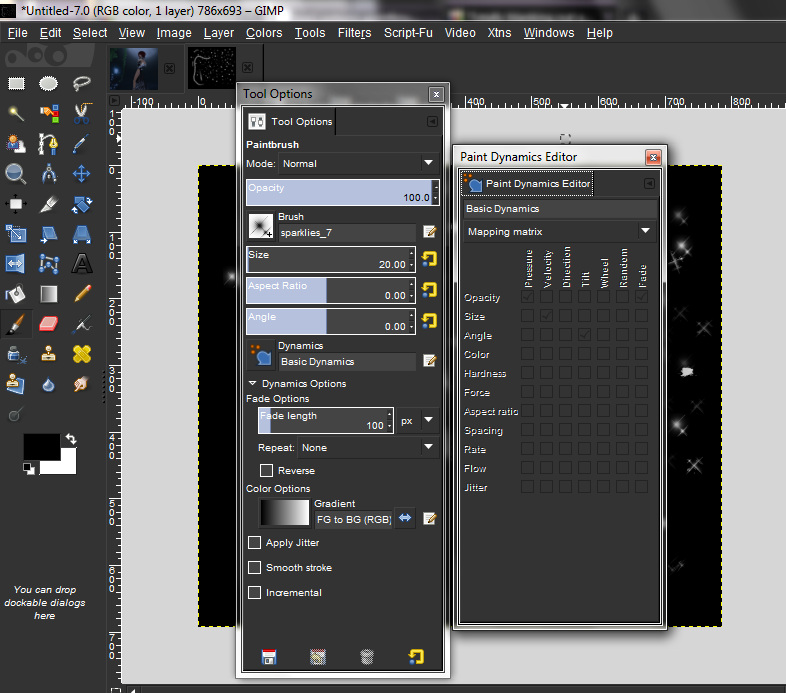
Oh and when I turn on basic brush dynamics, all boxes are greyed, cannot be changed...

Am I like in major need of a coffee IV cause I've lost it? Or has this changed and I just didn't notice?

Is there way to have the paintbrush deliver random size strokes? I know I've done it before, manytimes!

oi vei...*goes off in search of her mind*


Edit: Added second Image

Image

_________________
“There´s tools and colours for all of us,
to lend from nature to make the world
more understandable and beautiful”.

Image


Last edited by Jorden on Fri Feb 03, 2012 1:28 pm, edited 2 times in total.

Share on Facebook Share on Twitter Share on Orkut Share on Digg Share on MySpace Share on Delicious Share on Technorati
Top
 Post subject: Re: Totally blanking out apparently...
PostPosted: Fri Feb 03, 2012 12:30 pm  (#2) 
Offline
GimpChat Member
User avatar

Joined: Apr 07, 2010
Posts: 14182
Did you say you already clicked the little blue arrow that says dynamics? Is that what is grayed out?

_________________
Image


Top
 Post subject: Re: Totally blanking out apparently...
PostPosted: Fri Feb 03, 2012 2:22 pm  (#3) 
Offline
GimpChat Member
User avatar

Joined: Oct 29, 2010
Posts: 711
Location: Netherlands
The first brush menu belongs to Gimp-2.6.x.
The second one belongs to Gimp-2.7.x.
Did you install both?
I don't know what would happen in Windows when both are installed.
In Linux it can be done w/o interfering with each other too much if you install in different folders.
Gerard.

_________________
Gentoo Linux always up-to-date.
Kernel-3.17.4 Python-2.7.8/3.3.5
Gimp-2.8.14

I use Linux only.
And Virtualbox with Win 7


Top
 Post subject: Re: Totally blanking out apparently...
PostPosted: Fri Feb 03, 2012 2:47 pm  (#4) 
Offline
GimpChat Member
User avatar

Joined: Sep 29, 2011
Posts: 120
Location: Texas
hmm no..I always do a clean install.....this is wierd. *goes to check*

_________________
“There´s tools and colours for all of us,
to lend from nature to make the world
more understandable and beautiful”.

Image


Top
 Post subject: Re: Totally blanking out apparently...
PostPosted: Fri Feb 03, 2012 2:49 pm  (#5) 
Offline
GimpChat Member
User avatar

Joined: Sep 29, 2011
Posts: 120
Location: Texas
Now the first brush menu, the very first image..is not mine..it is off the gimp.org website. If that is what you mean....the other two, the darker themes are mine.

_________________
“There´s tools and colours for all of us,
to lend from nature to make the world
more understandable and beautiful”.

Image


Top
 Post subject: Re: Totally blanking out apparently...
PostPosted: Fri Feb 03, 2012 2:57 pm  (#6) 
Offline
GimpChat Member
User avatar

Joined: Oct 29, 2010
Posts: 711
Location: Netherlands
Well that explains it.
Gimp-2.7 lacks indeed a lot of things available in 2.6.
Like paint with gradient,you have to set the brush dynamics to "Random Color" and then you have no pressure control.
I sincerely hope this gets ironed out before 2.8 comes out.
Gerard.

_________________
Gentoo Linux always up-to-date.
Kernel-3.17.4 Python-2.7.8/3.3.5
Gimp-2.8.14

I use Linux only.
And Virtualbox with Win 7


Top
 Post subject: Re: Totally blanking out apparently...
PostPosted: Fri Feb 03, 2012 3:35 pm  (#7) 
Offline
GimpChat Member
User avatar

Joined: Sep 29, 2011
Posts: 120
Location: Texas
omg good then it's not me...because I was looking for that also and couldn't find it.....

well..it doesn't get my job done the way I used to but at least I know I'm not going crazy.

Thanks Gerard

_________________
“There´s tools and colours for all of us,
to lend from nature to make the world
more understandable and beautiful”.

Image


Top
 Post subject: Re: Totally blanking out apparently...
PostPosted: Fri Feb 03, 2012 3:54 pm  (#8) 
Offline
GimpChat Member
User avatar

Joined: Oct 29, 2010
Posts: 711
Location: Netherlands
You're welcome.
Right now I prefer 2.6 over 2.7.
Only one thing I use 2.7 for is when I want to be able to rotate a brush.
Gerard.

_________________
Gentoo Linux always up-to-date.
Kernel-3.17.4 Python-2.7.8/3.3.5
Gimp-2.8.14

I use Linux only.
And Virtualbox with Win 7


Top
 Post subject: Re: Totally blanking out apparently...
PostPosted: Fri Feb 03, 2012 4:07 pm  (#9) 
Offline
GimpChat Member
User avatar

Joined: Sep 29, 2011
Posts: 120
Location: Texas
I may have to consider that, though I use GMIC -alot- as I do miss that with the brushes, i used it just as much....and don't know if GMIC is backwards compatible.

Thanks for all your help Gerard.

_________________
“There´s tools and colours for all of us,
to lend from nature to make the world
more understandable and beautiful”.

Image


Top
 Post subject: Re: Totally blanking out apparently...
PostPosted: Fri Feb 03, 2012 4:13 pm  (#10) 
Offline
GimpChat Member
User avatar

Joined: Aug 24, 2011
Posts: 1785
Location: Dallas, TX
gerard82 wrote:
You're welcome.
Right now I prefer 2.6 over 2.7.
Only one thing I use 2.7 for is when I want to be able to rotate a brush.
Gerard.


You can still rotate and/or resize your brush using 2.6 if you have the brush utilities script. I use it all the time. Here ya go....


Attachments:
rotateBrush.scm [5.86 KiB]
Downloaded 78 times

_________________
Image
Top
 Post subject: Re: Totally blanking out apparently...
PostPosted: Fri Feb 03, 2012 5:35 pm  (#11) 
Offline
GimpChat Member
User avatar

Joined: Oct 29, 2010
Posts: 711
Location: Netherlands
@Jorden,
GMIC runs ok in both 2.6.and 2.7.

@Draconian,
I already have that script.
Trouble is it has no preview.
In 2.7 you can assign keyboard shortcuts and watch the brush rotate until it has the right angle.
Gerard.

_________________
Gentoo Linux always up-to-date.
Kernel-3.17.4 Python-2.7.8/3.3.5
Gimp-2.8.14

I use Linux only.
And Virtualbox with Win 7


Top
 Post subject: Re: Totally blanking out apparently...
PostPosted: Fri Feb 03, 2012 5:46 pm  (#12) 
Offline
GimpChat Member
User avatar

Joined: Aug 24, 2011
Posts: 1785
Location: Dallas, TX
Ahhhhh. Sound pretty sweet. I'm gonna wait for 2.8 and cross my fingers that I'm still breathing when it does. Oh well, maybe one of the newbs will grab it.

_________________
Image


Top
 Post subject: Re: Totally blanking out apparently...
PostPosted: Fri Feb 03, 2012 5:54 pm  (#13) 
Offline
Global Moderator
User avatar

Joined: May 16, 2010
Posts: 16317
2.8 will supposedly have brush to gradient and a new brush pack.Brush rotation is already included.
Also included in Gimp-2.8 are new brush dynamics.
I would like to know if anyone has tried Gimp-2.6.12?
Supposedly many bugs have been fixed that were in Gimp-2.6.11.
I could compile it for Windows if no-one has tried it yet.
Gimp developers just released the source for it.

***********************************************
There is one last bug fix release in the stable GIMP 2.6 series before the highly anticipated GIMP 2.8.

Lots of reported problems have been fixed:

Changes from 2.6.11 to 2.6.12:

These bugs were fixed:

627328 – GIMP 2.6.10 segfaults when CTRL-left click on a layer mask
631885 – GIMP fails to import a path from SVG
631728 – Crash or Gtk-CRITICAL on File→Open
641259 – [abrt] gimp-2:2.6.11-1.fc14: py-slice.py:172:slice:TypeError: integer argument expected, got float
640219 – gimp(1) manpage fixes
640612 – Sample Colorize does not function non-interactively
646947 – file-pdf-load: Don’t use deprecated API
639203 – file-psp: fix for bogus input data
639203 – Fixes for some buffer overflow problems
652280 – Guard against crash due to quitting while DND is processed
660305 – fails to build with -Werror=format-security
623045 – script-fu: make server IPv6 aware

******************************************

http://www.gimpusers.com/news/00399-gim ... le-release

_________________
Image


Top
 Post subject: Re: Totally blanking out apparently...
PostPosted: Fri Feb 03, 2012 6:45 pm  (#14) 
Offline
GimpChat Member
User avatar

Joined: Oct 29, 2010
Posts: 711
Location: Netherlands
As you can see in my sig I have 2.6.12 installed.
Haven't noticed any difference with 2.6.11 though.
Probably because the 2.6.11 I ran already had quite a few patches from Gentoo.
I don't know if you've seen this:
http://git.gnome.org/browse/gimp/
There's talk about 2.6.13.
Wonder when it'll become available.
Gerard.

_________________
Gentoo Linux always up-to-date.
Kernel-3.17.4 Python-2.7.8/3.3.5
Gimp-2.8.14

I use Linux only.
And Virtualbox with Win 7


Top
Post new topic Reply to topic  [ 14 posts ] 

All times are UTC - 5 hours [ DST ]


* Login  


Powered by phpBB3 © phpBB Group