It is currently Sat Oct 24, 2026 5:37 am


All times are UTC - 5 hours [ DST ]


Post new topic Reply to topic  [ 10 posts ] 
Author Message
 Post subject: Cannot add a plug-in
PostPosted: Sun Feb 12, 2012 9:49 pm  (#1) 
Offline
GimpChat Member

Joined: May 31, 2010
Posts: 26
GIMP Version: 2.6.11
Operating System: Linux
OS Version: Ubuntu 11.10
GIMP Experience: Beginner Level

List any relevant plug-ins or scripts:
file-ora.py

List any ERROR messages you received:
please see screen grab


Been trying to add the plug-in to open files from MyPaint unsuccessfully. I've scowered the internet for a week trying to find a solution. I have also tried the instructions by Rod, here. viewtopic.php?f=8&t=720 Image

I really didn't want to bother anyone with this, as I feel I should be able to find a solution on my own, But please help me? I'm losing my mind! lol

This stuff is so simple to do in comparison using Windows :)

Thank you all in advance for any direction I recieve

Sorry for for making my first post a call for help. Long time stalker here. :)


Share on Facebook Share on Twitter Share on Orkut Share on Digg Share on MySpace Share on Delicious Share on Technorati
Top
 Post subject: Re: Cannot add a plug-in
PostPosted: Sun Feb 12, 2012 11:22 pm  (#2) 
Offline
GimpChat Member
User avatar

Joined: Apr 18, 2011
Posts: 620
Location: New York
I add all plugins into my home dir where I have automatically have permission:

/home/cecilia/.gimp-2.6/plug-ins


your folder will have your name instead of mine (of course)

_________________
Ubuntu 24.04.1, Kernel i686, 6.8.0-52-generic
python3 v3.12.3 ----- GIMP - ver 2.10.38


Top
 Post subject: Re: Cannot add a plug-in
PostPosted: Sun Feb 12, 2012 11:44 pm  (#3) 
Offline
GimpChat Member

Joined: May 31, 2010
Posts: 26
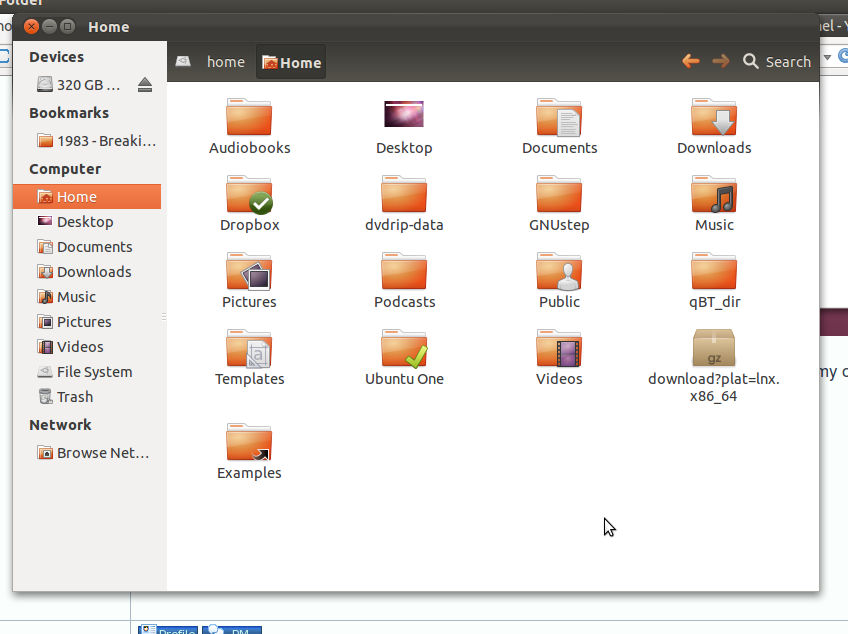
I tried to do it that way as well, but to my surprise, the folder isnt there! I know it exists, because the path to it shows through the folder options in Gimp, but when I attempt to navigate to it, it looks like this. Image

Thank you so much for the response, Cecilia!

Do you know of a way to make the Gimp2.6 file visible, so I can navigate to it correctly?


Top
 Post subject: Re: Cannot add a plug-in
PostPosted: Mon Feb 13, 2012 3:08 am  (#4) 
Offline
Script Coder
User avatar

Joined: Oct 25, 2010
Posts: 4812
The name of the ".gimp-2.6" folder starts with a dot so it is not displayed by default (Unix convention). You have to tell you file navigator to display "hidden" files (Ctrl-H or else).

Also make sure that the file is made "executable" (likely via a "Properties" dialog obtained by right-clicking on it)

_________________
Image


Top
 Post subject: Re: Cannot add a plug-in
PostPosted: Mon Feb 13, 2012 6:49 am  (#5) 
Offline
Global Moderator
User avatar

Joined: May 16, 2010
Posts: 16206
Yes it is probably hidden. :)


Top
 Post subject: Re: Cannot add a plug-in
PostPosted: Mon Feb 13, 2012 6:55 am  (#6) 
Offline
GimpChat Member

Joined: Apr 12, 2010
Posts: 5870
For sure is hidden that is the default in Ubuntu (that for this is very similar to Windows )

i suggest to chose to display hidden files as default there is not danger to see hidden or system files

and yes you need also to make the file executable as explained by ofnuts (for plugin you should see in the propriety dialog a box "allow to run as a program" )

_________________
My 3D Gallery on Deviantart http://photocomix2.deviantart.com/
Main gallery http://www.flickriver.com/photos/photocomix-mandala/
Mandala and simmetry http://www.flickriver.com/photos/photocomix_mandala/

Image

Mrs Wilbress


Top
 Post subject: Re: Cannot add a plug-in
PostPosted: Mon Feb 13, 2012 9:33 am  (#7) 
Offline
GimpChat Member
User avatar

Joined: Oct 29, 2010
Posts: 711
Location: Netherlands
Install "mc".
Open it in a terminal.
It will show you all files.
With the cursor over the plugin hit F9 and navigate to File and hit Enter.
In the dropdown menu you should set the cursor over Chmod.
Hit Enter and in the menu you will see "execute" hit space to set it.
Then navigate to Set and hit enter again.
Gerard.

_________________
Gentoo Linux always up-to-date.
Kernel-3.17.4 Python-2.7.8/3.3.5
Gimp-2.8.14

I use Linux only.
And Virtualbox with Win 7


Top
 Post subject: Re: Cannot add a plug-in
PostPosted: Mon Feb 13, 2012 10:58 am  (#8) 
Offline
GimpChat Member
User avatar

Joined: Apr 07, 2010
Posts: 14182
I see that you are in Ubuntu. I don't have that but I am in Fedora, I go to Home, then go up top to View and then check show hidden files, once you check that you will see your Gimp folder. Once there, look for your plug-ins then put your plug-in there.

If you right click on your plug-in go down to properties, click the permissions tab, put a tick mark beside Execute-allow executing file as program then close.
Now you should have your working plug-in when you open your Gimp.

_________________
Image


Top
 Post subject: Re: Cannot add a plug-in
PostPosted: Mon Feb 13, 2012 1:31 pm  (#9) 
Offline
GimpChat Member
User avatar

Joined: Oct 29, 2010
Posts: 711
Location: Netherlands
@molly,
Linux distro's come with a large variety of default desktops.
They operate differently too.
Mc is available in all Linux repo's and is a very handy tool.
Gerard.

_________________
Gentoo Linux always up-to-date.
Kernel-3.17.4 Python-2.7.8/3.3.5
Gimp-2.8.14

I use Linux only.
And Virtualbox with Win 7


Top
 Post subject: Re: Cannot add a plug-in
PostPosted: Mon Feb 13, 2012 3:45 pm  (#10) 
Offline
GimpChat Member

Joined: May 31, 2010
Posts: 26
Thank you all so much!!

Showing the hidden files and allowing as an executible did the trick!

What an awesome bunch of Gimpers you all are :)


Top
Post new topic Reply to topic  [ 10 posts ] 

All times are UTC - 5 hours [ DST ]


* Login  


Powered by phpBB3 © phpBB Group