It is currently Tue Nov 24, 2026 9:59 am


All times are UTC - 5 hours [ DST ]


Post new topic Reply to topic  [ 10 posts ] 
Author Message
 Post subject: Curve Text Help Please
PostPosted: Wed Feb 15, 2012 10:35 am  (#1) 
Offline
GimpChat Member
User avatar

Joined: Dec 22, 2011
Posts: 399
GIMP Version: 2.6.11
Operating System: Windows
OS Version: Windows 7 Home 64bit
GIMP Experience: Basic Level


Wow...am struggling with curving my text using the Paths Tool....goes everywhere except where I want lol. Come somebody help or put up a link that will give me the basics, thanks.

_________________
Image


Share on Facebook Share on Twitter Share on Orkut Share on Digg Share on MySpace Share on Delicious Share on Technorati
Top
 Post subject: Re: Curve Text Help Please
PostPosted: Wed Feb 15, 2012 10:48 am  (#2) 
Offline
GimpChat Member
User avatar

Joined: Sep 12, 2011
Posts: 377
Location: UK
Here is one for you
www.youtube.com Video from : www.youtube.com


Top
 Post subject: Re: Curve Text Help Please
PostPosted: Wed Feb 15, 2012 11:37 am  (#3) 
Offline
GimpChat Member
User avatar

Joined: Dec 22, 2011
Posts: 399
Lorri wrote:

Thanks...had already found this and for some reason did not work for me but after looking again and trying it seems to be working...happy story :)

_________________
Image


Top
 Post subject: Re: Curve Text Help Please
PostPosted: Wed Feb 15, 2012 1:52 pm  (#4) 
Offline
Retired Staff
User avatar

Joined: May 22, 2008
Posts: 6946
Location: Somewhere in GIMP
Text along a path can get cranky. It doesn't always come out the way you hope it will. I did find that if it didn't work well the first time, moving the text a bit to the right and trying again seems to help.

_________________
Image
World War IV will be fought with sticks and stones. - Albert Einstein


Top
 Post subject: Re: Curve Text Help Please
PostPosted: Wed Feb 15, 2012 4:15 pm  (#5) 
Offline
GimpChat Member
User avatar

Joined: Dec 22, 2011
Posts: 399
I can manage to get my text to path but comes out in black outline with no fill whatever I do...Any ideas?

Thanks

_________________
Image


Top
 Post subject: Re: Curve Text Help Please
PostPosted: Wed Feb 15, 2012 4:36 pm  (#6) 
Offline
Retired Staff
User avatar

Joined: May 22, 2008
Posts: 6946
Location: Somewhere in GIMP
Deblk wrote:
I can manage to get my text to path but comes out in black outline with no fill whatever I do...Any ideas?

Thanks
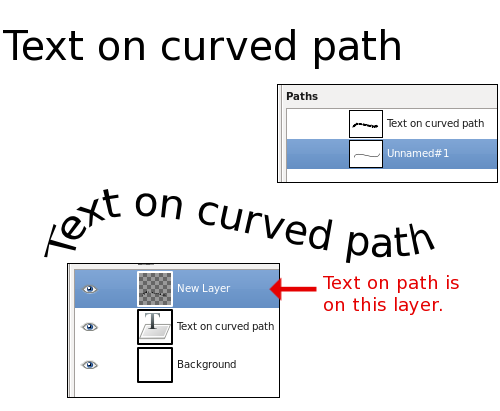
Painting the selection with the paintbrush doesn't work for you? You can fill the selection using the bucket tool, too.

Also, if you haven't made a new layer for the text selection, it won't work either.

Hope this image helps.
Image

_________________
Image
World War IV will be fought with sticks and stones. - Albert Einstein


Top
 Post subject: Re: Curve Text Help Please
PostPosted: Wed Feb 15, 2012 5:15 pm  (#7) 
Offline
GimpChat Member
User avatar

Joined: Dec 22, 2011
Posts: 399
Thanks....getting there.

Is there a plugin for curving text?

_________________
Image


Top
 Post subject: Re: Curve Text Help Please
PostPosted: Wed Feb 15, 2012 11:58 pm  (#8) 
Offline
Retired Staff
User avatar

Joined: May 22, 2008
Posts: 6946
Location: Somewhere in GIMP
Deblk wrote:
Is there a plugin for curving text?
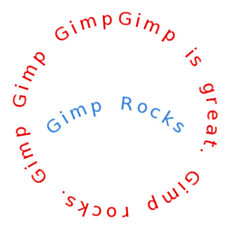
I don't think so. There is one for putting text in a circle in File > Create > Logos > Text Circle.

You can do just a part of a circle with it.

Image

_________________
Image
World War IV will be fought with sticks and stones. - Albert Einstein


Top
 Post subject: Re: Curve Text Help Please
PostPosted: Thu Feb 16, 2012 5:10 am  (#9) 
Offline
GimpChat Member
User avatar

Joined: Apr 07, 2010
Posts: 14182
You can also try filters > curve > bend

_________________
Image


Top
 Post subject: Re: Curve Text Help Please
PostPosted: Thu Feb 16, 2012 5:52 am  (#10) 
Offline
GimpChat Member
User avatar

Joined: Dec 22, 2011
Posts: 399
Thanks everybody....learning everyday. All sorted now :)

_________________
Image


Top
Post new topic Reply to topic  [ 10 posts ] 

All times are UTC - 5 hours [ DST ]


* Login  


Powered by phpBB3 © phpBB Group