It is currently Tue Sep 22, 2026 5:30 am


All times are UTC - 5 hours [ DST ]


Post new topic Reply to topic  [ 28 posts ]  Go to page 1, 2  Next
Author Message
 Post subject: WrapMap(?) Border: Fade from edge to Black (or White)?
PostPosted: Thu Feb 16, 2012 10:43 pm  (#1) 
Offline
GimpChat Member
User avatar

Joined: Apr 20, 2011
Posts: 287
Location: Dane-ish Co., West Gonsin
GIMP Version: 2.6.11
Operating System: Linux
OS Version: Ubuntu
GIMP Experience: Intermediate Level


Long-time learkner. First time postper.

I have in mind an effect I'd like to see with a photograph.

Imagine a b&w photograph, cut into an irregular shape, say the shape of a pear.

Imagine it mounted in a white matte with a larger pear-shaped opening.

Now, the effect I can altmost see is a "gradient fade" from each point on the pear to a, what's it called (go, go junior-high geometry!), congruent? point on the pear opening in the matte.

I've futzled with WrapMap[tm] (for whose author we are, all, deeply grateful), but the irreguloid shape seems to be inhibulatory.

Knowing this cast of characters as I do from regularly strolls through here, I thought you just might be interested.

Anyway, I've let the thought exscape, and the banging is already way down.

Thank you.
GrAMP.


Share on Facebook Share on Twitter Share on Orkut Share on Digg Share on MySpace Share on Delicious Share on Technorati
Top
 Post subject: Re: WrapMap(?) Border: Fade from edge to Black (or White)?
PostPosted: Fri Feb 17, 2012 4:34 am  (#2) 
Offline
Script Coder
User avatar

Joined: Oct 25, 2010
Posts: 4812
Wrapmap won't work between two shapes.

You can use Wrapmap on layer mask to create a fade border around your inner pear shaped object, and use the outside border of the gradient it produced to obtain the cut for the matte.

_________________
Image


Top
 Post subject: Re: WrapMap(?) Border: Fade from edge to Black (or White)?
PostPosted: Fri Feb 17, 2012 7:53 am  (#3) 
Offline
GimpChat Member
User avatar

Joined: Apr 20, 2011
Posts: 287
Location: Dane-ish Co., West Gonsin
Thanks, ofnuts.

The laserfocus of the dream is that the gradient must be "dynamic" as it proceeds along the path: (a) taking its minimum from the edge pixel of the inner outline and fading (different amounts) outwardly to white, and (b) taking its direction from the angle between start point and end point howeverso determined.

For that matter, in version 1, I don't really care if the gradient "rays" from innershape to outershape are the same length or not.

For example, if a maximum distance of a gradient fade from black to white (0-255; 0-100%) has been decided to be 1 in, then a ray starting on a black edge pixel will be 1-in long, while one starting on a 50% gray will be but a 1/2-in. One starting on white would be 0-in.

In version 2, the "fade rate" would adjust itself such that all rays were exactly 1-in long.

That's what I'm talkin' about.

I imagine it's like a starburst effect where the darker edges have longer bursts than the lighter ones, in version one at least.

_________________
--
GraMP
"Once you sit on your glasses, the rest of getting old seems obvious."


Top
 Post subject: Re: WrapMap(?) Border: Fade from edge to Black (or White)?
PostPosted: Fri Feb 17, 2012 8:49 am  (#4) 
Offline
GimpChat Member
User avatar

Joined: Apr 20, 2011
Posts: 287
Location: Dane-ish Co., West Gonsin
Now finding RobA's "Sample Gradient Along Path"
http://registry.gimp.org/node/10240
which seems to do circumferentially what I'd like to see radially.

As for deciding the "direction" of gradient rays, outward normals to the curve seem to be the best default.

Subject matter, "courtesy" of the crude messpaint of the current operating system I am stuck on.
Image

_________________
--
GraMP
"Once you sit on your glasses, the rest of getting old seems obvious."


Top
 Post subject: Re: WrapMap(?) Border: Fade from edge to Black (or White)?
PostPosted: Fri Feb 17, 2012 9:56 am  (#5) 
Offline
GimpChat Member
User avatar

Joined: Apr 20, 2011
Posts: 287
Location: Dane-ish Co., West Gonsin
My tres crude attempt, trying to generate a WrapMap using a gradient from Sample-Gradient-along-Path using a "flattened" path (using lasso tool on an out-and-back path). First reaction is "it ain't very saturated: no blacks in it". Second reaction is, it's not fading. :hehe (I ran across a 2D gradient script too, but already suspect it may not take my S-G-a-P gradient as an input argument.)

Image

_________________
--
GraMP
"Once you sit on your glasses, the rest of getting old seems obvious."


Top
 Post subject: Re: WrapMap(?) Border: Fade from edge to Black (or White)?
PostPosted: Fri Feb 17, 2012 10:53 am  (#6) 
Offline
Script Coder
User avatar

Joined: Oct 25, 2010
Posts: 4812
I still quite don't get what you are trying to obtain... Can you sketch it, even roughly?

_________________
Image


Top
 Post subject: Re: WrapMap(?) Border: Fade from edge to Black (or White)?
PostPosted: Fri Feb 17, 2012 11:26 am  (#7) 
Offline
Global Moderator
User avatar

Joined: May 16, 2010
Posts: 16173
I think i get what you mean.
If you want the colors to create the gradient fill (sun burst effect)
Try Robs version of the Solidify filter by Flaming Pear. :)
It takes an image (with alpha) and creates an outward gradient fill using the colors of the image.
It's purpose is to get rid of halos around the image using the images colors as fill.
It seems this is what you are looking for.
viewtopic.php?f=9&t=3153&hilit=Solidify

Example
Image

_________________
Image


Top
 Post subject: Re: WrapMap(?) Border: Fade from edge to Black (or White)?
PostPosted: Fri Feb 17, 2012 2:07 pm  (#8) 
Offline
GimpChat Member
User avatar

Joined: Apr 20, 2011
Posts: 287
Location: Dane-ish Co., West Gonsin
@Rod,

BOING!!!

(Happy birthday, indeed!)

Thas whatahm talkinbout Willis.

@ofnuts
I thought I ~was~ providing a picture. :oops: That's just how BAD it is over here where I sit.
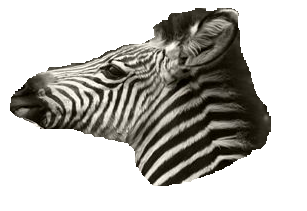
Thanks bofthyou.
--
GRamp

_________________
--
GraMP
"Once you sit on your glasses, the rest of getting old seems obvious."


Top
 Post subject: Re: WrapMap(?) Border: Fade from edge to Black (or White)?
PostPosted: Fri Feb 17, 2012 6:12 pm  (#9) 
Offline
Global Moderator
User avatar

Joined: May 16, 2010
Posts: 16173
Glad to help. :)
Welcome to Gimp Chat and thanks for the Happy B-day wishes.

_________________
Image


Top
 Post subject: Re: WrapMap(?) Border: Fade from edge to Black (or White)?
PostPosted: Fri Feb 17, 2012 8:11 pm  (#10) 
Offline
GimpChat Member
User avatar

Joined: Apr 20, 2011
Posts: 287
Location: Dane-ish Co., West Gonsin
To tie a bow on this, here's my result:
Image

Not really what I expected (I think I expected certain colors to be "more equal" than others; psychochromatically speaking, maybe).

Still perfectly understandable. And I think it will serve my purpose admirable.

Let me bury praise for RobA's brilliancy here too in this out-of-the-way thread.

Kudos, King.
--
Gramp

_________________
--
GraMP
"Once you sit on your glasses, the rest of getting old seems obvious."


Top
 Post subject: Re: WrapMap(?) Border: Fade from edge to Black (or White)?
PostPosted: Sat Feb 18, 2012 8:17 am  (#11) 
Offline
Script Coder
User avatar

Joined: Oct 25, 2010
Posts: 4812
gramp wrote:
Not really what I expected (I think I expected certain colors to be "more equal" than others; psychochromatically speaking, maybe).

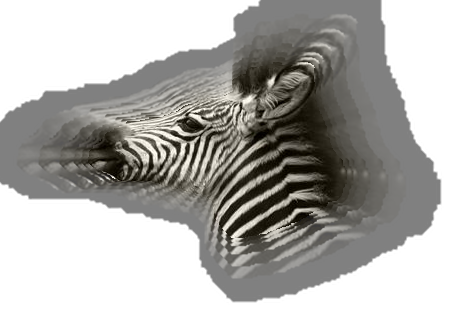
More like this perhaps?
Attachment:
zebra.jpg
zebra.jpg [ 60.36 KiB | Viewed 2447 times ]

_________________
Image


Top
 Post subject: Re: WrapMap(?) Border: Fade from edge to Black (or White)?
PostPosted: Sat Feb 18, 2012 1:21 pm  (#12) 
Offline
GimpChat Member
User avatar

Joined: Apr 20, 2011
Posts: 287
Location: Dane-ish Co., West Gonsin
No. In fact that's kind've perpendiculiar to what I was thinking.

Still I ~love~ the look of that one! The "halo" emphasizes the essence of the subject. It begs the question, "What sorts of halos would ~contradict~--or mock--the essence?"
(Speaking of the latter, I was imagining what the WORST POSSIBLE instrumental trio could be: bagpipes, accordion, and bass drum?)

No, I was thinking of the image growing larger "behind" the original but losing contrast towards white as it does so.

I understand that is exactly what RobA's Bleed Color into Transparent filter does, and that's why I was surprised.

Put another way, I want to walk from a sharp boundary edge at white, to a grayscale point on the image boundary and see the brightness reduce along the way.

From a bumpmap point of view, I could say the image is at the bottom of a bucket with sloped sides, with the top of the bucket at 100% white.

"I'll know it if I see it." :mrgreen:
--
gramp

_________________
--
GraMP
"Once you sit on your glasses, the rest of getting old seems obvious."


Top
 Post subject: Re: WrapMap(?) Border: Fade from edge to Black (or White)?
PostPosted: Sat Feb 18, 2012 4:29 pm  (#13) 
Offline
Script Coder
User avatar

Joined: Oct 25, 2010
Posts: 4812
gramp wrote:
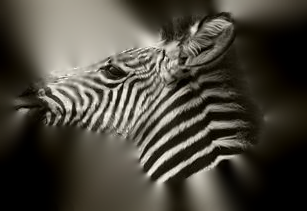
"I'll know it if I see it." :mrgreen:


Attachment:
zebra2.jpg
zebra2.jpg [ 55.1 KiB | Viewed 2434 times ]

_________________
Image


Top
 Post subject: Re: WrapMap(?) Border: Fade from edge to Black (or White)?
PostPosted: Sat Feb 18, 2012 6:15 pm  (#14) 
Offline
GimpChat Member
User avatar

Joined: Apr 07, 2010
Posts: 14182
Image

_________________
Image


Top
 Post subject: Re: WrapMap(?) Border: Fade from edge to Black (or White)?
PostPosted: Sat Feb 18, 2012 11:35 pm  (#15) 
Offline
GimpChat Member
User avatar

Joined: Apr 20, 2011
Posts: 287
Location: Dane-ish Co., West Gonsin
@ofnuts
BOING! That fits right in the hole in my vision. Are the rays taking their values from the image itself?

@molly
You've managed a different take: again (to my mind), rendering "zebra" to the essences blackness and whiteness.

Thanks ya'll. Reckon how you did them? :)
--
grAmp

_________________
--
GraMP
"Once you sit on your glasses, the rest of getting old seems obvious."


Top
 Post subject: Re: WrapMap(?) Border: Fade from edge to Black (or White)?
PostPosted: Sun Feb 19, 2012 7:00 am  (#16) 
Offline
Script Coder
User avatar

Joined: Oct 25, 2010
Posts: 4812
gramp wrote:
@ofnuts
BOING! That fits right in the hole in my vision. Are the rays taking their values from the image itself?

Indeed.
To achieve:
  • duplicate the head layer
  • obtain a 20px border selection around the head:
    • alpha to selection on head
    • Select/shrink 20px
    • Save to channel
    • alpha to selection on head again
    • In channels dialog: right click on saved selection a above and "Subtract from selection"
  • invert selection and [delete] to keep only the rim on the zebra head
  • Select/None
  • Filters/Blur/Move and use Zoom/Outward/ and a length about twice what you want. The result is very faint... but mostly because of very low values in the alpha channel. The rest is playing with the layer mask in two steps:
  • First step to restore opacity to about 100% everywhere (fill with white)
  • Second step to generate the fading effect if needed:
    • Obtain selection on head as above
    • grow to required size for matte cut
    • add layer mask
    • fill selection with "shaped" gradient (black on the outside)
    • adjust fade with the Levels or Curves tool

_________________
Image


Top
 Post subject: Re: WrapMap(?) Border: Fade from edge to Black (or White)?
PostPosted: Sun Feb 19, 2012 9:24 am  (#17) 
Offline
GimpChat Member

Joined: Mar 04, 2011
Posts: 2615
Maybe an effect like this using the G'Mic plugin

Image

a little 1 min 30 sec howto http://youtu.be/X6JDEyxiFkk


Top
 Post subject: Re: WrapMap(?) Border: Fade from edge to Black (or White)?
PostPosted: Sun Feb 19, 2012 3:28 pm  (#18) 
Offline
GimpChat Member
User avatar

Joined: Apr 20, 2011
Posts: 287
Location: Dane-ish Co., West Gonsin
ofnuts wrote:
gramp wrote:
@ofnuts
BOING! That fits right in the hole in my vision. Are the rays taking their values from the image itself?

Indeed.
To achieve:
  • duplicate the head layer
  • obtain a 20px border selection around the head:
    • alpha to selection on head
    • Select/shrink 20px
    • Save to channel
    • alpha to selection on head again
    • In channels dialog: right click on saved selection a above and "Subtract from selection"
  • invert selection and [delete] to keep only the rim on the zebra head
  • Select/None
  • Filters/Blur/Move and use Zoom/Outward/ and a length about twice what you want. The result is very faint... but mostly because of very low values in the alpha channel. The rest is playing with the layer mask in two steps:
  • First step to restore opacity to about 100% everywhere (fill with white)
  • Second step to generate the fading effect if needed:
    • Obtain selection on head as above
    • grow to required size for matte cut
    • add layer mask
    • fill selection with "shaped" gradient (black on the outside)
    • adjust fade with the Levels or Curves tool


I've always been dumbfounded by the help you (all) so willingly, even eagerly, serve up.

Now, I have been founddumbed for myself.

Thanks loads.
--
GraMP

_________________
--
GraMP
"Once you sit on your glasses, the rest of getting old seems obvious."


Top
 Post subject: Re: WrapMap(?) Border: Fade from edge to Black (or White)?
PostPosted: Sun Feb 19, 2012 3:30 pm  (#19) 
Offline
GimpChat Member
User avatar

Joined: Apr 20, 2011
Posts: 287
Location: Dane-ish Co., West Gonsin
rich2005 wrote:
Maybe an effect like this using the G'Mic plugin

a little 1 min 30 sec howto http://youtu.be/X6JDEyxiFkk


(You read my mind: my Very First reaction was "Oh No! G'Mic!! Oh I ~wish~ somebody could give me the minute-thirty intro to it!!")

No more excuses. Thanks, Rich.

Quoting the vid: "Okay, it's... and... that's something, anyway." :hehe

_________________
--
GraMP
"Once you sit on your glasses, the rest of getting old seems obvious."


Top
 Post subject: Re: WrapMap(?) Border: Fade from edge to Black (or White)?
PostPosted: Sun Feb 19, 2012 7:40 pm  (#20) 
Offline
GimpChat Member
User avatar

Joined: Apr 20, 2011
Posts: 287
Location: Dane-ish Co., West Gonsin
Having read my post where I actually tried to describe what I thought I wanted, I found enough hints there to try it.

I just made a stack of images that got larger and brighter and fainter (lower contrast) behind the original, then did a simple blur on the composited stack with this result:
Image

@ofnuts
I followed your steps fine, but the result I got from the "motion blur zoom outwards" surprised me; it seems not to be outward but SE->NW.
Image
(This one however was made on the stack of the previous image.)
--
gramp

_________________
--
GraMP
"Once you sit on your glasses, the rest of getting old seems obvious."


Top
Post new topic Reply to topic  [ 28 posts ]  Go to page 1, 2  Next

All times are UTC - 5 hours [ DST ]


* Login  


Powered by phpBB3 © phpBB Group