It is currently Tue Sep 22, 2026 4:57 am


All times are UTC - 5 hours [ DST ]


Post new topic Reply to topic  [ 8 posts ] 
Author Message
 Post subject: How to use text really good
PostPosted: Wed Feb 29, 2012 7:07 pm  (#1) 
Offline
GimpChat Member

Joined: Feb 24, 2012
Posts: 158
GIMP Version: 2.6
Operating System: Windows
OS Version: XP - SP3
GIMP Experience: Basic Level


i cant seem to make the text look good
i always have to use photoshop(THE BOMB) to use text


Share on Facebook Share on Twitter Share on Orkut Share on Digg Share on MySpace Share on Delicious Share on Technorati
Top
 Post subject: Re: How to use text really good
PostPosted: Wed Feb 29, 2012 7:56 pm  (#2) 
Offline
Script Coder
User avatar

Joined: Oct 25, 2010
Posts: 4812
What do you mean by "look good", or otherwise, what do you find not good enough with Gimp text?

_________________
Image


Top
 Post subject: Re: How to use text really good
PostPosted: Wed Feb 29, 2012 8:04 pm  (#3) 
Offline
GimpChat Member
User avatar

Joined: Mar 02, 2011
Posts: 1850
Location: Michigan
ofnuts wrote:
What do you mean by "look good", or otherwise, what do you find not good enough with Gimp text?

I think he is talking about in forum signatures, and if I remember right PS has more options for text looks.

_________________
Image
I'm back I think


Top
 Post subject: Re: How to use text really good
PostPosted: Wed Feb 29, 2012 8:11 pm  (#4) 
Offline
Script Coder
User avatar

Joined: Feb 18, 2011
Posts: 4826
Location: Bendigo Vic. Australia
Select your text-layer, click layer to image size, then go to, Filters: Alpha to logo, and try any of the effects there.

_________________
Image
No matter how much you push the envelope, it'll still be stationery.


Top
 Post subject: Re: How to use text really good
PostPosted: Wed Feb 29, 2012 8:23 pm  (#5) 
Offline
Global Moderator
User avatar

Joined: May 16, 2010
Posts: 16173
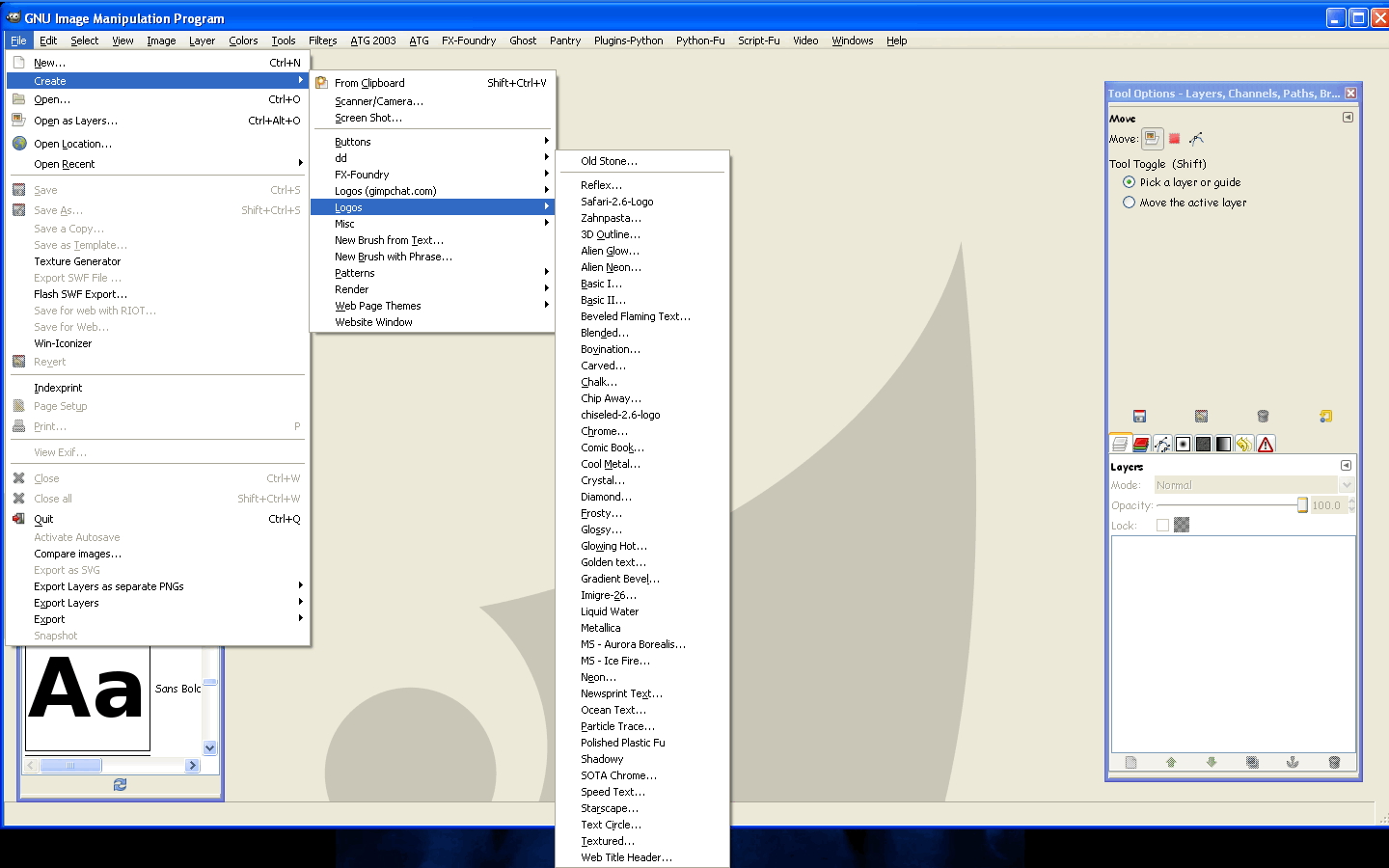
Also File>Create>Logos :)

Image

many come with Gimp by default but some of these i installed myself. :)
You can find many of these logo scripts out there.

_________________
Image


Top
 Post subject: Re: How to use text really good
PostPosted: Wed Feb 29, 2012 8:57 pm  (#6) 
Offline
GimpChat Member

Joined: Feb 24, 2012
Posts: 158
im just going to use photoshop for my text


Top
 Post subject: Re: How to use text really good
PostPosted: Wed Feb 29, 2012 10:12 pm  (#7) 
Offline
GimpChat Member
User avatar

Joined: Jan 20, 2012
Posts: 583
Hes saying as in the ability to edit text as say options to put Bold and Italics on rather than have to pretty much manually adjusting it. (Right?)

_________________


"In the face of adversity, there's three things: fly, freeze or fight; We're choosing to fight..."- Guy Boucher, Tampa Bay Lighting Head Coach


Top
 Post subject: Re: How to use text really good
PostPosted: Wed Feb 29, 2012 10:45 pm  (#8) 
Offline
Global Moderator
User avatar

Joined: May 16, 2010
Posts: 16173
War Hero wrote:
im just going to use photoshop for my text


Okay.
By the way the Open Source program Inkscape is great with text also. :)

_________________
Image


Top
Post new topic Reply to topic  [ 8 posts ] 

All times are UTC - 5 hours [ DST ]


* Login  


Powered by phpBB3 © phpBB Group