It is currently Sun Sep 20, 2026 10:05 am


All times are UTC - 5 hours [ DST ]


Post new topic Reply to topic  [ 44 posts ]  Go to page 1, 2, 3  Next
Author Message
 Post subject: Making an item drape.
PostPosted: Thu Mar 01, 2012 1:57 pm  (#1) 
Offline
GimpChat Member

Joined: Feb 06, 2011
Posts: 342
GIMP Version: 2.6.11
Operating System: Windows
OS Version: XP - SP3
GIMP Experience: Basic Level

List any relevant plug-ins or scripts:
Hi everyone,

I hope 2012 is going great. :)

I have a question. I found a tut on how to drape things like curtains, clothes, etc. I believe they used Photoshop and its transform:warp tool which from what I gather is way different from our iwarp tool. Below I posted the end part of the tut which is the affect I am trying to learn. Any suggestions would be most graciously appreciated on how to achieve this in Gimp?? :)

Liana


Edit: I did play around some more ( had my thinking cap on) and played with the settings a bit and came up with this. Still not smooth though. :(


Attachments:
drape tut#2.png
drape tut#2.png [ 126.19 KiB | Viewed 2816 times ]
drape tut.png
drape tut.png [ 105.78 KiB | Viewed 2823 times ]
Share on Facebook Share on Twitter Share on Orkut Share on Digg Share on MySpace Share on Delicious Share on Technorati
Top
 Post subject: Re: Making an item drape.
PostPosted: Thu Mar 01, 2012 3:01 pm  (#2) 
Offline
GimpChat Member
User avatar

Joined: Jan 20, 2012
Posts: 583
I think in the dev release the Warp tool is much MUCH better. Only what I have heard. Unfortunately they have yet to make a 2.7.* or 2.8 stable yet.(Wish they would hurry up, I'm dying for it here!) But great programs take great amount of time.

_________________


"In the face of adversity, there's three things: fly, freeze or fight; We're choosing to fight..."- Guy Boucher, Tampa Bay Lighting Head Coach


Top
 Post subject: Re: Making an item drape.
PostPosted: Thu Mar 01, 2012 3:44 pm  (#3) 
Offline
GimpChat Member

Joined: Feb 06, 2011
Posts: 342
Thanks Ward.. I guess that's good to hear and not in ways. :) I will wait for the newer versions to become more stable unless someone thinks of a brainy idea in the mean time.


Top
 Post subject: Re: Making an item drape.
PostPosted: Thu Mar 01, 2012 5:40 pm  (#4) 
Offline
GimpChat Member
User avatar

Joined: Apr 07, 2010
Posts: 14182
There are not very many things I don't like about GIMP, BUT...iwarp is definitely at the top of the list.
It needs a lot of work as far as a script goes and would be a real treat if the fantastic script writers on this forum could make it equal to the one in PhotoShop.
I know it is asking a lot but it does suck. :hoh :gaah

_________________
Image


Top
 Post subject: Re: Making an item drape.
PostPosted: Thu Mar 01, 2012 5:58 pm  (#5) 
Offline
GimpChat Member
User avatar

Joined: Jan 20, 2012
Posts: 583
I think they have worked on, I was looking through the dev release notes and I thought I saw something about it. Dunno for sure.

_________________


"In the face of adversity, there's three things: fly, freeze or fight; We're choosing to fight..."- Guy Boucher, Tampa Bay Lighting Head Coach


Top
 Post subject: Re: Making an item drape.
PostPosted: Thu Mar 01, 2012 6:58 pm  (#6) 
Offline
Global Moderator
User avatar

Joined: May 16, 2010
Posts: 16173
Actually i think displace would work much better than IWarp. :)

_________________
Image


Top
 Post subject: Re: Making an item drape.
PostPosted: Thu Mar 01, 2012 7:05 pm  (#7) 
Offline
Script Coder
User avatar

Joined: Oct 25, 2010
Posts: 4812
Rod wrote:
Actually i think displace would work much better than IWarp. :)
Good luck computing the right map :)

_________________
Image


Top
 Post subject: Re: Making an item drape.
PostPosted: Thu Mar 01, 2012 7:15 pm  (#8) 
Offline
Global Moderator
User avatar

Joined: May 16, 2010
Posts: 16173
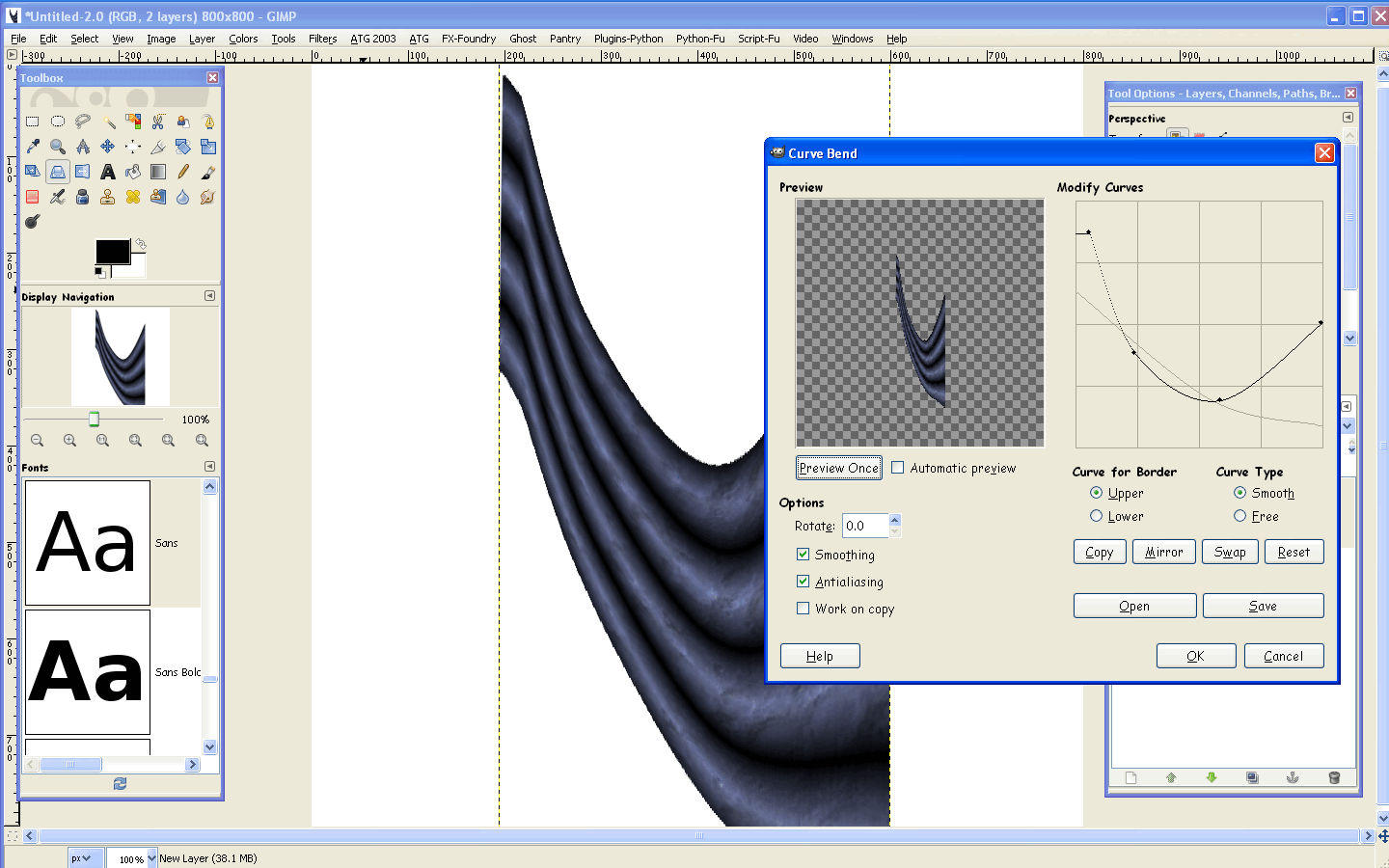
Curve Bend seems to work.

Image

_________________
Image


Top
 Post subject: Re: Making an item drape.
PostPosted: Thu Mar 01, 2012 7:18 pm  (#9) 
Offline
GimpChat Member
User avatar

Joined: Apr 07, 2010
Posts: 14182
That bends but it doesn't drape. a good iwarp or liquify script will make the gathers as well as the bend.

_________________
Image


Top
 Post subject: Re: Making an item drape.
PostPosted: Thu Mar 01, 2012 7:42 pm  (#10) 
Offline
Global Moderator
User avatar

Joined: May 16, 2010
Posts: 16173
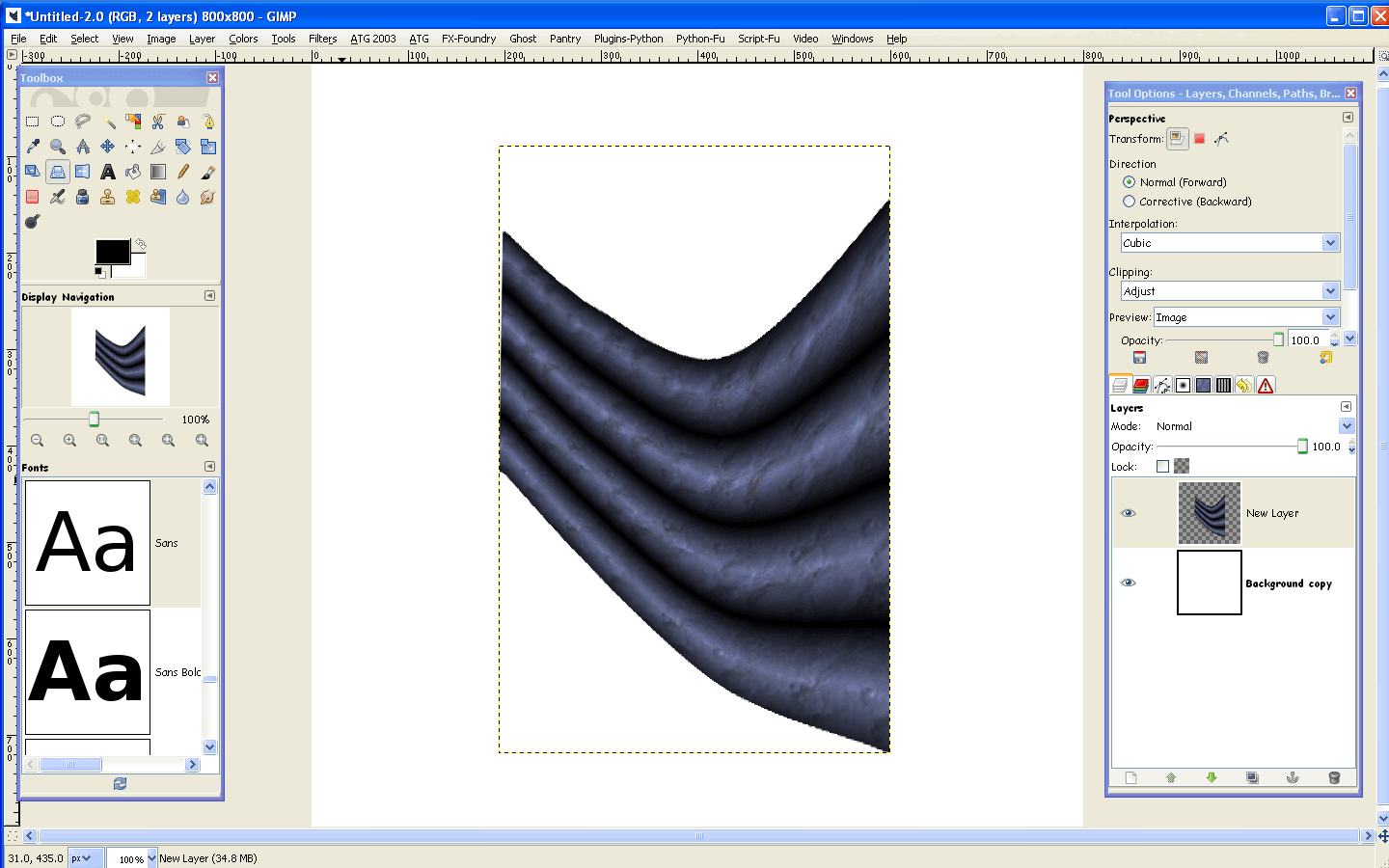
Yes but if you use Perspective first it looks much better. :)

Image

Bunching could probably take place if you make the gradient folds closer, and play with the lines a bit.

Image

_________________
Image


Top
 Post subject: Re: Making an item drape.
PostPosted: Thu Mar 01, 2012 8:18 pm  (#11) 
Offline
Global Moderator
User avatar

Joined: May 16, 2010
Posts: 16173
Have you tried the Cage Transform tool yet?

_________________
Image


Top
 Post subject: Re: Making an item drape.
PostPosted: Thu Mar 01, 2012 8:49 pm  (#12) 
Offline
Global Moderator
User avatar

Joined: May 16, 2010
Posts: 16173
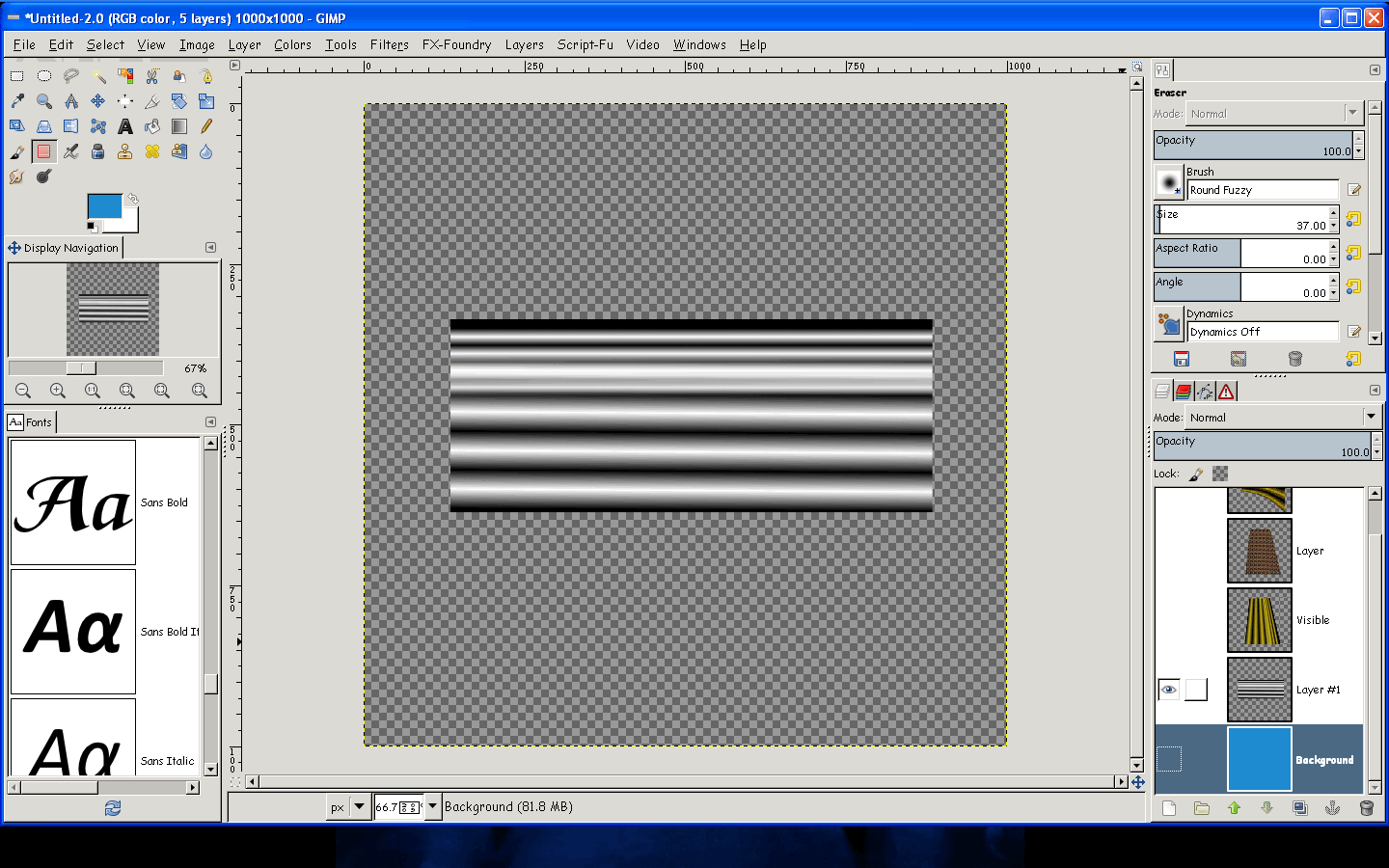
If you use the 4bars gradient and make two layers of it one small bars one large
then set the top layers mode to multiply you get something like this.

Image

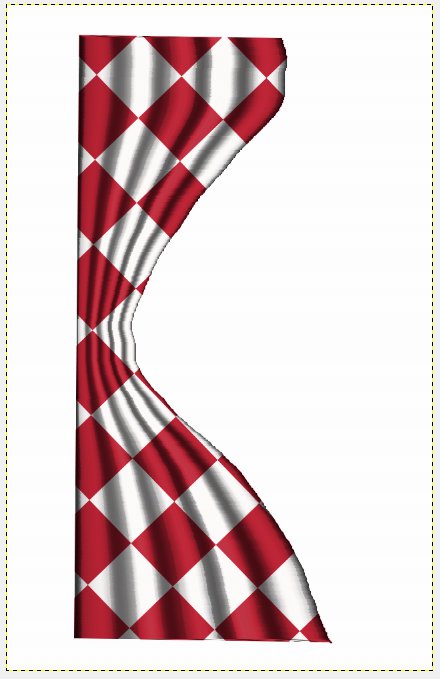
Now if you add your pattern, perspective and then curve bend..
Image

Curve bend to path may work even better. :)

_________________
Image


Top
 Post subject: Re: Making an item drape.
PostPosted: Thu Mar 01, 2012 10:49 pm  (#13) 
Offline
GimpChat Member

Joined: Feb 06, 2011
Posts: 342
Oh lots of ideas to play with. Thanks Rod!!
Sometimes I can come up with how to do things, but sometimes I get stuck. :gaah

Edit: Actually playing with perspective and curve bend gets pretty close to what I am wanting to achieve. :)


Top
 Post subject: Re: Making an item drape.
PostPosted: Fri Mar 02, 2012 8:36 am  (#14) 
Offline
GimpChat Member
User avatar

Joined: Apr 07, 2010
Posts: 14182
Looking good Rod, now maybe the iwarp can be used along the bottom to make it not so straight. That filter has to be good for something. lol

_________________
Image


Top
 Post subject: Re: Making an item drape.
PostPosted: Fri Mar 02, 2012 2:34 pm  (#15) 
Offline
Global Moderator
User avatar

Joined: May 16, 2010
Posts: 16173
I use IWarp for making knots in wood too.
And of course it creates awesome animated Hulks. :)

_________________
Image


Top
 Post subject: Re: Making an item drape.
PostPosted: Sat Mar 03, 2012 3:08 pm  (#16) 
Offline
GimpChat Member

Joined: Feb 06, 2011
Posts: 342
Here is what I played with a bit. Its just a hmm trial run?? :hehe


Attachments:
drape.png
drape.png [ 49.19 KiB | Viewed 2199 times ]


Last edited by Lianam on Sat Mar 03, 2012 3:28 pm, edited 1 time in total.
Top
 Post subject: Re: Making an item drape.
PostPosted: Sat Mar 03, 2012 3:20 pm  (#17) 
Offline
GimpChat Member
User avatar

Joined: Apr 07, 2010
Posts: 14182
Is it invisible Lianam? :teeth

_________________
Image


Top
 Post subject: Re: Making an item drape.
PostPosted: Sat Mar 03, 2012 3:30 pm  (#18) 
Offline
GimpChat Member

Joined: Feb 06, 2011
Posts: 342
:hehe It was... :rofl

Edit: I made all the pieces separate and then merged them together and did the curve bend on the finished item. I used both the upper and lower on the curve for border settings. Not perfect but just playing.


Top
 Post subject: Re: Making an item drape.
PostPosted: Sat Mar 03, 2012 6:17 pm  (#19) 
Offline
GimpChat Member
User avatar

Joined: Feb 14, 2012
Posts: 426
I started with a checkerboard background. Then I used the Selection Blend script fu that was made by RobA. Here is a link to the thread: viewtopic.php?f=9&t=3730

I just made a selection in the shape of a curtain on a new layer. And made a straight Horizontal blend from black to white using the Selection Blend script.
Image

Then I simply used the Free Hand option in the curves dialog box to create a curvy blend.
Image

Then I set the layer Mode to Hard Light and set the opacity down a bit before getting rid of the outside of the checkerboard pattern on the background layer.
Image

Using curves like this is a technique I discovered a while back.

Alan


Top
 Post subject: Re: Making an item drape.
PostPosted: Sat Mar 03, 2012 6:19 pm  (#20) 
Offline
GimpChat Member
User avatar

Joined: Apr 07, 2010
Posts: 14182
Very nice Lianam. I like yours very much too Alan, two different approaches. to arrive at the same results. KUDOs :jumpclap :hi5

_________________
Image


Top
Post new topic Reply to topic  [ 44 posts ]  Go to page 1, 2, 3  Next

All times are UTC - 5 hours [ DST ]


* Login  


Powered by phpBB3 © phpBB Group