It is currently Tue Nov 24, 2026 3:35 am


All times are UTC - 5 hours [ DST ]


Post new topic Reply to topic  [ 44 posts ]  Go to page Previous  1, 2, 3  Next
Author Message
 Post subject: Re: Making an item drape.
PostPosted: Sat Mar 03, 2012 7:00 pm  (#21) 
Offline
GimpChat Member
User avatar

Joined: Sep 29, 2011
Posts: 120
Location: Texas
There's also the calling of Paintdotnet that RodA I think it was wrote about last week that enables you to take it into the paintdotnet, use the liquify tool and back into gimp. I use it so much now on smoothing figures, it is sooooo easy.

_________________
“There´s tools and colours for all of us,
to lend from nature to make the world
more understandable and beautiful”.

Image


Top
 Post subject: Re: Making an item drape.
PostPosted: Sat Mar 03, 2012 7:46 pm  (#22) 
Offline
GimpChat Member
User avatar

Joined: Apr 07, 2010
Posts: 14182
I have Paint.Net in Windows. I have used it for years. I also have all the updates including liquify and Bloat. It is a very good piece of software and I used it all the time when I was in Windows. I think, but not sure there is a app similar in Fedora, I am going to check it out cuz it is a super program and I miss it, but not enough to go back to Windows. :teeth :oops:

_________________
Image


Top
 Post subject: Re: Making an item drape.
PostPosted: Sat Mar 03, 2012 7:57 pm  (#23) 
Offline
GimpChat Member
User avatar

Joined: Sep 29, 2011
Posts: 120
Location: Texas
ahhhhh yeah ....that does make a difference...I forgot about that......i've been debating abandoning windows myself......am close...but ohhhh so much to change over.

_________________
“There´s tools and colours for all of us,
to lend from nature to make the world
more understandable and beautiful”.

Image


Top
 Post subject: Re: Making an item drape.
PostPosted: Sat Mar 03, 2012 8:05 pm  (#24) 
Offline
GimpChat Member
User avatar

Joined: Apr 07, 2010
Posts: 14182
News flash. Just went back to Fedora and found Paint.net in add and remove programs. I installed it and I have most of the plug-ins including bloat but not liquify. I am going to try tomorrow to see if I can update the ones I don't have. I will let you know. Woo Hoo, now I don't have to go to Windows, :jumpclap :pengy

_________________
Image


Top
 Post subject: Re: Making an item drape.
PostPosted: Sat Mar 03, 2012 8:11 pm  (#25) 
Offline
GimpChat Member
User avatar

Joined: Sep 29, 2011
Posts: 120
Location: Texas
Yay!!!!!!

_________________
“There´s tools and colours for all of us,
to lend from nature to make the world
more understandable and beautiful”.

Image


Top
 Post subject: Re: Making an item drape.
PostPosted: Sat Mar 03, 2012 10:42 pm  (#26) 
Offline
GimpChat Member
User avatar

Joined: Sep 24, 2010
Posts: 12870
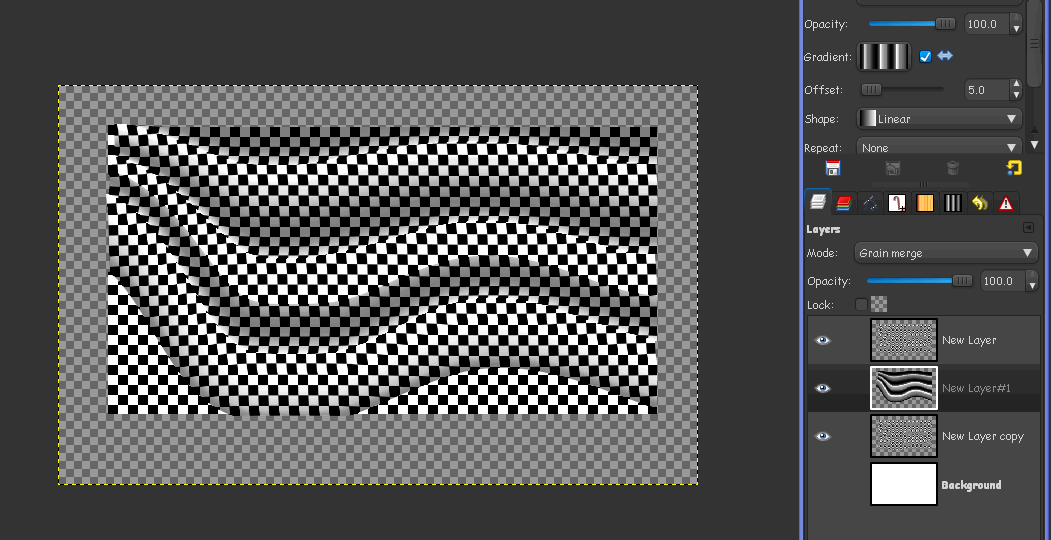
Just did a gradient and iwarped the gradient. I then used that result as the source for the displacement map with checkered pattern as the target. I then set that same result to Overlay and a duplicate displacement map result to darken with reduced opacity to taste. Including the XCF as well as viewable result. As a side note, I set the x,y displacement values to 2 and 2 (only wanted a little warp) and smear. :)


Attachments:
checkered_flag.png
checkered_flag.png [ 222.17 KiB | Viewed 1780 times ]
checkered_flag.xcf [368.49 KiB]
Downloaded 82 times

_________________
Lyle

Psalm 109:8

Image
Top
 Post subject: Re: Making an item drape.
PostPosted: Sat Mar 03, 2012 10:46 pm  (#27) 
Offline
GimpChat Member
User avatar

Joined: Sep 24, 2010
Posts: 12870
Same ripple pattern; larger checkers. :)


Attachments:
checkered_flag.png
checkered_flag.png [ 125.75 KiB | Viewed 1779 times ]

_________________
Lyle

Psalm 109:8

Image
Top
 Post subject: Re: Making an item drape.
PostPosted: Sat Mar 03, 2012 11:16 pm  (#28) 
Offline
GimpChat Member
User avatar

Joined: Feb 14, 2012
Posts: 426
lylejk wrote:
Just did a gradient and iwarped the gradient. I then used that result as the source for the displacement map with checkered pattern as the target. I then set that same result to Overlay and a duplicate displacement map result to darken with reduced opacity to taste. Including the XCF as well as viewable result. As a side note, I set the x,y displacement values to 2 and 2 (only wanted a little warp) and smear. :)


I'm very interested in how you do this. I get the iwarped gradient. But using that result as the source for displacement map with the checkered pattern as the target. And also don't get seting that same result to overlay etc.

Can someone explain how to do this?

Alan


Top
 Post subject: Re: Making an item drape.
PostPosted: Sat Mar 03, 2012 11:19 pm  (#29) 
Offline
GimpChat Member
User avatar

Joined: Sep 24, 2010
Posts: 12870
Click on the included XCF file Alan (first entry) and I believe that will answer your questions. Displacement mapping is very powerful but you can go too far. lol

:)

_________________
Lyle

Psalm 109:8

Image


Top
 Post subject: Re: Making an item drape.
PostPosted: Sat Mar 03, 2012 11:51 pm  (#30) 
Offline
GimpChat Member
User avatar

Joined: Sep 24, 2010
Posts: 12870
Argue; brain thinking overlay but I meant Grain Merge. My apologies. lol

:)

_________________
Lyle

Psalm 109:8

Image


Top
 Post subject: Re: Making an item drape.
PostPosted: Sat Mar 03, 2012 11:53 pm  (#31) 
Offline
GimpChat Member
User avatar

Joined: Feb 14, 2012
Posts: 426
OK I was looking at your file. Displacement map filter to shift pixels around on the checkerboard pattern using the gradient pattern as the pattern. Then grain merge the gradient layer to make the checkerboard pattern darker and lighter and then the checkerboard pattern placed on the top layer and set to darken only to darken the lighter part of the checkerboard pattern that is lightened by the grain merge layer.

Got it. Thats pretty cool. I always wondered how displacement maps worked. Thanks lylejk

Alan


Top
 Post subject: Re: Making an item drape.
PostPosted: Sat Mar 03, 2012 11:56 pm  (#32) 
Offline
GimpChat Member
User avatar

Joined: Sep 24, 2010
Posts: 12870
Yeah; do like displacement mapping for things like this. Also, I apologize again for saying overlay when I meant Grain Merge. :)

_________________
Lyle

Psalm 109:8

Image


Top
 Post subject: Re: Making an item drape.
PostPosted: Sun Mar 04, 2012 12:28 am  (#33) 
Offline
Global Moderator
User avatar

Joined: May 16, 2010
Posts: 16306
Very nicely done Lyle. :)

_________________
Image


Top
 Post subject: Re: Making an item drape.
PostPosted: Sun Mar 04, 2012 12:30 am  (#34) 
Offline
GimpChat Member
User avatar

Joined: Sep 24, 2010
Posts: 12870
Thanks Rod, but you and me both know it's not my idea; just wanted to share per this thread since I didn't see it mentioned yet. :)

_________________
Lyle

Psalm 109:8

Image


Top
 Post subject: Re: Making an item drape.
PostPosted: Sun Mar 04, 2012 12:45 am  (#35) 
Offline
Global Moderator
User avatar

Joined: May 16, 2010
Posts: 16306
Still some very nice results, very pro looking.
Thanks for sharing them. :)

_________________
Image


Top
 Post subject: Re: Making an item drape.
PostPosted: Sun Mar 04, 2012 12:49 am  (#36) 
Offline
GimpChat Member
User avatar

Joined: Sep 24, 2010
Posts: 12870
Bump the x,y values to 5 and used G'MIC's Chessboard pattern creator this time (and of course a different pattern; why not. lol). Also blended in an actual canvas texture (GIMPressionist canvas that I really like) since this thread is about draped fabrics. Thanks again for rekindling my interest in displacement mapping; been a little while. :)


Attachments:
check_cnvs.jpg
check_cnvs.jpg [ 388.76 KiB | Viewed 2065 times ]

_________________
Lyle

Psalm 109:8

Image
Top
 Post subject: Re: Making an item drape.
PostPosted: Sun Mar 04, 2012 12:53 am  (#37) 
Offline
Global Moderator
User avatar

Joined: May 16, 2010
Posts: 16306
That looks so good ...even the bunching. :)

_________________
Image


Top
 Post subject: Re: Making an item drape.
PostPosted: Sun Mar 04, 2012 12:54 am  (#38) 
Offline
GimpChat Member
User avatar

Joined: Sep 24, 2010
Posts: 12870
Thanks Rod; for an even additional variation, I iWarped the left side; have to be careful (I wasn't) since it can also distort areas that you may not want distorted. :)


Attachments:
check_cnvs.jpg
check_cnvs.jpg [ 339.21 KiB | Viewed 2064 times ]

_________________
Lyle

Psalm 109:8

Image
Top
 Post subject: Re: Making an item drape.
PostPosted: Mon Mar 05, 2012 3:29 am  (#39) 
Offline
Global Moderator
User avatar

Joined: May 16, 2010
Posts: 16306
It still looks pretty darn good!
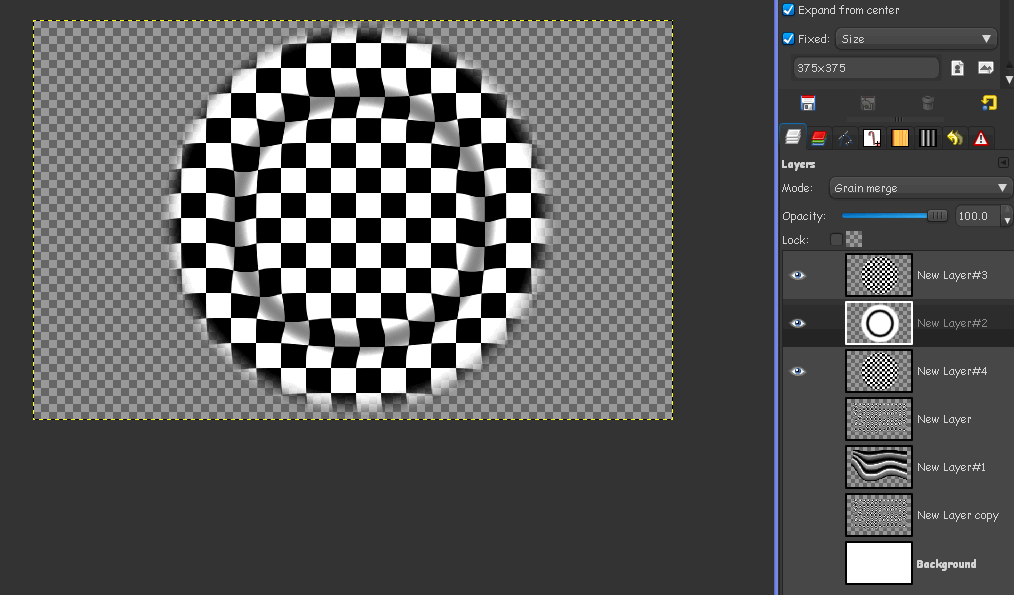
I had to try this myself and i am overjoyed with the results.I am thinking draped Photofont :lol :)
Image

This is a series of circles white black white and blurred (about 18), then displaced the same way.
Image

_________________
Image


Top
 Post subject: Re: Making an item drape.
PostPosted: Mon Mar 05, 2012 8:28 am  (#40) 
Offline
GimpChat Member
User avatar

Joined: Aug 24, 2011
Posts: 1785
Location: Dallas, TX
Interesting techniques! Got me to thinking....anyone smell something burning?

I know this thread is not exactly about "drapes" per se, but I used a little different approach to make some.

1. Make your pattern or "target" layer. In this case it was a simple mock denum.
2. Create a new transparent layer above it and apply the Flare Rays Size 1 gradient.
3. Select the pattern (denum) layer and go to Filters>Distorts>Polar Coordinates and set the values to 100 and 0, then check the box for Map Backwards and uncheck the other boxes.
4. On the pattern layer, go to Filters>Map>Bump Map and use the gradient layer for the bump map. Set to Sinusoidal and crank up the depth all the way to 65.

For a more uniform drape I just cut out a selection and made several dupes and moved them into position. (See second pic)

You can still use the Iwarp to mold the gradient to a particular shape, and then the bump mapping to get a similar effect.


Attachments:
Polar drapes.jpg
Polar drapes.jpg [ 213.54 KiB | Viewed 2046 times ]
Drapes uniform.jpg
Drapes uniform.jpg [ 216.24 KiB | Viewed 2046 times ]

_________________
Image
Top
Post new topic Reply to topic  [ 44 posts ]  Go to page Previous  1, 2, 3  Next

All times are UTC - 5 hours [ DST ]


* Login  


Powered by phpBB3 © phpBB Group