It is currently Tue Jun 09, 2026 8:24 pm


All times are UTC - 5 hours [ DST ]


Post new topic Reply to topic  [ 93 posts ]  Go to page 1, 2, 3, 4, 5  Next
Author Message
 Post subject: Strolling Down Mac Gimp Lane. :)
PostPosted: Mon Feb 20, 2012 9:57 pm  (#1) 
Offline
GimpChat Member

Joined: Mar 14, 2011
Posts: 998
So, I thought I would stroll down the Mac Lane. I am hoping that I will be able to produce a decent Gimp 2.7.5 build (without any X-windows which is so 90's!! :) ). Here is a screenshot of my efforts.
Attachment:
File comment: Mac Gimp 2.7.5
gimp-2.7-Screen shot.jpg
gimp-2.7-Screen shot.jpg [ 495.05 KiB | Viewed 4330 times ]

(The screenshot is using a 36MP D800 Sample Image)

This is running on Snow Leopard 64-bit build. I also built my favorite plugins. I am hoping that by the time Gimp 2.8 is released, I will be able to have a Mac version as well.

Stay tuned and if anyone wants to help, drop me a line. You will soon hear about it on my website and of course here!

:gimp

Partha


Share on Facebook Share on Twitter Share on Orkut Share on Digg Share on MySpace Share on Delicious Share on Technorati
Top
 Post subject: Re: Strolling Down Mac Gimp Lane. :)
PostPosted: Mon Feb 20, 2012 10:15 pm  (#2) 
Offline
GimpChat Member
User avatar

Joined: Apr 08, 2010
Posts: 5420
Location: Northwest Ohio
Awesome! Us Mac users appreciate your efforts.


Top
 Post subject: Re: Strolling Down Mac Gimp Lane. :)
PostPosted: Tue Feb 21, 2012 6:06 pm  (#3) 
Offline
GimpChat Member

Joined: Mar 14, 2011
Posts: 998
2-ton wrote:
Awesome! Us Mac users appreciate your efforts.

Thanks. :)

I might call upon you to beta test if you are game.


Top
 Post subject: Re: Strolling Down Mac Gimp Lane. :)
PostPosted: Tue Feb 21, 2012 10:20 pm  (#4) 
Offline
GimpChat Member

Joined: Jul 11, 2011
Posts: 111
Dang it I wrote the most elegant reply that would put the history of the internet and bulletin boards to shame, but alas I lost it because I thought I was logged in.

Partha way to go on getting a build for mac going! So happy to see the X window exit, hate all that extra clicking to change focus from window to tools. Shudders.

I am willing help with beta testing as well as I can. I have a 2+ year old Asus laptop with Snow Leopard and Lion running on it, we can talk Vista too if you want side by side. But I would need help in that area I am sure.

I haven't kept up with all the fancy computer'y stuff as I would like but I manage, usually with the help of my wiz kid nephew. But if explained, I'm sure I can understand and get you what you need. You are welcome to as many of my programs logs as you can handle.

(Copies my reply in case I have repeat of last reply)

WW


Top
 Post subject: Re: Strolling Down Mac Gimp Lane. :)
PostPosted: Tue Feb 21, 2012 11:52 pm  (#5) 
Offline
GimpChat Member
User avatar

Joined: Apr 08, 2010
Posts: 5420
Location: Northwest Ohio
I can try to test, although I am new to macs and have very little knowledge about how it works. I think my snow leopard is 32 bit.


Top
 Post subject: Re: Strolling Down Mac Gimp Lane. :)
PostPosted: Wed Feb 22, 2012 5:36 am  (#6) 
Offline
GimpChat Member

Joined: Mar 14, 2011
Posts: 998
@WW,

I know the feeling. I have lost a few treatise that would put Shakespeare to shame. :)

@2-ton, No worries. I am not looking for experience. Are you able to use your current Gimp?

So, thanks both!! My goal is to make it so that you drag Gimp to the app folder or your dock and you are done.


Top
 Post subject: Re: Strolling Down Mac Gimp Lane. :)
PostPosted: Mon Feb 27, 2012 3:17 pm  (#7) 
Offline
GimpChat Member
User avatar

Joined: Apr 08, 2010
Posts: 5420
Location: Northwest Ohio
Trying out 2.7.5 for Mac is cool! I hope more of our mac users help test it out! I will say right off the bat, that one thing that is driving me crazy is that filters and such open behind the toolbox and you cannot just click on the window to bring it forward, you have to move it out from under. The toolboxes will always be on top, even when you have more windows open...which makes it impossible to work on gimp while trying to read instructions in an email, as those tool boxes stay on top of ALL windows. I love that the newest plug-ins and g'mic are included! The slider for brush size was hard for me to find, actually it was accidental that I found it, lol, but that may be because I have only used 2.6 before. Another plus...my 2.6 gimp required a double click to do most things, while Partha's beta works with single clicks, yay.


Top
 Post subject: Re: Strolling Down Mac Gimp Lane. :)
PostPosted: Mon Feb 27, 2012 3:42 pm  (#8) 
Offline
Script Coder
User avatar

Joined: Oct 25, 2010
Posts: 4812
partha wrote:
So, I thought I would stroll down the Mac Lane. I am hoping that I will be able to produce a decent Gimp 2.7.5 build (without any X-windows which is so 90's!! :) ). Here is a screenshot of my efforts.
Attachment:
gimp-2.7-Screen shot.jpg

(The screenshot is using a 36MP D800 Sample Image)

This is running on Snow Leopard 64-bit build. I also built my favorite plugins. I am hoping that by the time Gimp 2.8 is released, I will be able to have a Mac version as well.

Stay tuned and if anyone wants to help, drop me a line. You will soon hear about it on my website and of course here!

:gimp

Partha

As a Linux user I don't give a hoot :)

But then I look at the download stats of my stuff by OS and I applaud with all four hands. :jumpclap :jumpclap :jumpclap

_________________
Image


Top
 Post subject: Re: Strolling Down Mac Gimp Lane. :)
PostPosted: Mon Feb 27, 2012 6:24 pm  (#9) 
Offline
GimpChat Member

Joined: Mar 14, 2011
Posts: 998
ofnuts wrote:
partha wrote:
...

:gimp

Partha

As a Linux user I don't give a hoot :)

I have used Unix for a very very long time. Moved to SCO, Novell, and then Linux - RedHat, Mandrake, etc. So, I agree. :)
Quote:
But then I look at the download stats of my stuff by OS and I applaud with all four hands. :jumpclap :jumpclap :jumpclap

Thanks!
Mac users have been left out and so figured I would give it a shot. :)

(A minor detail - I count 6 hands - segfault! )


Top
 Post subject: Re: Strolling Down Mac Gimp Lane. :)
PostPosted: Mon Feb 27, 2012 6:27 pm  (#10) 
Offline
GimpChat Member

Joined: Mar 14, 2011
Posts: 998
2-ton wrote:
Trying out 2.7.5 for Mac is cool! I hope more of our mac users help test it out! I will say right off the bat, that one thing that is driving me crazy is that filters and such open behind the toolbox and you cannot just click on the window to bring it forward, you have to move it out from under. The toolboxes will always be on top, even when you have more windows open...which makes it impossible to work on gimp while trying to read instructions in an email, as those tool boxes stay on top of ALL windows. I love that the newest plug-ins and g'mic are included! The slider for brush size was hard for me to find, actually it was accidental that I found it, lol, but that may be because I have only used 2.6 before. Another plus...my 2.6 gimp required a double click to do most things, while Partha's beta works with single clicks, yay.

Thanks 2-ton!! Appreciate all the time you and WW are putting into this. This will make MacGimp a better product for all of us.

:tyspin


Top
 Post subject: Re: Strolling Down Mac Gimp Lane. :)
PostPosted: Mon Feb 27, 2012 11:18 pm  (#11) 
Offline
GimpChat Member
User avatar

Joined: Apr 08, 2010
Posts: 5420
Location: Northwest Ohio
haha, macgimp....need to find a scottish tam for wilbur to wear for the macgimp mascot!


Top
 Post subject: Re: Strolling Down Mac Gimp Lane. :)
PostPosted: Tue Feb 28, 2012 5:35 am  (#12) 
Offline
GimpChat Member

Joined: Mar 14, 2011
Posts: 998
2-ton wrote:
haha, macgimp....need to find a scottish tam for wilbur to wear for the macgimp mascot!

Hey neat! :)

We could start a contest on who can come up with the best McGimp image!


Top
 Post subject: Re: Strolling Down Mac Gimp Lane. :)
PostPosted: Fri Mar 02, 2012 2:57 pm  (#13) 
Offline
GimpChat Member
User avatar

Joined: Apr 08, 2010
Posts: 5420
Location: Northwest Ohio
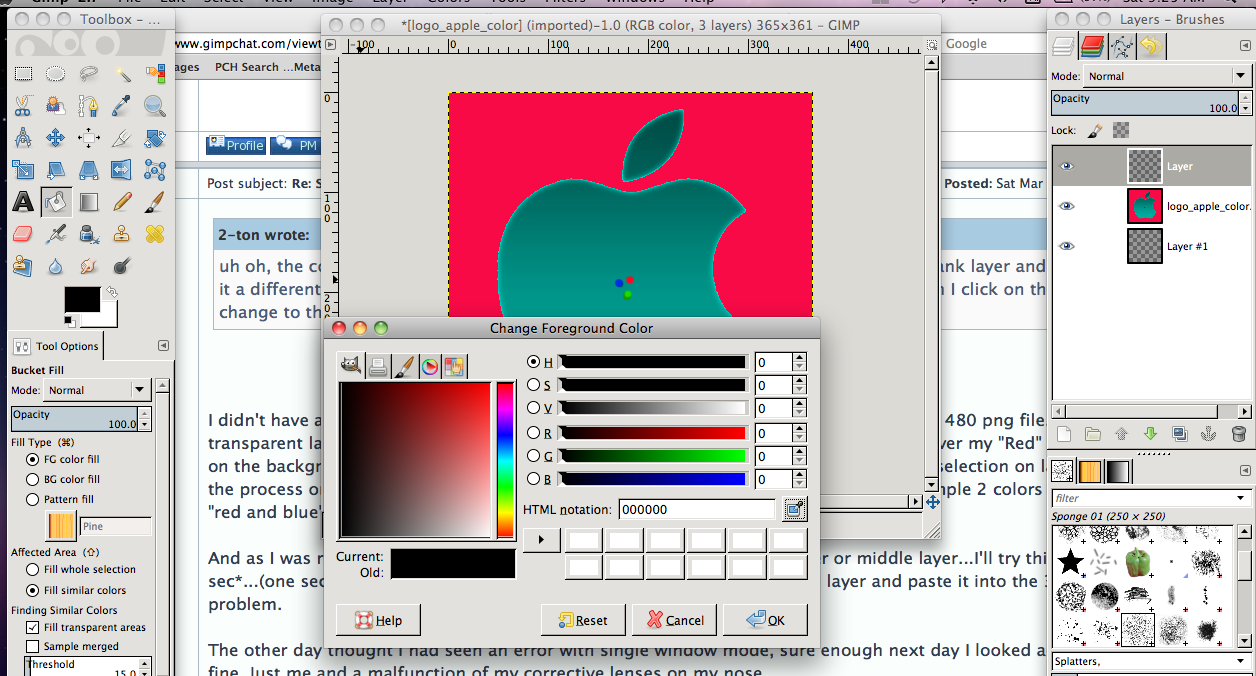
uh oh, the color picker wouldn't work when I tried to use it. I had just bucket filled a blank layer and decided to make it a different color, so I tried to use the picker to grab a color on another layer but when I click on the picker, it didn't change to the picker icon. It was a 3 layer png, and this was the middle layer.


Top
 Post subject: Re: Strolling Down Mac Gimp Lane. :)
PostPosted: Sat Mar 03, 2012 12:10 am  (#14) 
Offline
GimpChat Member

Joined: Mar 14, 2011
Posts: 998
2-ton wrote:
uh oh, the color picker wouldn't work when I tried to use it. I had just bucket filled a blank layer and decided to make it a different color, so I tried to use the picker to grab a color on another layer but when I click on the picker, it didn't change to the picker icon. It was a 3 layer png, and this was the middle layer.

Hmm this I have to investigate. I just opened a PNG and added a transparent layer, bucket filled with blue. Then I clicked on the color changer and it turned into an eyedropper which also brought up the color palette. So, have not duplicated the issue.

Thanks 2-ton for the feedback.


Top
 Post subject: Re: Strolling Down Mac Gimp Lane. :)
PostPosted: Sat Mar 03, 2012 8:03 am  (#15) 
Offline
GimpChat Member

Joined: Jul 11, 2011
Posts: 111
2-ton wrote:
uh oh, the color picker wouldn't work when I tried to use it. I had just bucket filled a blank layer and decided to make it a different color, so I tried to use the picker to grab a color on another layer but when I click on the picker, it didn't change to the picker icon. It was a 3 layer png, and this was the middle layer.


I didn't have any issue with my test install. I made a 3 color pattern background, a 640 x 480 png file. I made 2 transparent layers above it. On the first transparent layer I drew out a square selection over my "Red" strip, then clicked on the background layer into my "green" strip. Then was able to past the green into the selection on layer 2. I reversed the process on the 3rd layer. No problem. I was even able to widen the selection and sample 2 colors and it mixed ... "red and blue" and made a purple out of it. And that pasted fine.

And as I was reading this...I see where you said you had used the 2nd layer or middle layer...I'll try this too.... *one sec*...(one second later) *back* I was able to "pick" the color from the 2nd layer and paste it into the 3rd layer no problem.

The other day thought I had seen an error with single window mode, sure enough next day I looked again and all was fine. Just me and a malfunction of my corrective lenses on my nose.

Happy huntin'!

WW


Top
 Post subject: Re: Strolling Down Mac Gimp Lane. :)
PostPosted: Sat Mar 03, 2012 9:19 am  (#16) 
Offline
GimpChat Member
User avatar

Joined: Apr 08, 2010
Posts: 5420
Location: Northwest Ohio
Just found another oddity....I had two layers, a pic on top and just black on bottom. the top pic had a transparent border around it so the black showed through. On the bottom layer I tried to do select>distort. Both times I tried it, when I clicked ok it shut gimp down.

I am thinking perhaps the layer I wanted to use the color picker on wasn't right in some way...maybe should have done layer to image size or some such thing. However with the select>distort, I did have both layers' layer to image size'.


Top
 Post subject: Re: Strolling Down Mac Gimp Lane. :)
PostPosted: Sat Mar 03, 2012 9:28 am  (#17) 
Offline
GimpChat Member
User avatar

Joined: Apr 08, 2010
Posts: 5420
Location: Northwest Ohio
just tried to use the color picker again...took a screen shot...the color choice screen doesn't look right and it wouldn't let me bucket fill, either.
Image


Top
 Post subject: Re: Strolling Down Mac Gimp Lane. :)
PostPosted: Sat Mar 03, 2012 10:00 am  (#18) 
Offline
GimpChat Member

Joined: Jul 11, 2011
Posts: 111
2-ton wrote:
just tried to use the color picker again...took a screen shot...the color choice screen doesn't look right and it wouldn't let me bucket fill, either.
Image


Which color from Layer 2 are you selecting? Is this a logo I can download?


Top
 Post subject: Re: Strolling Down Mac Gimp Lane. :)
PostPosted: Sat Mar 03, 2012 12:56 pm  (#19) 
Offline
GimpChat Member
User avatar

Joined: Apr 07, 2010
Posts: 14182
It doesn't look like you had the "fill whole selection" selected on your bucket tool

_________________
Image


Top
 Post subject: Re: Strolling Down Mac Gimp Lane. :)
PostPosted: Sat Mar 03, 2012 9:42 pm  (#20) 
Offline
GimpChat Member
User avatar

Joined: Apr 08, 2010
Posts: 5420
Location: Northwest Ohio
@ww I couldn't get the color picker to work...could not get the icon cursor when I clicked on the eyedropper, so didn't even think about what color I wanted. The Logo is one I made for some tutorial, I forget which one though. Well I didn't 'make' it, I changed it from the apple logo I got from google images. Oh wait, I remember I made that as one of those pics you stare at the dots then look at a blank wall to see the reversed color image on the wall.

@molly...true, but should that matter? I didn't care how much of the pic was filled, only that something would fill. I was more interested in trying to get the color picker to work.


Top
Post new topic Reply to topic  [ 93 posts ]  Go to page 1, 2, 3, 4, 5  Next

All times are UTC - 5 hours [ DST ]


* Login  


Powered by phpBB3 © phpBB Group