It is currently Wed Jun 10, 2026 4:25 am


All times are UTC - 5 hours [ DST ]


Post new topic Reply to topic  [ 34 posts ]  Go to page Previous  1, 2
Author Message
 Post subject: Re: Cran-Tau
PostPosted: Sat Sep 25, 2010 11:29 pm  (#21) 
Offline
GimpChat Member
User avatar

Joined: Sep 24, 2010
Posts: 12775
To Rod; you can dooo ittt. lol

:)

_________________
Lyle

Psalm 109:8

Image


Top
 Post subject: Re: Cran-Tau
PostPosted: Sat Sep 25, 2010 11:36 pm  (#22) 
Offline
GimpChat Member
User avatar

Joined: Apr 08, 2010
Posts: 5420
Location: Northwest Ohio
Image


Top
 Post subject: Re: Cran-Tau
PostPosted: Sun Sep 26, 2010 1:12 am  (#23) 
Offline
Retired Staff
User avatar

Joined: May 22, 2008
Posts: 6946
Location: Somewhere in GIMP
Rod wrote:
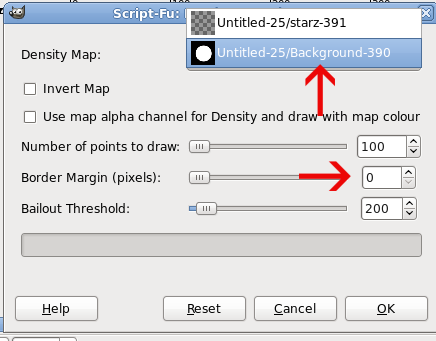
lol ... now it keeps telling me the density map has to be the same size as the layer?
I get that message if I change the Border Margin setting to something other than zero.

You should have two layers.

The top layer is either white or transparent. Make sure you have the top layer selected before you start the filter.

The bottom layer is the density map - black bg and white shape. Make sure you have it selected in the Density Map dropdown (what is the 'official' name for that dropdown?).

Image

_________________
Image
World War IV will be fought with sticks and stones. - Albert Einstein


Top
 Post subject: Re: Cran-Tau
PostPosted: Sun Sep 26, 2010 11:48 am  (#24) 
Offline
Global Moderator
User avatar

Joined: May 16, 2010
Posts: 16023
Ahh must be the border margin thing then, although i think the default settings has 0 for border.Not sure though.Ill try again. =)

Thanks O!

_________________
Image


Top
 Post subject: Re: Cran-Tau
PostPosted: Sun Sep 26, 2010 8:26 pm  (#25) 
Offline
GimpChat Member
User avatar

Joined: Apr 08, 2010
Posts: 5420
Location: Northwest Ohio
what is bailout threshold?


Top
 Post subject: Re: Cran-Tau
PostPosted: Sun Sep 26, 2010 8:34 pm  (#26) 
Offline
GimpChat Member
User avatar

Joined: Jul 04, 2010
Posts: 2253
Location: Retired Moderator Slowly Returning to the Living.
Here is two of my many experiments with it.
Attachment:
Wow.jpg
Wow.jpg [ 466.05 KiB | Viewed 1821 times ]


And


Attachments:
Kisses.jpg
Kisses.jpg [ 1.28 MiB | Viewed 1821 times ]

_________________
Artists aren't crazy! We're eccentric! ~G.M. Ross

Image

My Sigs = My Photos
Check out my work at http://www.flickr.com/photos/photomastergreg.
Top
 Post subject: Re: Cran-Tau
PostPosted: Sun Sep 26, 2010 8:46 pm  (#27) 
Offline
GimpChat Member
User avatar

Joined: Apr 08, 2010
Posts: 5420
Location: Northwest Ohio
those are very cool...how about a quick run-through?


Top
 Post subject: Re: Cran-Tau
PostPosted: Sun Sep 26, 2010 10:21 pm  (#28) 
Offline
GimpChat Member
User avatar

Joined: Jul 04, 2010
Posts: 2253
Location: Retired Moderator Slowly Returning to the Living.
I created a 800x600 blank white image.
I created a large black text layer that said wow.
I created a new transparent layer.
I selected a brush called Jelly_violet_lg.
I ran RobA's Random Density map on the transparent layer, using the text layer as the source.
I created a new transparent layer.
I selected a brush called Jelly_gunmetalblue_lg.
I ran RobA's Random Density map on the transparent layer, using the text layer as the source and inverted map.
I added a drop shadow to purple text layer.
I linked the shadow and the purple text layer and moved them slightly.
That was it for the first one.

The second one I did with a brush I created from a model's lips and added a gradient background.
Then I did the shadow on the lips layer, skewed it and shrunk the height

I can give more detail if needed.

_________________
Artists aren't crazy! We're eccentric! ~G.M. Ross

Image

My Sigs = My Photos
Check out my work at http://www.flickr.com/photos/photomastergreg.


Top
 Post subject: Re: Cran-Tau
PostPosted: Sun Sep 26, 2010 10:46 pm  (#29) 
Offline
GimpChat Member
User avatar

Joined: Sep 24, 2010
Posts: 12775
I like these PM. Man what cool toy this Script-fu is. :)

_________________
Lyle

Psalm 109:8

Image


Top
 Post subject: Re: Cran-Tau
PostPosted: Mon Sep 27, 2010 5:42 am  (#30) 
Offline
Global Moderator
User avatar

Joined: May 16, 2010
Posts: 16023
I hope to get it to work someday. lol

_________________
Image


Top
 Post subject: Re: Cran-Tau
PostPosted: Mon Sep 27, 2010 8:43 pm  (#31) 
Offline
Script Coder
User avatar

Joined: Jul 14, 2010
Posts: 697
PhotoMaster wrote:
Here is two of my many experiments with it.
Attachment:
Wow.jpg


And


Those were the grid version, right?

-Rob A>

_________________
Image
Fantasy Cartography and Mapping by RobA


Top
 Post subject: Re: Cran-Tau
PostPosted: Mon Sep 27, 2010 8:48 pm  (#32) 
Offline
GimpChat Member
User avatar

Joined: Jul 04, 2010
Posts: 2253
Location: Retired Moderator Slowly Returning to the Living.
Grid Version??

_________________
Artists aren't crazy! We're eccentric! ~G.M. Ross

Image

My Sigs = My Photos
Check out my work at http://www.flickr.com/photos/photomastergreg.


Top
 Post subject: Re: Cran-Tau
PostPosted: Mon Sep 27, 2010 10:52 pm  (#33) 
Offline
GimpChat Member
User avatar

Joined: Apr 08, 2010
Posts: 5420
Location: Northwest Ohio
settings?


Top
 Post subject: Re: Cran-Tau
PostPosted: Tue May 10, 2016 9:05 am  (#34) 
Offline
GimpChat Member
User avatar

Joined: Apr 20, 2011
Posts: 287
Location: Dane-ish Co., West Gonsin
I bring you, "Greetings!", from the Year 2016! (You are NOT--in a million years--going to believe who's running for President!! (well, one of them, anyway...))

I am time-traveling back to investigate what may have happened to RobA's random-density-fill.scm script. Reference is made in this thread to two versions (types, really) of the script: I gather that the original paints in random locations, while a later version aligns locations to a (pre-defined, likely) grid.

Lyle's creation appears to have used the former and PhotoMaster's more regular composition the latter (although his later question suggests he may not have been aware of it).

But I did not come to sow discord here in the past, but only to report that my problem in the future will be (er, "will have been"??) with a version identified internally as "v2.1". I also came back to see if Rod ever figured it out, but I see that his problem was eerily similar to mine.

I did have this working in the past... er, well, "less distant future", but like so many scripts, when I went to use it again, only 6 or so years later, it seems to be a different beast--or I am. The (non)-behavior, for me, with v2.1 is that I set up the white-and-gray-on-black density layer as a density map, and then create an equally sized white or transparent map above it, and select it as the active layer, and then run the random-density-map filter/script on it with a new red cute-little-star brush, and? nada. zippo. dudzo. I'm left with an unblemished new layer, white or transparent as the case may be. (may will have been, in the future: 2016)

In the other, more complicated, xcf--the one I really want it to work for, I was getting a different error: the one Rob reported here, that the active and density-map layers' sizes did not match. That left me crest-fallen, as I had made both as new layers, w/o touching size parameters. At one point, I even duped the map layer to make a new layer and filled it with white, but with similar disappointment as reward.

However, finding mention here of other versions led me to look inside my (GIMP 2.8--yes, it gets THAT far!!!) scripts/ folder where I found I had even earlier[1] found versions 1.0 and 2.0. v2.0 worked for me in the ways described.

1.0 did also. It has a plainer set of options, including a "number of objects to paint", which I prefer but ignorantly set to 5000 as a first test, and a tell-tale user-setting for a "Bailout Threshold" as well--of which one couldn't ask a better hint of original authorship... :mrgreen:).

I do think I detect a "pattern" to the randomness, in this fashion: in order to monitor progress, I chose to draw only 100 objects, and then used Ctrl-F to repeat applications of the same filter. "I thought I saw" a preference for the filter to place new objects near existing ones; that is to say, I think I see arcs and lines forming--but that may just be the brain doin its thing too.

(Like the original Rob, I'm trying to paint forests, but to give a bumpy impression of them in heightmaps carved on CNC.)

[1] "early/late" soon have little meaning for us time-travelers. and hallucinators. ...and forum readers.

_________________
--
GraMP
"Once you sit on your glasses, the rest of getting old seems obvious."


Top
Post new topic Reply to topic  [ 34 posts ]  Go to page Previous  1, 2

All times are UTC - 5 hours [ DST ]


* Login  


Powered by phpBB3 © phpBB Group