It is currently Wed Sep 23, 2026 7:39 pm


All times are UTC - 5 hours [ DST ]


Post new topic Reply to topic  [ 128 posts ]  Go to page 1, 2, 3, 4, 5 ... 7  Next
Author Message
 Post subject: Gimp 2.8 (my release)
PostPosted: Sat May 12, 2012 9:10 am  (#1) 
Offline
GimpChat Member

Joined: Mar 14, 2011
Posts: 998
Hi All,

My Gimp 2.8 builds and the Useful Plugins are now available at my website (www.partha.com).

Thanks,
Partha


Share on Facebook Share on Twitter Share on Orkut Share on Digg Share on MySpace Share on Delicious Share on Technorati
Top
 Post subject: Re: Gimp 2.8 (my release)
PostPosted: Sat May 12, 2012 10:06 am  (#2) 
Offline
GimpChat Member

Joined: May 05, 2012
Posts: 39
Does the windows installer version require you to uninstall gimp 3.6 ?
I mean as long as your path is not same as old 3.6 will both work .

Edit: there seems to be something wrong with the zipped plugin version , just opens a new page with code . exe version of plugin is fine downloading . This applies to both 32 and 64bit DL links too .


Top
 Post subject: Re: Gimp 2.8 (my release)
PostPosted: Sat May 12, 2012 10:39 am  (#3) 
Offline
GimpChat Member
User avatar

Joined: Apr 30, 2010
Posts: 1937
Location: Missouri
I tried it, like all of the other installations it asks for one dll after another and when I hunt down and find most of them it still asks for them. It's like some sadistic game, I wait for years for something, then when it finally comes out it doesn't install. Then someone comes out with another installer and it doesn't work either. I give up, I won't mess with it anymore, I'll just stick with 2.6.12, that one works. Thanks for your efforts though.

_________________
Image
The last time I kept an open mind,
my brain fell out and the dog grabbed it.
Now it's full of dirt, toothmarks, and dog slobber.
No more open minds or dogs for me.


Top
 Post subject: Re: Gimp 2.8 (my release)
PostPosted: Sat May 12, 2012 11:01 am  (#4) 
Offline
GimpChat Member
User avatar

Joined: Apr 07, 2010
Posts: 14182
Partha,
I downloaded your Gimp-2.8 (64-bit). Everything installed ok. I then clicked Wilbur to open it and came up with an error (OXC000007b), then it opened. Everything looks fine.
I then tried GMIC, came up with same error as above, tried MathMap, same error. Then I went to File Logos > Metallica, same error, then tried distorts, bevel, same error. That is as far as I went so I guess I could say it isn't working properly, sorry.

_________________
Image


Top
 Post subject: Re: Gimp 2.8 (my release)
PostPosted: Sat May 12, 2012 11:22 am  (#5) 
Offline
GimpChat Member

Joined: Mar 14, 2011
Posts: 998
Edkiefer wrote:
Does the windows installer version require you to uninstall gimp 3.6 ?
I mean as long as your path is not same as old 3.6 will both work .

Edit: there seems to be something wrong with the zipped plugin version , just opens a new page with code . exe version of plugin is fine downloading . This applies to both 32 and 64bit DL links too .

No, it won't uninstall anything.

The Plugins are in a 7z zipped file. I don't know why it does that. Can you right click and save it?

Thanks,
Partha


Last edited by partha on Sat May 12, 2012 11:28 am, edited 1 time in total.

Top
 Post subject: Re: Gimp 2.8 (my release)
PostPosted: Sat May 12, 2012 11:27 am  (#6) 
Offline
GimpChat Member

Joined: Mar 14, 2011
Posts: 998
molly wrote:
Partha,
I downloaded your Gimp-2.8 (64-bit). Everything installed ok. I then clicked Wilbur to open it and came up with an error (OXC000007b), then it opened. Everything looks fine.
I then tried GMIC, came up with same error as above, tried MathMap, same error. Then I went to File Logos > Metallica, same error, then tried distorts, bevel, same error. That is as far as I went so I guess I could say it isn't working properly, sorry.

Molly,

That error typically means that you are trying to open a 64-bit file on a 32-bit OS. It shouldn't happen to you since I think you have a 64-bit OS? Can you tell me a bit more about the your operating system?

Thanks,
Partha

Edit: Molly, as a test, I downloaded my build (64-bit) from my website and installed it like you would. It took a long time to find all the fonts and then opened up just fine. I will test the plugins next.

BTW, I tested my builds on 2 64-bit machines, 1 32-bit Windows 7 machine and 1 32-bit XP machine.


Last edited by partha on Sat May 12, 2012 11:45 am, edited 1 time in total.

Top
 Post subject: Re: Gimp 2.8 (my release)
PostPosted: Sat May 12, 2012 11:30 am  (#7) 
Offline
GimpChat Member

Joined: Mar 14, 2011
Posts: 998
Gms9810 wrote:
I tried it, like all of the other installations it asks for one dll after another and when I hunt down and find most of them it still asks for them. It's like some sadistic game, I wait for years for something, then when it finally comes out it doesn't install. Then someone comes out with another installer and it doesn't work either. I give up, I won't mess with it anymore, I'll just stick with 2.6.12, that one works. Thanks for your efforts though.

Sorry about your bad experience. All DLLs are included in the build. Can you send me some screenshots of what is happening after you install it?


Top
 Post subject: Re: Gimp 2.8 (my release)
PostPosted: Sat May 12, 2012 11:58 am  (#8) 
Offline
GimpChat Member

Joined: May 05, 2012
Posts: 39
partha wrote:
Edkiefer wrote:
Does the windows installer version require you to uninstall gimp 3.6 ?
I mean as long as your path is not same as old 3.6 will both work .

Edit: there seems to be something wrong with the zipped plugin version , just opens a new page with code . exe version of plugin is fine downloading . This applies to both 32 and 64bit DL links too .

No, it won't uninstall anything.

The Plugins are in a 7z zipped file. I don't know why it does that. Can you right click and save it?

Thanks,
Partha

"Save link as" worked, I forgot about that .


Top
 Post subject: Re: Gimp 2.8 (my release)
PostPosted: Sat May 12, 2012 12:10 pm  (#9) 
Offline
GimpChat Member
User avatar

Joined: Apr 07, 2010
Posts: 14182
Quote:
Molly,

That error typically means that you are trying to open a 64-bit file on a 32-bit OS. It shouldn't happen to you since I think you have a 64-bit OS? Can you tell me a bit more about the your operating system?

Thanks,
Partha


I have Windows 7 (64-bit)
i5 core
8 GB RAM
1T. space
What else should I put here?

_________________
Image


Top
 Post subject: Re: Gimp 2.8 (my release)
PostPosted: Sat May 12, 2012 12:29 pm  (#10) 
Offline
GimpChat Member

Joined: Mar 14, 2011
Posts: 998
molly wrote:
Quote:
Molly,

That error typically means that you are trying to open a 64-bit file on a 32-bit OS. It shouldn't happen to you since I think you have a 64-bit OS? Can you tell me a bit more about the your operating system?

Thanks,
Partha


I have Windows 7 (64-bit)
i5 core
8 GB RAM
1T. space
What else should I put here?

Nothing. These are fine specifications. I am stumped why you got the error. Would you do me a favor and re-download the 64-bit build and try again? I reran the installation and it worked fine for me.


Top
 Post subject: Re: Gimp 2.8 (my release)
PostPosted: Sat May 12, 2012 12:35 pm  (#11) 
Offline
GimpChat Member
User avatar

Joined: Apr 07, 2010
Posts: 14182
Ok Partha I will do that. I have to go back to Windows, I am now in Linux Fedora on my other hard drive.

_________________
Image


Top
 Post subject: Re: Gimp 2.8 (my release)
PostPosted: Sat May 12, 2012 12:51 pm  (#12) 
Offline
GimpChat Member

Joined: Mar 14, 2011
Posts: 998
molly wrote:
Ok Partha I will do that. I have to go back to Windows, I am now in Linux Fedora on my other hard drive.

Molly,

Thanks! I have gotten feedback on my website that 64-bit downloaded and installed perfectly including the plugins. When you are ready just PM and we can sort this all out.

Partha


Top
 Post subject: Re: Gimp 2.8 (my release)
PostPosted: Sat May 12, 2012 1:05 pm  (#13) 
Offline
GimpChat Member
User avatar

Joined: Apr 07, 2010
Posts: 14182
Ok thanks,
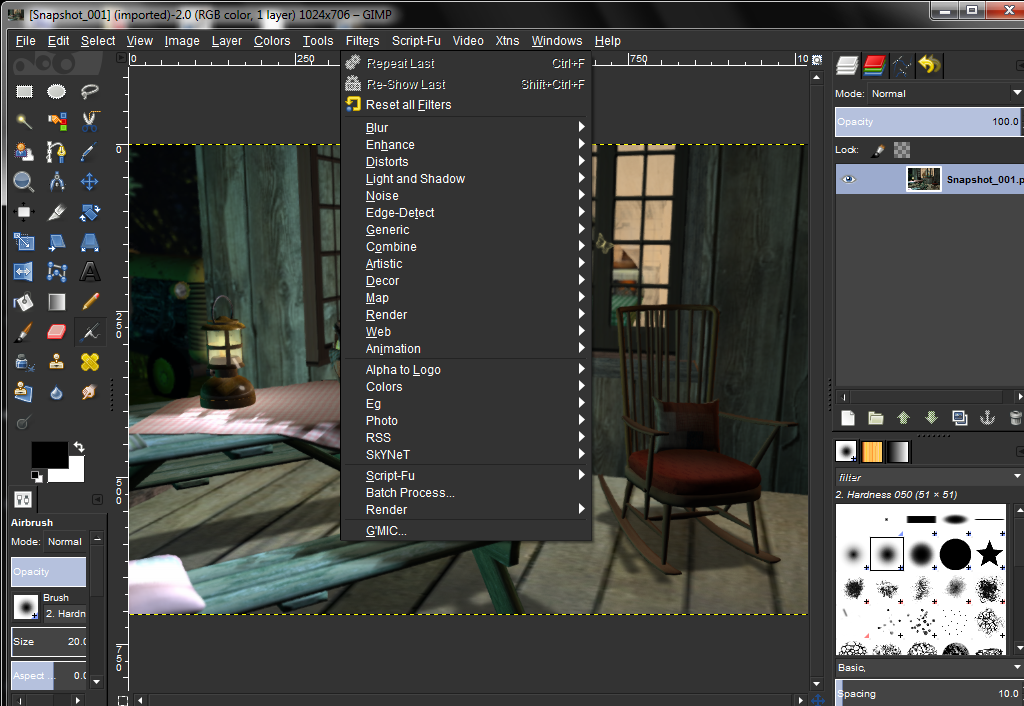
I used control panel and got rid of all traces or previous installation and re-downloaded again from your site. So far, no errors BUT also no GMIC, Melatica in file-logos didn't work, under Script-Fu > Edges, picture frame doesn't work or add mat, but the dialog comes up but nothing happens.
Under distorts, there is no bevel.
I have to go for a while to prepare supper so I will come back later and try some more things to see what works and doesn't work.

_________________
Image


Top
 Post subject: Re: Gimp 2.8 (my release)
PostPosted: Sat May 12, 2012 1:45 pm  (#14) 
Offline
GimpChat Member
User avatar

Joined: Mar 23, 2012
Posts: 7388
Location: Göteborg at last!
Bevel should be in decor Molly.


Top
 Post subject: Re: Gimp 2.8 (my release)
PostPosted: Sat May 12, 2012 2:07 pm  (#15) 
Offline
GimpChat Member
User avatar

Joined: Apr 07, 2010
Posts: 14182
It probably is Erisian, but the one I like is supposed to be in distorts, maybe I just have to add it from my arsenal. thanks

_________________
Image


Top
 Post subject: Re: Gimp 2.8 (my release)
PostPosted: Sat May 12, 2012 2:18 pm  (#16) 
Offline
GimpChat Member
User avatar

Joined: Mar 23, 2012
Posts: 7388
Location: Göteborg at last!
Ok. Didn't realize you had two.


Top
 Post subject: Re: Gimp 2.8 (my release)
PostPosted: Sat May 12, 2012 3:53 pm  (#17) 
Offline
GimpChat Member
User avatar

Joined: Sep 29, 2011
Posts: 120
Location: Texas
I was so happy to log in and see the news of partha's build, I've been waiting for it with great anticipation. The install went perfectly, (I use the 64 bit), have used G'MiC and am anxious to get going with it.


Thank you soooooo much Partha!!!!!!!!!!!!!!

_________________
“There´s tools and colours for all of us,
to lend from nature to make the world
more understandable and beautiful”.

Image


Top
 Post subject: Re: Gimp 2.8 (my release)
PostPosted: Sat May 12, 2012 4:03 pm  (#18) 
Offline
GimpChat Member
User avatar

Joined: Apr 07, 2010
Posts: 14182
@Partha
Here is what I know so far.
When I open your Gimp, I have to X out 18 times cuz I get that same error that many times, except everyone is from a different plug-in. Here are the names,
wavelet-denoise.exe, twist.exe, saturate.exe, resynth.exe, pspi.exe, Plasma2.exe, mathmap.exe, gmic_gimp.exe, gimp-plugin-toy.exe, depth-merge.exe, p4m.exe, colorize.exe, extention-script-fu.exe.

Under file > logos > metallica, no error but also doesn't work. I think this is Graechans script and it hasn't been compiled for gimp-2.8, not sure.
Under Script-Fu, edges, picture frame and add matt don't work, no error and the dialog comes up but nothing happens.

No GMIC, no MathMap. No Gap

There might be lots more but this is what I have come up with so far.

@ erisian, I emailed the bevel plug-in for you.

_________________
Image


Top
 Post subject: Re: Gimp 2.8 (my release)
PostPosted: Sat May 12, 2012 4:04 pm  (#19) 
Offline
GimpChat Member
User avatar

Joined: Apr 30, 2010
Posts: 1937
Location: Missouri
partha wrote:
Gms9810 wrote:
I tried it, like all of the other installations it asks for one dll after another and when I hunt down and find most of them it still asks for them. It's like some sadistic game, I wait for years for something, then when it finally comes out it doesn't install. Then someone comes out with another installer and it doesn't work either. I give up, I won't mess with it anymore, I'll just stick with 2.6.12, that one works. Thanks for your efforts though.

Sorry about your bad experience. All DLLs are included in the build. Can you send me some screenshots of what is happening after you install it?

Sure, I'll reinstall it and do a capture of every error. It may have to be done tonight.

_________________
Image
The last time I kept an open mind,
my brain fell out and the dog grabbed it.
Now it's full of dirt, toothmarks, and dog slobber.
No more open minds or dogs for me.


Top
 Post subject: Re: Gimp 2.8 (my release)
PostPosted: Sat May 12, 2012 4:55 pm  (#20) 
Offline
GimpChat Member
User avatar

Joined: Sep 29, 2011
Posts: 120
Location: Texas
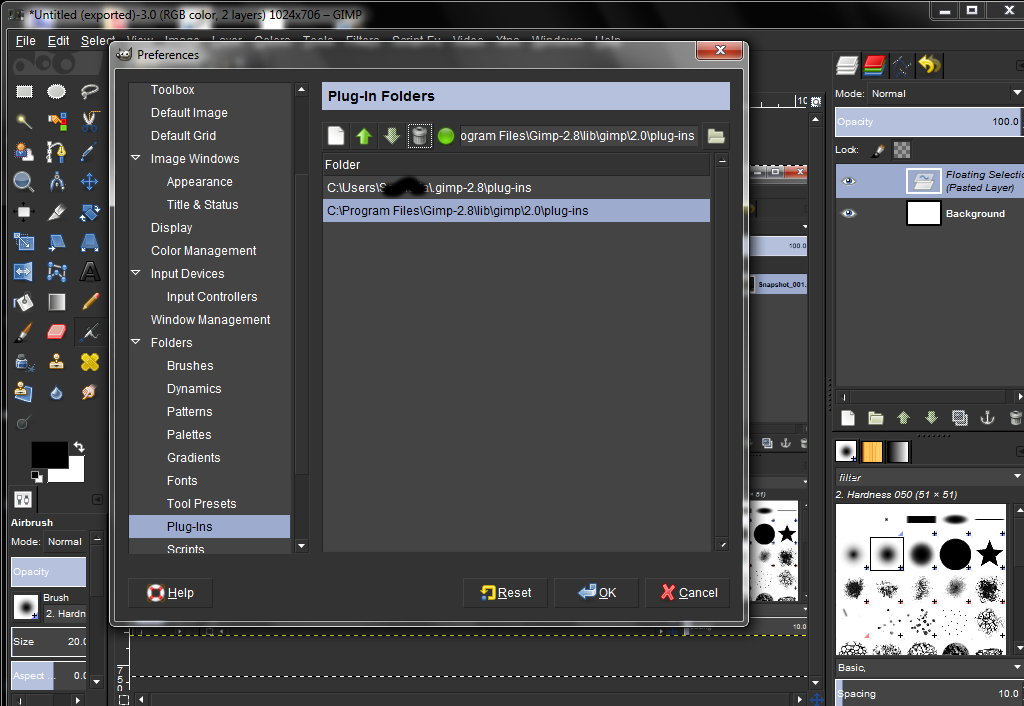
As I posted here and so I don't duplicate, but so you can see...I have discovered I am having some .py issues. As in, the one's i put in my plug-ins folder...don't show up. Such as Gurm...paint.net callout...(the two main ones I need)....and a few misc. ones that aren't a big deal. I am going to try moving them to the C://program files gimp or playing around with it in case I figure out what I am doing wrong...

The original post is here...
Original post where you mentioned you installed python in your build with my info.

Image

Image


thank you so very very much Partha...other than this it's worked like a charm.

_________________
“There´s tools and colours for all of us,
to lend from nature to make the world
more understandable and beautiful”.

Image


Top
Post new topic Reply to topic  [ 128 posts ]  Go to page 1, 2, 3, 4, 5 ... 7  Next

All times are UTC - 5 hours [ DST ]


* Login  


Powered by phpBB3 © phpBB Group