It is currently Tue Aug 18, 2026 6:13 pm


All times are UTC - 5 hours [ DST ]


Post new topic Reply to topic  [ 81 posts ]  Go to page 1, 2, 3, 4, 5  Next
Author Message
 Post subject: Bytes and Pixels comes out with a spirograph plugin!
PostPosted: Mon May 14, 2012 11:01 am  (#1) 
Offline
Global Moderator
User avatar

Joined: May 16, 2010
Posts: 16161
This is pretty nifty. :)
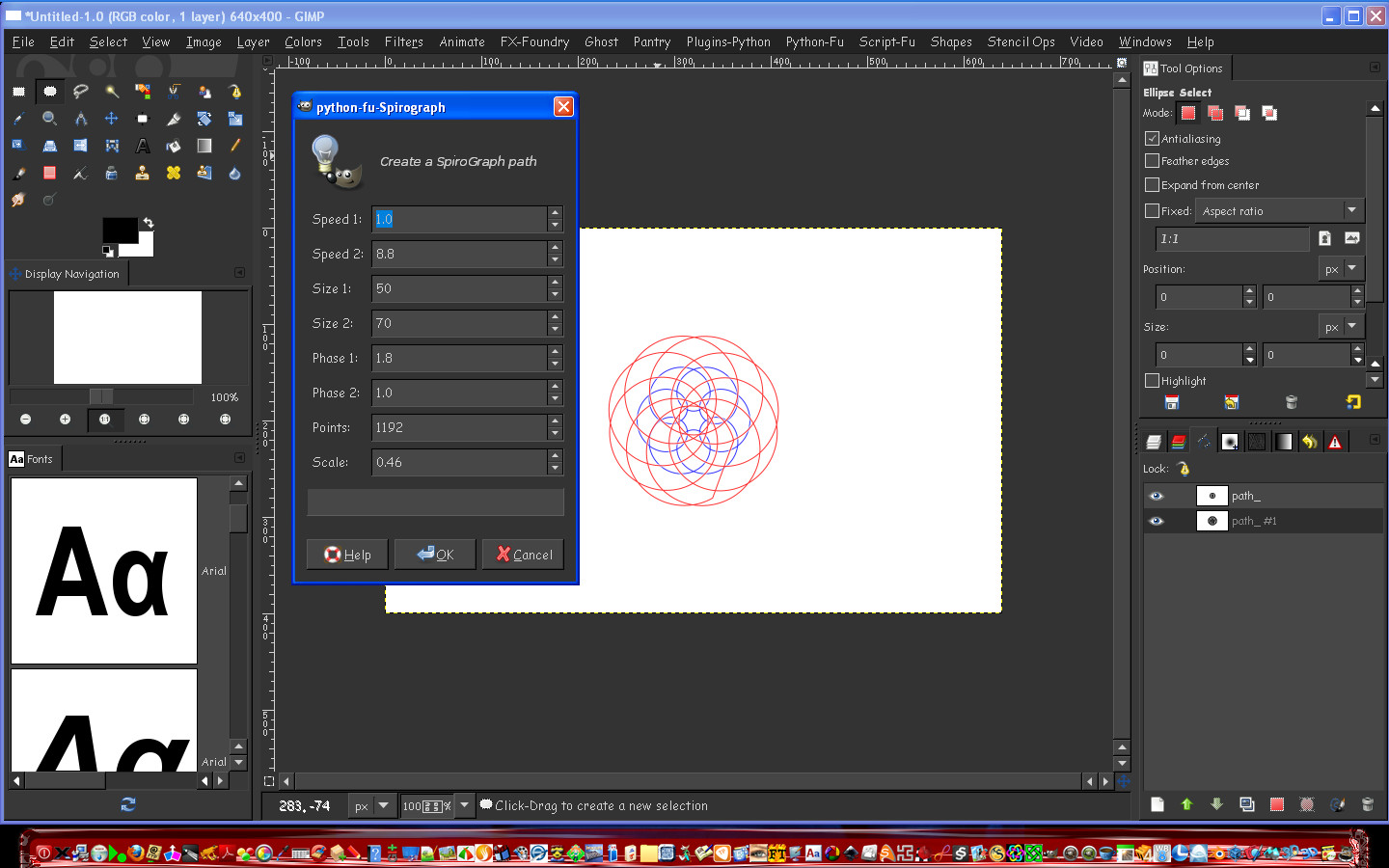
You adjust the values and then run the filter.
The red one is my own (image values shown) the blue one is the default.
The beauty is it creates a path that isn't stroked.

http://registry.gimp.org/node/26291

Image

_________________
Image


Share on Facebook Share on Twitter Share on Orkut Share on Digg Share on MySpace Share on Delicious Share on Technorati
Top
 Post subject: Re: Bytes and Pixels comes out with a spirograph plugin!
PostPosted: Mon May 14, 2012 11:44 am  (#2) 
Offline
GimpChat Member
User avatar

Joined: Mar 23, 2012
Posts: 7388
Location: Göteborg at last!
Thanks for that Rod. I'll be playing all night with that one. I downloaded Word art as well.


Top
 Post subject: Re: Bytes and Pixels comes out with a spirograph plugin!
PostPosted: Mon May 14, 2012 11:45 am  (#3) 
Offline
GimpChat Member
User avatar

Joined: Sep 24, 2010
Posts: 12832
Thanks for sharing Rod; of course I follow my own piper. ;)

:)


Attachments:
spiral_droste.png
spiral_droste.png [ 1.24 MiB | Viewed 6532 times ]

_________________
Lyle

Psalm 109:8

Image
Top
 Post subject: Re: Bytes and Pixels comes out with a spirograph plugin!
PostPosted: Mon May 14, 2012 11:47 am  (#4) 
Offline
GimpChat Member
User avatar

Joined: Mar 23, 2012
Posts: 7388
Location: Göteborg at last!
Wow Lyle, that's amazing! Did you Droste that?


Top
 Post subject: Re: Bytes and Pixels comes out with a spirograph plugin!
PostPosted: Mon May 14, 2012 11:49 am  (#5) 
Offline
GimpChat Member
User avatar

Joined: Sep 24, 2010
Posts: 12832
File name gives it away Erisian. ;)

:)

_________________
Lyle

Psalm 109:8

Image


Top
 Post subject: Re: Bytes and Pixels comes out with a spirograph plugin!
PostPosted: Mon May 14, 2012 11:49 am  (#6) 
Offline
Global Moderator
User avatar

Joined: May 16, 2010
Posts: 16161
Excellent Lyle. :)

_________________
Image


Top
 Post subject: Re: Bytes and Pixels comes out with a spirograph plugin!
PostPosted: Mon May 14, 2012 11:51 am  (#7) 
Offline
GimpChat Member
User avatar

Joined: Mar 23, 2012
Posts: 7388
Location: Göteborg at last!
Sorry, didn't notice that Lyle.


Top
 Post subject: Re: Bytes and Pixels comes out with a spirograph plugin!
PostPosted: Mon May 14, 2012 11:53 am  (#8) 
Offline
GimpChat Member
User avatar

Joined: Sep 24, 2010
Posts: 12832
Thanks Rod. I created 2 paths with this cool python plugin. Couldn't figure out how to scale (will play later) so I scaled the paths to the size that I wanted before stroking them with dynamic brush (love this new GIMP 2.7/2.8 feature) and then, of course droste it.

And you ninja'd me Erisian. lol

:ninja :ninja :)

_________________
Lyle

Psalm 109:8

Image


Top
 Post subject: Re: Bytes and Pixels comes out with a spirograph plugin!
PostPosted: Mon May 14, 2012 11:57 am  (#9) 
Offline
GimpChat Member
User avatar

Joined: Mar 23, 2012
Posts: 7388
Location: Göteborg at last!
Cool! :teeth


Top
 Post subject: Re: Bytes and Pixels comes out with a spirograph plugin!
PostPosted: Mon May 14, 2012 12:15 pm  (#10) 
Offline
Global Moderator
User avatar

Joined: May 16, 2010
Posts: 16161
lylejk wrote:
Thanks Rod. I created 2 paths with this cool python plugin. Couldn't figure out how to scale (will play later) so I scaled the paths to the size that I wanted before stroking them with dynamic brush (love this new GIMP 2.7/2.8 feature) and then, of course droste it.

And you ninja'd me Erisian. lol

:ninja :ninja :)


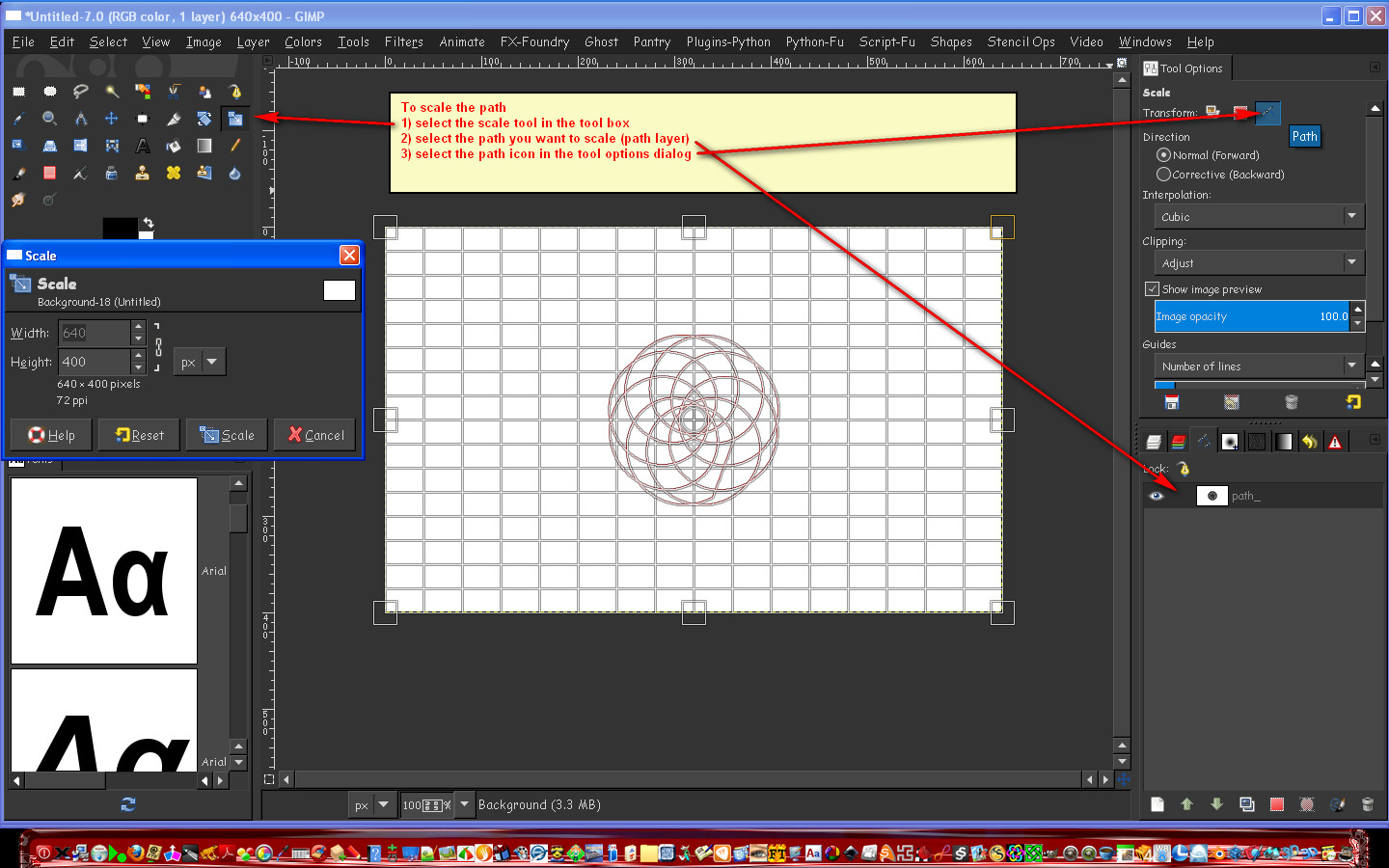
If you want to have two layers of the same path but one larger duplicate the path layer first.
To move or center one path over another either select the move tool and the path icon in the tool options dialog.Or select the path tool in the tool box and select the move option.
Here is how to scale just one path.
Image

_________________
Image


Top
 Post subject: Re: Bytes and Pixels comes out with a spirograph plugin!
PostPosted: Mon May 14, 2012 12:18 pm  (#11) 
Offline
GimpChat Member
User avatar

Joined: Sep 24, 2010
Posts: 12832
Thanks Rod; indeed I wanted to individually scale both paths but independently so I did just that. Lot's of possibilities for this new toy and will experiment more later. Again, thanks for sharing your find. :)

_________________
Lyle

Psalm 109:8

Image


Top
 Post subject: Re: Bytes and Pixels comes out with a spirograph plugin!
PostPosted: Mon May 14, 2012 12:20 pm  (#12) 
Offline
Global Moderator
User avatar

Joined: May 16, 2010
Posts: 16161
No problem. I can't wait to see more of your renders their pretty awesome. :)

_________________
Image


Top
 Post subject: Re: Bytes and Pixels comes out with a spirograph plugin!
PostPosted: Tue May 15, 2012 10:24 pm  (#13) 
Offline
GimpChat Member

Joined: Apr 29, 2012
Posts: 44
Hey guys, glad you like this script. I need to apologize for the lack of documentation. The way it works: Circle 1 and Circle 2 sizes are relative, i.e. 40x70 is the same as 4x7 or 400x700.

The scale represents percentage of the image size (1 being 100%), so scale of 0.3 will output path that is 30 percent of the image smallest dimension (height normally). So if you want to render same path larger just re-run the script with different scale factor.


Top
 Post subject: Re: Bytes and Pixels comes out with a spirograph plugin!
PostPosted: Tue May 15, 2012 10:45 pm  (#14) 
Offline
GimpChat Member
User avatar

Joined: Sep 24, 2010
Posts: 12832
Thanks for coming by B and P; I did figure out the percentage thing and made a few other ones (not sharing) and really do like your creation and thanks for sharing. :)

_________________
Lyle

Psalm 109:8

Image


Top
 Post subject: Re: Bytes and Pixels comes out with a spirograph plugin!
PostPosted: Tue May 15, 2012 11:10 pm  (#15) 
Offline
GimpChat Member

Joined: Apr 29, 2012
Posts: 44
Alright.
The Vector Path plug is coming out maybe later today, check it out as well. I also posted some examples of Spirograph usage on my site.

Cheers!


Top
 Post subject: Re: Bytes and Pixels comes out with a spirograph plugin!
PostPosted: Tue May 15, 2012 11:36 pm  (#16) 
Offline
GimpChat Member
User avatar

Joined: Sep 24, 2010
Posts: 12832
I saw that a few days ago; looks like it could create very cool Guilloché borders like those in Diplomas and Certificates (I wonder what the foruma for meander pattern is?). Look forward to that B-and-P. :)

_________________
Lyle

Psalm 109:8

Image


Top
 Post subject: Re: Bytes and Pixels comes out with a spirograph plugin!
PostPosted: Tue May 15, 2012 11:54 pm  (#17) 
Offline
GimpChat Member
User avatar

Joined: Sep 24, 2010
Posts: 12832
What the hey; why not add RobA's Multifill to the mix. :)


Attachments:
spiral_mfill.png
spiral_mfill.png [ 280.97 KiB | Viewed 2560 times ]

_________________
Lyle

Psalm 109:8

Image
Top
 Post subject: Re: Bytes and Pixels comes out with a spirograph plugin!
PostPosted: Wed May 16, 2012 12:10 am  (#18) 
Offline
GimpChat Member
User avatar

Joined: Sep 24, 2010
Posts: 12832
Since Molly likes lace, I thought I would combine spiralgraph with Drost then Mehdi's Kaleidoscope filter for this lace texture (yes, it's seamless; it's what I do). You all can use the texture however you see fit. Yup; it looks like I'm on a Spiralgraph binge. lol

:)


Attachments:
spiral_kaleido.png
spiral_kaleido.png [ 2.76 MiB | Viewed 2558 times ]

_________________
Lyle

Psalm 109:8

Image
Top
 Post subject: Re: Bytes and Pixels comes out with a spirograph plugin!
PostPosted: Wed May 16, 2012 5:43 am  (#19) 
Offline
GimpChat Member
User avatar

Joined: Mar 23, 2012
Posts: 7388
Location: Göteborg at last!
Beautiful lace Lyle. Nice work.


Top
 Post subject: Re: Bytes and Pixels comes out with a spirograph plugin!
PostPosted: Wed May 16, 2012 5:45 am  (#20) 
Offline
GimpChat Member
User avatar

Joined: Apr 07, 2010
Posts: 14182
Thanks Lyle, I think that would make a very good pattern to bump.

_________________
Image


Top
Post new topic Reply to topic  [ 81 posts ]  Go to page 1, 2, 3, 4, 5  Next

All times are UTC - 5 hours [ DST ]


* Login  


Powered by phpBB3 © phpBB Group