It is currently Wed Jun 10, 2026 3:41 pm


All times are UTC - 5 hours [ DST ]


Post new topic Reply to topic  [ 37 posts ]  Go to page 1, 2  Next
Author Message
 Post subject: Gimp-2.8 Help manual (inside Gimp-2.8) for Windows
PostPosted: Tue May 15, 2012 3:11 pm  (#1) 
Offline
Global Moderator
User avatar

Joined: May 16, 2010
Posts: 16023
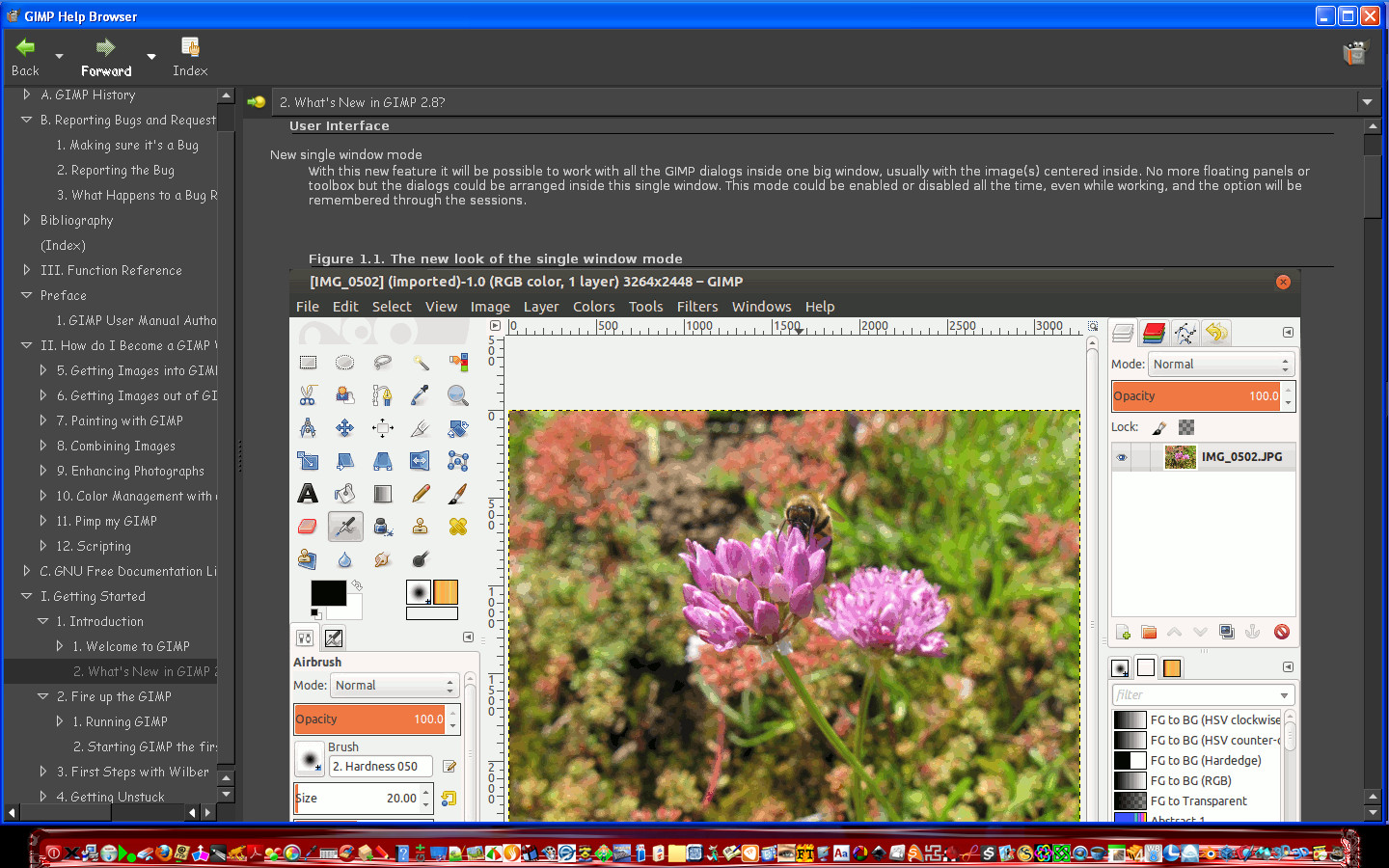
I have a help browser setup ready to go.It works pretty good.<Image>\Help
I just need to get a package together for distribution.Here it is running in Gimp-2.8 (Parthas version)

Image

Uploading it now FTP

_________________
Image


Share on Facebook Share on Twitter Share on Orkut Share on Digg Share on MySpace Share on Delicious Share on Technorati
Top
 Post subject: Re: Gimp-2.8 Help manual (inside Gimp-2.8) for Windows
PostPosted: Tue May 15, 2012 3:35 pm  (#2) 
Offline
Global Moderator
User avatar

Joined: May 16, 2010
Posts: 16023
You can download it here.
www.simplygimp.com/downloads/zip/Gimp-2.8-help.zip
The README is included. Please read it for directions for installing everything correctly.
Inside the zip is a help folder which goes in the share\gimp\2.0\ folder
Inside the zip is a plugins folder - everything inside it goes in your UserFolder\.gimp-2.8\plug-ins folder
Also included is the README and an image (the one above)
Restart Gimp-2.8 and you will be able to go to Help>Help and the dialog will open for the manual. :)
I have only tested this in Parthas version of Windows 32 Gimp-2.8 install.

Enjoy!

_________________
Image


Top
 Post subject: Re: Gimp-2.8 Help manual (inside Gimp-2.8) for Windows
PostPosted: Tue May 15, 2012 11:14 pm  (#3) 
Offline
GimpChat Member
User avatar

Joined: Nov 16, 2011
Posts: 5127
Location: Metro Vancouver, BC
Works in regular 2.8, Vista. I already had 2.6 help set-up using my web browser. All I had to do was copy the help file, I didn't use the plugin files. Context and dialog help work as well.

_________________
Image
Gimp 2.8.18, Linux, median user
Gimp Chat Tutorials Index
Spirit Bear (Kermode)


Top
 Post subject: Re: Gimp-2.8 Help manual (inside Gimp-2.8) for Windows
PostPosted: Wed May 16, 2012 9:55 pm  (#4) 
Offline
Global Moderator
User avatar

Joined: May 16, 2010
Posts: 16023
Odinbc wrote:
Works in regular 2.8, Vista. I already had 2.6 help set-up using my web browser. All I had to do was copy the help file, I didn't use the plugin files. Context and dialog help work as well.


Yes if you have the help browser running but its for Gimp-2.6 help just copy over those files in
share/gimp/2.0/help/en with the Gimp-2.8 docs i provided in the zip folder (help>en folder), and you should be good to go. :)

_________________
Image


Top
 Post subject: Re: Gimp-2.8 Help manual (inside Gimp-2.8) for Windows
PostPosted: Fri May 18, 2012 4:46 pm  (#5) 
Offline
GimpChat Member
User avatar

Joined: Jun 04, 2011
Posts: 254
cool! thanks

_________________
Image


Top
 Post subject: Re: Gimp-2.8 Help manual (inside Gimp-2.8) for Windows
PostPosted: Fri May 18, 2012 10:31 pm  (#6) 
Offline
Global Moderator
User avatar

Joined: May 16, 2010
Posts: 16023
Alonte wrote:
cool! thanks

You are very welcome. :)
As the Gimp-2.8 help files update (as they are unfinished), i will update this package to include newest additions to the manual.

_________________
Image


Top
 Post subject: Re: Gimp-2.8 Help manual (inside Gimp-2.8) for Windows
PostPosted: Sat Jun 09, 2012 8:07 pm  (#7) 
Offline
Script Coder
User avatar

Joined: Feb 18, 2011
Posts: 4826
Location: Bendigo Vic. Australia
I get an 'Invalid argument' error when i open help, help preferences indicates i have a local copy installed but i did not install one, do i need to? and from where for 2.8 help.

_________________
Image
No matter how much you push the envelope, it'll still be stationery.


Top
 Post subject: Re: Gimp-2.8 Help manual (inside Gimp-2.8) for Windows
PostPosted: Sun Jun 10, 2012 4:32 am  (#8) 
Offline
Global Moderator
User avatar

Joined: May 16, 2010
Posts: 16023
Graechan wrote:
I get an 'Invalid argument' error when i open help, help preferences indicates i have a local copy installed but i did not install one, do i need to? and from where for 2.8 help.


Did you use the manual i provided?
Look in the share/gimp/2.0 folder and see if there is a help folder in there.
Inside that folder should be an en folder. Inside that are the html file or docs as well as some other files needed for the manual to work.
Make sure to use the plug-in and dll files i provided.
Also what version are you using?

_________________
Image


Top
 Post subject: Re: Gimp-2.8 Help manual (inside Gimp-2.8) for Windows
PostPosted: Mon Jun 11, 2012 9:51 pm  (#9) 
Offline
Script Coder
User avatar

Joined: Feb 18, 2011
Posts: 4826
Location: Bendigo Vic. Australia
Rod I believe it's all my fault I was a little mixed up with trying to do to many things at once after I deleted my windows, good trick that, but when I get Gimp working properly I'll start again.
Should be soon, I'm resting today to clear my head please forgive any dumb questions.

_________________
Image
No matter how much you push the envelope, it'll still be stationery.


Top
 Post subject: Re: Gimp-2.8 Help manual (inside Gimp-2.8) for Windows
PostPosted: Tue Jun 12, 2012 1:21 am  (#10) 
Offline
Script Coder
User avatar

Joined: Feb 18, 2011
Posts: 4826
Location: Bendigo Vic. Australia
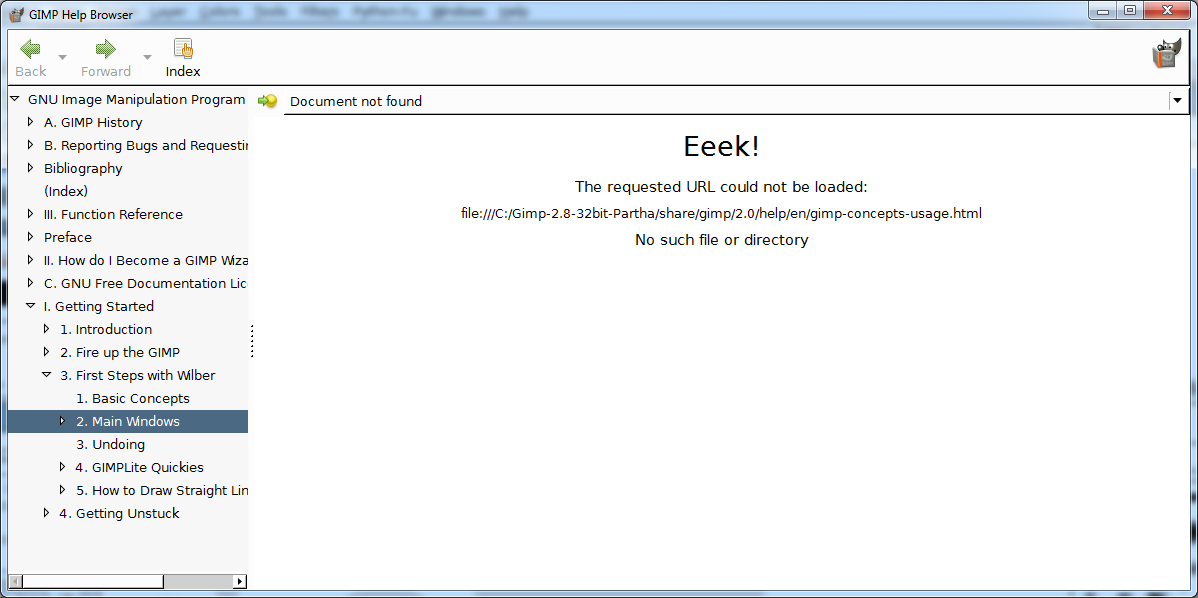
The error I get is because this file is missing

gimp-concepts-usage.html

Failed to open 'file:///C:/Gimp-2.8-64bit-Partha+SF/share/gimp/2.0/help/en/gimp-concepts-usage.html': The specified file was not found.

_________________
Image
No matter how much you push the envelope, it'll still be stationery.


Top
 Post subject: Re: Gimp-2.8 Help manual (inside Gimp-2.8) for Windows
PostPosted: Tue Jun 12, 2012 9:32 pm  (#11) 
Offline
Script Coder
User avatar

Joined: Feb 18, 2011
Posts: 4826
Location: Bendigo Vic. Australia
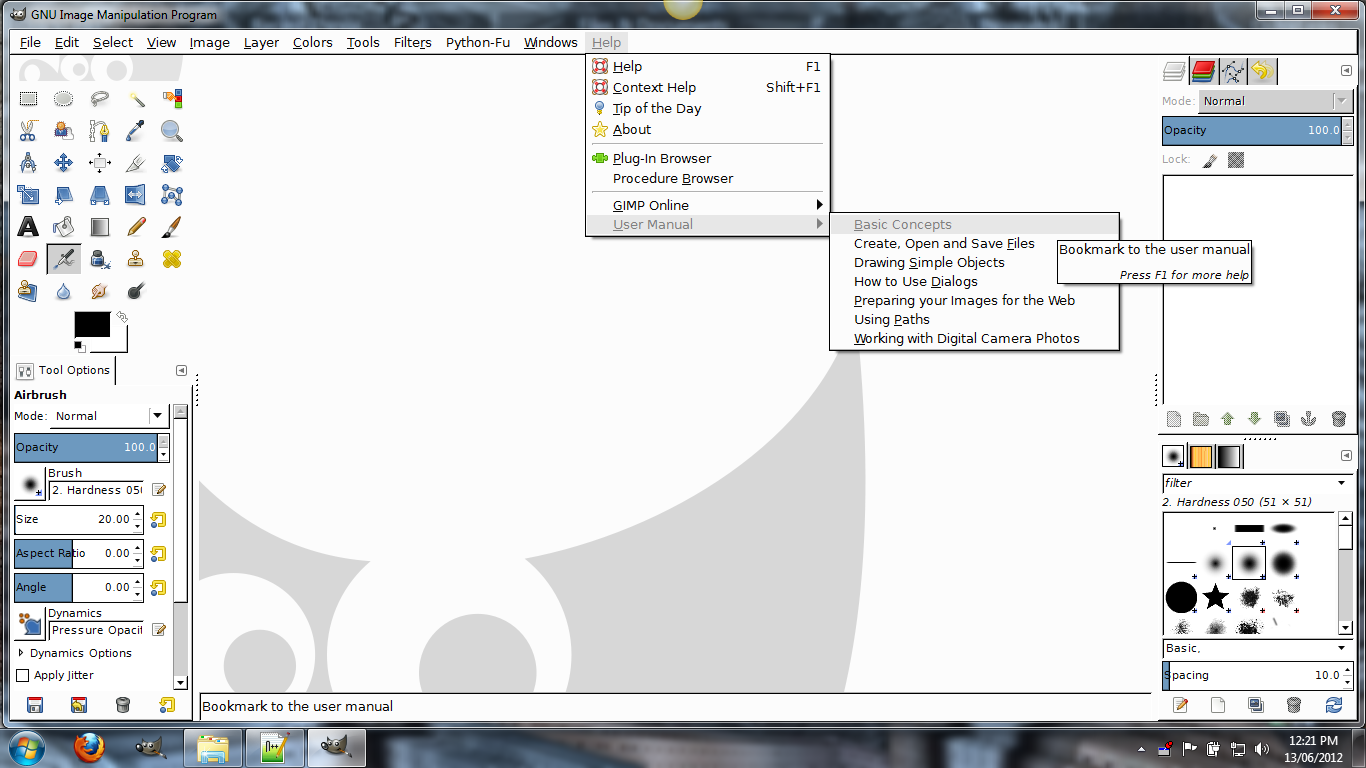
Rod all is fine on 2.8 32bit except for this error

Image

this happens when I select this

Image

_________________
Image
No matter how much you push the envelope, it'll still be stationery.


Top
 Post subject: Re: Gimp-2.8 Help manual (inside Gimp-2.8) for Windows
PostPosted: Wed Jun 13, 2012 10:43 am  (#12) 
Offline
Global Moderator
User avatar

Joined: May 16, 2010
Posts: 16023
Okay here is how i fixed it. (sort of)
1) create a new html file named
gimp-concepts-usage.html
2) copy everything in gimp-first-steps.html to that new html file.
place the new file in the share\gimp\2.0\help\en folder and test it.

You will need to scroll down a bit for the basic concepts info.
The problem is when basic concepts is supposed to load it needs the html# reference for the information on that page. I imagine the same goes for paths and using dialog windows.

You will have to just remember to scroll down the page that the help browser loads to find the information you need.
When Gimp is compiled it creates these menu items so the c file for the help-browser would need to be changed to reflect the difference i think.

_________________
Image


Top
 Post subject: Re: Gimp-2.8 Help manual (inside Gimp-2.8) for Windows
PostPosted: Wed Jun 13, 2012 10:54 am  (#13) 
Offline
Global Moderator
User avatar

Joined: May 16, 2010
Posts: 16023
Paths and using dialogs both need to be updated also. I will get these done asap. :)

_________________
Image


Top
 Post subject: Re: Gimp-2.8 Help manual (inside Gimp-2.8) for Windows
PostPosted: Wed Jun 13, 2012 11:17 am  (#14) 
Offline
GimpChat Member
User avatar

Joined: Jan 13, 2011
Posts: 2639
Location: Poland
I can not test - need access to several computers.
According to me is not about changing the file name.
Why?
Rod (Your solution would be better) - your set time work - not once.
According to my record in terms of environmental variables.
Graechan?
Portable version (no changes in environmental variables) - whether the installation (as amended)?

_________________
Image


Top
 Post subject: Re: Gimp-2.8 Help manual (inside Gimp-2.8) for Windows
PostPosted: Wed Jun 13, 2012 11:20 am  (#15) 
Offline
Global Moderator
User avatar

Joined: May 16, 2010
Posts: 16023
Graechan can you test these two
Help>User Manual>Using Paths
Help>User Manual>How to Use Dialogs
Give me the urls (HTML pages), it is looking for?
Then i can fix them. :)

_________________
Image


Top
 Post subject: Re: Gimp-2.8 Help manual (inside Gimp-2.8) for Windows
PostPosted: Wed Jun 13, 2012 11:27 am  (#16) 
Offline
Global Moderator
User avatar

Joined: May 16, 2010
Posts: 16023
Help>User Manual> using paths should lead to this file
http://docs.gimp.org/2.8/en/gimp-using-paths.html
Help>User Manual>How to Use Dialogs should open this file
http://docs.gimp.org/2.8/en/gimp-concepts-docks.html

_________________
Image


Top
 Post subject: Re: Gimp-2.8 Help manual (inside Gimp-2.8) for Windows
PostPosted: Wed Jun 13, 2012 11:34 am  (#17) 
Offline
GimpChat Member
User avatar

Joined: Jan 13, 2011
Posts: 2639
Location: Poland
Each system is different.
In XP without setting the environment variable does not help.

_________________
Image


Top
 Post subject: Re: Gimp-2.8 Help manual (inside Gimp-2.8) for Windows
PostPosted: Wed Jun 13, 2012 11:52 am  (#18) 
Offline
Global Moderator
User avatar

Joined: May 16, 2010
Posts: 16023
MareroQ wrote:
Each system is different.
In XP without setting the environment variable does not help.


I am testing on Windows xp and it seems to work fine for me now.

_________________
Image


Top
 Post subject: Re: Gimp-2.8 Help manual (inside Gimp-2.8) for Windows
PostPosted: Wed Jun 13, 2012 11:38 pm  (#19) 
Offline
Script Coder
User avatar

Joined: Feb 18, 2011
Posts: 4826
Location: Bendigo Vic. Australia
Rod I do get a bit lost with what you are asking,but if look at these 2 links in firefox you will see where they lead

http://docs.gimp.org/2.8/en/dialogs.html Dialoges

http://docs.gimp.org/2.8/en/gimp-using-paths.html Paths

_________________
Image
No matter how much you push the envelope, it'll still be stationery.


Top
 Post subject: Re: Gimp-2.8 Help manual (inside Gimp-2.8) for Windows
PostPosted: Thu Jun 14, 2012 7:13 am  (#20) 
Offline
Global Moderator
User avatar

Joined: May 16, 2010
Posts: 16023
Graechan wrote:
Rod I do get a bit lost with what you are asking,but if look at these 2 links in firefox you will see where they lead

http://docs.gimp.org/2.8/en/dialogs.html Dialoges

http://docs.gimp.org/2.8/en/gimp-using-paths.html Paths


Sorry Graechan.I didn't mean to confuse you at all.
As you saw before the plugin (when selecting "Basic Concepts" ), would not load the html page because it didn't exist.
So creating the "gimp-concepts-usage.html" page and copying all the data (view src) from gimp-first-steps.html page to it creates the content you need.The plugin will then call the page you created and show it in the help browser window.
The other 2 for Paths and Dialogs have the html pages already available so i have no idea why they do not show in the help browser.The content is there it just isn't showing up for some reason.I will have to look into the code a bit more and get back to you.

Did you try the fix for Basic Concepts link?
Did it work for you?

_________________
Image


Top
Post new topic Reply to topic  [ 37 posts ]  Go to page 1, 2  Next

All times are UTC - 5 hours [ DST ]


* Login  


Powered by phpBB3 © phpBB Group