It is currently Tue Jun 09, 2026 4:46 pm


All times are UTC - 5 hours [ DST ]


Post new topic Reply to topic  [ 22 posts ]  Go to page 1, 2  Next
Author Message
 Post subject: Snapshots Using Fedora [SOLVED]
PostPosted: Wed May 16, 2012 5:20 pm  (#1) 
Offline
GimpChat Member
User avatar

Joined: Apr 07, 2010
Posts: 14182
GIMP Version: 2.6.11
Operating System: Linux
OS Version: Windows7 (64-bit) and Fedora 16
GIMP Experience: Basic Level


I am using Linux Fedora 16. I have KSnapshot installed and have been using that for all my screen shots. Works great, but the problem is when I want to screen a drop down menu, by the time I bring up KSnapshot, the drop down menu won't stay down to snap the pic.

I also tried PrtScn on the keyboard but it doesn't take the picture. I went into a Fedora site and it says it should go into my pictures, but it doesn't.

Can anyone help with this,
Thanx in advance. :gaah :gaah

_________________
Image


Share on Facebook Share on Twitter Share on Orkut Share on Digg Share on MySpace Share on Delicious Share on Technorati
Top
 Post subject: Re: Snapshots Using Fedora
PostPosted: Wed May 16, 2012 5:39 pm  (#2) 
Offline
GimpChat Member
User avatar

Joined: Jan 20, 2012
Posts: 583
Try using lightscreen, I believe it has a linux port.

_________________


"In the face of adversity, there's three things: fly, freeze or fight; We're choosing to fight..."- Guy Boucher, Tampa Bay Lighting Head Coach


Top
 Post subject: Re: Snapshots Using Fedora
PostPosted: Wed May 16, 2012 5:43 pm  (#3) 
Offline
GimpChat Founder
User avatar

Joined: May 22, 2008
Posts: 5241
Location: Gimpville
Try the delay feature to grab screen shots of drop-downs and pop-ups. It works great!!

_________________
“If you reach for the stars, you just might land on a decently sized hill.” - Stuart Hill


Top
 Post subject: Re: Snapshots Using Fedora
PostPosted: Wed May 16, 2012 6:03 pm  (#4) 
Offline
GimpChat Member
User avatar

Joined: Apr 07, 2010
Posts: 14182
Sure doesn't work great for me. The first time, everything locked, took me ten minutes to get out of it.
When I tried again I set the delay to 4 seconds and it just stays at 4 seconds. When I right click and make a drop down it just sits there. grrr

EDIT: strike message above, I finally got it to work after a lot of hesitation. Why won't my PrtScn work, says on the Linux forum that it should go into my pictures but they lied'. :roll:

_________________
Image


Top
 Post subject: Re: Snapshots Using Fedora
PostPosted: Thu May 17, 2012 9:57 am  (#5) 
Offline
GimpChat Founder
User avatar

Joined: May 22, 2008
Posts: 5241
Location: Gimpville
molly wrote:
Why won't my PrtScn work, says on the Linux forum that it should go into my pictures but they lied'. :roll:

Hmmm. Perhaps that's a new feature in Gnome3. Previously in Gnome, Prtsc grabs a snapshot, then brings up dialog that allows you to save it wherever you want, with the default location being the desktop. Search for Screenshot*. Maybe it's automatically putting it in your home/user folder. Prtsc is not going to grab a drop down menu though. When you hit the Prtsc (or any key), the focus moves away and the drop down closes. The delay feature in ksnapshot allows you to refocus the mouse and display drop downs after you hit the "snapshot" button.

_________________
“If you reach for the stars, you just might land on a decently sized hill.” - Stuart Hill


Top
 Post subject: Re: Snapshots Using Fedora
PostPosted: Thu May 17, 2012 10:28 am  (#6) 
Offline
GimpChat Member
User avatar

Joined: Apr 07, 2010
Posts: 14182
Thank you Tux. I searched and no screen shots are anywhere where I can find them.
I will stick with the KSnapshot, I set the seconds to 3 and it gives me a better chance to get all the ducks in a row before executing.

_________________
Image


Top
 Post subject: Re: Snapshots Using Fedora
PostPosted: Thu May 17, 2012 10:33 am  (#7) 
Offline
GimpChat Member
User avatar

Joined: Oct 29, 2010
Posts: 711
Location: Netherlands
I installed ksnapshot icon in the panel.
This avoids having to click in the display.
Might help you too molly.
I agree ksnapshot works quite good.
Gerard.

Edit: No it doesn't work,sorry.

_________________
Gentoo Linux always up-to-date.
Kernel-3.17.4 Python-2.7.8/3.3.5
Gimp-2.8.14

I use Linux only.
And Virtualbox with Win 7


Last edited by gerard82 on Thu May 17, 2012 10:41 am, edited 1 time in total.

Top
 Post subject: Re: Snapshots Using Fedora
PostPosted: Thu May 17, 2012 10:40 am  (#8) 
Offline
GimpChat Member
User avatar

Joined: Apr 07, 2010
Posts: 14182
Thank you Gerard, I am getting on to it now, it is just that sometimes it sits there forever before the thing comes up to say to select. no matter if I have it set on 1 sec or 4.

_________________
Image


Top
 Post subject: Re: Snapshots Using Fedora
PostPosted: Thu May 17, 2012 10:53 am  (#9) 
Offline
GimpChat Member
User avatar

Joined: Nov 09, 2011
Posts: 726
Hi molly.
Are you using KDE?
I use Kubuntu and KSnapshot takes menus.

_________________
Image
Be patient, English is not my language.


Top
 Post subject: Re: Snapshots Using Fedora
PostPosted: Thu May 17, 2012 10:57 am  (#10) 
Offline
GimpChat Member
User avatar

Joined: Apr 07, 2010
Posts: 14182
I am using Gnome in Fedora 16

_________________
Image


Top
 Post subject: Re: Snapshots Using Fedora
PostPosted: Thu May 17, 2012 11:11 am  (#11) 
Offline
GimpChat Member
User avatar

Joined: Nov 09, 2011
Posts: 726
Maybe that's the problem. Try to use a gtk based screen capture app, like Shutter

Edit:
Sorry, I was wrong. KSnapshot only allows me to to take the menus if I choose a delay time.

_________________
Image
Be patient, English is not my language.


Last edited by YAFU on Thu May 17, 2012 11:23 am, edited 2 times in total.

Top
 Post subject: Re: Snapshots Using Fedora
PostPosted: Thu May 17, 2012 11:12 am  (#12) 
Offline
GimpChat Member

Joined: Mar 04, 2011
Posts: 2602
@ Molly

I suspect you are not using ksnapshot, at least you should not be as I would think you are using a standard fedora with gnome.

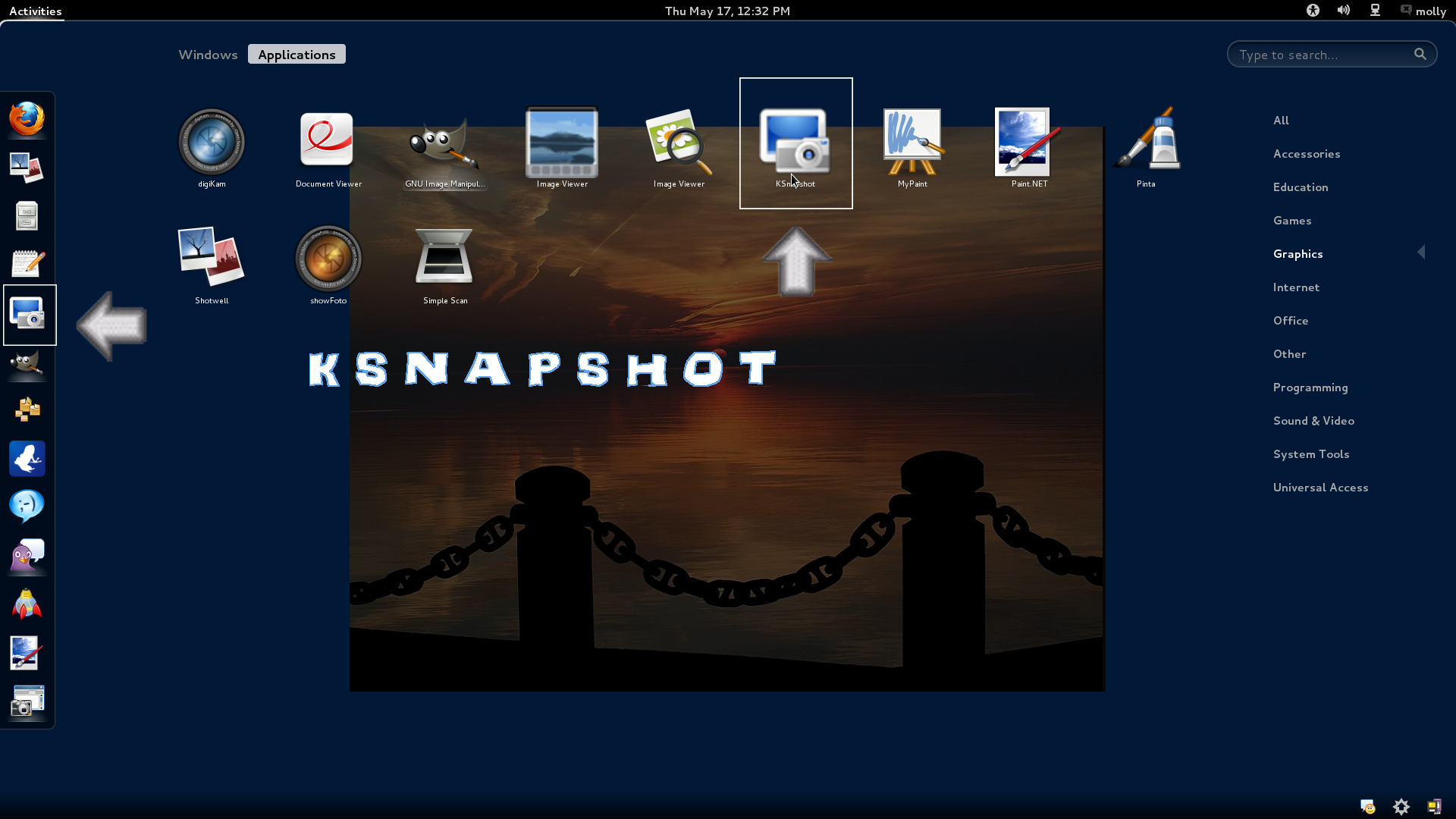
This is an old Tosh M1 laptop that I use to try out distros. A composite of the screenshot tool dialog taken with.. the screenshot tool. Linux is great.

Image

working fine here.


Top
 Post subject: Re: Snapshots Using Fedora
PostPosted: Thu May 17, 2012 11:22 am  (#13) 
Offline
GimpChat Member
User avatar

Joined: Apr 07, 2010
Posts: 14182
I do have ksnapshot, I have been using it since I got Fedora. It works fine, except for drop downs, but I just have to get used to how many seconds to set it for that. I installed it with yum install just after I got Fedora
.
Image

_________________
Image


Top
 Post subject: Re: Snapshots Using Fedora
PostPosted: Thu May 17, 2012 11:28 am  (#14) 
Offline
GimpChat Member

Joined: Mar 04, 2011
Posts: 2602
well don't, use the native gnome screenshot. KDE apps and Gnome apps are interchangeable to a certain degree but better to use what is there already.


Top
 Post subject: Re: Snapshots Using Fedora
PostPosted: Thu May 17, 2012 11:54 am  (#15) 
Offline
GimpChat Member
User avatar

Joined: Apr 07, 2010
Posts: 14182
I will look into it. thanks

_________________
Image


Top
 Post subject: Re: Snapshots Using Fedora
PostPosted: Thu May 17, 2012 12:31 pm  (#16) 
Offline
GimpChat Member
User avatar

Joined: Oct 29, 2010
Posts: 711
Location: Netherlands
Like YAFU I use KDE.
In KDE I found out the "printscreen" button will start ksnapshot.
Unless you have a menu open.Probably due to "interrupt masking".
So I tried your solution and set a 5 second delay.
That works as you can see in the attached file.


Attachments:
5secondsdelay.png
5secondsdelay.png [ 468.02 KiB | Viewed 1370 times ]

_________________
Gentoo Linux always up-to-date.
Kernel-3.17.4 Python-2.7.8/3.3.5
Gimp-2.8.14

I use Linux only.
And Virtualbox with Win 7
Top
 Post subject: Re: Snapshots Using Fedora
PostPosted: Thu May 17, 2012 1:34 pm  (#17) 
Offline
GimpChat Member
User avatar

Joined: Apr 07, 2010
Posts: 14182
:oops: Thanks Gerard, I like the ksnapshot, just had a prob with hesitation, I probably need a good reboot, I never turn off my pc so should do it now. :oops:

_________________
Image


Top
 Post subject: Re: Snapshots Using Fedora
PostPosted: Thu May 17, 2012 2:12 pm  (#18) 
Offline
GimpChat Member
User avatar

Joined: Oct 29, 2010
Posts: 711
Location: Netherlands
After you have hit the "take a new snapshot" button this window will disappear.
After the delay has run out there will be something in the panel that you should click (maybe twice).
In the screenshot I added it's on the right in the panel,partially obscured by the dropdown.
It's the title of the gimp window.
Gerard.

_________________
Gentoo Linux always up-to-date.
Kernel-3.17.4 Python-2.7.8/3.3.5
Gimp-2.8.14

I use Linux only.
And Virtualbox with Win 7


Top
 Post subject: Re: Snapshots Using Fedora
PostPosted: Thu May 17, 2012 4:36 pm  (#19) 
Offline
GimpChat Member
User avatar

Joined: Apr 07, 2010
Posts: 14182
thanks Gerard, I think I got it okay now.

_________________
Image


Top
 Post subject: Re: Snapshots Using Fedora [SOLVED]
PostPosted: Fri May 18, 2012 5:27 am  (#20) 
Offline
GimpChat Member
User avatar

Joined: Oct 29, 2010
Posts: 711
Location: Netherlands
You're quite welcome molly.
A Linux system with a GUI like Gnome or KDE should be capable of running all apps .
Fedora,Suse are among the best binary distro's so when you install an app it will make sure all dependencies are met.
Gnome uses GTK and KDE uses Qt graphical libraries to draw windows etc.
GTK stands for Gimp Tool Kit,what Qt stands for I don't know.

I've used Gnome for a short while with RedHat years ago but liked KDE better.
I bet most installs will have a mixture of GTK and Qt based apps.
Take for instance CD/DVD burning,in Linux there's one that is better than any other:k3b.
It's KDE based.

Re the screenshot problem: It took me a while to figure it out.
Your idea of using delay is the only way to make it work.
Trouble was to figure out what to click after the delay.
Gerard.

_________________
Gentoo Linux always up-to-date.
Kernel-3.17.4 Python-2.7.8/3.3.5
Gimp-2.8.14

I use Linux only.
And Virtualbox with Win 7


Top
Post new topic Reply to topic  [ 22 posts ]  Go to page 1, 2  Next

All times are UTC - 5 hours [ DST ]


* Login  


Powered by phpBB3 © phpBB Group