It is currently Fri Sep 25, 2026 10:49 am


All times are UTC - 5 hours [ DST ]


Post new topic Reply to topic  [ 69 posts ]  Go to page Previous  1, 2, 3, 4  Next
Author Message
 Post subject: Re: Can't find extra plug-ins for Mathmap
PostPosted: Wed Jun 20, 2012 3:27 pm  (#21) 
Offline
GimpChat Founder
User avatar

Joined: May 22, 2008
Posts: 5241
Location: Gimpville
This is where I placed the extra folder...

Image

_________________
“If you reach for the stars, you just might land on a decently sized hill.” - Stuart Hill


Top
 Post subject: Re: Can't find extra plug-ins for Mathmap
PostPosted: Wed Jun 20, 2012 3:41 pm  (#22) 
Offline
GimpChat Member

Joined: Apr 12, 2010
Posts: 5870
@MOLLY The triangles !!
click on the triangles before the name to expand the menu !
Quote:
There should be just one extra folder inside the expressions folder.
I have just an extra folder and all the mm filters inside of it.There shouldn't be any folders inside of the extra folder either.
F:\Gimp-2.8-32bit-Partha\pref_1\mathmap\expressions\extra


No could be all the subfolders you wish in the expression folder, from the name of the subfolder derive the name of the menu:
As example the Droste is usually in a subfolder called "map" and so show up in mathmap/map if you move it in a different subfolder
or rename the folder the menu position will change


Let you know if you solved and btw my old page on da is still there search on DA "Photocomix MathMap "you immediately
got them my nick for that account was "photocomix_resources" i can't update the material there for some reason recover the lost PW is quite complex , but the DL link are all still active

_________________
My 3D Gallery on Deviantart http://photocomix2.deviantart.com/
Main gallery http://www.flickriver.com/photos/photocomix-mandala/
Mandala and simmetry http://www.flickriver.com/photos/photocomix_mandala/

Image

Mrs Wilbress


Last edited by PhotoComix on Wed Jun 20, 2012 3:46 pm, edited 1 time in total.

Top
 Post subject: Re: Can't find extra plug-ins for Mathmap
PostPosted: Wed Jun 20, 2012 3:43 pm  (#23) 
Offline
GimpChat Member

Joined: Apr 12, 2010
Posts: 5870
PS

for Triangles i intend that in your previous screenshot, at the end of the previous page

those at the left

Image

_________________
My 3D Gallery on Deviantart http://photocomix2.deviantart.com/
Main gallery http://www.flickriver.com/photos/photocomix-mandala/
Mandala and simmetry http://www.flickriver.com/photos/photocomix_mandala/

Image

Mrs Wilbress


Top
 Post subject: Re: Can't find extra plug-ins for Mathmap
PostPosted: Wed Jun 20, 2012 4:56 pm  (#24) 
Offline
GimpChat Member
User avatar

Joined: Apr 07, 2010
Posts: 14182
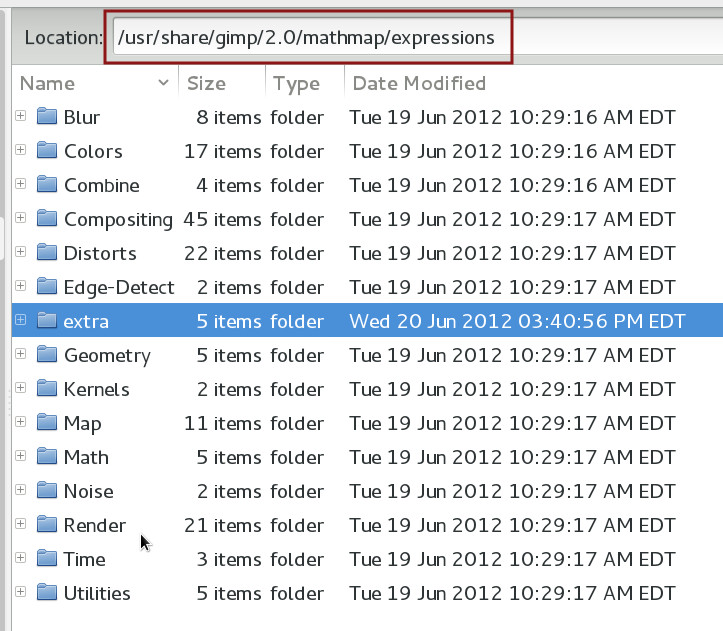
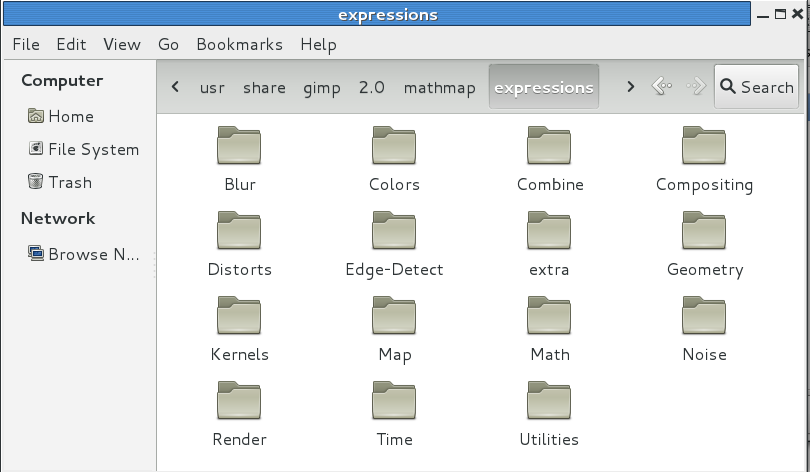
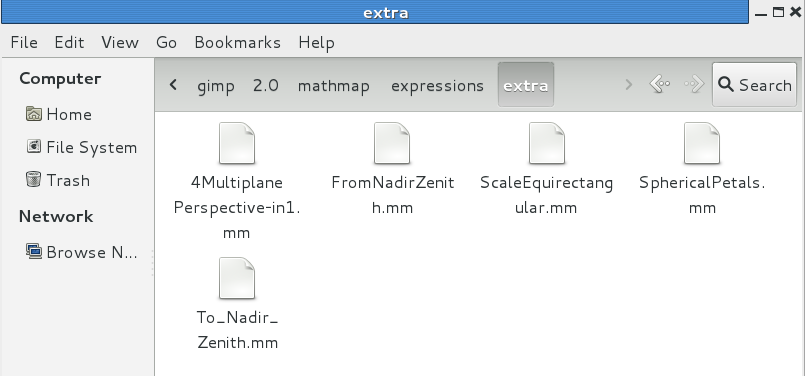
Yes PC, that is all of them, and yes I opened every triangle in the whole list just to make sure the files I want are not under something else. All the triangle drop downs have something under them except the bottom one, there is nothing. I don't have an "extra". I know what they look like cuz I had them in other versions of Mathmap. They aren't there. I also placed my folder in the exact place as Tux did in his. I will screen shot my expression folder and the Extra folder and place them in this thread.

Image

Image

_________________
Image


Top
 Post subject: Re: Can't find extra plug-ins for Mathmap
PostPosted: Wed Jun 20, 2012 5:09 pm  (#25) 
Offline
GimpChat Founder
User avatar

Joined: May 22, 2008
Posts: 5241
Location: Gimpville
The only difference I can think of between your system and mine is that you are using the 64-bit version and I'm using the 32-bit.

Sometimes, it's helpful to start GIMP from a terminal and view console messages, which can often point you to the problem.

Open a terminal and type: gimp <enter> then copy and paste the terminal console output back here so we can check out the messages you're getting.

_________________
“If you reach for the stars, you just might land on a decently sized hill.” - Stuart Hill


Top
 Post subject: Re: Can't find extra plug-ins for Mathmap
PostPosted: Wed Jun 20, 2012 5:19 pm  (#26) 
Offline
GimpChat Member
User avatar

Joined: Apr 07, 2010
Posts: 14182
[molly@localhost ~]$ gimp
Gtk-Message: Failed to load module "pk-gtk-module"
GIMP-Error: Failed to load data:

Couldn't recognize the image file format for file '/home/molly/.gimp-2.8/patterns/AnEveningunderthegold.xcf'

GIMP-Error: Failed to load data:

Fatal parse error in pattern file '/home/molly/.gimp-2.8/patterns/wild by eMelody.pat': Unknown pattern format version 65536.

GIMP-Error: Failed to load data:

Couldn't recognize the image file format for file '/home/molly/.gimp-2.8/patterns/Enchantment.xcf'

GIMP-Error: Failed to load data:

Couldn't recognize the image file format for file '/home/molly/.gimp-2.8/patterns/scale_pattern.scm'

GIMP-Error: Failed to load data:

Couldn't recognize the image file format for file '/home/molly/.gimp-2.8/patterns/Violet-08.xcf'

GIMP-Error: Failed to load data:

Couldn't recognize the image file format for file '/home/molly/.gimp-2.8/patterns/AquaticGold.xcf'

GIMP-Error: Failed to load data:

Couldn't recognize the image file format for file '/home/molly/.gimp-2.8/patterns/GlassPearls.xcf'

GIMP-Error: Failed to load data:

Couldn't recognize the image file format for file '/home/molly/.gimp-2.8/patterns/Silver-b.xcf'

GIMP-Error: Failed to load data:

Couldn't recognize the image file format for file '/home/molly/.gimp-2.8/patterns/Amber.xcf'

GIMP-Error: Failed to load data:

Fatal parse error in pattern file '/home/molly/.gimp-2.8/patterns/wassimo patterns.pat': Unknown pattern format version 65536.

GIMP-Error: Failed to load data:

Failed to load image '/home/molly/.gimp-2.8/patterns/diagonalweaveseamless.jpg': Error interpreting JPEG image file (Not a JPEG file: starts with 0x00 0x00)

GIMP-Error: Failed to load data:

Fatal parse error in pattern file '/home/molly/.gimp-2.8/patterns/dragonscales01.pat': Unknown pattern format version 65536.

GIMP-Error: Failed to load data:

Couldn't recognize the image file format for file '/home/molly/.gimp-2.8/patterns/readme.txt'

GIMP-Error: Failed to load data:

Fatal parse error in gradient file '/home/molly/.gimp-2.8/gradients/gold-metal.psd': Not a GIMP gradient file.

GIMP-Error: Failed to load data:

Fatal parse error in gradient file '/home/molly/.gimp-2.8/gradients/transparentgrad1.grd': Not a GIMP gradient file.

GIMP-Error: Failed to load data:

Fatal parse error in gradient file '/home/molly/.gimp-2.8/gradients/2.grd': Not a GIMP gradient file.

GIMP-Error: Unable to run plug-in "resynthesizer"
(/home/molly/.gimp-2.8/plug-ins/resynthesizer)

Failed to execute child process "/home/molly/.gimp-2.8/plug-ins/resynthesizer" (No such file or directory)

GIMP-Error: Unable to run plug-in "resynthesizer-gui"
(/home/molly/.gimp-2.8/plug-ins/resynthesizer-gui)

Failed to execute child process "/home/molly/.gimp-2.8/plug-ins/resynthesizer-gui" (No such file or directory)


** (process:3873): WARNING **: Trying to register gtype 'GMountMountFlags' as enum when in fact it is of type 'GFlags'

** (process:3873): WARNING **: Trying to register gtype 'GDriveStartFlags' as enum when in fact it is of type 'GFlags'

** (process:3873): WARNING **: Trying to register gtype 'GSocketMsgFlags' as enum when in fact it is of type 'GFlags'
Gtk-Message: Failed to load module "pk-gtk-module"

** (process:3874): WARNING **: Trying to register gtype 'GMountMountFlags' as enum when in fact it is of type 'GFlags'

** (process:3874): WARNING **: Trying to register gtype 'GDriveStartFlags' as enum when in fact it is of type 'GFlags'

** (process:3874): WARNING **: Trying to register gtype 'GSocketMsgFlags' as enum when in fact it is of type 'GFlags'
Gtk-Message: Failed to load module "pk-gtk-module"

(script-fu:3875): GLib-WARNING **: (gerror.c:390):g_error_new_valist: runtime check failed: (domain != 0)
script-fu-Warning: Error while loading /home/molly/.gimp-2.8/scripts/Pattern from Image.scm:

Error: (/home/molly/.gimp-2.8/scripts/Pattern from Image.scm : 188) eval: unbound variable: image


script-fu-Warning: Procedure script-fu-sg-dejw in script-fu-menu-register does not exist


(script-fu:3875): GLib-WARNING **: (gerror.c:390):g_error_new_valist: runtime check failed: (domain != 0)
script-fu-Warning: Error while loading /home/molly/.gimp-2.8/scripts/Picture Frame.scm:

Error: (/home/molly/.gimp-2.8/scripts/Picture Frame.scm : 307) illegal function


script-fu-batch-resize-and-save-images: image-type contains unrecognizable parts:'March'
fp-script-fu-posterize-all: image-type contains unrecognizable parts:'RGB* GRAYSCALE*'
plasti-wrap: image-type contains unrecognizable parts:'Licence GPL -http://www.gnu.org/licenses/gpl-3.0.txt'
script-fu-parchment-texture: image-type contains unrecognizable parts:'RGB* GRAY* INDEX*'
RMA-path-blend: image-type contains unrecognizable parts:'RGB*, GREY*'
RMA-selection-blend: image-type contains unrecognizable parts:'RGB*, GREY*'
fp-script-fu-anim-path-stroke: image-type contains unrecognizable parts:'RGB* GRAYSCALE*'


_________________
Image


Top
 Post subject: Re: Can't find extra plug-ins for Mathmap
PostPosted: Thu Jun 21, 2012 8:47 am  (#27) 
Offline
GimpChat Member

Joined: Apr 12, 2010
Posts: 5870
well i see many problems but not sure if related:
you have many misplaced files,
as xcf images and txt files in the pattern and gradient folders
some missed files (i.e.apparently the graphic interface file is missed in your resynthesizer plugin)
something wrong in a gtk library and with a few script fu.

You should remove the misplaced files (txt ,.grd & psd files in pattern and gradient folders )because they may cause some plugin and script to crash or give fatal error

I can't see anything strictly related to MM, but some of that error may crash scripts (as some graechan script) that do use MM

_________________
My 3D Gallery on Deviantart http://photocomix2.deviantart.com/
Main gallery http://www.flickriver.com/photos/photocomix-mandala/
Mandala and simmetry http://www.flickriver.com/photos/photocomix_mandala/

Image

Mrs Wilbress


Top
 Post subject: Re: Can't find extra plug-ins for Mathmap
PostPosted: Thu Jun 21, 2012 8:58 am  (#28) 
Offline
GimpChat Member
User avatar

Joined: Apr 07, 2010
Posts: 14182
Thank you PC, I will check those out.

_________________
Image


Top
 Post subject: Re: Can't find extra plug-ins for Mathmap
PostPosted: Thu Jun 21, 2012 9:32 am  (#29) 
Offline
GimpChat Member

Joined: Apr 12, 2010
Posts: 5870
just follow the path and remove the files you may also want delete anything related to resynthesizer and then reinstall it

Still i can't see nothing that should create directly problem with mathmap

humm maybe this "pk-gtk-module failed to load" not sure for what that module is for neither if MM may need it

_________________
My 3D Gallery on Deviantart http://photocomix2.deviantart.com/
Main gallery http://www.flickriver.com/photos/photocomix-mandala/
Mandala and simmetry http://www.flickriver.com/photos/photocomix_mandala/

Image

Mrs Wilbress


Top
 Post subject: Re: Can't find extra plug-ins for Mathmap
PostPosted: Thu Jun 21, 2012 9:39 am  (#30) 
Offline
GimpChat Member
User avatar

Joined: Apr 07, 2010
Posts: 14182
Ok, PC, Tux or anyone,

I just went to gradients and patterns and deleted all the files that got there by mistake.
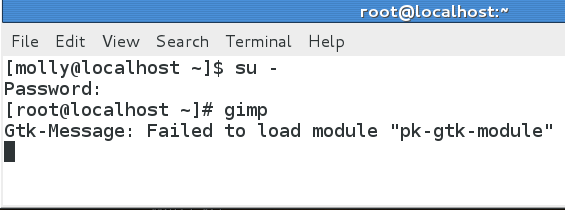
I then went back to terminal and went to root and typed in gimp.
This is the error I got below and also it tried to open gimp but just half of it came up.

Image


EDIT:
I rebooted my pc and went to terminal again and typed gimp. Gimp opened fine with all its parts but I got this message below.

Image

_________________
Image


Top
 Post subject: Re: Can't find extra plug-ins for Mathmap
PostPosted: Thu Jun 21, 2012 9:42 am  (#31) 
Offline
GimpChat Member

Joined: Apr 12, 2010
Posts: 5870
i did a quick search there are know bugs with the pk-gtk-module in fedora and ubuntu, i can't see nothing about Windows

From the bug description is hard guess if and how a similar bug could influence gimp or MM
(edit-update ahh i see from your message that it does !! :gaah )

Are you on linux ? which distro ?

_________________
My 3D Gallery on Deviantart http://photocomix2.deviantart.com/
Main gallery http://www.flickriver.com/photos/photocomix-mandala/
Mandala and simmetry http://www.flickriver.com/photos/photocomix_mandala/

Image

Mrs Wilbress


Top
 Post subject: Re: Can't find extra plug-ins for Mathmap
PostPosted: Thu Jun 21, 2012 9:52 am  (#32) 
Offline
GimpChat Member
User avatar

Joined: Apr 07, 2010
Posts: 14182
I am on Fedora 17

_________________
Image


Top
 Post subject: Re: Can't find extra plug-ins for Mathmap
PostPosted: Thu Jun 21, 2012 10:07 am  (#33) 
Offline
GimpChat Founder
User avatar

Joined: May 22, 2008
Posts: 5241
Location: Gimpville
I get the same warning error "pk-gtk-module" as well but it doesn't seem to affect the operation of GIMP or any other app that generates that warning.

https://bugzilla.redhat.com/show_bug.cgi?id=643129

This bug doesn't keep me from seeing the extra folder.

The path shown here looks like a problem..

Image

There is no path: /root/.gimp-2.8/mathmap/expressions

The actual path is /usr/share/gimp/2.0/mathmap/expressions

I'm unsure why it's looking for the gimp-2.8 under /root/. That makes no sense to me.

_________________
“If you reach for the stars, you just might land on a decently sized hill.” - Stuart Hill


Top
 Post subject: Re: Can't find extra plug-ins for Mathmap
PostPosted: Thu Jun 21, 2012 10:13 am  (#34) 
Offline
GimpChat Member
User avatar

Joined: Apr 07, 2010
Posts: 14182
I am completely baffled. I thought when I ran the terminal again that it would just shorten the list of the errors but now it is just the Gtk message.

_________________
Image


Top
 Post subject: Re: Can't find extra plug-ins for Mathmap
PostPosted: Thu Jun 21, 2012 10:55 am  (#35) 
Offline
GimpChat Member
User avatar

Joined: Jan 13, 2011
Posts: 2648
Location: Poland
Just my guess.
Quote:
I'm unsure why it's looking for the gimp-2.8 under /root/. That makes no sense to me.

This is very different for each system and the installed program
According to me it depends on the mode of the console launch - makes a difference - whether in the User mode and Administrator (root) - and hence different target location.
You can always try to move the files to your preferred (in GIMP) location.
My installation Mathmap for Gimp 2.8 and 2.9 (Ubuntu 12.04-64bit) went smoothly.

_________________
Image


Top
 Post subject: Re: Can't find extra plug-ins for Mathmap
PostPosted: Thu Jun 21, 2012 11:02 am  (#36) 
Offline
GimpChat Member
User avatar

Joined: Apr 07, 2010
Posts: 14182
Mathmap itself installed smoothly. and works in every category except it just doesn't recognize the extra folder inside the expression folder.
That is the strange part. I also run 64-bit

_________________
Image


Top
 Post subject: Re: Can't find extra plug-ins for Mathmap
PostPosted: Thu Jun 21, 2012 12:11 pm  (#37) 
Offline
GimpChat Member
User avatar

Joined: Oct 29, 2010
Posts: 711
Location: Netherlands
When you start Gimp for the first time it creates a .gimp-2.x folder in wherever you are.
So when you use su it creates this folder in /root and won't use your /home/username folder.
Gerard.

_________________
Gentoo Linux always up-to-date.
Kernel-3.17.4 Python-2.7.8/3.3.5
Gimp-2.8.14

I use Linux only.
And Virtualbox with Win 7


Top
 Post subject: Re: Can't find extra plug-ins for Mathmap
PostPosted: Thu Jun 21, 2012 12:29 pm  (#38) 
Offline
GimpChat Member
User avatar

Joined: Apr 07, 2010
Posts: 14182
When I added the extra folder to the expressions folder, I did it all through the terminal/nautilus.
All my mathmap is there. I don't have any of the Mathmap files in my user/.gimp folder.

_________________
Image


Top
 Post subject: Re: Can't find extra plug-ins for Mathmap
PostPosted: Thu Jun 21, 2012 1:27 pm  (#39) 
Offline
GimpChat Founder
User avatar

Joined: May 22, 2008
Posts: 5241
Location: Gimpville
Gerald has a point. Make sure you run GIMP from terminal as a normal user, not as root. That's why we are seeing the strange path /root/.gmp-2.8

This still doesn't explain your problem.

_________________
“If you reach for the stars, you just might land on a decently sized hill.” - Stuart Hill


Top
 Post subject: Re: Can't find extra plug-ins for Mathmap
PostPosted: Thu Jun 21, 2012 1:32 pm  (#40) 
Offline
GimpChat Member
User avatar

Joined: Apr 07, 2010
Posts: 14182
[molly@localhost ~]$ gimp
Gtk-Message: Failed to load module "pk-gtk-module"
GIMP-Error: Failed to load data:

Fatal parse error in pattern file '/home/molly/.gimp-2.8/patterns/wild by eMelody.pat': Unknown pattern format version 65536.

GIMP-Error: Failed to load data:

Couldn't recognize the image file format for file '/home/molly/.gimp-2.8/patterns/scale_pattern.scm'

GIMP-Error: Failed to load data:

Couldn't recognize the image file format for file '/home/molly/.gimp-2.8/patterns/Amber.xcf'

GIMP-Error: Failed to load data:

Fatal parse error in pattern file '/home/molly/.gimp-2.8/patterns/wassimo patterns.pat': Unknown pattern format version 65536.

GIMP-Error: Failed to load data:

Fatal parse error in pattern file '/home/molly/.gimp-2.8/patterns/dragonscales01.pat': Unknown pattern format version 65536.

GIMP-Error: Failed to load data:

Couldn't recognize the image file format for file '/home/molly/.gimp-2.8/patterns/readme.txt'

GIMP-Error: Failed to load data:

Fatal parse error in gradient file '/home/molly/.gimp-2.8/gradients/transparentgrad1.grd': Not a GIMP gradient file.

GIMP-Error: Failed to load data:

Fatal parse error in gradient file '/home/molly/.gimp-2.8/gradients/2.grd': Not a GIMP gradient file.

/home/molly/.gimp-2.8/plug-ins/Ghost-120.8bf: /home/molly/.gimp-2.8/plug-ins/Ghost-120.8bf: cannot execute binary file

(gimp:2519): LibGimpBase-WARNING **: gimp: gimp_wire_read(): error
GIMP-Error: Unable to run plug-in "resynthesizer"
(/home/molly/.gimp-2.8/plug-ins/resynthesizer)

Failed to execute child process "/home/molly/.gimp-2.8/plug-ins/resynthesizer" (No such file or directory)

GIMP-Error: Unable to run plug-in "resynthesizer-gui"
(/home/molly/.gimp-2.8/plug-ins/resynthesizer-gui)

Failed to execute child process "/home/molly/.gimp-2.8/plug-ins/resynthesizer-gui" (No such file or directory)


** (process:2530): WARNING **: Trying to register gtype 'GMountMountFlags' as enum when in fact it is of type 'GFlags'

** (process:2530): WARNING **: Trying to register gtype 'GDriveStartFlags' as enum when in fact it is of type 'GFlags'

** (process:2530): WARNING **: Trying to register gtype 'GSocketMsgFlags' as enum when in fact it is of type 'GFlags'
Gtk-Message: Failed to load module "pk-gtk-module"

** (process:2531): WARNING **: Trying to register gtype 'GMountMountFlags' as enum when in fact it is of type 'GFlags'

** (process:2531): WARNING **: Trying to register gtype 'GDriveStartFlags' as enum when in fact it is of type 'GFlags'

** (process:2531): WARNING **: Trying to register gtype 'GSocketMsgFlags' as enum when in fact it is of type 'GFlags'
Gtk-Message: Failed to load module "pk-gtk-module"

(script-fu:2532): GLib-WARNING **: (gerror.c:390):g_error_new_valist: runtime check failed: (domain != 0)
script-fu-Warning: Error while loading /home/molly/.gimp-2.8/scripts/Pattern from Image.scm:

Error: (/home/molly/.gimp-2.8/scripts/Pattern from Image.scm : 188) eval: unbound variable: image


script-fu-Warning: Procedure script-fu-sg-dejw in script-fu-menu-register does not exist


(script-fu:2532): GLib-WARNING **: (gerror.c:390):g_error_new_valist: runtime check failed: (domain != 0)
script-fu-Warning: Error while loading /home/molly/.gimp-2.8/scripts/Picture Frame.scm:

Error: (/home/molly/.gimp-2.8/scripts/Picture Frame.scm : 307) illegal function


script-fu-batch-resize-and-save-images: image-type contains unrecognizable parts:'March'
fp-script-fu-posterize-all: image-type contains unrecognizable parts:'RGB* GRAYSCALE*'
plasti-wrap: image-type contains unrecognizable parts:'Licence GPL -http://www.gnu.org/licenses/gpl-3.0.txt'
script-fu-parchment-texture: image-type contains unrecognizable parts:'RGB* GRAY* INDEX*'
RMA-path-blend: image-type contains unrecognizable parts:'RGB*, GREY*'
RMA-selection-blend: image-type contains unrecognizable parts:'RGB*, GREY*'
fp-script-fu-anim-path-stroke: image-type contains unrecognizable parts:'RGB* GRAYSCALE*'

ok, I just ran it without going to root and typed in gimp as a normal user. It has all different kinds of errors now.

_________________
Image


Top
Post new topic Reply to topic  [ 69 posts ]  Go to page Previous  1, 2, 3, 4  Next

All times are UTC - 5 hours [ DST ]


* Login  


Powered by phpBB3 © phpBB Group