It is currently Fri Sep 04, 2026 5:37 pm


All times are UTC - 5 hours [ DST ]


Post new topic Reply to topic  [ 12 posts ] 
Author Message
 Post subject: Gimp Rocks!
PostPosted: Sun Jul 15, 2012 1:59 am  (#1) 
Offline
Global Moderator
User avatar

Joined: May 16, 2010
Posts: 16169
Image

_________________
Image


Share on Facebook Share on Twitter Share on Orkut Share on Digg Share on MySpace Share on Delicious Share on Technorati
Top
 Post subject: Re: Gimp Rocks!
PostPosted: Sun Jul 15, 2012 6:35 am  (#2) 
Offline
GimpChat Member
User avatar

Joined: Mar 23, 2012
Posts: 7388
Location: Göteborg at last!
Hey -graffiti. That's really cool. I don't know what layer mode you used but I find Grain Merge useful for this kind of thing.


Top
 Post subject: Re: Gimp Rocks!
PostPosted: Sun Jul 15, 2012 7:10 am  (#3) 
Offline
GimpChat Member
User avatar

Joined: Aug 24, 2011
Posts: 1785
Location: Dallas, TX
That is kinda cool looking Rod. I had to try my hand at that to see if I could replicate it. Text, Stroke, Spread Noise on the both layers and rotate.
Grain Merge at 80% on a background of choice. Piece of cake! This would make a cool addition to the Logo Factory or maybe a script by itself called Chaulk Graffiti.


Attachments:
Drac Attack Chaulk.jpg
Drac Attack Chaulk.jpg [ 1.51 MiB | Viewed 2282 times ]

_________________
Image
Top
 Post subject: Re: Gimp Rocks!
PostPosted: Sun Jul 15, 2012 8:47 am  (#4) 
Offline
Global Moderator
User avatar

Joined: May 16, 2010
Posts: 16169
Draconian wrote:
That is kinda cool looking Rod. I had to try my hand at that to see if I could replicate it. Text, Stroke, Spread Noise on the both layers and rotate.
Grain Merge at 80% on a background of choice. Piece of cake! This would make a cool addition to the Logo Factory or maybe a script by itself called Chaulk Graffiti.


I agree :)

_________________
Image


Top
 Post subject: Re: Gimp Rocks!
PostPosted: Sun Jul 15, 2012 10:12 am  (#5) 
Offline
GimpChat Member
User avatar

Joined: Mar 23, 2012
Posts: 7388
Location: Göteborg at last!
-


Last edited by Erisian on Thu Sep 19, 2024 2:07 pm, edited 1 time in total.

Top
 Post subject: Re: Gimp Rocks!
PostPosted: Sun Jul 15, 2012 5:13 pm  (#6) 
Offline
GimpChat Member
User avatar

Joined: Apr 08, 2010
Posts: 5420
Location: Northwest Ohio
somewhere I saw a tut...long time ago, where they used bump mapping to give the graffiti a contoured look.


Top
 Post subject: Re: Gimp Rocks!
PostPosted: Sun Jul 15, 2012 6:10 pm  (#7) 
Offline
GimpChat Member
User avatar

Joined: Mar 23, 2012
Posts: 7388
Location: Göteborg at last!
2-ton wrote:
somewhere I saw a tut...long time ago, where they used bump mapping to give the graffiti a contoured look.


Good point. I tried a displacement map but it wasn't very good. Maybe I should have tried bump mapping.


Top
 Post subject: Re: Gimp Rocks!
PostPosted: Sat Jul 21, 2012 12:15 am  (#8) 
Offline
GimpChat Member

Joined: Jul 14, 2012
Posts: 162
I had some fun playing around with this generator to make some scenes,

http://graffiticreator.net/

From this thread,

http://www.gimptalk.com/index.php?/topic/35889-realistic-graffiti-tutorial/


Top
 Post subject: Re: Gimp Rocks!
PostPosted: Sat Jul 21, 2012 2:02 pm  (#9) 
Offline
Global Moderator
User avatar

Joined: May 16, 2010
Posts: 16169
Very cool!

_________________
Image


Top
 Post subject: Re: Gimp Rocks!
PostPosted: Tue Jul 24, 2012 7:02 pm  (#10) 
Offline
GimpChat Member

Joined: Jul 14, 2012
Posts: 162
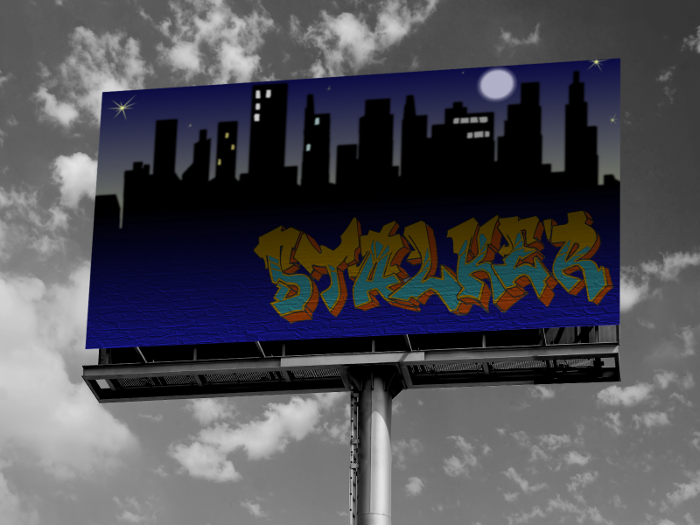
Here's something I did today. I just couldn't find the right photo for the billboard. Even the stock that cost didn't look too great. The best I could do was to desaturate to make it somewhat interesting. I thought about putting a street light to the left. It's kind of bare over there.

Image


Top
 Post subject: Re: Gimp Rocks!
PostPosted: Wed Jul 25, 2012 3:54 pm  (#11) 
Offline
GimpChat Member
User avatar

Joined: Mar 23, 2012
Posts: 7388
Location: Göteborg at last!
A streetlight would be perfect, otherwise it's a great image


Top
 Post subject: Re: Gimp Rocks!
PostPosted: Wed Jul 25, 2012 7:13 pm  (#12) 
Offline
GimpChat Member

Joined: Jul 14, 2012
Posts: 162
Thanks Erisian. I put it aside for the moment but I need to look at it and think about balance and positioning.


Top
Post new topic Reply to topic  [ 12 posts ] 

All times are UTC - 5 hours [ DST ]


* Login  


Powered by phpBB3 © phpBB Group