It is currently Mon Nov 16, 2026 11:46 pm


All times are UTC - 5 hours [ DST ]


Post new topic Reply to topic  [ 43 posts ]  Go to page Previous  1, 2, 3  Next
Author Message
 Post subject: Re: A new theme
PostPosted: Sat Jul 21, 2012 3:01 pm  (#21) 
Offline
GimpChat Member

Joined: May 09, 2012
Posts: 914
@Rod

Here is the modified theme for the blue.
To change colors, change the 6 files "blue_xxxxx_samj.png".
There is no need DLL for this to work and there is one file "gtkrc" (which prevents to change to other themes).


(I still do not understand the usefulness of this DLL :lol )


Attachments:
Midnight Metal(mod_samj).zip [493.63 KiB]
Downloaded 125 times
Top
 Post subject: Re: A new theme
PostPosted: Sat Jul 21, 2012 4:39 pm  (#22) 
Offline
Global Moderator
User avatar

Joined: May 16, 2010
Posts: 16272
I am pretty sure its the dynamics caused by using the DLL file Sam.

Sam could you show me a screenshot of the theme working in Gimp-2.8.1?
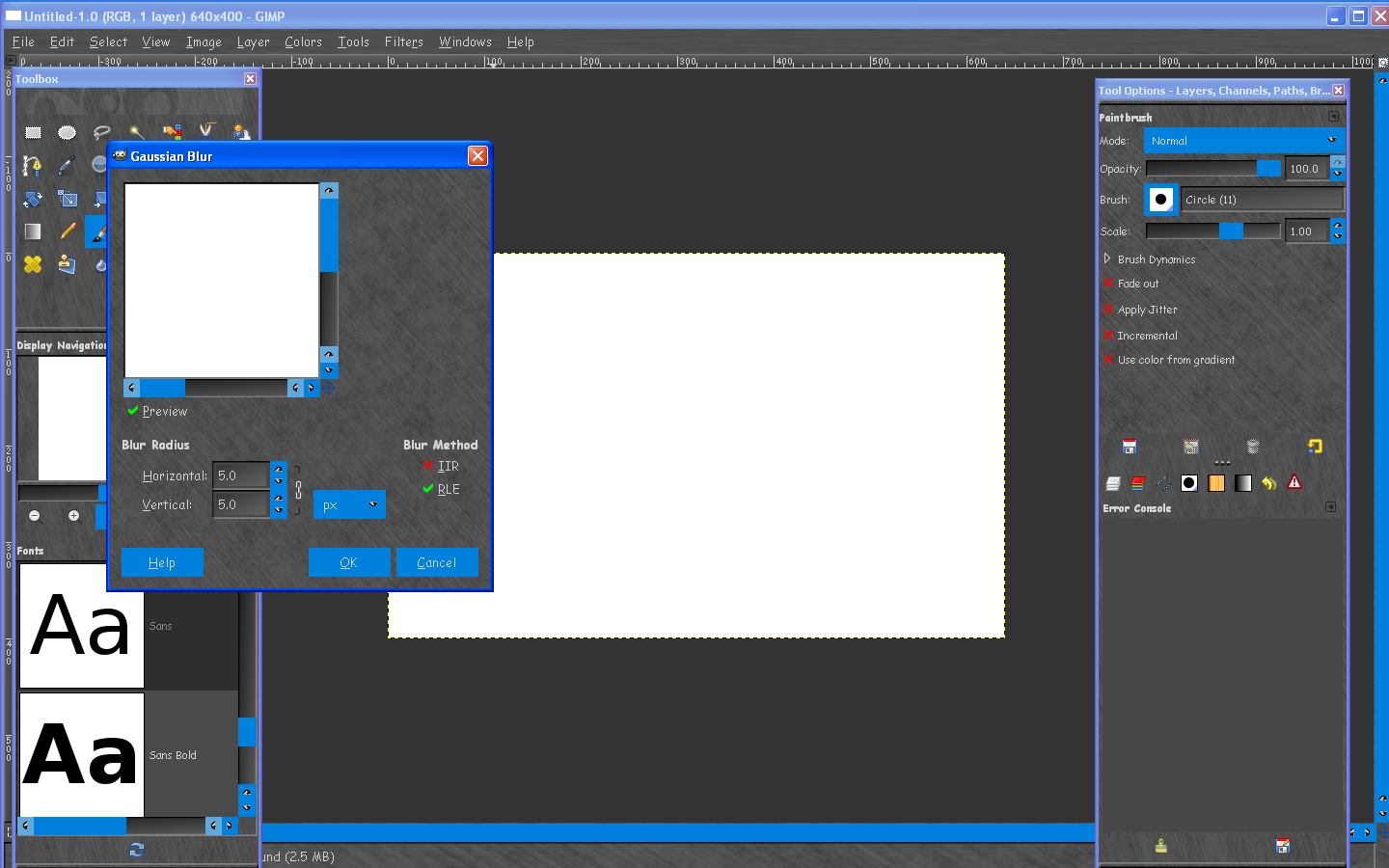
This is a screenshot of it in Gimp-2.6.12 and it is way different than the one i have.
Image

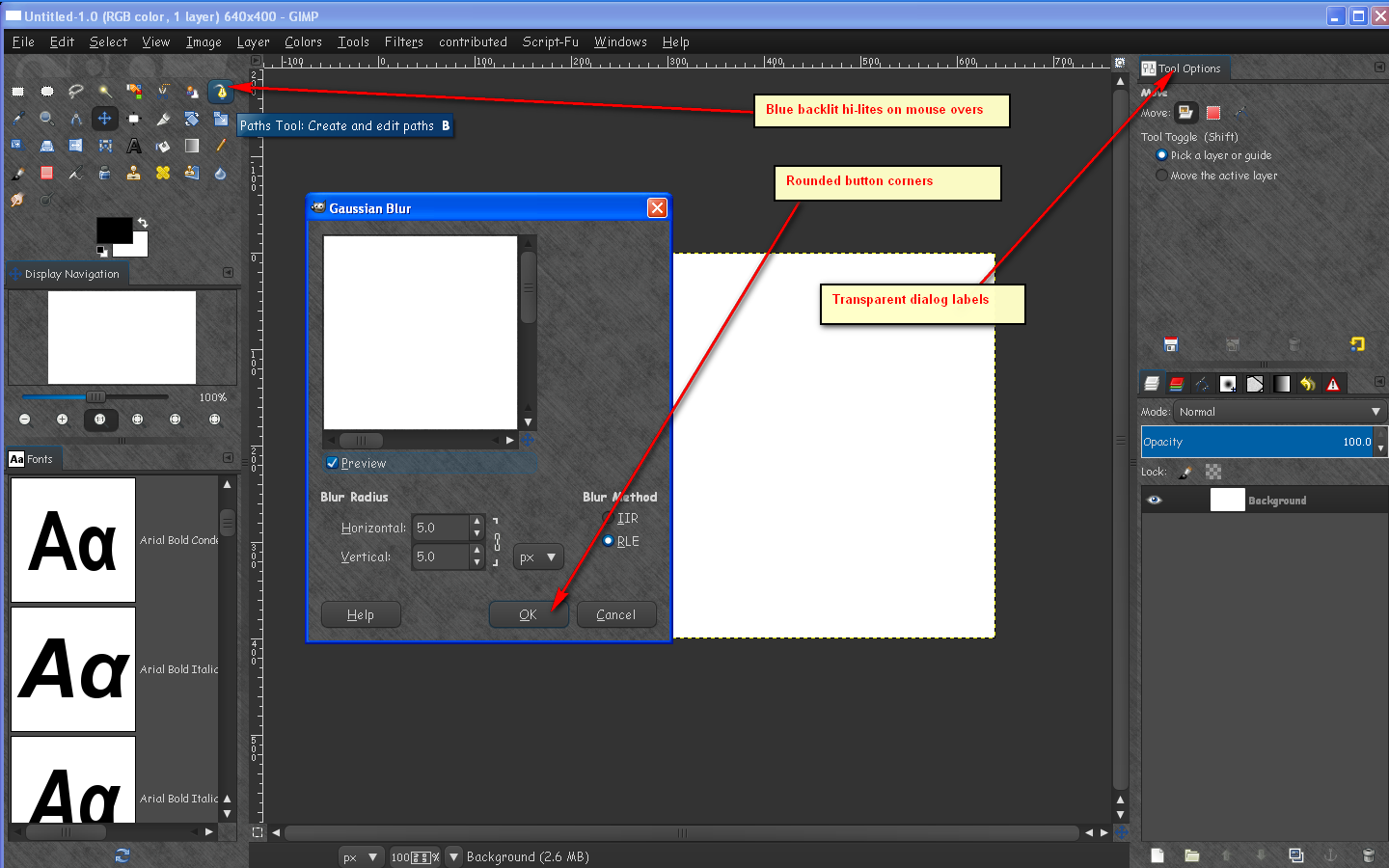
Notice the square buttons. Also my theme has a glossy loading bar and rounded buttons.The mouse over on the tools in the tool box also shows a rounded back hi lite.

My Theme
Image

Image

So you can clearly see how the DLL file effects the theme.
Somehow my Gimp is using both gtkrc files.
One from the midnight-metal folder, and the gtkrc file for Aurora in my ect, and pref_1 folders.
It is using the DLL file.

Thanks. :)

_________________
Image


Top
 Post subject: Re: A new theme
PostPosted: Sat Jul 21, 2012 5:34 pm  (#23) 
Offline
GimpChat Member

Joined: May 09, 2012
Posts: 914
@Rod
Your theme works well on 32-bit version of Gimp Portable Partha but not 64-bit version.
On the 2 screenshots, I see the effect of the DLL.
The problem is the two files gtkrc :(


Attachments:
test_32bits_2_files_gtkrc_without_DLL.png
test_32bits_2_files_gtkrc_without_DLL.png [ 668.05 KiB | Viewed 2631 times ]
test_32bits_2_files_gtkrc.png
test_32bits_2_files_gtkrc.png [ 569.33 KiB | Viewed 2631 times ]
Top
 Post subject: Re: A new theme
PostPosted: Sat Jul 21, 2012 5:39 pm  (#24) 
Offline
Global Moderator
User avatar

Joined: May 16, 2010
Posts: 16272
So it does work for you in the 32 bit portable version then.
It just doesn't work in 64 bit.

That is probably because that aurora dll file is 32 bit. :)
Perhaps if Partha could compile the dll file as 64 bit?

_________________
Image


Top
 Post subject: Re: A new theme
PostPosted: Sat Jul 21, 2012 5:54 pm  (#25) 
Offline
GimpChat Member

Joined: May 09, 2012
Posts: 914
@Rod

Here's a simple theme that works with the DLL.
remove the file "gtkrc", directory "gimp-2.8.1-32bit-Partha\pref_1"

EDIT : 2012-07-22 New file


Attachments:
Rod_Theme.zip [333.78 KiB]
Downloaded 104 times
Rod_theme.png
Rod_theme.png [ 547.26 KiB | Viewed 2630 times ]


Last edited by samj on Sun Jul 22, 2012 12:37 pm, edited 1 time in total.
Top
 Post subject: Re: A new theme
PostPosted: Sat Jul 21, 2012 5:56 pm  (#26) 
Offline
GimpChat Member

Joined: May 09, 2012
Posts: 914
@Rod

Rod wrote:
So it does work for you in the 32 bit portable version then.
It just doesn't work in 64 bit.

That is probably because that aurora dll file is 32 bit. :)
Perhaps if Partha could compile the dll file as 64 bit?


Where are the sources of this DLL?


Top
 Post subject: Re: A new theme
PostPosted: Sat Jul 21, 2012 11:37 pm  (#27) 
Offline
GimpChat Member
User avatar

Joined: Jan 20, 2012
Posts: 583
Ah its a conflict between both gtkrc's samj?

_________________


"In the face of adversity, there's three things: fly, freeze or fight; We're choosing to fight..."- Guy Boucher, Tampa Bay Lighting Head Coach


Top
 Post subject: Re: A new theme
PostPosted: Sun Jul 22, 2012 5:39 am  (#28) 
Offline
GimpChat Member

Joined: May 09, 2012
Posts: 914
Bonjour,

@ZWard117

If you keep the file "gtktc" in the directory "\pref_1", other themes will not work properly. It is preferable to remove it.

The proposed theme of this link (Rod_Theme.zip [313.22 KiB] ) can not interfere with other themes :
viewtopic.php?f=15&t=4740&start=20#p59388


Top
 Post subject: Re: A new theme
PostPosted: Sun Jul 22, 2012 6:54 am  (#29) 
Offline
GimpChat Member

Joined: Mar 14, 2011
Posts: 998
Rod wrote:
So it does work for you in the 32 bit portable version then.
It just doesn't work in 64 bit.

That is probably because that aurora dll file is 32 bit. :)
Perhaps if Partha could compile the dll file as 64 bit?

Rod,

I have the aurora engine but not compiled as a DLL in the 64-bit version. I was under the assumption that .a files work fine under Windows. I will have to revise this assumption. :)


Top
 Post subject: Re: A new theme
PostPosted: Sun Jul 22, 2012 9:37 am  (#30) 
Offline
Global Moderator
User avatar

Joined: May 16, 2010
Posts: 16272
samj wrote:
Bonjour,

@ZWard117

If you keep the file "gtktc" in the directory "\pref_1", other themes will not work properly. It is preferable to remove it.

The proposed theme of this link (Rod_Theme.zip [313.22 KiB] ) can not interfere with other themes :
viewtopic.php?f=15&t=4740&start=20#p59388


I did add in the README the theme is kind of permanent. :)
Because it uses the 2 gtkrc files in ect and .gimp-2.8 (pref_1) folders.

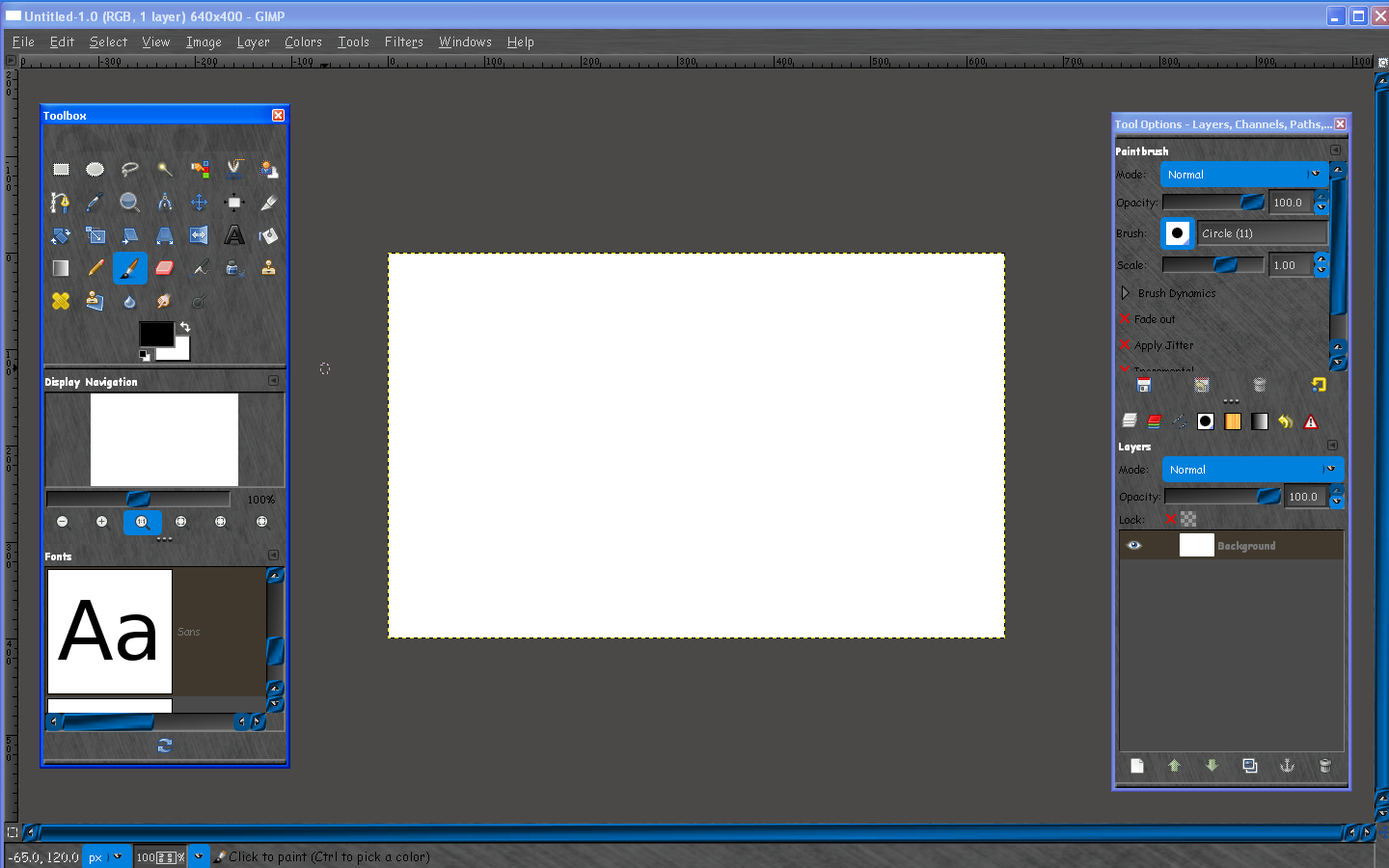
However i have revamped it - place these in the new Samj theme. I am reasonably sure this set will work in all versions of Gimp. :) :bigthup - I call this theme set Metallic Blue Licorice.
Image

Image

images attached in zip


Attachments:
Rounded_Buttons_Samj_Theme.zip [2.54 KiB]
Downloaded 102 times

_________________
Image
Top
 Post subject: Re: A new theme
PostPosted: Sun Jul 22, 2012 10:20 am  (#31) 
Offline
GimpChat Member

Joined: May 09, 2012
Posts: 914
@Rod

Thank you very much for the pictures, the result is beautiful :jumpclap

EDIT : New File


Attachments:
Rod_Metallic_Blue_Licorice.zip [515.77 KiB]
Downloaded 113 times
Top
 Post subject: Re: A new theme
PostPosted: Sun Jul 22, 2012 11:47 am  (#32) 
Offline
Global Moderator
User avatar

Joined: May 16, 2010
Posts: 16272
Thanks Sam! :)
I am having fun playing with it now.

_________________
Image


Top
 Post subject: Re: A new theme
PostPosted: Mon Jul 23, 2012 2:53 pm  (#33) 
Offline
GimpChat Member
User avatar

Joined: Jan 20, 2012
Posts: 583
So if you use 64bit you can't use this? Is that what has come to?

_________________


"In the face of adversity, there's three things: fly, freeze or fight; We're choosing to fight..."- Guy Boucher, Tampa Bay Lighting Head Coach


Top
 Post subject: Re: A new theme
PostPosted: Mon Jul 23, 2012 6:16 pm  (#34) 
Offline
Global Moderator
User avatar

Joined: May 16, 2010
Posts: 16272
ZWard117 wrote:
So if you use 64bit you can't use this? Is that what has come to?


If you have the 64 bit libpixmap.dll file you can. :)

_________________
Image


Top
 Post subject: Re: A new theme
PostPosted: Mon Jul 23, 2012 7:44 pm  (#35) 
Offline
GimpChat Member
User avatar

Joined: Jan 20, 2012
Posts: 583
Well the metallic parts work, it's the blue aurora parts that don't work. I'll just modify it for the orange from another theme I have, if that's okay?

_________________


"In the face of adversity, there's three things: fly, freeze or fight; We're choosing to fight..."- Guy Boucher, Tampa Bay Lighting Head Coach


Top
 Post subject: Re: A new theme
PostPosted: Wed Jul 25, 2012 9:00 pm  (#36) 
Offline
GimpChat Member

Joined: Feb 23, 2011
Posts: 71
I am really liking this theme :) , but the tabs and icons are very small on my screen. The text size is large in comparison. Could someone tell me where to go to change the sizes of the tabs and icons?

Hopefully it's not too many steps, or I may not make it through the steps.

Thanks!


Attachments:
new theme.jpg
new theme.jpg [ 32.57 KiB | Viewed 1537 times ]

_________________
Image
Top
 Post subject: Re: A new theme
PostPosted: Wed Jul 25, 2012 9:54 pm  (#37) 
Offline
Global Moderator
User avatar

Joined: May 16, 2010
Posts: 16272
Grits wrote:
I am really liking this theme :) , but the tabs and icons are very small on my screen. The text size is large in comparison. Could someone tell me where to go to change the sizes of the tabs and icons?

Hopefully it's not too many steps, or I may not make it through the steps.

Thanks!


Here is one that should work.This dismisses the code for small icons and uses the larger ones.Let me know if this doesn't work.
You will need to place this one where you put the others (overwrite them)
Make a backup first. :)
Zip attached.


Attachments:
LargeIconsAurora_Dark_Metal_RDgtkrc.zip [2.62 KiB]
Downloaded 105 times

_________________
Image
Top
 Post subject: Re: A new theme
PostPosted: Thu Jul 26, 2012 5:57 pm  (#38) 
Offline
GimpChat Member

Joined: Feb 23, 2011
Posts: 71
Thanks so much! But I somehow lost my pulldown menus in the process of installing the large icon file..

I actually tried replacing the file twice, last night and just now. I thought it didn't work because I was too tired to be doing such technical stuff.

But I redid it just now and still no pulldowns. (I'm not saying I am in better mental shape at the moment, lol)

Is there a setting for those?

edit: oh, wait!! The words are there, just almost the same color as their background.

See, told ya I was in no better shape at the moment!

_________________
Image


Top
 Post subject: Re: A new theme
PostPosted: Thu Jul 26, 2012 6:07 pm  (#39) 
Offline
Global Moderator
User avatar

Joined: May 16, 2010
Posts: 16272
Please tell me you made a backup of the old gtkrc file?
Can you give me a screenshot of the new one installed? :) :lol

You may have to OPEN an image to see the menus also.

_________________
Image


Top
 Post subject: Re: A new theme
PostPosted: Thu Jul 26, 2012 7:02 pm  (#40) 
Offline
GimpChat Member

Joined: Feb 23, 2011
Posts: 71
Here's a screenshot. It's not just the menu words that are pale. The save, cancel, etc in the popup boxes are pale too.

I have several of the gtkrc files. One is named origine, one with the smaller icons, and I noticed another one directly under themes. Is that supposed to be there?

I installed the theme in my user/theme folder. Was that the proper place for it?

Thanks for your help!


Attachments:
menu text light.png
menu text light.png [ 107.91 KiB | Viewed 1518 times ]

_________________
Image
Top
Post new topic Reply to topic  [ 43 posts ]  Go to page Previous  1, 2, 3  Next

All times are UTC - 5 hours [ DST ]


* Login  


Powered by phpBB3 © phpBB Group