It is currently Sun Oct 11, 2026 9:08 am


All times are UTC - 5 hours [ DST ]


Post new topic Reply to topic  [ 129 posts ]  Go to page Previous  1, 2, 3, 4, 5 ... 7  Next
Author Message
 Post subject: Re: Pseudo Stippling in G'MIC
PostPosted: Thu Oct 14, 2010 6:34 pm  (#21) 
Offline
Retired Staff
User avatar

Joined: May 22, 2008
Posts: 6946
Location: Somewhere in GIMP
Very nice, Molly. :clap :jumpclap

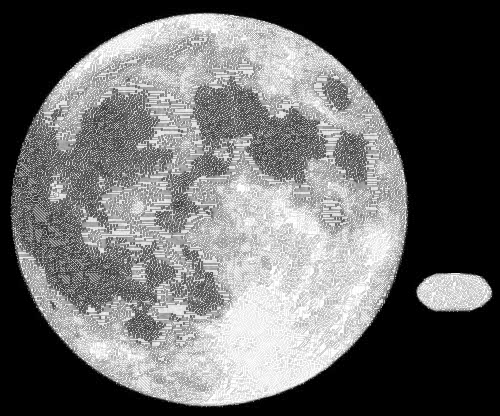
This is an image of a supposed UFO and the moon but it looks like the UFO was painted in to me. See original image here.

I like the moon like that.

Image

_________________
Image
World War IV will be fought with sticks and stones. - Albert Einstein


Top
 Post subject: Re: Pseudo Stippling in G'MIC
PostPosted: Thu Oct 14, 2010 6:41 pm  (#22) 
Offline
GimpChat Member
User avatar

Joined: Jul 04, 2010
Posts: 2253
Location: Retired Moderator Slowly Returning to the Living.
Actually the space ship was real! That was where I parked it!

_________________
Artists aren't crazy! We're eccentric! ~G.M. Ross

Image

My Sigs = My Photos
Check out my work at http://www.flickr.com/photos/photomastergreg.


Top
 Post subject: Re: Pseudo Stippling in G'MIC
PostPosted: Thu Oct 14, 2010 6:55 pm  (#23) 
Offline
Retired Staff
User avatar

Joined: May 22, 2008
Posts: 6946
Location: Somewhere in GIMP
PhotoMaster wrote:
Actually the space ship was real! That was where I parked it!


Image

_________________
Image
World War IV will be fought with sticks and stones. - Albert Einstein


Top
 Post subject: Re: Pseudo Stippling in G'MIC
PostPosted: Thu Oct 14, 2010 8:07 pm  (#24) 
Offline
GimpChat Member
User avatar

Joined: Jul 04, 2010
Posts: 2253
Location: Retired Moderator Slowly Returning to the Living.
The sad thing is that my son would be the one to write the ticket!

_________________
Artists aren't crazy! We're eccentric! ~G.M. Ross

Image

My Sigs = My Photos
Check out my work at http://www.flickr.com/photos/photomastergreg.


Top
 Post subject: Re: Pseudo Stippling in G'MIC
PostPosted: Fri Oct 15, 2010 1:14 am  (#25) 
Offline
GimpChat Member
User avatar

Joined: Sep 24, 2010
Posts: 12850
Bigger dots. :mrgreen:

Highkeyed, dithered, dup, blur with 0.2 radius and multiplied that result. flattened, and repeated. Final subtle cleaning with Photocomix smoothing. Just wish I could get Accord's program to work (new ImageMagic incompatible with his program, and, for some reason, the old version partially works and then crashes; not sure if it's a VM issue). :)

ref: http://www.fontplay.com/freephotos/seve ... 107-03.jpg


Attachments:
bigdots.png
bigdots.png [ 426.02 KiB | Viewed 3200 times ]

_________________
Lyle

Psalm 109:8

Image
Top
 Post subject: Re: Pseudo Stippling in G'MIC
PostPosted: Fri Oct 15, 2010 1:44 pm  (#26) 
Offline
GimpChat Member
User avatar

Joined: Jul 04, 2010
Posts: 2253
Location: Retired Moderator Slowly Returning to the Living.
Sweeeeet! I love it!!!

_________________
Artists aren't crazy! We're eccentric! ~G.M. Ross

Image

My Sigs = My Photos
Check out my work at http://www.flickr.com/photos/photomastergreg.


Top
 Post subject: Re: Pseudo Stippling in G'MIC
PostPosted: Fri Oct 15, 2010 1:45 pm  (#27) 
Offline
Retired Staff
User avatar

Joined: May 22, 2008
Posts: 6946
Location: Somewhere in GIMP
WOW!!! That is excellent, Lyle. Makes me feel a bit dotty.

_________________
Image
World War IV will be fought with sticks and stones. - Albert Einstein


Top
 Post subject: Re: Pseudo Stippling in G'MIC
PostPosted: Fri Oct 15, 2010 2:00 pm  (#28) 
Offline
GimpChat Member
User avatar

Joined: Sep 24, 2010
Posts: 12850
Thanks for the comments, but how about squares too. lol

:)


Attachments:
fp021107-03.png
fp021107-03.png [ 142.48 KiB | Viewed 3188 times ]

_________________
Lyle

Psalm 109:8

Image
Top
 Post subject: Re: Pseudo Stippling in G'MIC
PostPosted: Fri Oct 15, 2010 3:40 pm  (#29) 
Offline
GimpChat Member
User avatar

Joined: Oct 06, 2010
Posts: 4050
@Lyle: I don't understand your instructions, like highkeyed, etc. Sounds like you are doing this in some other program. Could you clarify, please?

I love the results, just wish there was a program/plug-in that could randomize (voronoi, for example) on dot size according to black thickness. Secord's results do this, but how I wish someone would take that and run with it. It seems like the thing we are all looking for, lol. :)

_________________
"In order to attain the impossible, one must attempt the absurd."
~ Miguel de Cervantes


Top
 Post subject: Re: Pseudo Stippling in G'MIC
PostPosted: Fri Oct 15, 2010 4:56 pm  (#30) 
Offline
GimpChat Member
User avatar

Joined: Jul 04, 2010
Posts: 2253
Location: Retired Moderator Slowly Returning to the Living.
I'm trying to figure it out too.

_________________
Artists aren't crazy! We're eccentric! ~G.M. Ross

Image

My Sigs = My Photos
Check out my work at http://www.flickr.com/photos/photomastergreg.


Top
 Post subject: Re: Pseudo Stippling in G'MIC
PostPosted: Fri Oct 15, 2010 6:08 pm  (#31) 
Offline
GimpChat Member
User avatar

Joined: Sep 24, 2010
Posts: 12850
I shouldn't have called it Highkey. I created a solid white fill layer set to 90% Opacity and the a copy of the original on top layer set to burn. :)

_________________
Lyle

Psalm 109:8

Image


Top
 Post subject: Re: Pseudo Stippling in G'MIC
PostPosted: Fri Oct 15, 2010 6:13 pm  (#32) 
Offline
GimpChat Member
User avatar

Joined: Sep 24, 2010
Posts: 12850
mahvin wrote:
....
I love the results, just wish there was a program/plug-in that could randomize (voronoi, for example) on dot size according to black thickness. Secord's results do this, but how I wish someone would take that and run with it. It seems like the thing we are all looking for, lol. :)


Somebody has, but you have to email him and he may share his code (I haven't yet). :)

http://www.eng.uwaterloo.ca/~alopyrev/c ... eport.html

_________________
Lyle

Psalm 109:8

Image


Top
 Post subject: Re: Pseudo Stippling in G'MIC
PostPosted: Fri Oct 15, 2010 9:13 pm  (#33) 
Offline
GimpChat Member
User avatar

Joined: Jul 04, 2010
Posts: 2253
Location: Retired Moderator Slowly Returning to the Living.
I was able to get the high-key, but nothing after that looked right. Ahg!

_________________
Artists aren't crazy! We're eccentric! ~G.M. Ross

Image

My Sigs = My Photos
Check out my work at http://www.flickr.com/photos/photomastergreg.


Top
 Post subject: Re: Pseudo Stippling in G'MIC
PostPosted: Fri Oct 15, 2010 10:31 pm  (#34) 
Offline
GimpChat Member
User avatar

Joined: Sep 24, 2010
Posts: 12850
After dither, you do a very low radius blur, set layer to multiply, and then you duplicate that layer several times til the circles are bigger (forgot to mention the duplication step; sorry for the oversite). :)

_________________
Lyle

Psalm 109:8

Image


Top
 Post subject: Re: Pseudo Stippling in G'MIC
PostPosted: Sat Oct 16, 2010 7:00 am  (#35) 
Offline
Global Moderator
User avatar

Joined: May 16, 2010
Posts: 16200
This is an image dithered with the ximagic plug-in (8bf)
http://www.ximagic.com/g_index.html

Image

You can achieve some pretty neat results with it also. =)


Top
 Post subject: Re: Pseudo Stippling in G'MIC
PostPosted: Sat Oct 16, 2010 9:11 am  (#36) 
Offline
GimpChat Member
User avatar

Joined: Apr 07, 2010
Posts: 14182
Rod, I downloaded that plug-in. I use windows XP. Where would I put that plug-in? Would I put it in the gimp 2.6 plug-in folder?

_________________
Image


Top
 Post subject: Re: Pseudo Stippling in G'MIC
PostPosted: Sat Oct 16, 2010 9:38 am  (#37) 
Offline
GimpChat Member
User avatar

Joined: Sep 24, 2010
Posts: 12850
Put it in your user plugins folder Molly. Also, it is a photoshop filter, so, if you don't have PSPI installed, you'll need that too. :)

_________________
Lyle

Psalm 109:8

Image


Top
 Post subject: Re: Pseudo Stippling in G'MIC
PostPosted: Sat Oct 16, 2010 9:52 am  (#38) 
Offline
GimpChat Member
User avatar

Joined: Apr 07, 2010
Posts: 14182
thanks lyle. No I don't have photoshop so guess that is that.......

_________________
Image


Top
 Post subject: Re: Pseudo Stippling in G'MIC
PostPosted: Sat Oct 16, 2010 11:22 am  (#39) 
Offline
GimpChat Member
User avatar

Joined: Sep 24, 2010
Posts: 12850
PSPI is a GIMP filter. It allows you to use PS filters in GIMP. :)

http://tml.pp.fi/gimp/pspi.html

_________________
Lyle

Psalm 109:8

Image


Top
 Post subject: Re: Pseudo Stippling in G'MIC
PostPosted: Sat Oct 16, 2010 1:33 pm  (#40) 
Offline
GimpChat Member
User avatar

Joined: Apr 07, 2010
Posts: 14182
thank you lyle. I put it in my Gimp 2.6 plug-in folder. I will check it out

_________________
Image


Top
Post new topic Reply to topic  [ 129 posts ]  Go to page Previous  1, 2, 3, 4, 5 ... 7  Next

All times are UTC - 5 hours [ DST ]


* Login  


Powered by phpBB3 © phpBB Group