It is currently Tue Jun 09, 2026 9:36 pm


All times are UTC - 5 hours [ DST ]


Post new topic Reply to topic  [ 23 posts ]  Go to page 1, 2  Next
Author Message
 Post subject: crayon font
PostPosted: Sat Aug 11, 2012 12:31 pm  (#1) 
Offline
GimpChat Member
User avatar

Joined: Jun 04, 2011
Posts: 254
GIMP Version: 2.8
Operating System: Windows
OS Version: vista-sp4
GIMP Experience: Basic Level


I don't know if this relates to gimp help but, I need a crayon font that has commercial use does any one know where to find one? i've looked and and i did find a few but only for personal use and I'm not trying to get sued.

_________________
Image


Share on Facebook Share on Twitter Share on Orkut Share on Digg Share on MySpace Share on Delicious Share on Technorati
Top
 Post subject: Re: crayon font
PostPosted: Sat Aug 11, 2012 12:40 pm  (#2) 
Offline
GimpChat Member

Joined: Aug 05, 2011
Posts: 606
Location: limestone,ny
http://www.myfonts.com/search/crayon/


Top
 Post subject: Re: crayon font
PostPosted: Sat Aug 11, 2012 1:43 pm  (#3) 
Offline
GimpChat Member
User avatar

Joined: Apr 07, 2010
Posts: 14182
I looked in most of the font places. I see lots of what they call crayon fonts. Are you talking about a crayon like a crayola crayon for a font? If so I don't think there is any out there except maybe on one of the pay sites, and that is doubtful

_________________
Image


Top
 Post subject: Re: crayon font
PostPosted: Sat Aug 11, 2012 3:26 pm  (#4) 
Offline
GimpChat Member
User avatar

Joined: Sep 24, 2010
Posts: 12775
Easier to just write your text then play with spread noise or dissolve. These fonts at that link alc59 are too picey for me. Now, if you want a font in the shape of a crayon, you might want to ask Rod; not sure if he's still playing with Photofont or not. :)

_________________
Lyle

Psalm 109:8

Image


Top
 Post subject: Re: crayon font
PostPosted: Sat Aug 11, 2012 5:54 pm  (#5) 
Offline
GimpChat Member
User avatar

Joined: Apr 30, 2010
Posts: 1937
Location: Missouri
This isn't a font, rather a thought. If I needed a really realistic crayon I'd draw it in mypaint as a crayon then export it to a png. BTW, for nyone who doesn't have mypaint I suggest that you get it. It's small, free, and the best drawing software I've seen. Artrage is arguably better not not free.

_________________
Image
The last time I kept an open mind,
my brain fell out and the dog grabbed it.
Now it's full of dirt, toothmarks, and dog slobber.
No more open minds or dogs for me.


Top
 Post subject: Re: crayon font
PostPosted: Sat Aug 11, 2012 8:35 pm  (#6) 
Offline
Global Moderator
User avatar

Joined: May 16, 2010
Posts: 16023
Do you want crayon texture?
Or crayon shaped text?

If you want textured font try brushes.
Open Gimp and type out the entire alphabet on a layer, and using the paths tool create a path inside each layered font.Then stroke each one and use noise spread to get the crayon effect or stroke with a textured brush.
Then separate each letter to its own layer and save each as a separate image.

There you go your own very custom crayon font. :)
Use colorize to color the text after you use it in a project.
Here is a abr brush that creates scribbles like crayons.
http://faye-fairy.deviantart.com/art/Cr ... s-90769805

If you want crayon shaped text i would just create text from a crayon shaped brush and only the text you need for the project.You can create your own crayon shape.Then use it as a brush in any project.

_________________
Image


Top
 Post subject: Re: crayon font
PostPosted: Sat Aug 11, 2012 8:48 pm  (#7) 
Offline
Global Moderator
User avatar

Joined: May 16, 2010
Posts: 16023
Here is another set of free crayola brushes for personal or commercial use.
http://www.designersbrush.com/brushes/crayon-brushes

_________________
Image


Top
 Post subject: Re: crayon font
PostPosted: Wed Aug 15, 2012 2:02 pm  (#8) 
Offline
GimpChat Member
User avatar

Joined: Jun 04, 2011
Posts: 254
I was looking for a font that looks like it was written in crayon

_________________
Image


Top
 Post subject: Re: crayon font
PostPosted: Wed Aug 15, 2012 4:22 pm  (#9) 
Offline
Global Moderator
User avatar

Joined: May 16, 2010
Posts: 16023
Not sure if these are free but it looks like a nice collection. :)
http://slodive.com/inspiration/chalkboard-font/

_________________
Image


Top
 Post subject: Re: crayon font
PostPosted: Wed Aug 15, 2012 4:37 pm  (#10) 
Offline
GimpChat Member
User avatar

Joined: Aug 24, 2011
Posts: 1785
Location: Dallas, TX
I have to agree with Lyle. IMO the approach he mentioned is going to be about as close as you are going to get. To find a font that looks like crayola and not chaulk is ging to be hard to find.

I used different settings on a couple of layers to get this effect. I may still have too much spread noise here and it may still resemble chaulk a bit, but still, with a little effort I think I could make it really look like a crayon was used to write it. If we get it figured out better maybe someone would script it and then all you would have to do is type your text with whatever font you want and convert it using the script with a single click.


Attachments:
Crayola.png
Crayola.png [ 52.04 KiB | Viewed 5974 times ]

_________________
Image
Top
 Post subject: Re: crayon font
PostPosted: Wed Aug 15, 2012 4:48 pm  (#11) 
Offline
Global Moderator
User avatar

Joined: May 16, 2010
Posts: 16023
That isn't too bad Draconian. A little gloss with the shine script may do the trick. Just to make it waxy looking like crayon. :)

_________________
Image


Top
 Post subject: Re: crayon font
PostPosted: Wed Aug 15, 2012 5:01 pm  (#12) 
Offline
GimpChat Member
User avatar

Joined: Aug 24, 2011
Posts: 1785
Location: Dallas, TX
I tried to do exactly that but as I just got thru posting on your snake breath thread, I can't get shine to work. That's what it needs alright.

_________________
Image


Top
 Post subject: Re: crayon font
PostPosted: Wed Aug 15, 2012 9:11 pm  (#13) 
Offline
GimpChat Member
User avatar

Joined: May 27, 2011
Posts: 707
Found this font,it is called eraser medium on dafont.com
it is based on a video tut on youtube :
http://www.youtube.com/watch?v=NJQCXwjCSDQ

hopes that helps
sorry if I am not here too often,but work is keeping me busy


Top
 Post subject: Re: crayon font
PostPosted: Wed Aug 15, 2012 9:14 pm  (#14) 
Offline
Global Moderator
User avatar

Joined: May 16, 2010
Posts: 16023
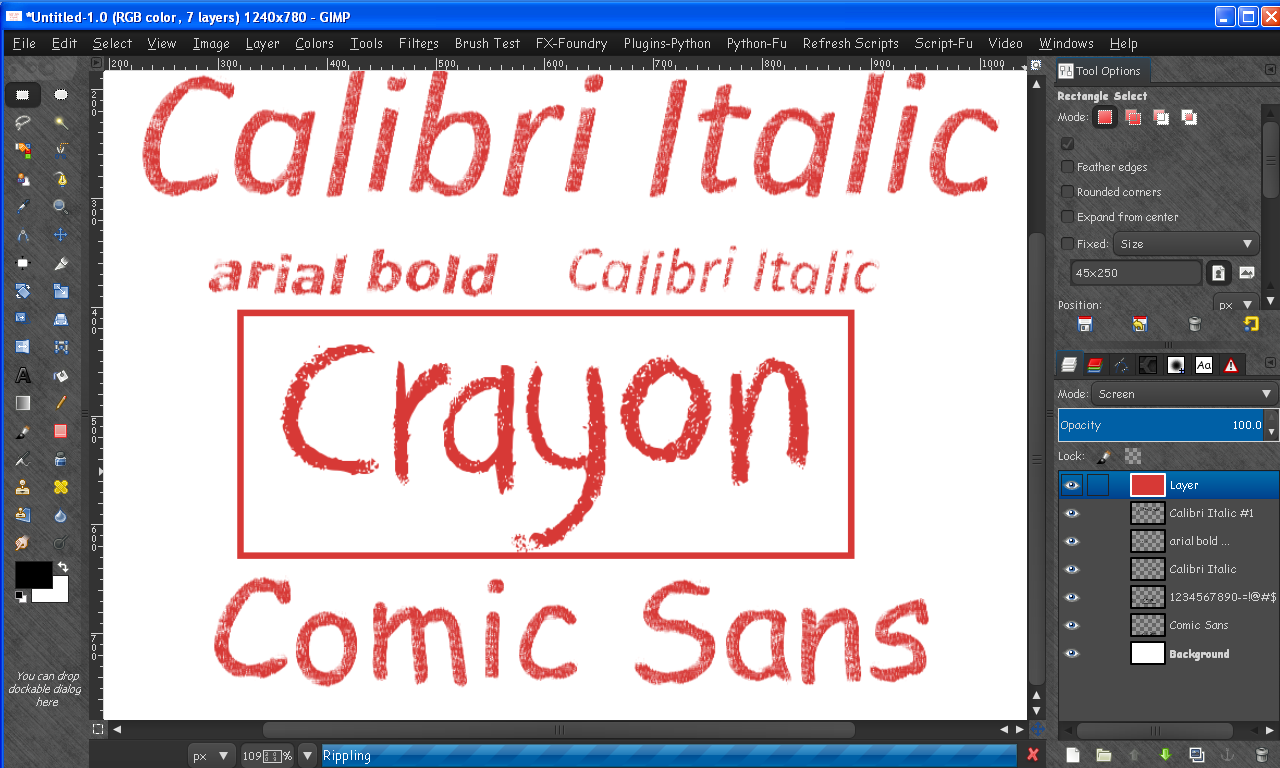
I went ahead and wrote a script for a crayon effect. This should work for any larger size text.
Small text will get highly distorted.Here are some examples.
Keep in mind the red color is from the layer in screen mode above all the text layers.
Also once the filter is applied the text is rasterized, and is no longer editable.
If you like these i will attach the script in a dedicated post elsewhere.
Calibri Italic seems to work the best.

The crayon text that has a rectangle around it is the commercial font Crumbled Crayon.
That was my target goal. :) I think i got pretty close.

Image

Also this effect works best on a white bg , and the fonts in the image work the best.
Let me know what you think and i will go from there. :) :bigthup

Thanks!

_________________
Image


Top
 Post subject: Re: crayon font
PostPosted: Wed Aug 15, 2012 9:45 pm  (#15) 
Offline
GimpChat Member
User avatar

Joined: Nov 16, 2011
Posts: 5127
Location: Metro Vancouver, BC
Nice one Rod!

_________________
Image
Gimp 2.8.18, Linux, median user
Gimp Chat Tutorials Index
Spirit Bear (Kermode)


Top
 Post subject: Re: crayon font
PostPosted: Thu Aug 16, 2012 8:36 am  (#16) 
Offline
GimpChat Member
User avatar

Joined: Aug 24, 2011
Posts: 1785
Location: Dallas, TX
Nice work Rod. The one in the middle would be my choice, looks more realistic than the sharp edges on all the rest of the examples. They look too contrived. I don't see that shine you were talking about applied here.

_________________
Image


Top
 Post subject: Re: crayon font
PostPosted: Thu Aug 16, 2012 11:51 am  (#17) 
Offline
Script Coder
User avatar

Joined: Jul 14, 2010
Posts: 697
Seeing Rod's sample, I realized this looks similar to the distressed results of my water ripple script: http://registry.gimp.org/node/24597

You might get something satisfactory playing with that...

Attachment:
ripple.jpg
ripple.jpg [ 42.59 KiB | Viewed 3235 times ]


-Rob A>

_________________
Image
Fantasy Cartography and Mapping by RobA


Top
 Post subject: Re: crayon font
PostPosted: Thu Aug 16, 2012 2:33 pm  (#18) 
Offline
GimpChat Member
User avatar

Joined: Aug 24, 2011
Posts: 1785
Location: Dallas, TX
I still believe that Spread Noise with a very low setting like 3 followed by a Gaussian Blur of 1 yeilds a much more crayon like effect. Too much Spread Noise and it starts looking more like chaulk.

I fooled around with this a little more and ended up using Glossy Stroke to finish it off. To put a few holes in it I also used a desaturated RGB Noise @.50, then levels and a few other tweaks to get some good particles then Alpha selected the Noise layer and used it to delete from the text layers before the blur step.

I know, clear as mud. Anyhoo, here's a couple. One ended up looking good enought to eat!


Attachments:
Crayon_1.png
Crayon_1.png [ 96.26 KiB | Viewed 3229 times ]
Crayon_2.png
Crayon_2.png [ 109.91 KiB | Viewed 3229 times ]

_________________
Image
Top
 Post subject: Re: crayon font
PostPosted: Thu Aug 16, 2012 2:45 pm  (#19) 
Offline
GimpChat Member
User avatar

Joined: Apr 07, 2010
Posts: 14182
I will eat the first on as a gum drop and the second as a ju-jube yummy

_________________
Image


Top
 Post subject: Re: crayon font
PostPosted: Thu Aug 16, 2012 2:55 pm  (#20) 
Offline
GimpChat Member
User avatar

Joined: Aug 24, 2011
Posts: 1785
Location: Dallas, TX
:rofl And I was thinking the second one had icing on it!

_________________
Image


Top
Post new topic Reply to topic  [ 23 posts ]  Go to page 1, 2  Next

All times are UTC - 5 hours [ DST ]


* Login  


Powered by phpBB3 © phpBB Group