It is currently Sun Sep 20, 2026 11:12 am


All times are UTC - 5 hours [ DST ]


Post new topic Reply to topic  [ 11 posts ] 
Author Message
 Post subject: Fit window to image
PostPosted: Tue Aug 28, 2012 11:04 am  (#1) 
Offline
Retired Staff
User avatar

Joined: May 22, 2008
Posts: 6946
Location: Somewhere in GIMP
GIMP Version: 2.6.11
Operating System: Linux
OS Version: Fedora 17
GIMP Experience: Intermediate Level


I'm still in the GIMP 3 windows mode. Have tried the single one and really prefer the "old" way.

Anyway, in v2.6 I could quickly size the window to the image size and I don't remember what I did. Seemed like I pressed a keyboard combo when I did it.

Does anyone know how to do it in v2.8?

_________________
Image
World War IV will be fought with sticks and stones. - Albert Einstein


Share on Facebook Share on Twitter Share on Orkut Share on Digg Share on MySpace Share on Delicious Share on Technorati
Top
 Post subject: Re: Fit window to image
PostPosted: Tue Aug 28, 2012 11:09 am  (#2) 
Offline
GimpChat Member
User avatar

Joined: Apr 07, 2010
Posts: 14182
Did you try Ctrl-R O.

_________________
Image


Top
 Post subject: Re: Fit window to image
PostPosted: Tue Aug 28, 2012 11:14 am  (#3) 
Offline
Retired Staff
User avatar

Joined: May 22, 2008
Posts: 6946
Location: Somewhere in GIMP
Ctrl + R doesn't work.

I kind of want to say Ctrl + E but that brings up Export.

_________________
Image
World War IV will be fought with sticks and stones. - Albert Einstein


Top
 Post subject: Re: Fit window to image
PostPosted: Tue Aug 28, 2012 11:19 am  (#4) 
Offline
Script Coder
User avatar

Joined: Jun 22, 2010
Posts: 1171
Location: Here and there
Using Edit>Keyboard Shortcuts and searching on fit:

2.8 Fit Image in Window Shift+Ctrl+J
2.6 Fit Image in Window Shift+Ctrl+E

Kevin


Top
 Post subject: Re: Fit window to image
PostPosted: Tue Aug 28, 2012 11:21 am  (#5) 
Offline
GimpChat Member
User avatar

Joined: Apr 07, 2010
Posts: 14182
Also, I saw Shift-Ctrl-E in the hotkeys, lol

I just tried it and Shift=Ctrl-J works per Kevin's post. :mrgreen:


Attachments:
Hotkeys.7z [1.24 KiB]
Downloaded 117 times

_________________
Image
Top
 Post subject: Re: Fit window to image
PostPosted: Tue Aug 28, 2012 11:40 am  (#6) 
Offline
Script Coder
User avatar

Joined: Apr 23, 2010
Posts: 1553
Location: not from Guildford after all
Note that if you have the scrollbars displayed (the default setting) then the button in the upper-right corner will enable "Zoom to fit" mode.

Attachment:
SSzoom-to-fit.png
SSzoom-to-fit.png [ 24.28 KiB | Viewed 4667 times ]

_________________
Any sufficiently primitive technology is indistinguishable from a rock.


Top
 Post subject: Re: Fit window to image
PostPosted: Tue Aug 28, 2012 11:44 am  (#7) 
Offline
Retired Staff
User avatar

Joined: May 22, 2008
Posts: 6946
Location: Somewhere in GIMP
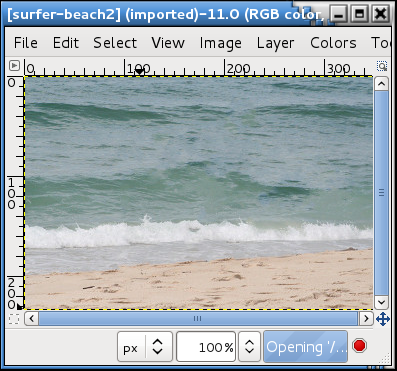
That works when I want the image zoomed to fit the window. I want the window to resize to the image size.

I want this

Image

to become this. Opening the image takes the upper and lower padding away and the full menu bar width is there and that is ok. I just want to get rid of the extra padding.

Image

_________________
Image
World War IV will be fought with sticks and stones. - Albert Einstein


Top
 Post subject: Re: Fit window to image
PostPosted: Tue Aug 28, 2012 12:15 pm  (#8) 
Offline
GimpChat Member
User avatar

Joined: Mar 23, 2012
Posts: 7388
Location: Göteborg at last!
In 2.6 there is a function called shrinkwrap which shrinks the window to your image. I can't remember where it is and I don't know if it's in 2.8.


Top
 Post subject: Re: Fit window to image
PostPosted: Tue Aug 28, 2012 12:16 pm  (#9) 
Offline
Script Coder
User avatar

Joined: Apr 23, 2010
Posts: 1553
Location: not from Guildford after all
Isn't what you desire accomplished by "View->Shrink Wrap" (CTRL-E)?

_________________
Any sufficiently primitive technology is indistinguishable from a rock.


Top
 Post subject: Re: Fit window to image
PostPosted: Tue Aug 28, 2012 12:19 pm  (#10) 
Offline
Retired Staff
User avatar

Joined: May 22, 2008
Posts: 6946
Location: Somewhere in GIMP
Ctrl + E takes me to export in v2.8. I used to use that in v2.6 but it doesn't work in v2.8

Ah! You gave me a good clue, saulgoode. I looked in View/Shrink Wrap and it is now Ctrl + J in v2.8. That works! Thanks!

_________________
Image
World War IV will be fought with sticks and stones. - Albert Einstein


Top
 Post subject: Re: Fit window to image
PostPosted: Tue Aug 28, 2012 2:00 pm  (#11) 
Offline
Script Coder
User avatar

Joined: Jul 14, 2010
Posts: 697
I tend to keep the navigation dialog http://docs.gimp.org/en/gimp-navigation-dialog.html docked in the sidebar.

This gives quick access to fit to window, 1:1 zoom in and out as well as panning.

-Rob A>

_________________
Image
Fantasy Cartography and Mapping by RobA


Top
Post new topic Reply to topic  [ 11 posts ] 

All times are UTC - 5 hours [ DST ]


* Login  


Powered by phpBB3 © phpBB Group