It is currently Fri Sep 04, 2026 5:10 pm


All times are UTC - 5 hours [ DST ]


Post new topic Reply to topic  [ 41 posts ]  Go to page 1, 2, 3  Next
Author Message
 Post subject: New Gimp Theme?
PostPosted: Thu Sep 06, 2012 12:53 pm  (#1) 
Offline
GimpChat Member
User avatar

Joined: Sep 06, 2012
Posts: 28
I'm new here so if this isn't posted in the right place, I apologize.
I'm trying to find a new theme for gimp but when I try to use the zip file from gimper.net, it doesn't work. I'm looking for a girly theme like light pink and brown but I've had no luck in finding one and I'm sure there's probably not one but I figured it couldn't hurt to ask. Any help with this would be greatly appreciated.

Thanks!


Share on Facebook Share on Twitter Share on Orkut Share on Digg Share on MySpace Share on Delicious Share on Technorati
Top
 Post subject: Re: New Gimp Theme?
PostPosted: Thu Sep 06, 2012 1:31 pm  (#2) 
Offline
GimpChat Member

Joined: Apr 12, 2010
Posts: 5870
theme for 2.8 are a bit different what version you use ?

_________________
My 3D Gallery on Deviantart http://photocomix2.deviantart.com/
Main gallery http://www.flickriver.com/photos/photocomix-mandala/
Mandala and simmetry http://www.flickriver.com/photos/photocomix_mandala/

Image

Mrs Wilbress


Top
 Post subject: Re: New Gimp Theme?
PostPosted: Thu Sep 06, 2012 1:37 pm  (#3) 
Offline
GimpChat Member
User avatar

Joined: Sep 06, 2012
Posts: 28
PhotoComix wrote:
theme for 2.8 are a bit different what version you use ?

2.8


Top
 Post subject: Re: New Gimp Theme?
PostPosted: Thu Sep 06, 2012 3:13 pm  (#4) 
Offline
GimpChat Member
User avatar

Joined: Nov 16, 2011
Posts: 5127
Location: Metro Vancouver, BC
Have a look here.
http://www.flickr.com/groups/gimpusers/ ... 692292016/

_________________
Image
Gimp 2.8.18, Linux, median user
Gimp Chat Tutorials Index
Spirit Bear (Kermode)


Top
 Post subject: Re: New Gimp Theme?
PostPosted: Thu Sep 06, 2012 3:19 pm  (#5) 
Offline
GimpChat Member
User avatar

Joined: Mar 23, 2012
Posts: 7388
Location: Göteborg at last!
:welcome to Ginp Chat GimpinMommy. I adore your avatar and sig. :) Did you make them yourself?


Top
 Post subject: Re: New Gimp Theme?
PostPosted: Thu Sep 06, 2012 3:34 pm  (#6) 
Offline
GimpChat Member
User avatar

Joined: Jan 20, 2012
Posts: 583
I am looking at one right now. I will screen shot it and put it up in a bit
EDIT:
Correction: Here is the theme.
For use:Open up you gimp-2.8 folder.
For windows it is C:\Users\NAMEHERE\.gimp-2.8
Right click the file gtkrc and name it Originalgtkrc.
Drag the gtkrc file in the zip attached into your gimp-2.8 folder.
Run Gimp.
It should load fine. If it gets all blocky and doesn't look like this image than you need to add the engine to gimp.


Go to C:\Program Files\GIMP 2\lib\gtk-2.0\2.10.0\engines
and drag the libmurrine.dll into this folder.
Than restart gimp. If you want the theme altered let me know via PM and I will do so.
Attachment:
Theme.zip [58.83 KiB]
Downloaded 137 times

_________________


"In the face of adversity, there's three things: fly, freeze or fight; We're choosing to fight..."- Guy Boucher, Tampa Bay Lighting Head Coach


Last edited by ZWard117 on Thu Sep 06, 2012 4:21 pm, edited 1 time in total.

Top
 Post subject: Re: New Gimp Theme?
PostPosted: Thu Sep 06, 2012 4:18 pm  (#7) 
Offline
GimpChat Member
User avatar

Joined: Apr 07, 2010
Posts: 14182
GimpinMommy wrote:
I'm new here so if this isn't posted in the right place, I apologize.
I'm trying to find a new theme for gimp but when I try to use the zip file from gimper.net, it doesn't work. I'm looking for a girly theme like light pink and brown but I've had no luck in finding one and I'm sure there's probably not one but I figured it couldn't hurt to ask. Any help with this would be greatly appreciated.

Thanks!


These are the ones I used. I am on Linux Fedora. Are you using Windows?
There are 15 Themes in this package.


Attachments:
GTK2 Themes for GIMP 2.8.zip [1.01 MiB]
Downloaded 134 times

_________________
Image
Top
 Post subject: Re: New Gimp Theme?
PostPosted: Thu Sep 06, 2012 4:22 pm  (#8) 
Offline
GimpChat Member
User avatar

Joined: Jan 20, 2012
Posts: 583
Molly you and your ninja skills :P

_________________


"In the face of adversity, there's three things: fly, freeze or fight; We're choosing to fight..."- Guy Boucher, Tampa Bay Lighting Head Coach


Top
 Post subject: Re: New Gimp Theme?
PostPosted: Thu Sep 06, 2012 4:27 pm  (#9) 
Offline
GimpChat Member
User avatar

Joined: Apr 07, 2010
Posts: 14182
You would be surprised how many times I have been ninj'd, like several. :teeth

_________________
Image


Top
 Post subject: Re: New Gimp Theme?
PostPosted: Thu Sep 06, 2012 6:41 pm  (#10) 
Offline
GimpChat Member
User avatar

Joined: Sep 06, 2012
Posts: 28
Erisian wrote:
:welcome to Ginp Chat GimpinMommy. I adore your avatar and sig. :) Did you make them yourself?


Thank you! No, a good friend of mine made them.


Top
 Post subject: Re: New Gimp Theme?
PostPosted: Thu Sep 06, 2012 6:55 pm  (#11) 
Offline
GimpChat Member
User avatar

Joined: Sep 06, 2012
Posts: 28
ZWard117 wrote:
I am looking at one right now. I will screen shot it and put it up in a bit
EDIT:
Correction: Here is the theme.
For use:Open up you gimp-2.8 folder.
For windows it is C:\Users\NAMEHERE\.gimp-2.8
Right click the file gtkrc and name it Originalgtkrc.
Drag the gtkrc file in the zip attached into your gimp-2.8 folder.
Run Gimp.
It should load fine. If it gets all blocky and doesn't look like this image than you need to add the engine to gimp.


Go to C:\Program Files\GIMP 2\lib\gtk-2.0\2.10.0\engines
and drag the libmurrine.dll into this folder.
Than restart gimp. If you want the theme altered let me know via PM and I will do so.
Attachment:
Theme.zip


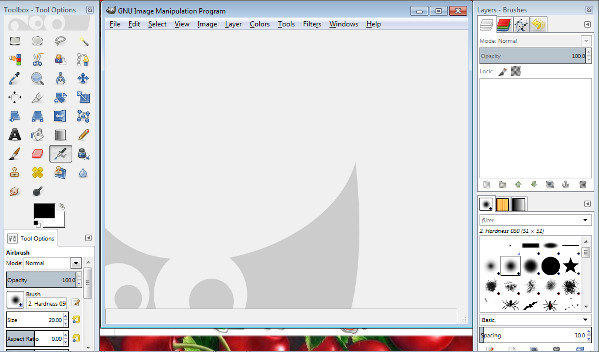
This is what it looks like:
Image
I can't seem to get it to change. I did the first set of steps you gave.

ETA: I did the second set of steps also and it still doesn't work.


Top
 Post subject: Re: New Gimp Theme?
PostPosted: Thu Sep 06, 2012 7:10 pm  (#12) 
Offline
GimpChat Member
User avatar

Joined: Sep 06, 2012
Posts: 28
molly wrote:
GimpinMommy wrote:
I'm new here so if this isn't posted in the right place, I apologize.
I'm trying to find a new theme for gimp but when I try to use the zip file from gimper.net, it doesn't work. I'm looking for a girly theme like light pink and brown but I've had no luck in finding one and I'm sure there's probably not one but I figured it couldn't hurt to ask. Any help with this would be greatly appreciated.

Thanks!


These are the ones I used. I am on Linux Fedora. Are you using Windows?
There are 15 Themes in this package.


Yes, I'm using Windows. Will they work for Windows?


Top
 Post subject: Re: New Gimp Theme?
PostPosted: Thu Sep 06, 2012 7:13 pm  (#13) 
Offline
GimpChat Member
User avatar

Joined: Apr 07, 2010
Posts: 14182
I don't know, Maybe you could try them to see and if they don't work, delete them.

_________________
Image


Top
 Post subject: Re: New Gimp Theme?
PostPosted: Thu Sep 06, 2012 7:35 pm  (#14) 
Offline
GimpChat Member
User avatar

Joined: Sep 06, 2012
Posts: 28
I don't know. I have to be doing something wrong for none of these to work...
I really appreciate all the help.


Top
 Post subject: Re: New Gimp Theme?
PostPosted: Thu Sep 06, 2012 8:37 pm  (#15) 
Offline
GimpChat Member

Joined: Apr 12, 2010
Posts: 5870
did you tried to change themes from

start gimp
Edit/preferences/themes ??

if there you don't see themes or are only 2 then the new are not properly installed !

huumm...if may help i may zip my theme folders there are about 20 extra themes (5 from Samj, 4 from Rod for the others i am not sure...all seems to work

to use just replace your themes folder (it is inside share/gimp/2.0) with that inside that contain also the 2 default themes

Attachment:
themes.zip [4.04 KiB]
Downloaded 110 times

_________________
My 3D Gallery on Deviantart http://photocomix2.deviantart.com/
Main gallery http://www.flickriver.com/photos/photocomix-mandala/
Mandala and simmetry http://www.flickriver.com/photos/photocomix_mandala/

Image

Mrs Wilbress


Top
 Post subject: Re: New Gimp Theme?
PostPosted: Thu Sep 06, 2012 8:44 pm  (#16) 
Offline
GimpChat Member
User avatar

Joined: Sep 06, 2012
Posts: 28
PhotoComix wrote:
did you tried to change themes from

start gimp
Edit/preferences/themes ??

if there you don't see themes or are only 2 then the new are not properly installed !

huumm...if may help i may zip my theme folders there are about 20 extra themes (5 from Samj, 4 from Rod for the others i am not sure...all seems to work

to use just replace your themes folder (it is inside share/gimp/2.0) with that inside that contain also the 2 default themes

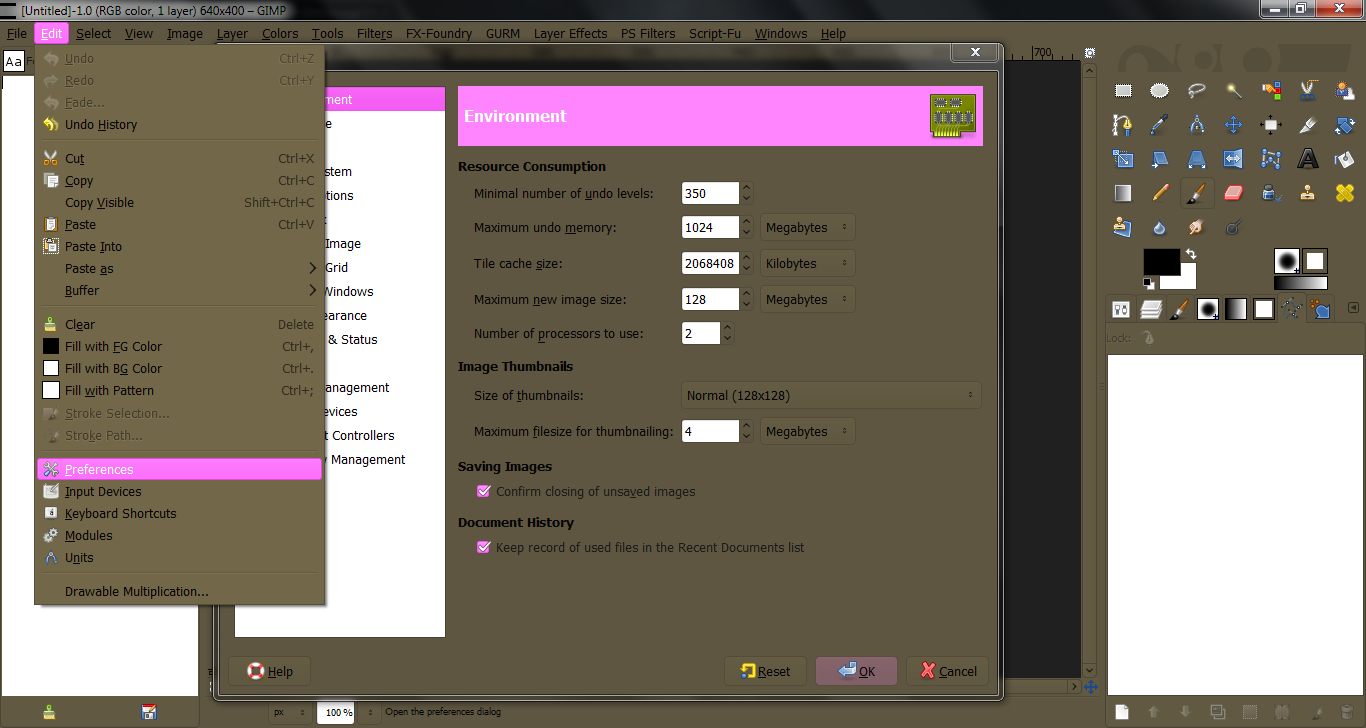
Attachment:
themes.zip


This is what I see, so I guess I'm doing it wrong.
Image


Top
 Post subject: Re: New Gimp Theme?
PostPosted: Thu Sep 06, 2012 8:51 pm  (#17) 
Offline
GimpChat Member
User avatar

Joined: Sep 06, 2012
Posts: 28
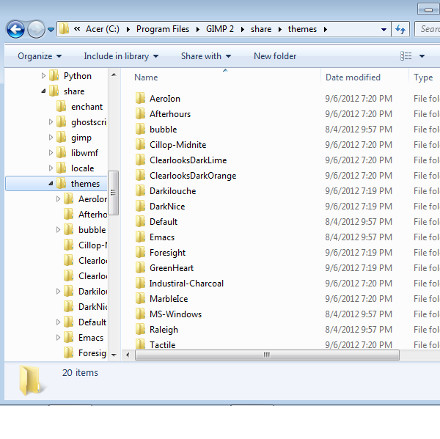
Just to show you where I'm extracting the files to:
Image


Top
 Post subject: Re: New Gimp Theme?
PostPosted: Thu Sep 06, 2012 10:27 pm  (#18) 
Offline
GimpChat Member

Joined: Apr 12, 2010
Posts: 5870
no share/themes

but share/gimp/2.0/themes

Oh well they may even stay were you placed but in case you have to add that path you used , that ending in share/themes
in the the preferences dialog...instead if you move everything there should not be needed change the prefrerences

_________________
My 3D Gallery on Deviantart http://photocomix2.deviantart.com/
Main gallery http://www.flickriver.com/photos/photocomix-mandala/
Mandala and simmetry http://www.flickriver.com/photos/photocomix_mandala/

Image

Mrs Wilbress


Top
 Post subject: Re: New Gimp Theme?
PostPosted: Thu Sep 06, 2012 10:42 pm  (#19) 
Offline
GimpChat Member
User avatar

Joined: Jan 20, 2012
Posts: 583
Ah crap I was afraid this would happen. Put the folder in gimp-2.8/themes folder as well. I'll make a video using your theme as an example and to show it.
Just looked and it looks like the GTKRC file went missing sorry. Will add to post when corrected.

Theme:
Attachment:
Theme.zip [96.01 KiB]
Downloaded 105 times


Video:http://youtu.be/5G49sfFwnX4

_________________


"In the face of adversity, there's three things: fly, freeze or fight; We're choosing to fight..."- Guy Boucher, Tampa Bay Lighting Head Coach


Last edited by ZWard117 on Fri Sep 07, 2012 12:37 am, edited 1 time in total.

Top
 Post subject: Re: New Gimp Theme?
PostPosted: Thu Sep 06, 2012 11:36 pm  (#20) 
Offline
GimpChat Member
User avatar

Joined: Sep 06, 2012
Posts: 28
PhotoComix wrote:
no share/themes

but share/gimp/2.0/themes

Oh well they may even stay were you placed but in case you have to add that path you used , that ending in share/themes
in the the preferences dialog...instead if you move everything there should not be needed change the prefrerences


Got it! It's like a whole new world! Ha ha! Thanks! :tyspin


Top
Post new topic Reply to topic  [ 41 posts ]  Go to page 1, 2, 3  Next

All times are UTC - 5 hours [ DST ]


* Login  


Powered by phpBB3 © phpBB Group