It is currently Sun Sep 20, 2026 8:29 pm


All times are UTC - 5 hours [ DST ]


Post new topic Reply to topic  [ 38 posts ]  Go to page 1, 2  Next
Author Message
 Post subject: Content Menu "Edit with Gimp" [SOLVED by GC Member alc59]
PostPosted: Tue Sep 11, 2012 4:19 pm  (#1) 
Offline
Administrator
User avatar

Joined: Aug 10, 2012
Posts: 14206
Location: Native to NYC living in Arizona, Gimp 2.8 - 3.0, Win 11 PC.
GIMP Version: 2.6.11
Operating System: Windows
OS Version: XP - SP3
GIMP Experience: Basic Level


To make a long story short, I reinstalled my 2.6.11 GIMP...
When I "right click" on a JPG, there is a listing in the menu that says, "Edit with GIMP" (see attachment).

If I click on this option listed in the "right click" menu, I get this message, (also see attachment).

I don't think this is a GIMP issue, but I'm not sure. Would anyone know what might be going on here?


Attachments:
Right Click Image 2.PNG
Right Click Image 2.PNG [ 89.48 KiB | Viewed 4926 times ]

_________________
Image
"A wise man learns more from a foolish question than a fool can learn from a wise answer"
Image


Last edited by Wallace on Mon Mar 17, 2014 7:06 pm, edited 2 times in total.
Share on Facebook Share on Twitter Share on Orkut Share on Digg Share on MySpace Share on Delicious Share on Technorati
Top
 Post subject: Re: Right Click Menu... "Edit with GIMP"???
PostPosted: Tue Sep 11, 2012 4:28 pm  (#2) 
Offline
GimpChat Founder
User avatar

Joined: May 22, 2008
Posts: 5241
Location: Gimpville
You'll need to associate each file type that you'd like to open with GIMP.

Right click on the file (type) you wist to associate with GIMP, select properties and "Open With" (or "Change" if it is already associated with an application). Then, select the application, in this case GIMP. From then on, all files of that type (i.e. jpg) will open in GIMP.

_________________
“If you reach for the stars, you just might land on a decently sized hill.” - Stuart Hill


Top
 Post subject: Re: Right Click Menu... "Edit with GIMP"???
PostPosted: Tue Sep 11, 2012 4:36 pm  (#3) 
Offline
GimpChat Member

Joined: Apr 19, 2012
Posts: 80
Location: Australia
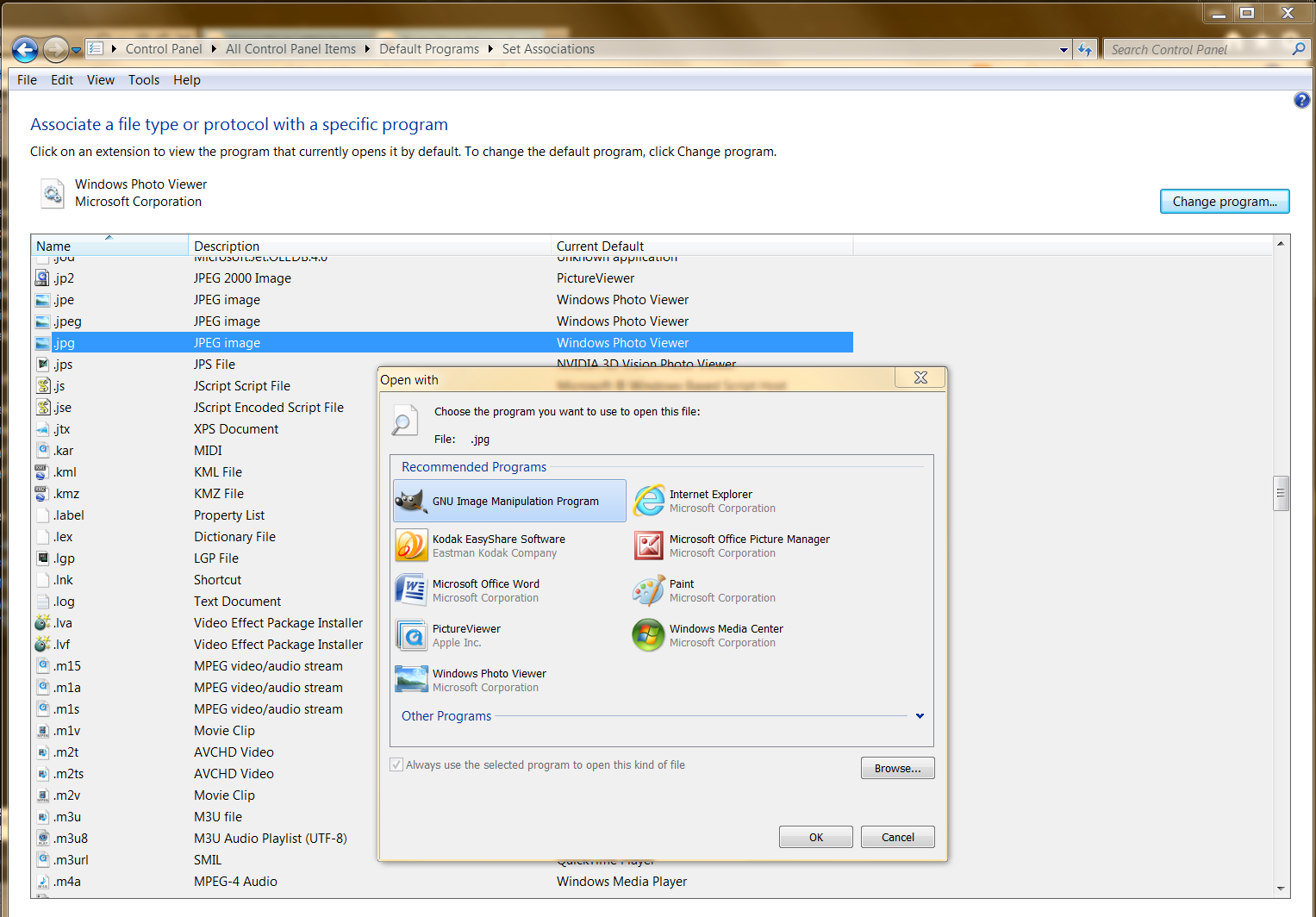
Wallace, the pic below is from Windows7 but I'm sure it will be similar in XP's control panel.
Image
:ninja


Top
 Post subject: Re: Right Click Menu... "Edit with GIMP"???
PostPosted: Tue Sep 11, 2012 4:40 pm  (#4) 
Offline
Script Coder
User avatar

Joined: Jun 22, 2010
Posts: 1171
Location: Here and there
I'll offer an alternative on windows XP.

Click on Folder Options on the File Explorer menu bar
Select the File Types tab
Find JPG in the list and select it

In the section "Details for JPG" click on the "Advanced" button
Select the "Edit" or "Edit with GIMP" (whatever you have) and press the Edit button
Make sure the path to the GIMP executable is correct:
Attachment:
Untitled.png
Untitled.png [ 104.83 KiB | Viewed 4896 times ]


Kevin


Top
 Post subject: Re: Right Click Menu... "Edit with GIMP"???
PostPosted: Tue Sep 11, 2012 4:49 pm  (#5) 
Offline
Administrator
User avatar

Joined: Aug 10, 2012
Posts: 14206
Location: Native to NYC living in Arizona, Gimp 2.8 - 3.0, Win 11 PC.
GnuTux wrote:
You'll need to associate each file type that you'd like to open with GIMP.

Right click on the file (type) you wist to associate with GIMP, select properties and "Open With" (or "Change" if it is already associated with an application). Then, select the application, in this case GIMP. From then on, all files of that type (i.e. jpg) will open in GIMP.


I understand this, but don't wish to open every JPG I click on with GIMP. I only wish to be able to edit JPG's with GIMP.
When I left click on a JPG that has it's file association changed to GIMP, it will open with GIMP and not the default WPF (Windows Picture and Fax viewer).
All I want is to be able to preview an image with WPF, without opening the image for editing in GIMP.
If I wish to "edit an image using GIMP, how do I make it so when I right click an image file and chose "Edit with GIMP" from the menu, that this image will open with Gimp for editing only and not for simple image previewing.

_________________
Image
"A wise man learns more from a foolish question than a fool can learn from a wise answer"
Image


Top
 Post subject: Re: Right Click Menu... "Edit with GIMP"???
PostPosted: Tue Sep 11, 2012 4:52 pm  (#6) 
Offline
GimpChat Member

Joined: Apr 19, 2012
Posts: 80
Location: Australia
Then paynekj's answer is what you are looking for.


Top
 Post subject: Re: Right Click Menu... "Edit with GIMP"???
PostPosted: Tue Sep 11, 2012 5:01 pm  (#7) 
Offline
GimpChat Member

Joined: Apr 12, 2010
Posts: 5870
You will be always able to edit jpg with gimp

File associations will only automatically load gimp when you click on a jpg, that is, how you guessed more a nightmare than a advantage

Well files may even be associated to more then 1 program, as example may be opened as default with a image viewer but still have that option "edit with ..something else"(even gimp)

but personally i don't trust much this because almost any program try to hack or modify the right click menu, so it is hard to plan what should be there, and harder guess how long will remain there because unplanned changes from other programs

So in my opinion the best remain do not associate gimp to any file, and to edit jpg just load gimp and drag the jpg in the gimp window (or in top of the toolbox if files to open are more then 1 )

_________________
My 3D Gallery on Deviantart http://photocomix2.deviantart.com/
Main gallery http://www.flickriver.com/photos/photocomix-mandala/
Mandala and simmetry http://www.flickriver.com/photos/photocomix_mandala/

Image

Mrs Wilbress


Top
 Post subject: Re: Right Click Menu... "Edit with GIMP"???
PostPosted: Tue Sep 11, 2012 5:10 pm  (#8) 
Offline
Administrator
User avatar

Joined: Aug 10, 2012
Posts: 14206
Location: Native to NYC living in Arizona, Gimp 2.8 - 3.0, Win 11 PC.
b10h4z4rd wrote:
Then paynekj's answer is what you are looking for.


I have tried this and I get this message when I attempt to make the association and open JPG'd from the right click menu using "Edit with GIMP". (see attachment)

It does not seem to work.


Attachments:
File Association Edit with GIMP.PNG
File Association Edit with GIMP.PNG [ 822.04 KiB | Viewed 4872 times ]

_________________
Image
"A wise man learns more from a foolish question than a fool can learn from a wise answer"
Image
Top
 Post subject: Re: Right Click Menu... "Edit with GIMP"???
PostPosted: Tue Sep 11, 2012 5:17 pm  (#9) 
Offline
GimpChat Member

Joined: Apr 19, 2012
Posts: 80
Location: Australia
I'm no longer running XP, so I'll wing it...
When did that error message appear? After you clicked the 'Edit...' button?
Or after you confirmed the changes in the Edit window?


Top
 Post subject: Re: Right Click Menu... "Edit with GIMP"???
PostPosted: Tue Sep 11, 2012 5:22 pm  (#10) 
Offline
Administrator
User avatar

Joined: Aug 10, 2012
Posts: 14206
Location: Native to NYC living in Arizona, Gimp 2.8 - 3.0, Win 11 PC.
PhotoComix wrote:
You will be always able to edit jpg with gimp

File associations will only automatically load gimp when you click on a jpg, that is, how you guessed more a nightmare than a advantage

Well files may even be associated to more then 1 program, as example may be opened as default with a image viewer but still have that option "edit with ..something else"(even gimp)

but personally i don't trust much this because almost any program try to hack or modify the right click menu, so it is hard to plan what should be there, and harder guess how long will remain there because unplanned changes from other programs

So in my opinion the best remain do not associate gimp to any file, and to edit jpg just load gimp and drag the jpg in the gimp window (or in top of the toolbox if files to open are more then 1 )


Yeah... I think that's what I'll have to do and disregard the "Edit with GIMP" option in the right click menu.
I could hack this menu and remove this, but I don't think I'll do that.
Although I can open any image for editing in GIMP by selecting "Edit" from the right click menu.
I guess I'm just being fussy.

Funny thing is that windows says that JPG's are already registered to open with GIMP for editing, but when I click on "Edit with GIMP"... It shows no program associated to preform this action. :roll:

_________________
Image
"A wise man learns more from a foolish question than a fool can learn from a wise answer"
Image


Top
 Post subject: Re: Right Click Menu... "Edit with GIMP"???
PostPosted: Tue Sep 11, 2012 5:25 pm  (#11) 
Offline
Administrator
User avatar

Joined: Aug 10, 2012
Posts: 14206
Location: Native to NYC living in Arizona, Gimp 2.8 - 3.0, Win 11 PC.
b10h4z4rd wrote:
I'm no longer running XP, so I'll wing it...
When did that error message appear? After you clicked the 'Edit...' button?
Or after you confirmed the changes in the Edit window?


Once I made all the changes and then tried to apply them, the message came up.
Windows still says that I can't preform this action, because no program is associated with this action. :hehe

_________________
Image
"A wise man learns more from a foolish question than a fool can learn from a wise answer"
Image


Top
 Post subject: Re: Right Click Menu... "Edit with GIMP"???
PostPosted: Tue Sep 11, 2012 5:28 pm  (#12) 
Offline
GimpChat Founder
User avatar

Joined: May 22, 2008
Posts: 5241
Location: Gimpville
Wallace wrote:
I have tried this and I get this message when I attempt to make the association and open JPG'd from the right click menu using "Edit with GIMP".

When you right click, as I mentioned in my first post, to make GIMP the default association for .jpg, do .jpg files open when you double click them, or do you get the same error?

_________________
“If you reach for the stars, you just might land on a decently sized hill.” - Stuart Hill


Top
 Post subject: Re: Right Click Menu... "Edit with GIMP"???
PostPosted: Tue Sep 11, 2012 5:32 pm  (#13) 
Offline
GimpChat Member

Joined: Apr 19, 2012
Posts: 80
Location: Australia
Wallace wrote:
To make a long story short, I reinstalled my 2.6.11 GIMP...

Did you changed the location where you 're-installed' it?
That's why paynekj said "Make sure the path to the executable is correct"
You could use the "Browse' button to find it rather than type it.


Top
 Post subject: Re: Right Click Menu... "Edit with GIMP"???
PostPosted: Tue Sep 11, 2012 5:36 pm  (#14) 
Offline
Administrator
User avatar

Joined: Aug 10, 2012
Posts: 14206
Location: Native to NYC living in Arizona, Gimp 2.8 - 3.0, Win 11 PC.
GnuTux wrote:
Wallace wrote:
I have tried this and I get this message when I attempt to make the association and open JPG'd from the right click menu using "Edit with GIMP".

When you right click, as I mentioned in my first post, to make GIMP the default association for .jpg, do .jpg files open when you double click them, or do you get the same error?


Only when I right click and chose "Edit with GIMP", do I get the message about not being able to preform this action because no program is associated with it to perform this action. :hehe
Windows also tells me that GIMP is already registered to preform this action, but when I try to do it, it say no program is associated with it to perform this action. :roll:

_________________
Image
"A wise man learns more from a foolish question than a fool can learn from a wise answer"
Image


Top
 Post subject: Re: Right Click Menu... "Edit with GIMP"???
PostPosted: Tue Sep 11, 2012 5:38 pm  (#15) 
Offline
GimpChat Member

Joined: Apr 12, 2010
Posts: 5870
@ Gnu Tux i just read your message

On windows gimp file association once done was really hard to broken, to the point that the only solution to break involved install other software (no the obvious method was not working, once done that file association was not easy to undone)

Not sure if now that is fixed but i will not dare to try

----------------------------------------------------------------------------------

Yes as explained that may be fixed but even better remove totally that "open with gimp" (that should be explained too in same message)

It was a time when open with gimp would have opened 1 gimp for each jpg to open , much better if doesn't open any, and would even better if the Explorer menu would be left as it is,(not referred to you here ..but to whoever had that idea to add by default gimp to the Windows explorer menu ) except when a user really wish to modify it

_________________
My 3D Gallery on Deviantart http://photocomix2.deviantart.com/
Main gallery http://www.flickriver.com/photos/photocomix-mandala/
Mandala and simmetry http://www.flickriver.com/photos/photocomix_mandala/

Image

Mrs Wilbress


Last edited by PhotoComix on Tue Sep 11, 2012 5:41 pm, edited 1 time in total.

Top
 Post subject: Re: Right Click Menu... "Edit with GIMP"???
PostPosted: Tue Sep 11, 2012 5:40 pm  (#16) 
Offline
Administrator
User avatar

Joined: Aug 10, 2012
Posts: 14206
Location: Native to NYC living in Arizona, Gimp 2.8 - 3.0, Win 11 PC.
b10h4z4rd wrote:
Wallace wrote:
To make a long story short, I reinstalled my 2.6.11 GIMP...

Did you changed the location where you 're-installed' it?
That's why paynekj said "Make sure the path to the executable is correct"
You could use the "Browse' button to find it rather than type it.


The installation location is the same and I did "Browse" to make sure I had the right location.
It says that GIMP is already registered to perform this action, but when I use the right click menus and chose "Edit with GIMP" it tell me the opposite. :hehe

_________________
Image
"A wise man learns more from a foolish question than a fool can learn from a wise answer"
Image


Top
 Post subject: Re: Right Click Menu... "Edit with GIMP"???
PostPosted: Tue Sep 11, 2012 5:41 pm  (#17) 
Offline
GimpChat Member
User avatar

Joined: Nov 16, 2011
Posts: 5127
Location: Metro Vancouver, BC
A couple of handy utilities you may find useful from NirSoft.

ShellMenuView is a small utility that display the list of static menu items that appeared in the context menu when you right-click a file/folder on Windows Explorer, and allows you to easily disable unwanted menu items.

ShellExView utility displays the details of shell extensions (DLLs) installed on your computer, and allows you to easily disable and enable each shell extension.

_________________
Image
Gimp 2.8.18, Linux, median user
Gimp Chat Tutorials Index
Spirit Bear (Kermode)


Top
 Post subject: Re: Right Click Menu... "Edit with GIMP"???
PostPosted: Tue Sep 11, 2012 5:49 pm  (#18) 
Offline
GimpChat Founder
User avatar

Joined: May 22, 2008
Posts: 5241
Location: Gimpville
So you can't do as I suggested in my 1st post and associate .jpg with GIMP, then be able to double click a .jpg and have it open in GIMP. I'm still unclear as to whether you can or cannot do that. Or is it that when you try to associate using the method I suggested, it tells you it's already associated with GIMP?

If that's the case, associate the .jpg with another app, then you should be able to "Open with GIMP". As long as the associated app's path to the .exe is correct, I can't see why it wouldn't work.

_________________
“If you reach for the stars, you just might land on a decently sized hill.” - Stuart Hill


Top
 Post subject: Re: Right Click Menu... "Edit with GIMP"???
PostPosted: Tue Sep 11, 2012 5:56 pm  (#19) 
Offline
Administrator
User avatar

Joined: Aug 10, 2012
Posts: 14206
Location: Native to NYC living in Arizona, Gimp 2.8 - 3.0, Win 11 PC.
Odinbc wrote:
A couple of handy utilities you may find useful from NirSoft.

ShellMenuView is a small utility that display the list of static menu items that appeared in the context menu when you right-click a file/folder on Windows Explorer, and allows you to easily disable unwanted menu items.

ShellExView utility displays the details of shell extensions (DLLs) installed on your computer, and allows you to easily disable and enable each shell extension.


I downloaded this utility, thanks maybe this can help me remove the "Edit with GIMP" from my right click menu that doesn't seem to function properly.

I did take a look at my registry and where the shell extensions for "Edit with GIMP" should have been... there was nothing there that pointed to "Edit with GIMP". :? So I left it as is...

_________________
Image
"A wise man learns more from a foolish question than a fool can learn from a wise answer"
Image


Top
 Post subject: Re: Right Click Menu... "Edit with GIMP"???
PostPosted: Tue Sep 11, 2012 5:58 pm  (#20) 
Offline
GimpChat Member

Joined: Apr 12, 2010
Posts: 5870
Poor Win Explorer is so abused by contrasting commands from so many programs and utilities that you can't expected it to work t as should...not always

I believe in this case a sort of reset (first delete the path from Explorer , then reload Windows, and last add the path again) may solve

Anyway once deleted i would not add again that "edit with gimp"

_________________
My 3D Gallery on Deviantart http://photocomix2.deviantart.com/
Main gallery http://www.flickriver.com/photos/photocomix-mandala/
Mandala and simmetry http://www.flickriver.com/photos/photocomix_mandala/

Image

Mrs Wilbress


Top
Post new topic Reply to topic  [ 38 posts ]  Go to page 1, 2  Next

All times are UTC - 5 hours [ DST ]


cron

* Login  


Powered by phpBB3 © phpBB Group