It is currently Tue Sep 08, 2026 10:40 am


All times are UTC - 5 hours [ DST ]


Post new topic Reply to topic  [ 82 posts ]  Go to page Previous  1, 2, 3, 4, 5  Next
Author Message
 Post subject: Re: Painting a Picture in a Picture Tutorial
PostPosted: Wed Sep 12, 2012 9:48 am  (#41) 
Offline
GimpChat Member
User avatar

Joined: Aug 30, 2012
Posts: 2174
This does look really cool tut, but I've not managed to find a picture of a hand a paintbrush for free yet, anyone link to and actual picture of one.

_________________
Image


Top
 Post subject: Re: Painting a Picture in a Picture Tutorial
PostPosted: Wed Sep 12, 2012 9:52 am  (#42) 
Offline
GimpChat Member
User avatar

Joined: Apr 07, 2010
Posts: 14182
he4rty wrote:
This does look really cool tut, but I've not managed to find a picture of a hand a paintbrush for free yet, anyone link to and actual picture of one.


@he4rty I put the link to hands in the tute, it is hi-lighted in red and they are all free in Bing.

_________________
Image


Top
 Post subject: Re: Painting a Picture in a Picture Tutorial
PostPosted: Wed Sep 12, 2012 9:56 am  (#43) 
Offline
Retired Staff
User avatar

Joined: May 22, 2008
Posts: 6946
Location: Somewhere in GIMP
he4rty wrote:
This does look really cool tut, but I've not managed to find a picture of a hand a paintbrush for free yet, anyone link to and actual picture of one.

I had to do a little cloning and smudging to clean up my hand picture. Most of them are not free.

_________________
Image
World War IV will be fought with sticks and stones. - Albert Einstein


Top
 Post subject: Re: Painting a Picture in a Picture Tutorial
PostPosted: Wed Sep 12, 2012 11:00 am  (#44) 
Offline
GimpChat Member
User avatar

Joined: Apr 08, 2010
Posts: 5420
Location: Northwest Ohio
Finally, I got to this fun tut! I know....jaggies on the paintbrush, but the pic the pic I found had no watermark so I used it, unfortunately it was quite small and the enlarging created jaggies. Placement can also get a bit tricky, depending on the background pic and the brush pic. Still, this is a much easier way to get this effect than the old tutorial i tried a few years ago.

Image


Top
 Post subject: Re: Painting a Picture in a Picture Tutorial
PostPosted: Wed Sep 12, 2012 11:35 am  (#45) 
Offline
GimpChat Member
User avatar

Joined: Aug 30, 2012
Posts: 2174
2-Ton - really nice, Having trouble with blocky images as well, I searched the net and came across this little tip, I'll assume your hand is on a transparent layer.
Go layer>transparency>alpha to selection
Go selection>Shrink Selection and shrink by 2px
Invert Selction
Go Filters>blur>gausians blur and blurr between 2 -5 px
So this should just blurr the edges of your hand so it blends better.

_________________
Image


Top
 Post subject: Re: Painting a Picture in a Picture Tutorial
PostPosted: Wed Sep 12, 2012 11:54 am  (#46) 
Offline
GimpChat Member
User avatar

Joined: Apr 07, 2010
Posts: 14182
@2-ton, very nice job, cute baby. I guess you did get around to it after all huh!

_________________
Image


Top
 Post subject: Re: Painting a Picture in a Picture Tutorial
PostPosted: Wed Sep 12, 2012 11:59 am  (#47) 
Offline
GimpChat Member
User avatar

Joined: Apr 08, 2010
Posts: 5420
Location: Northwest Ohio
yes, finally! And the best thing is that I have learned a bit of how to use edge detect! Also, I used layer mask instead of erase because I wasn't sure exactly where I was going to be erasing.


Top
 Post subject: Re: Painting a Picture in a Picture Tutorial
PostPosted: Wed Sep 12, 2012 12:12 pm  (#48) 
Offline
GimpChat Member
User avatar

Joined: Apr 07, 2010
Posts: 14182
This is the first time I used edge detect too, I find it a cool script.

Image

_________________
Image


Top
 Post subject: Re: Painting a Picture in a Picture Tutorial
PostPosted: Wed Sep 12, 2012 2:33 pm  (#49) 
Offline
Script Coder
User avatar

Joined: Jun 22, 2010
Posts: 1171
Location: Here and there
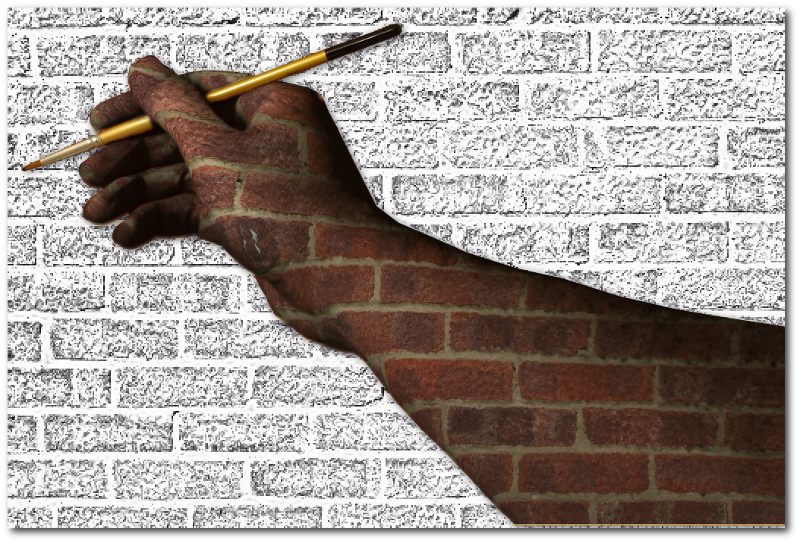
Sorry it's taken me so long to get to this, but this chap I've subcontracted the painting to is taking forever:

Image

Kevin


Top
 Post subject: Re: Painting a Picture in a Picture Tutorial
PostPosted: Wed Sep 12, 2012 2:40 pm  (#50) 
Offline
Retired Staff
User avatar

Joined: May 22, 2008
Posts: 6946
Location: Somewhere in GIMP
:lol Those bricks are heavy, Kevin. That's really cool. Love it.

_________________
Image
World War IV will be fought with sticks and stones. - Albert Einstein


Top
 Post subject: Re: Painting a Picture in a Picture Tutorial
PostPosted: Wed Sep 12, 2012 2:40 pm  (#51) 
Offline
GimpChat Member
User avatar

Joined: Apr 07, 2010
Posts: 14182
That is very cool Kevin. love the big brush, :teeth

_________________
Image


Top
 Post subject: Re: Painting a Picture in a Picture Tutorial
PostPosted: Wed Sep 12, 2012 2:45 pm  (#52) 
Offline
GimpChat Member
User avatar

Joined: Aug 16, 2012
Posts: 4271
Location: Göteborg, Sweden
2-ton: delightful picture! the edge detect filter never seems to get me anywhere, but yours looks really good.

paynekj: aww, give the poor guy a paint cannon! at this rate he won't get a christmas break. neat picture!

_________________


Top
 Post subject: Re: Painting a Picture in a Picture Tutorial
PostPosted: Wed Sep 12, 2012 3:57 pm  (#53) 
Offline
Script Coder
User avatar

Joined: Jun 22, 2010
Posts: 1171
Location: Here and there
he4rty wrote:
This does look really cool tut, but I've not managed to find a picture of a hand a paintbrush for free yet, anyone link to and actual picture of one.


How about this - it's my hand, photographed by me, this evening and you're free to do anything you like with it:
Attachment:
IMGP8872_sml.png
IMGP8872_sml.png [ 541.01 KiB | Viewed 2382 times ]

It's a png with a transparent background.

Kevin


Top
 Post subject: Re: Painting a Picture in a Picture Tutorial
PostPosted: Wed Sep 12, 2012 4:12 pm  (#54) 
Offline
GimpChat Member
User avatar

Joined: Aug 30, 2012
Posts: 2174
Thanks a lot Kevin

_________________
Image


Top
 Post subject: Re: Painting a Picture in a Picture Tutorial
PostPosted: Wed Sep 12, 2012 4:35 pm  (#55) 
Offline
GimpChat Member
User avatar

Joined: Apr 07, 2010
Posts: 14182
very nice Kevin. Look like you have a pretty nice camera there.

_________________
Image


Top
 Post subject: Re: Painting a Picture in a Picture Tutorial
PostPosted: Wed Sep 12, 2012 11:19 pm  (#56) 
Offline
GimpChat Member
User avatar

Joined: Dec 11, 2011
Posts: 532
i tried this tonight...here is what i came up with....


Attachments:
painting the dukes.jpg
painting the dukes.jpg [ 159.48 KiB | Viewed 2365 times ]

_________________
Image
Top
 Post subject: Re: Painting a Picture in a Picture Tutorial
PostPosted: Thu Sep 13, 2012 1:31 am  (#57) 
Offline
GimpChat Member
User avatar

Joined: Aug 30, 2012
Posts: 2174
Rdgracer71 - Nice job, takes me back abit.

Well had a go, went for the cliched image

Image

_________________
Image


Top
 Post subject: Re: Painting a Picture in a Picture Tutorial
PostPosted: Thu Sep 13, 2012 4:17 am  (#58) 
Offline
GimpChat Member
User avatar

Joined: Apr 07, 2010
Posts: 14182
That is very nice rdgracer71, good job. That picture sure takes you back a few years.

_________________
Image


Top
 Post subject: Re: Painting a Picture in a Picture Tutorial
PostPosted: Wed Sep 19, 2012 3:14 pm  (#59) 
Offline
GimpChat Member

Joined: Aug 05, 2011
Posts: 606
Location: limestone,ny
Image
Image
Image


Top
 Post subject: Re: Painting a Picture in a Picture Tutorial
PostPosted: Wed Sep 19, 2012 3:21 pm  (#60) 
Offline
GimpChat Member
User avatar

Joined: Apr 07, 2010
Posts: 14182
Wow that is so very cool alc. lots of imagination there.

_________________
Image


Top
Post new topic Reply to topic  [ 82 posts ]  Go to page Previous  1, 2, 3, 4, 5  Next

All times are UTC - 5 hours [ DST ]


* Login  


Powered by phpBB3 © phpBB Group