It is currently Tue Jul 21, 2026 2:38 pm


All times are UTC - 5 hours [ DST ]


Post new topic Reply to topic  [ 20 posts ] 
Author Message
 Post subject: Pretty (and pretty easy) basic outer space background..
PostPosted: Tue Sep 18, 2012 10:46 pm  (#1) 
Offline
GimpChat Member
User avatar

Joined: Aug 28, 2012
Posts: 3060
Location: Idk where I am.
I'll have to make this sections cause I can only add 3 attachment at a time...

Hellllllo everyone! It's been a long long long long long long did I mention longggggg time(?) since I've made a tutorial! Please bare with me and my horrible instruction skills as I attempt to tell you how to make something like this! xD

Attachment:
finished.png
finished.png [ 898.97 KiB | Viewed 11451 times ]


Okay.... Lets begin! xD

Step one:

Make an image (whatever size you want) with a black background> Go to Filters/Noise/HSV Noise and set it to how ever you like, the noise will be representing far away stars.
Attachment:
2.PNG
2.PNG [ 213.28 KiB | Viewed 11451 times ]


Step two (pt 1):

Get the sparkle brush and turn on jitter to make the sparkle go random and add some sparkles, then go to colorize, you can either make them white by turning saturation down or make them a vague color; I chose option 2.
Attachment:
3.PNG
3.PNG [ 297.28 KiB | Viewed 11451 times ]

_________________
Image
Reality is a lovely place...But I wouldn't wanna live there.


Share on Facebook Share on Twitter Share on Orkut Share on Digg Share on MySpace Share on Delicious Share on Technorati
Top
 Post subject: Re: Pretty (and pretty easy) basic outer space background..
PostPosted: Tue Sep 18, 2012 10:51 pm  (#2) 
Offline
GimpChat Member
User avatar

Joined: Aug 28, 2012
Posts: 3060
Location: Idk where I am.
Step 2 (pt 2):
Now make a new layer and select the sparkle brush again, this time make the sparkles much bigger this is to add perspective, now place at random some bigger “stars” and do the same process with colorize.
Attachment:
4.PNG
4.PNG [ 334.67 KiB | Viewed 11450 times ]

Step 3:
Next make a new layer and get a gradient of your color choosing and make a smooth layer (No repeating settings on) of the gradient, then set layer mode screen, now turn the transparency down I have it to 12.2 but how ever you'd prefer is what matters.

Attachment:
5.PNG
5.PNG [ 367.57 KiB | Viewed 11450 times ]


Now make a new layer and make big random color splotches (I used purple, blue and pink) with a soft fuzzy brush then set to overlay and blend them with smudging until it looks good to you.
Attachment:
6.PNG
6.PNG [ 462.35 KiB | Viewed 11450 times ]

_________________
Image
Reality is a lovely place...But I wouldn't wanna live there.


Top
 Post subject: Re: Pretty (and pretty easy) basic outer space background..
PostPosted: Tue Sep 18, 2012 10:59 pm  (#3) 
Offline
GimpChat Member
User avatar

Joined: Jul 17, 2012
Posts: 2769
very useful !

thank you Moko


Top
 Post subject: Re: Pretty (and pretty easy) basic outer space background..
PostPosted: Tue Sep 18, 2012 11:02 pm  (#4) 
Offline
GimpChat Member
User avatar

Joined: Aug 28, 2012
Posts: 3060
Location: Idk where I am.
Step 4:

Make a new layer and go to Filters/ Light and Shadow/ Gradient Flare, and select the default flare and change the color and settings how you like, then repeat the process over the flare what another flare only use “distant star” flare, now set you're lovely double flare over a big star or in a very bright spot:
Attachment:
8.PNG
8.PNG [ 469.93 KiB | Viewed 11448 times ]


Step 5:
Make a new layer from visible and duplicate it, now go to lens flare and place it over the gradient flare, now get a really big fuzzy brush and erase the part that is over the flare but not the glare of the lens flare. Depending on how much you like the glare you can keep it full or turn transparency down, it's up to you!
Attachment:
9.PNG
9.PNG [ 501.29 KiB | Viewed 11448 times ]

Attachment:
10.PNG
10.PNG [ 473.91 KiB | Viewed 11448 times ]


Last step:

Make a new layer from visible again and a new transparent layer and set to overlay, now get a/the black to white gradient and make the black go the opposite direction that the flare starts from so it looks like a light source (darker to light with light being near/on the flare.)

And you're done!

(@ Esper: Haha I wasn't done! but I'm glad you liked what you saw! Thank you! :D

_________________
Image
Reality is a lovely place...But I wouldn't wanna live there.


Top
 Post subject: Re: Pretty (and pretty easy) basic outer space background..
PostPosted: Tue Sep 18, 2012 11:43 pm  (#5) 
Offline
GimpChat Member
User avatar

Joined: Aug 16, 2012
Posts: 4271
Location: Göteborg, Sweden
mokonafan: it looks so beautiful, and doesn't seem too hard - i will definitely try this!

_________________


Top
 Post subject: Re: Pretty (and pretty easy) basic outer space background..
PostPosted: Wed Sep 19, 2012 12:35 am  (#6) 
Offline
GimpChat Member
User avatar

Joined: Aug 30, 2012
Posts: 2174
mokonafan - nice results.

_________________
Image


Top
 Post subject: Re: Pretty (and pretty easy) basic outer space background..
PostPosted: Wed Sep 19, 2012 6:04 am  (#7) 
Offline
GimpChat Member
User avatar

Joined: Apr 07, 2010
Posts: 14182
Mokonafan wrote:
Step 4:

Make a new layer and go to Filters/ Light and Shadow/ Gradient Flare, and select the default flare and change the color and settings how you like, then repeat the process over the flare what another flare only use “distant star” flare, now set you're lovely double flare over a big star or in a very bright spot:
Attachment:
The attachment 8.PNG is no longer available


Step 5:
Make a new layer from visible and duplicate it, now go to lens flare and place it over the gradient flare, now get a really big fuzzy brush and erase the part that is over the flare but not the glare of the lens flare. Depending on how much you like the glare you can keep it full or turn transparency down, it's up to you!
Attachment:
The attachment 9.PNG is no longer available

Attachment:
The attachment 10.PNG is no longer available


Last step:

Make a new layer from visible again and a new transparent layer and set to overlay, now get a/the black to white gradient and make the black go the opposite direction that the flare starts from so it looks like a light source (darker to light with light being near/on the flare.)

And you're done!

(@ Esper: Haha I wasn't done! but I'm glad you liked what you saw! Thank you! :D


That is very beautiful Moko, I made this into a pdf if anyone is interested.


Attachments:
Moko stars tute.pdf [801.71 KiB]
Downloaded 580 times

_________________
Image
Top
 Post subject: Re: Pretty (and pretty easy) basic outer space background..
PostPosted: Wed Sep 19, 2012 12:24 pm  (#8) 
Offline
GimpChat Member
User avatar

Joined: Aug 16, 2012
Posts: 4271
Location: Göteborg, Sweden
i made it, mokonafan :)! i made a miniature space scene from your tutorial and used it for my new signature. easy to work after your instructions and i had fun doing it, so thanks for sharing.

_________________


Top
 Post subject: Re: Pretty (and pretty easy) basic outer space background..
PostPosted: Wed Sep 19, 2012 12:52 pm  (#9) 
Offline
GimpChat Member
User avatar

Joined: Sep 24, 2010
Posts: 12809
Really nice tut Moko. :)

_________________
Lyle

Psalm 109:8

Image


Top
 Post subject: Re: Pretty (and pretty easy) basic outer space background..
PostPosted: Wed Sep 19, 2012 7:08 pm  (#10) 
Offline
GimpChat Member

Joined: Apr 12, 2010
Posts: 5870
Quote:
I'll have to make this sections cause I can only add 3 attachment at a time...


Apparently...
But no, you may add how much photo you like :yes :
look again, more or less under the "font color" widget, there is a yellow balloon, the next at the right of the yellow balloon is the right widget to submit images without limits for the quantity :coolthup :jumpclap

I had your same problem for long , it was really a disturbance when posting tuts, then GnuTux pointed me to the right widget to use
to submit images
The other , that you used is more adapt to attach zip, pdf ,etc

_________________
My 3D Gallery on Deviantart http://photocomix2.deviantart.com/
Main gallery http://www.flickriver.com/photos/photocomix-mandala/
Mandala and simmetry http://www.flickriver.com/photos/photocomix_mandala/

Image

Mrs Wilbress


Top
 Post subject: Re: Pretty (and pretty easy) basic outer space background..
PostPosted: Wed Sep 19, 2012 7:20 pm  (#11) 
Offline
GimpChat Member
User avatar

Joined: Apr 08, 2010
Posts: 5420
Location: Northwest Ohio
That has to be one of your best tutorials! Great job.


Top
 Post subject: Re: Pretty (and pretty easy) basic outer space background..
PostPosted: Wed Sep 19, 2012 7:38 pm  (#12) 
Offline
GimpChat Member

Joined: Apr 12, 2010
Posts: 5870
Oh yes , i forgot my compliment for the tut
i hope my tip may help , should look even better if no split in segments

_________________
My 3D Gallery on Deviantart http://photocomix2.deviantart.com/
Main gallery http://www.flickriver.com/photos/photocomix-mandala/
Mandala and simmetry http://www.flickriver.com/photos/photocomix_mandala/

Image

Mrs Wilbress


Top
 Post subject: Re: Pretty (and pretty easy) basic outer space background..
PostPosted: Wed Sep 19, 2012 10:41 pm  (#13) 
Offline
GimpChat Member
User avatar

Joined: Aug 28, 2012
Posts: 3060
Location: Idk where I am.
Thank you all for the nice comments!

@ AnMal: That looks very pretty! Thank you for trying it out! ^.^
@PhotoComix: Omd, Thankkkkkkkkkkkkkkkk Youuuuuuuuuuuuuuuuuuuuuuuuuu!!! :mrgreen:
@ Molly: Haha, why didn't I think of making a pdf! xD..Thank you for making it. :D

_________________
Image
Reality is a lovely place...But I wouldn't wanna live there.


Top
 Post subject: Re: Pretty (and pretty easy) basic outer space background..
PostPosted: Thu Sep 20, 2012 11:48 am  (#14) 
Offline
GimpChat Member
User avatar

Joined: Mar 23, 2012
Posts: 7388
Location: Göteborg at last!
That looks beautiful Mokonafan.


Top
 Post subject: Re: Pretty (and pretty easy) basic outer space background..
PostPosted: Thu Sep 20, 2012 1:27 pm  (#15) 
Offline
GimpChat Member
User avatar

Joined: Aug 28, 2012
Posts: 3060
Location: Idk where I am.
Thank you! :hi5

_________________
Image
Reality is a lovely place...But I wouldn't wanna live there.


Top
 Post subject: Re: Pretty (and pretty easy) basic outer space background..
PostPosted: Thu Sep 20, 2012 5:33 pm  (#16) 
Offline
GimpChat Member
User avatar

Joined: Mar 23, 2012
Posts: 7388
Location: Göteborg at last!
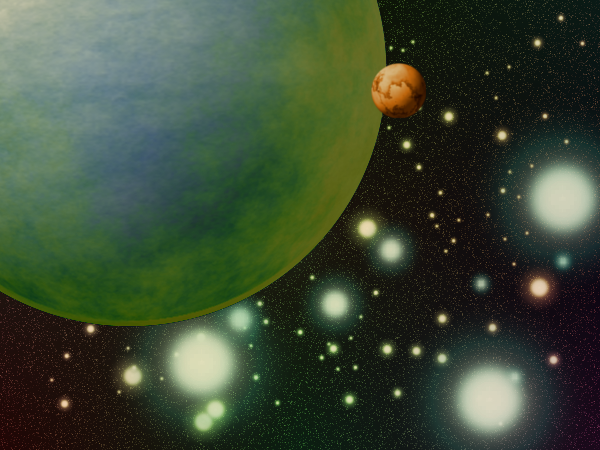
Thought I'd play with it a bit. I used plasma overlay layers to colour the stars.

Image


Top
 Post subject: Re: Pretty (and pretty easy) basic outer space background..
PostPosted: Thu Sep 20, 2012 7:11 pm  (#17) 
Offline
GimpChat Member
User avatar

Joined: Aug 28, 2012
Posts: 3060
Location: Idk where I am.
OoOoOoOoOoOoOo!! Nice!
I'm curious on how you made that planet?
Thank you for trying it out!

_________________
Image
Reality is a lovely place...But I wouldn't wanna live there.


Top
 Post subject: Re: Pretty (and pretty easy) basic outer space background..
PostPosted: Fri Sep 21, 2012 7:34 am  (#18) 
Offline
GimpChat Member
User avatar

Joined: Mar 23, 2012
Posts: 7388
Location: Göteborg at last!
Thank you Mokonafan. The basic planet was originally a grey square mapped to a sphere then colourized. The land was colourized plasma, width halved, layer to image size then map to sphere. The clouds are desaturated plasma, adjust levels, colour the black to alpha, then map to sphere. Play with layer modes and try duplicating layers if you need more solidity.


Top
 Post subject: Re: Pretty (and pretty easy) basic outer space background..
PostPosted: Fri Sep 21, 2012 12:29 pm  (#19) 
Offline
GimpChat Member
User avatar

Joined: Aug 28, 2012
Posts: 3060
Location: Idk where I am.
Ahh, okey! Thank you. xD

_________________
Image
Reality is a lovely place...But I wouldn't wanna live there.


Top
 Post subject: Re: Pretty (and pretty easy) basic outer space background..
PostPosted: Wed Apr 22, 2015 6:13 pm  (#20) 
Offline
GimpChat Member

Joined: Apr 22, 2015
Posts: 12
Thanks!


Top
Post new topic Reply to topic  [ 20 posts ] 

All times are UTC - 5 hours [ DST ]


* Login  


Powered by phpBB3 © phpBB Group