It is currently Sun Sep 06, 2026 6:12 am


All times are UTC - 5 hours [ DST ]


Post new topic Reply to topic  [ 13 posts ] 
Author Message
 Post subject: "transparent ribbons"
PostPosted: Sat Oct 06, 2012 5:22 am  (#1) 
Offline
GimpChat Member
User avatar

Joined: Jul 17, 2012
Posts: 2769
these are pics by Draconian and Wallace from the splash thread, they have those wonderful transparent, colorful ribbons or shapes

i guess you make them with a selection and a gradient...but i cant recreate it

anybody knows how to make them or can point me in the direction of a tutorial ?
i need to learn this technique pronto ! ;)

Draconian
Image

Wallace
Image
Image


Share on Facebook Share on Twitter Share on Orkut Share on Digg Share on MySpace Share on Delicious Share on Technorati
Top
 Post subject: Re: "transparent ribbons"
PostPosted: Sat Oct 06, 2012 8:10 am  (#2) 
Offline
GimpChat Member
User avatar

Joined: Apr 08, 2010
Posts: 5420
Location: Northwest Ohio
I would love a mini or full tutorial, also!


Top
 Post subject: Re: "transparent ribbons"
PostPosted: Sat Oct 06, 2012 4:18 pm  (#3) 
Offline
GimpChat Member
User avatar

Joined: Aug 24, 2011
Posts: 1785
Location: Dallas, TX
The ones in mine are nothing but a few squares/rectangles with a feathered fill and set to varying opacities. After you get a few layered squares/rectangles to your liking, use the GMIC Perspective filter, then duplicate, flip vertically, maybe scale down a bit after that and you are there. Not hard at all. Just play around with those steps and you'll get what you are looking for.

_________________
Image


Last edited by Draconian on Mon Oct 08, 2012 8:31 am, edited 1 time in total.

Top
 Post subject: Re: "transparent ribbons"
PostPosted: Sun Oct 07, 2012 6:57 am  (#4) 
Offline
GimpChat Member
User avatar

Joined: Apr 09, 2011
Posts: 1764
I just want to find where to put one ...was easier to add in the previous version for me but danged if I can find where on the new version


Top
 Post subject: Re: "transparent ribbons"
PostPosted: Sun Oct 07, 2012 3:53 pm  (#5) 
Offline
GimpChat Member
User avatar

Joined: Aug 24, 2011
Posts: 1785
Location: Dallas, TX
Not sure if I can replicate the exact effect but I'll try and give you a quick run down of the flow anyway. I really don't have the time to do a real live tutorial but you can get the idea from this.

1. Make your square or rectangle on a transparent layer and name it "solid template" with a color fill of your choice.

2. Duplicate the layer and alpha select it, then shrink by about 5 or so depending on your image size that you are working with and hit delete to create a line border.

3. Blur the 'border' layer by about 10 or 15 (whatever looks good to you).

4. Alpha select the solid template and reselect the border layer. Select>Invert>delete to trim away the excess blurring outside the template boundries. Name this result "Edge Template".

5. Use these templates, duplicating and arrangeing them to your liking.

6. Merge these assembled layers until you have a layer of several solid shapes and a layer of several edge shapes.

7. Duplicate those and offset them as desired and adjusting the opacity to suit your purposes. I made an additional set of combined layers using both a solid layer at a lower opacity and an edge layer aligned adn merged.

8. Add in a couple of smoke layers if you want, then merge all your layers except for the background. Go GMIC>Deformations>Perspective and just play around with the settings till you get it like you want it and click OK. You can also use the Perspective tool for this step if that is easier or if you don't have GMIC.

9. Duplicate the result, then go to Layer>Transform>Flip Vertically and reposition as desired. Scale to the size you like then erase any unwanted artifacts on both the perspective layers and merge the two.

9. Add a few lighting effects or whatever else you want and you are basically finished.

I have done a really quick (kinda lame but you get the idea) example to show the layers and attached two xcf files to show all the layers before the main merging and then the subsequent layers in the final steps. Hope this helps.


Attachments:
Transparent Rectangles.7z [3.91 MiB]
Downloaded 172 times

_________________
Image
Top
 Post subject: Re: "transparent ribbons"
PostPosted: Sun Oct 07, 2012 9:38 pm  (#6) 
Offline
GimpChat Member
User avatar

Joined: Jul 17, 2012
Posts: 2769
Draconian wrote:
Not sure if I can replicate the exact effect but I'll try and give you a quick run down of the flow anyway. I really don't have the time to do a real live tutorial but you can get the idea from this. *snip*
I have done a really quick (kinda lame but you get the idea) example to show the layers and attached two xcf files to show all the layers before the main merging and then the subsequent layers in the final steps. Hope this helps.
thanks Drac, that helped a lot !!
i tried a few things and couldnt get it to work, but didnt want to ask you again

the quick summary and the xcf's are exactly what i needed !
i dont think there has to be a long tutorial for everything, really
in fact i think tutorials are sometimes too long
following a tutorial is always a project, when mostly i just want to know roughly how its done

so not lame at all on your side

thanks again !


Top
 Post subject: Re: "transparent ribbons"
PostPosted: Mon Oct 08, 2012 8:30 am  (#7) 
Offline
GimpChat Member
User avatar

Joined: Aug 24, 2011
Posts: 1785
Location: Dallas, TX
Esper wrote:
so not lame at all on your side, thanks again !


I meant the result was kinda lame cuz I rushed thru it to get the steps straight in my head. Glad to be of help.

_________________
Image


Top
 Post subject: Re: "transparent ribbons"
PostPosted: Mon Oct 08, 2012 1:14 pm  (#8) 
Offline
GimpChat Member

Joined: Aug 05, 2011
Posts: 606
Location: limestone,ny
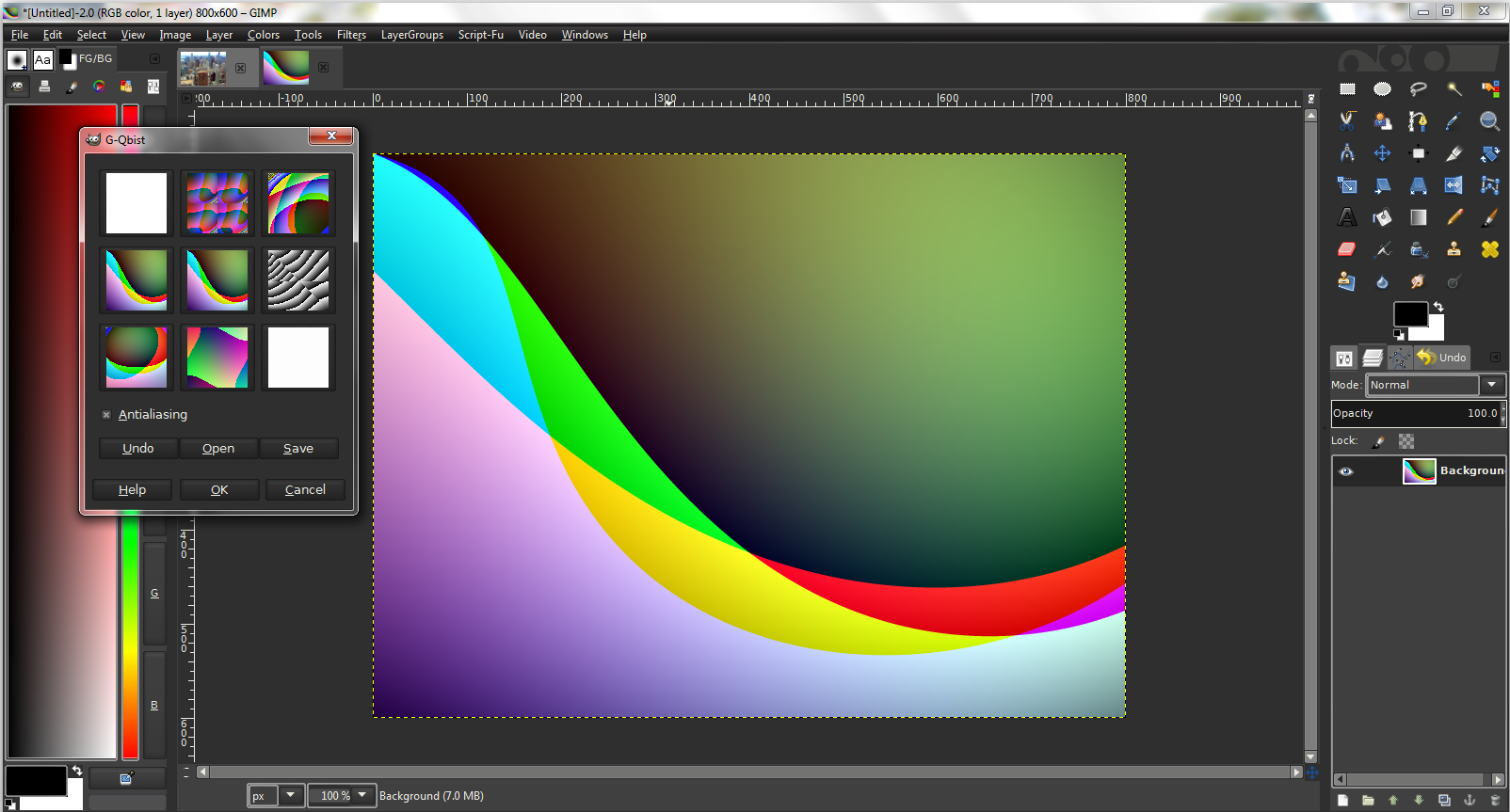
for some quick ribbon like backgrounds you could cheat and use render/pattern/Qbist, there'a a lot of different ones, click on one and it will show some more

Image


Top
 Post subject: Re: "transparent ribbons"
PostPosted: Mon Oct 08, 2012 1:29 pm  (#9) 
Offline
GimpChat Member
User avatar

Joined: Aug 16, 2012
Posts: 4271
Location: Göteborg, Sweden
alc59: that's interesting! i've never found a use for the qbist filter beforem, but i obviously didn't explore it enough.

_________________


Top
 Post subject: Re: "transparent ribbons"
PostPosted: Mon Oct 08, 2012 8:56 pm  (#10) 
Offline
GimpChat Member
User avatar

Joined: Jul 17, 2012
Posts: 2769
Draconian wrote:
I meant the result was kinda lame cuz I rushed thru it to get the steps straight in my head. Glad to be of help.
sorry to disagree, but i dont think the result you offered was lame :mrgreen:

alc59 wrote:
for some quick ribbon like backgrounds you could cheat and use render/pattern/Qbist, there'a a lot of different ones, click on one and it will show some more
thanks for poining that filter out ! :heart

its all random though, is it ?


Top
 Post subject: Re: "transparent ribbons"
PostPosted: Tue Oct 09, 2012 6:12 am  (#11) 
Offline
GimpChat Member

Joined: Mar 04, 2011
Posts: 2613
Some could be from pathblend see: http://registry.gimp.org/node/26195
An excellent script from RobA.

or it could be that some have been generated with Flamepainter see:
http://gimpchat.com/viewtopic.php?f=22& ... 488976453a

a couple of examples http://i.imgur.com/bwpgh.jpg


Top
 Post subject: Re: "transparent ribbons"
PostPosted: Tue Oct 09, 2012 8:11 am  (#12) 
Offline
GimpChat Member
User avatar

Joined: Nov 09, 2011
Posts: 726
You could also use pre-designed brushes. You create a transparent layer above your image. Choose white as brush color and with "Paintbrush Tool" or "Airbrush tool" and a very large brush size, draw with simple clicks the ribbons or waves in the transparent layer. Then try different layer modes in this transparent layer as "overlay" or "hard light".
https://browse.deviantart.com/?qh=&sect ... bons+brush
https://browse.deviantart.com/?qh=&sect ... aves+brush
https://browse.deviantart.com/?qh=&sect ... ract+brush
https://browse.deviantart.com/?qh=&sect ... oral+brush

_________________
Image
Be patient, English is not my language.


Top
 Post subject: Re: "transparent ribbons"
PostPosted: Tue Oct 09, 2012 10:38 am  (#13) 
Offline
GimpChat Member
User avatar

Joined: Jul 17, 2012
Posts: 2769
thanks for the help everybody


Top
Post new topic Reply to topic  [ 13 posts ] 

All times are UTC - 5 hours [ DST ]


* Login  


Powered by phpBB3 © phpBB Group