It is currently Sun Aug 23, 2026 12:37 am


All times are UTC - 5 hours [ DST ]


Post new topic Reply to topic  [ 11 posts ] 
Author Message
 Post subject: Isophotes Filter in G'MIC
PostPosted: Tue Oct 19, 2010 4:04 pm  (#1) 
Offline
GimpChat Member

Joined: Apr 12, 2010
Posts: 5870
Hy anybody could explain me how the heck the isophote filters works ?

I mean what its logic ? what is supposed to do except make most of the image transparent ?

_________________
My 3D Gallery on Deviantart http://photocomix2.deviantart.com/
Main gallery http://www.flickriver.com/photos/photocomix-mandala/
Mandala and simmetry http://www.flickriver.com/photos/photocomix_mandala/

Image

Mrs Wilbress


Share on Facebook Share on Twitter Share on Orkut Share on Digg Share on MySpace Share on Delicious Share on Technorati
Top
 Post subject: Re: Wireframe or truss any object.
PostPosted: Tue Oct 19, 2010 4:13 pm  (#2) 
Offline
Retired Staff
User avatar

Joined: May 22, 2008
Posts: 6946
Location: Somewhere in GIMP
Hope this is of some help. I did a search for the isophotes filter in G'MIC.

http://www.cambridgeincolour.com/forums/thread2595.htm

_________________
Image
World War IV will be fought with sticks and stones. - Albert Einstein


Top
 Post subject: Re: Wireframe or truss any object.
PostPosted: Tue Oct 19, 2010 5:47 pm  (#3) 
Offline
GimpChat Member

Joined: Apr 12, 2010
Posts: 5870
:yes thank O !

_________________
My 3D Gallery on Deviantart http://photocomix2.deviantart.com/
Main gallery http://www.flickriver.com/photos/photocomix-mandala/
Mandala and simmetry http://www.flickriver.com/photos/photocomix_mandala/

Image

Mrs Wilbress


Top
 Post subject: Re: Wireframe or truss any object.
PostPosted: Tue Oct 19, 2010 5:52 pm  (#4) 
Offline
Retired Staff
User avatar

Joined: May 22, 2008
Posts: 6946
Location: Somewhere in GIMP
You're welcome. I played with the filter using a color photo and a desaturated layer of the same photo, using the Color selection and changing the other settings. Chose just the default (desaturated) layer to apply the filter.

Got a very interesting effect setting the desat. layer to Value mode over the color layer. It was a little reminiscent of the B&W Pencil filter.

_________________
Image
World War IV will be fought with sticks and stones. - Albert Einstein


Top
 Post subject: Re: Isophotes Filter in G'MIC
PostPosted: Tue Oct 19, 2010 6:26 pm  (#5) 
Offline
Retired Staff
User avatar

Joined: May 22, 2008
Posts: 6946
Location: Somewhere in GIMP
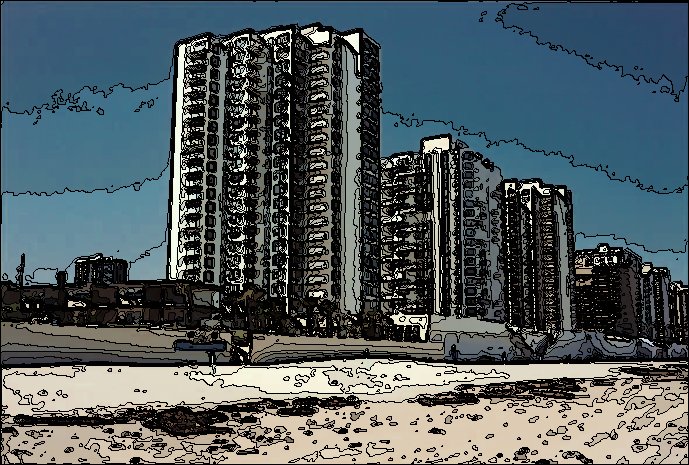
Original image here.

Image layer duplicated and desaturated using luminance setting.

The isophotes filter is in G'MIC > Countours > Isophotes
My settings:
Levels: 17
Smoothness: 1.14
Filling: Colors
Layer Mode Desaturated Layer: Value

The image looks like it has been indexed for a gif. I like the fine, squiggly black lines separating the different colors.

Image

_________________
Image
World War IV will be fought with sticks and stones. - Albert Einstein


Top
 Post subject: Re: Isophotes Filter in G'MIC
PostPosted: Tue Oct 19, 2010 6:50 pm  (#6) 
Offline
GimpChat Member
User avatar

Joined: Sep 24, 2010
Posts: 12837
Looks like some sort of graph cut seam detection scheme used in a lot of algorithms including the Liquid Rescale algorithm. Of course I could be wrong. :)

_________________
Lyle

Psalm 109:8

Image


Top
 Post subject: Re: Isophotes Filter in G'MIC
PostPosted: Sat Nov 06, 2010 11:53 am  (#7) 
Offline
GimpChat Member
User avatar

Joined: Oct 19, 2010
Posts: 376
Location: North Central Ohio, USA
When I saw O's example, the first thing I thought of was the Paint-by-Numbers pictures. Then after reading the info in the links, I thought of the topographic maps produced by the United States Geological Survey - instead of elevation contours, we get luminosity contours.

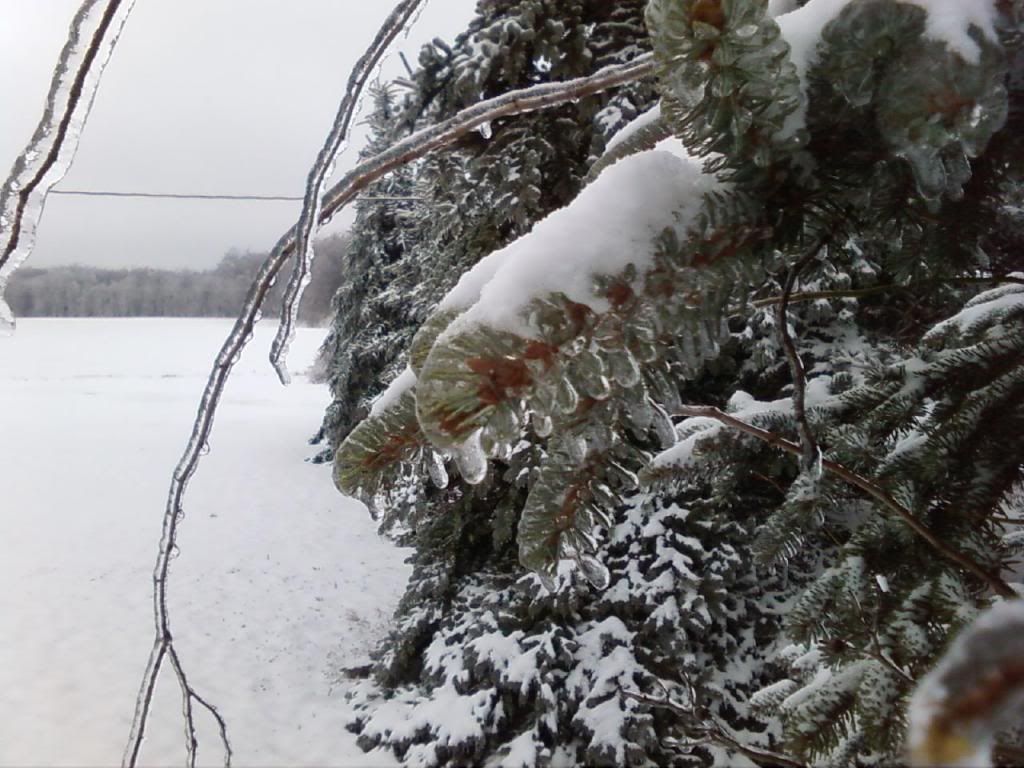
Here's a picture of mine which I took a few years ago following an ice storm (took it with my cellphone, no less!). The original image is here. I used a the same image prep (dup layer, desaturate by luminosity) and settings in G'MIC as O did. Once G'MIC finished I set the layer mode to Darken only. What was so interesting for me was that the filter picked out detail in the cloud and snow that I couldn't really get (or see) playing with the regular Brightness/Contrast sliders, and how changing the layer mode really changed the appearance
:tyspin I probably never would have experimented with this if I had not seen this thread.


Attachments:
Icestorm pinebough isophotes darken.jpg
Icestorm pinebough isophotes darken.jpg [ 1000.36 KiB | Viewed 5720 times ]

_________________
Life Truth: #12
My cat is a worst typist than I am.
Top
 Post subject: Re: Isophotes Filter in G'MIC
PostPosted: Sat Nov 06, 2010 1:35 pm  (#8) 
Offline
GimpChat Member

Joined: Apr 12, 2010
Posts: 5870
nice effect

_________________
My 3D Gallery on Deviantart http://photocomix2.deviantart.com/
Main gallery http://www.flickriver.com/photos/photocomix-mandala/
Mandala and simmetry http://www.flickriver.com/photos/photocomix_mandala/

Image

Mrs Wilbress


Top
 Post subject: Re: Isophotes Filter in G'MIC
PostPosted: Sat Nov 06, 2010 2:17 pm  (#9) 
Offline
Retired Staff
User avatar

Joined: May 22, 2008
Posts: 6946
Location: Somewhere in GIMP
Bob63 wrote:
I thought of the topographic maps produced by the United States Geological Survey - instead of elevation contours, we get luminosity contours.

What was so interesting for me was that the filter picked out detail in the cloud and snow that I couldn't really get (or see) playing with the regular Brightness/Contrast sliders, and how changing the layer mode really changed the appearance


Yes it does look like a topographic map. I, too, was intrigued about the color detail that the filter picked up.

Bob, I love the zoomed to full size image you did. It has so much detail outlined by the filter. Nice job.

_________________
Image
World War IV will be fought with sticks and stones. - Albert Einstein


Top
 Post subject: Re: Isophotes Filter in G'MIC
PostPosted: Sat Nov 06, 2010 11:59 pm  (#10) 
Offline
GimpChat Member
User avatar

Joined: Oct 19, 2010
Posts: 376
Location: North Central Ohio, USA
Thanks. I hope one day to own a digital camera that can help me get the kind of photos I used to get with my 35mm - although for a cellphone cam, it did capture more image information than I expected (I know I mentioned that already, it's just such a surprise). Something I didn't realize until I used this filter and the technique.

_________________
Life Truth: #12
My cat is a worst typist than I am.


Top
 Post subject: Re: Isophotes Filter in G'MIC
PostPosted: Sun Nov 07, 2010 10:57 am  (#11) 
Offline
Global Moderator
User avatar

Joined: May 16, 2010
Posts: 16164
If David put them in there, they have to be good for something. =)

_________________
Image


Top
Post new topic Reply to topic  [ 11 posts ] 

All times are UTC - 5 hours [ DST ]


* Login  


Powered by phpBB3 © phpBB Group