It is currently Thu Nov 26, 2026 10:55 pm


All times are UTC - 5 hours [ DST ]


Post new topic Reply to topic  [ 70 posts ]  Go to page Previous  1, 2, 3, 4  Next
Author Message
 Post subject: Re: Ask here help for GIMP_PhotoComix_Lab -2.8 (32 or 64bit )
PostPosted: Sun Dec 02, 2012 5:08 am  (#21) 
Offline
GimpChat Member

Joined: Apr 12, 2010
Posts: 5870
Gmic is in gimp/photocomix/plugins/gmic so to upGRADE you may just replace the files there with the new new version (everything except zlib.exe because that is used also by other plugin so is already present, 2 copies may create problem

Instead to update gmic filters the standard refresh botton in the plugin should work:
the only difference is that to mantain portability also of gmic the definition files are stored internally (in gimp/gmic filters)

note that sometimes , expecially when are new sources, the refresh bottom should be hit not only once 2 or even 3 times in a row (a little glitch not yet solved)

about the taskbar:
1)RIGHT click on empty place in the taskbar
2) Unmark "block the taskbar"
3) now simply drag the taskbar on the left, or on the right or to the top

another solution is from "My computer" but for that i can't indicate the right terminology (my computer is in italian, not sure which of the possible translation is that used...also because may not be a exact literally translation to be used
(i.e. My Computer is in italian "Pannello di controllo" that should be translated insomething as Control panel or Control Console, but if i remember well is translated in My Computer

Thank for offering help, the most hard part of the work i see is

1 get the list of all extra added in each category ,so for plugin scripts brushes etc(i just found how to do thank to Odinic http://www.sttmedia.com/filelistcreator-download)

2 For each item of the list ,i.e. gmic, add author name and project link, or download link
point 1 t is already basically solved, but 2 looks a nightmare to me, hundreds of links to finds out

there is more to do but this would allow me to give the deserved credit, that is very important
(i didn't promote much the project because of this lack of documentation )

_________________
My 3D Gallery on Deviantart http://photocomix2.deviantart.com/
Main gallery http://www.flickriver.com/photos/photocomix-mandala/
Mandala and simmetry http://www.flickriver.com/photos/photocomix_mandala/

Image

Mrs Wilbress


Top
 Post subject: Re: Ask here help for GIMP_PhotoComix_Lab -2.8 (32 or 64bit )
PostPosted: Mon Dec 03, 2012 8:54 am  (#22) 
Offline
GimpChat Member

Joined: Nov 28, 2012
Posts: 85
Location: France
Hello Photocomix,

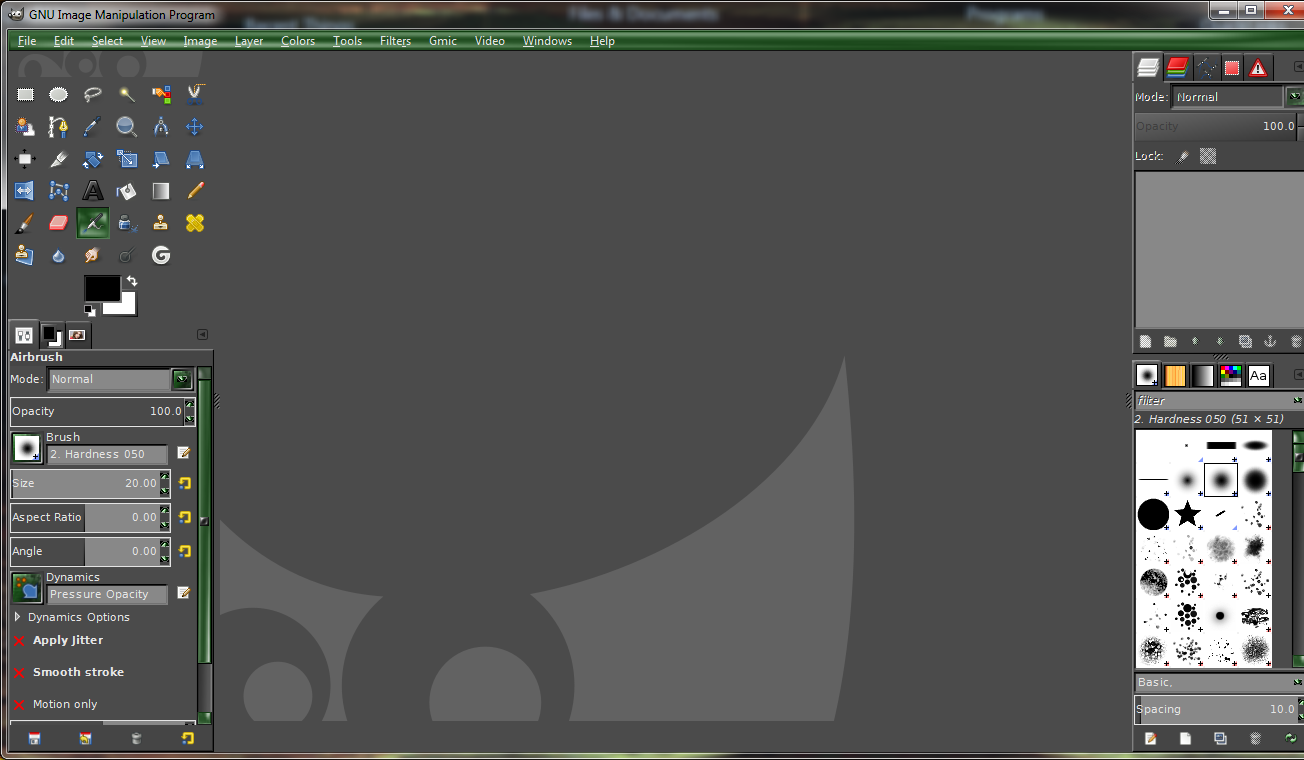
I think that you don't have understood me about the menu bar. I thought to change the menu bar of Gimp.

Image

I would like to modify the organisation of the menu, ie move "G'MIC" between "Filters" and "Video" ?


However for the list of all extra added, if you have already done it, I agree to try starting to compile links.
Could you sent me the list and I will compile author name and link project / download for each addon.


Top
 Post subject: Re: Ask here help for GIMP_PhotoComix_Lab -2.8 (32 or 64bit )
PostPosted: Mon Dec 03, 2012 12:28 pm  (#23) 
Offline
GimpChat Member

Joined: Apr 12, 2010
Posts: 5870
Quote:
Hello Photocomix,
I think that you don't have understood me about the menu bar. I thought to change the menu bar of Gimp.


you are right i was talking about move the win taskbar, in case of script or plugin too long to fit well

Quote:
I would like to modify the organisation of the menu


There is a file controlling the menu called menurc , that you may open and edit with a text editor
In the file it is explained what may be changed and how
i never digg in it so i can't say more except that there is another file "pluginrc" controlling in some extension the plugin

May be some new function in gimp that may help more ,i.e i never explored the new tagging system

Quote:
However for the list of all extra added, if you have already done it, I agree to try starting to compile links.
Could you sent me the list and I will compile author name and link project / download for each addon.


Wow :jumpclap thank i will send ASAP


Quote:
ie move "G'MIC" between "Filters" and "Video" ?


If was a python or a script fu create a additional "Gmic" menu will be easy (not sure if would be also possible move the menu in a peculiar position respect the others) as edit a path

In case of gmic would be trivial modify its code so it will create a new menu... but once done the code should be compiled


I

_________________
My 3D Gallery on Deviantart http://photocomix2.deviantart.com/
Main gallery http://www.flickriver.com/photos/photocomix-mandala/
Mandala and simmetry http://www.flickriver.com/photos/photocomix_mandala/

Image

Mrs Wilbress


Top
 Post subject: Re: Ask here help for GIMP_PhotoComix_Lab -2.8 (32 or 64bit )
PostPosted: Tue Dec 04, 2012 5:52 pm  (#24) 
Offline
GimpChat Member

Joined: Sep 13, 2011
Posts: 77
Hi.

Could you include the contents of the package? Does it inlcude GAP, MathMap, G'MIC, FX Foundry, Python scripting?

_________________
Using Windows Vista 32 bits, 3GBRAM, Intel core 2 Quad Q6600 2.4Ghz, Radeon HD 3450 graphics card, Lambda Lexicon USB audio interface.


Top
 Post subject: Re: Ask here help for GIMP_PhotoComix_Lab -2.8 (32 or 64bit )
PostPosted: Tue Dec 04, 2012 7:59 pm  (#25) 
Offline
Script Coder
User avatar

Joined: Feb 18, 2011
Posts: 4826
Location: Bendigo Vic. Australia
Yes it certainly Includes all of those plus 'help files'

_________________
Image
No matter how much you push the envelope, it'll still be stationery.


Top
 Post subject: Re: Ask here help for GIMP_PhotoComix_Lab -2.8 (32 or 64bit )
PostPosted: Wed Dec 05, 2012 12:22 pm  (#26) 
Offline
GimpChat Member

Joined: Apr 12, 2010
Posts: 5870
Quote:
Does it inlcude
GAP

Yes 2.6 (a build from Samj) in the 64bit version
2.7 (a build from JamesH ) in the 32bit version
This last will display a lot of popping and flashing black consoles when loading gimp
But are harmness and this version includes a few effect more , not in 2.6

About animation there is also a collection of very scripts many from Fenceposte
other from Saulgoode, and other for animated logo from GnuTux Graechan, JamesH and many others

Quote:
MathMap,

Yes and with a LOT of cool extra filters not included in other builds

Quote:
G'MIC,

Yes...humm i must update it again :gaah as now is installed a very recent version but not the very last just out

Anyway it would be easy to upgrade ..it is all ready

1 you download the ZIP with the new GMIC
(you may even do with the installer but setting well the installer path)

now open the gimp folder, look for photocomix/plugin/gmic, open the zip and replace the content
of the folder with the files in the zip...ALL except zlib.dll

DO NOT copy zlib.dll it is already installed globally because required also by other plugin and a clone will cause errors
(same if you prefer to use the installer, you point on that same folder, check that the file ended correctly in place , and REMOVE zlib.dll

About gmic to allow its portability its definition files are stored internally (in gimp/gmic_filters)


Quote:
FX Foundry,

Not Fx Foundry, not any

More exactly most of script included in the FX foundry pack ARE included but in the original version

FX fondry rename the script and add a new menu in gimp, i dislike both pratice and also in the pack were some script crippled by missing dependencies : some a additional patterns or gradient or some gimpressionist preset , all went MIA in the Fx Foundry version

So installing the FX foundry you risk to add a lot of clones , clonesthat the Fx Foundry habit to rename the script makes very hard to detect

Instead if you search (mostly in Colors and Filters menu , but that depend of what the filters does, i.e if is to automatize layer operations may be in the Layer menu ) you will found many of the same scripts ...and much more

Quote:
Python scripting


of course ! :yes

And there is also the GPS (GIMP PAINT STUDIO ) the UserFilter in a version that include a databse withALL the Filter Factary filters already converted for the userfilter

_________________
My 3D Gallery on Deviantart http://photocomix2.deviantart.com/
Main gallery http://www.flickriver.com/photos/photocomix-mandala/
Mandala and simmetry http://www.flickriver.com/photos/photocomix_mandala/

Image

Mrs Wilbress


Top
 Post subject: Re: Ask here help for GIMP_PhotoComix_Lab -2.8 (32 or 64bit )
PostPosted: Wed Dec 05, 2012 5:45 pm  (#27) 
Offline
Script Coder
User avatar

Joined: Feb 18, 2011
Posts: 4826
Location: Bendigo Vic. Australia
PhotoComix Sorry about not noticing FX-Foundry among that list from gasto as it is more trouble than it's worth

_________________
Image
No matter how much you push the envelope, it'll still be stationery.


Top
 Post subject: Re: Ask here help for GIMP_PhotoComix_Lab -2.8 (32 or 64bit )
PostPosted: Sun Dec 09, 2012 4:56 pm  (#28) 
Offline
GimpChat Member

Joined: Sep 13, 2011
Posts: 77
Does it include Offnut's Path tools?

http://sourceforge.net/projects/gimp-path-tools/

_________________
Using Windows Vista 32 bits, 3GBRAM, Intel core 2 Quad Q6600 2.4Ghz, Radeon HD 3450 graphics card, Lambda Lexicon USB audio interface.


Top
 Post subject: Re: Ask here help for GIMP_PhotoComix_Lab -2.8 (32 or 64bit )
PostPosted: Sun Dec 09, 2012 5:41 pm  (#29) 
Offline
GimpChat Member

Joined: Apr 12, 2010
Posts: 5870
There are several script from Oufunt but not all

anyway this is easy to check the python script are all in "photocomix/plugin/python" the others in the "photocomix/script" subfolder

this remind me that i still have to run a utility to finally get the full list , i will try now

_________________
My 3D Gallery on Deviantart http://photocomix2.deviantart.com/
Main gallery http://www.flickriver.com/photos/photocomix-mandala/
Mandala and simmetry http://www.flickriver.com/photos/photocomix_mandala/

Image

Mrs Wilbress


Top
 Post subject: Re: Ask here help for GIMP_PhotoComix_Lab -2.8 (32 or 64bit )
PostPosted: Sun Dec 09, 2012 9:42 pm  (#30) 
Offline
Script Coder
User avatar

Joined: Feb 18, 2011
Posts: 4826
Location: Bendigo Vic. Australia
To change the Menu location of GMIC is easily done in the pluginrc file GIMP-PC_Lab-2.8.2-32bits\PhotoComix\pluginrc

Just change the GMIC location from (menu-path "<Image>/Filters") to (menu-path "<Image>/Gmic")

The file looks like this

# GIMP pluginrc
#
# This file can safely be removed and will be automatically regenerated by
# querying the installed plugins.

(protocol-version 20)

(plug-in-def "C:\\GIMP-PC_Lab-2.8.2-32bits\\PhotoComix\\plug-ins\\_Preinstalled\\gmic_1.5.2.0_win32\\gmic_gimp.exe" 1351829060
(proc-def "plug-in-gmic" 1
"G'MIC"
"G'MIC"
"David Tschumperlé"
"David Tschumperlé"
"2008"
"_G'MIC..."
1
(menu-path "<Image>/Gmic")
and your menu Bar changes to this

Image

_________________
Image
No matter how much you push the envelope, it'll still be stationery.


Top
 Post subject: Re: Ask here help for GIMP_PhotoComix_Lab -2.8 (32 or 64bit )
PostPosted: Mon Dec 10, 2012 9:11 am  (#31) 
Offline
GimpChat Member

Joined: Nov 28, 2012
Posts: 85
Location: France
Thanks Graechan, I have changed the menu location for Gmic with your explanations.
That's I wanted do.


Top
 Post subject: Re: Ask here help for GIMP_PhotoComix_Lab -2.8 (32 or 64bit )
PostPosted: Mon Dec 10, 2012 1:14 pm  (#32) 
Offline
GimpChat Member
User avatar

Joined: Nov 16, 2011
Posts: 5127
Location: Metro Vancouver, BC
That's great info, Graechan :bigthup I'd love to have G'MIC handy on the main menu.

_________________
Image
Gimp 2.8.18, Linux, median user
Gimp Chat Tutorials Index
Spirit Bear (Kermode)


Top
 Post subject: Re: Ask here help for GIMP_PhotoComix_Lab -2.8 (32 or 64bit )
PostPosted: Mon Dec 10, 2012 7:43 pm  (#33) 
Offline
Script Coder
User avatar

Joined: Feb 18, 2011
Posts: 4826
Location: Bendigo Vic. Australia
Stenno and Odin, If like me you use 2.8 in single windows mode there is enough space along the top to move often used plugins up

_________________
Image
No matter how much you push the envelope, it'll still be stationery.


Top
 Post subject: Re: Ask here help for GIMP_PhotoComix_Lab -2.8 (32 or 64bit )
PostPosted: Tue Dec 11, 2012 4:55 pm  (#34) 
Offline
GimpChat Member

Joined: Nov 28, 2012
Posts: 85
Location: France
Hi Photocomix,

I have started to list the extensions of Photocomix Lab with FileListCreator, I have found more than 15000 files for 32 bit version, for some I did not find any authors or projects link on web, so I assume that they was already installed by default with Gimp and that was not extensions.
I wondered how to distinguish between the natives files installed with Gimp and those that you have installed.

If you have an idea I interrested to know it.


Top
 Post subject: Re: Ask here help for GIMP_PhotoComix_Lab -2.8 (32 or 64bit )
PostPosted: Tue Dec 11, 2012 5:40 pm  (#35) 
Offline
GimpChat Member
User avatar

Joined: Nov 16, 2011
Posts: 5127
Location: Metro Vancouver, BC
I don't have Photocomix Lab, but from this thread I noticed a path for "plug-ins\_Preinstalled".
When your using "FileListCreator" (great program, I use it too), use that as one of your starting point.

_________________
Image
Gimp 2.8.18, Linux, median user
Gimp Chat Tutorials Index
Spirit Bear (Kermode)


Top
 Post subject: Re: Ask here help for GIMP_PhotoComix_Lab -2.8 (32 or 64bit )
PostPosted: Tue Dec 11, 2012 6:36 pm  (#36) 
Offline
GimpChat Member

Joined: Apr 12, 2010
Posts: 5870
the path for all extra is ... GIMP-PC_Lab.2_8_2-64bits\PhotoComix

Odinbc yes that is the folder where are the plugin,
but are similar for script ( brush pattern etc ), anyway are all sub-folders of GIMP-PC_Lab.2_8_2-64 (or 32)bits\PhotoComix

_________________
My 3D Gallery on Deviantart http://photocomix2.deviantart.com/
Main gallery http://www.flickriver.com/photos/photocomix-mandala/
Mandala and simmetry http://www.flickriver.com/photos/photocomix_mandala/

Image

Mrs Wilbress


Top
 Post subject: Re: Ask here help for GIMP_PhotoComix_Lab -2.8 (32 or 64bit )
PostPosted: Wed Dec 12, 2012 6:38 am  (#37) 
Offline
GimpChat Member

Joined: Sep 13, 2011
Posts: 77
Hi people.

I am a little paranoid that this version will give me trouble. Last time I installed the GIMP 2.8.2 from the official Installer, it overwrote certain parts of the already installed GIMP 2.6.12, since the Installer did not allow to choose the directory for the installation.

How many people have tried GAP, and the included plug-ins?

_________________
Using Windows Vista 32 bits, 3GBRAM, Intel core 2 Quad Q6600 2.4Ghz, Radeon HD 3450 graphics card, Lambda Lexicon USB audio interface.


Top
 Post subject: Re: Ask here help for GIMP_PhotoComix_Lab -2.8 (32 or 64bit )
PostPosted: Wed Dec 12, 2012 6:56 am  (#38) 
Offline
GimpChat Member

Joined: Apr 12, 2010
Posts: 5870
This doesn't require install, just to unzip, and so can't overwrite files of other version

let say you may use as portable (in case just use a path without embedded blanc space..as just C (or what the hd name )

_________________
My 3D Gallery on Deviantart http://photocomix2.deviantart.com/
Main gallery http://www.flickriver.com/photos/photocomix-mandala/
Mandala and simmetry http://www.flickriver.com/photos/photocomix_mandala/

Image

Mrs Wilbress


Top
 Post subject: Re: Ask here help for GIMP_PhotoComix_Lab -2.8 (32 or 64bit )
PostPosted: Wed Dec 12, 2012 10:26 am  (#39) 
Offline
GimpChat Member

Joined: Nov 28, 2012
Posts: 85
Location: France
I think I have found a workaround, I have downloaded Gimp portable version by Framakey, and I have created a specific list with FileListCreator in order to have the basic files installed with Gimp.
Then I have have compared the 2 lists with a spreadsheet to keep only the extensions installed by Photocomix.
Now I think that it will more convenient for the check and adding the links.


Top
 Post subject: Re: Ask here help for GIMP_PhotoComix_Lab -2.8 (32 or 64bit )
PostPosted: Wed Dec 12, 2012 10:39 am  (#40) 
Offline
GimpChat Member
User avatar

Joined: Nov 16, 2011
Posts: 5127
Location: Metro Vancouver, BC
gasto wrote:
Hi people.
How many people have tried GAP, and the included plug-ins?
GAP works fine with 2.8.2 (win) from Gimp.org.

_________________
Image
Gimp 2.8.18, Linux, median user
Gimp Chat Tutorials Index
Spirit Bear (Kermode)


Top
Post new topic Reply to topic  [ 70 posts ]  Go to page Previous  1, 2, 3, 4  Next

All times are UTC - 5 hours [ DST ]


* Login  


Powered by phpBB3 © phpBB Group