It is currently Mon Sep 14, 2026 5:49 am


All times are UTC - 5 hours [ DST ]


Post new topic Reply to topic  [ 7 posts ] 
Author Message
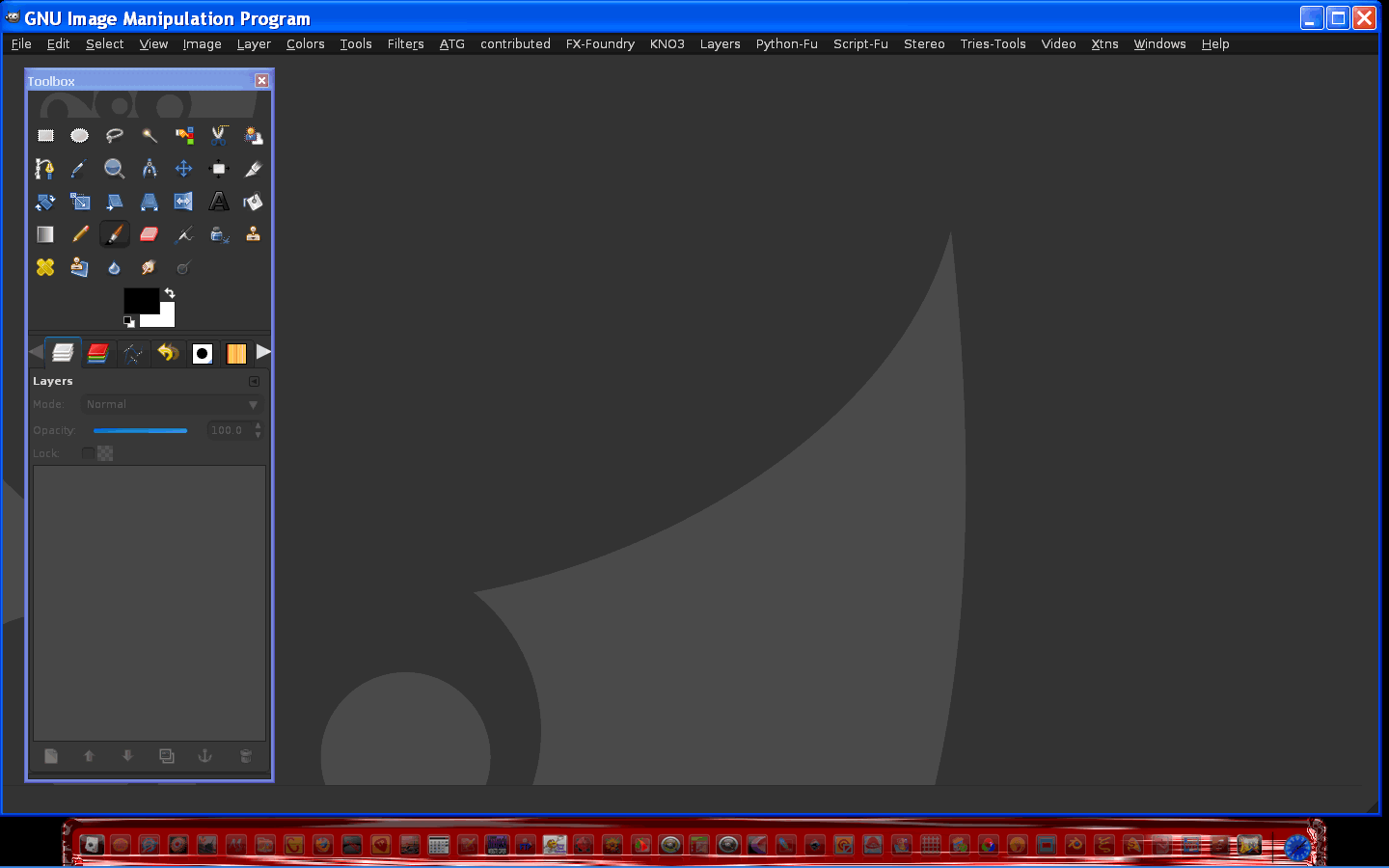
 Post subject: Theme Problem After Installing GIMP
PostPosted: Sat Nov 27, 2010 1:47 pm  (#1) 
Offline
New Member

Joined: Nov 27, 2010
Posts: 1
I just installed this lastest version but now my theme isn't right. I had aurora-midnight and now it's a like a mixture of aurora-midnight and standard windows. Any advice??? Tks.


Share on Facebook Share on Twitter Share on Orkut Share on Digg Share on MySpace Share on Delicious Share on Technorati
Top
 Post subject: Re: Theme Problem After Installing GIMP
PostPosted: Sat Nov 27, 2010 1:56 pm  (#2) 
Offline
Global Moderator
User avatar

Joined: May 16, 2010
Posts: 16173
Yup, try uninstalling themes and re-installing it.
That may work, i haven't tried it yet. =)

http://gimp-tutorials.net/downloads/gim ... s-v1-0.zip

_________________
Image


Top
 Post subject: Re: Theme Problem After Installing GIMP
PostPosted: Sat Nov 27, 2010 2:10 pm  (#3) 
Offline
Global Moderator
User avatar

Joined: May 16, 2010
Posts: 16173
Yes that worked for me. =)
Image

And welcome to Gimp Chat btw! :gimp

_________________
Image


Top
 Post subject: Re: Theme Problem After Installing GIMP
PostPosted: Sat Nov 27, 2010 3:06 pm  (#4) 
Offline
GimpChat Member
User avatar

Joined: Oct 06, 2010
Posts: 4050
Agreed, I have Aurora Midnight on my Windows 7 and I often have to set another theme, then go back and reset it back to Aurora Midnight. No idea why it does that, but that is how I fix it, too.

_________________
"In order to attain the impossible, one must attempt the absurd."
~ Miguel de Cervantes


Top
 Post subject: Re: Theme Problem After Installing GIMP
PostPosted: Sat Nov 27, 2010 3:25 pm  (#5) 
Offline
Global Moderator
User avatar

Joined: May 16, 2010
Posts: 16173
It seems every time a new gimp version is downloaded and installed it messes the theme program up somehow.

_________________
Image


Top
 Post subject: Re: Theme Problem After Installing GIMP
PostPosted: Mon Nov 29, 2010 8:26 pm  (#6) 
Offline
GimpChat Member
User avatar

Joined: Apr 30, 2010
Posts: 1937
Location: Missouri
Yep, every time you reinstall gimp, even if it's the same version you have to remove gimpthemes and reinstall it. Aurora midnight is my favorite too.

_________________
Image
The last time I kept an open mind,
my brain fell out and the dog grabbed it.
Now it's full of dirt, toothmarks, and dog slobber.
No more open minds or dogs for me.


Top
 Post subject: Re: Theme Problem After Installing GIMP
PostPosted: Tue Nov 30, 2010 3:44 am  (#7) 
Offline
Global Moderator
User avatar

Joined: May 16, 2010
Posts: 16173
I love the loader colors. =)

It has something to do with the gtkrc document. I think if you save that when uninstalling and throw it back in after install it will work then.One of them writes the theme name out automatically when you choose it with the Themes program.Probably the one in the program path itself, as that one gets deleted on uninstall i think.

The location escapes me for the moment. Probably GTK folder somewhere.

_________________
Image


Top
Post new topic Reply to topic  [ 7 posts ] 

All times are UTC - 5 hours [ DST ]


* Login  


Powered by phpBB3 © phpBB Group