It is currently Tue Jul 07, 2026 8:07 am


All times are UTC - 5 hours [ DST ]


Post new topic Reply to topic  [ 13 posts ] 
Author Message
 Post subject: Could somebody write me a script please.
PostPosted: Fri Feb 08, 2013 12:17 am  (#1) 
Offline
GimpChat Member
User avatar

Joined: Aug 30, 2012
Posts: 2174
I like playing with 3d perspective in gimp but it can be a bit tedious, I have thought about writing a script but to be honest wouldn't even know where to begin, Hence why I am here pleading on hands and knees for some help.

The workflow I would like the script to achieve would be as follows

1) copy the current selected layer.
2) Select newly copied layer and lower layer down one in layer stack.
3) Scale layer smaller by a determined factor
4) Repeat a determined number of times from step one but on most recently scaled layer.

So I would like to have control over the number of times the script will repeat range 1-500
And be able to enter in pixels the amount to reduce layer by when scaled, separate value for the width and height.

Maybe the script could be called "Perspective Scale".

Thanks.

_________________
Image


Share on Facebook Share on Twitter Share on Orkut Share on Digg Share on MySpace Share on Delicious Share on Technorati
Top
 Post subject: Re: Could somebody write me a script please.
PostPosted: Fri Feb 08, 2013 1:07 am  (#2) 
Hello He4rty,

Which version of Gimp would you like it written for?
Gimp 2.6 or Gimp 2.8?
Under which Menu would you like it to appear?
Would you also like to select the Interpolation method, or which method do you wish it to use?
Do you have any preference as to what the new layers should be called?
:)

fluffybunny


Top
 Post subject: Re: Could somebody write me a script please.
PostPosted: Fri Feb 08, 2013 2:02 am  (#3) 
Offline
GimpChat Member
User avatar

Joined: Aug 30, 2012
Posts: 2174
Thanks for the reply.

I am using gimp 2.8 on linux, I usually use the cubism setting when scaling the layer don't need to be named as they can merged together when finished.

_________________
Image


Top
 Post subject: Re: Could somebody write me a script please.
PostPosted: Fri Feb 08, 2013 2:16 am  (#4) 
Offline
GimpChat Member
User avatar

Joined: Jan 11, 2013
Posts: 254
Location: Germany
There is a script for 3D Text...but i don`t know if it is the right for it:
http://registry.gimp.org/node/24671
May someone can modify it?

_________________


Top
 Post subject: Re: Could somebody write me a script please.
PostPosted: Fri Feb 08, 2013 2:25 am  (#5) 
Offline
Script Coder
User avatar

Joined: Oct 25, 2010
Posts: 4812
he4rty wrote:
I like playing with 3d perspective in gimp but it can be a bit tedious, I have thought about writing a script but to be honest wouldn't even know where to begin, Hence why I am here pleading on hands and knees for some help.

The workflow I would like the script to achieve would be as follows

1) copy the current selected layer.
2) Select newly copied layer and lower layer down one in layer stack.
3) Scale layer smaller by a determined factor
4) Repeat a determined number of times from step one but on most recently scaled layer.

So I would like to have control over the number of times the script will repeat range 1-500
And be able to enter in pixels the amount to reduce layer by when scaled, separate value for the width and height.

Maybe the script could be called "Perspective Scale".

Thanks.

Past the 3rd or 4th iteration the layers will become very blurry, and there will be round-off errors on the layer size. It's better to apply a "ratio^N" scaling to the original layer to obtain the Nth layer.

_________________
Image


Top
 Post subject: Re: Could somebody write me a script please.
PostPosted: Fri Feb 08, 2013 3:37 am  (#6) 
Offline
GimpChat Member
User avatar

Joined: Jan 03, 2011
Posts: 1656
I've tried something he4rty, as a G'MIC filter.
If you have G'MIC installed and you refresh your filters, you should be able to access the entry "Testing / Ronounours / Perspective scale" which looks like this :

Image

If you have any idea for improvements, please let me know !


Top
 Post subject: Re: Could somebody write me a script please.
PostPosted: Fri Feb 08, 2013 5:41 am  (#7) 
Offline
GimpChat Member
User avatar

Joined: Jul 17, 2012
Posts: 2769
he4rty wrote:
The workflow I would like the script to achieve would be as follows

1) copy the current selected layer.
2) Select newly copied layer and lower layer down one in layer stack.
3) Scale layer smaller by a determined factor
4) Repeat a determined number of times from step one but on most recently scaled layer.

So I would like to have control over the number of times the script will repeat range 1-500
And be able to enter in pixels the amount to reduce layer by when scaled, separate value for the width and height.
how is that different to what 'Clone Layer' does ?

and wouldnt it be a good idea to contact the man who made 'Clone Layer' and ask him to modify his script a bit more ?


Top
 Post subject: Re: Could somebody write me a script please.
PostPosted: Fri Feb 08, 2013 6:16 am  (#8) 
Offline
Script Coder
User avatar

Joined: Nov 06, 2012
Posts: 239
Location: Italy
Hi he4rty.
I think my "Multi-Replicate" script might fit for you.
It creates multiple copies of a layer and also allows you to scale them down progressively along the horizontal and vertical directions, even in an independent way. There is also the possibility of eventually combining the created copies by either grouping or merging them together, just like you wish.
I posted my script both on this forum and at the GIMP Plugin Registry. Take a look:

http://www.gimpchat.com/viewtopic.php?f=9&t=6057
http://registry.gimp.org/node/22383


As for the thread published in this forum, I suggest you focus especially on its third page, where Graechan effectively describes with some examples how to obtain a perspective effect:

http://www.gimpchat.com/viewtopic.php?f ... 7&start=20

I really hope my script can help you to achieve the desired results. :)

_________________
Gino D's GIMP scripts: https://sites.google.com/site/ginodonig/gimp-scripts


Top
 Post subject: Re: Could somebody write me a script please.
PostPosted: Fri Feb 08, 2013 9:52 am  (#9) 
Offline
Retired Staff
User avatar

Joined: May 22, 2008
Posts: 6946
Location: Somewhere in GIMP
Ronounours wrote:
I've tried something he4rty, as a G'MIC filter.
If you have G'MIC installed and you refresh your filters, you should be able to access the entry "Testing / Ronounours / Perspective scale" which looks like this :

Image

If you have any idea for improvements, please let me know !
This is a cool filter, David. It would be nice if you could post it in the G'MIC forum.

It makes a rather fun animation. I would have liked the ability to make more layers than 10.

Image

_________________
Image
World War IV will be fought with sticks and stones. - Albert Einstein


Top
 Post subject: Re: Could somebody write me a script please.
PostPosted: Fri Feb 08, 2013 10:09 am  (#10) 
Offline
GimpChat Member
User avatar

Joined: Feb 14, 2012
Posts: 426
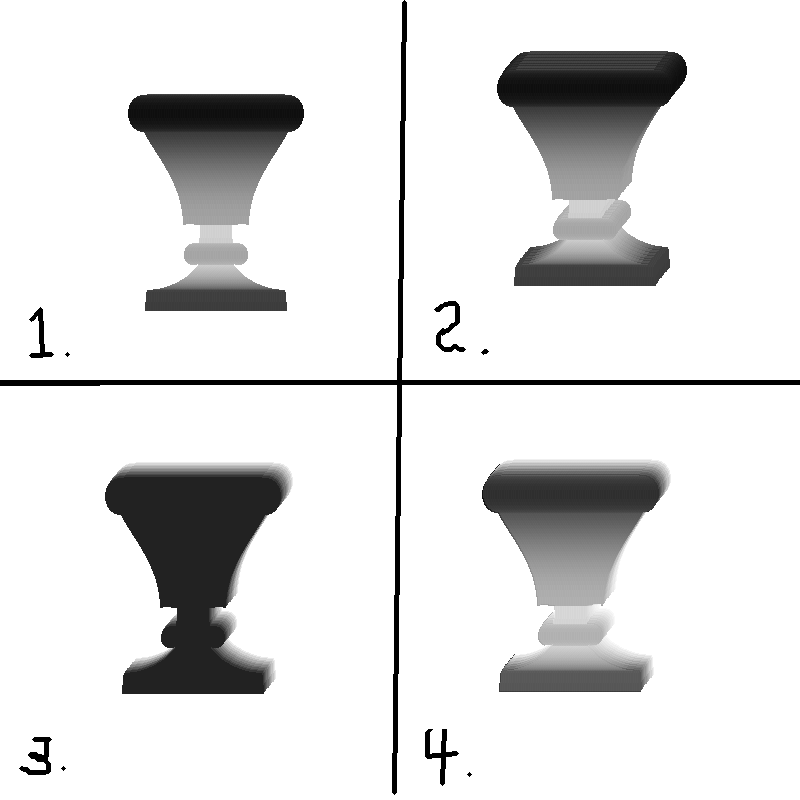
I use two images to make one image that appears to have height. I start out with #1 and copy to clipboard (Hard edges) Then use it as a brush to create #2 with no brush dynamics. Then I create #3 using a dynamic of size - color. When one (#2) object on its own layer is placed in front of (#3) object on its own layer set to screen mode it produces #4. It's a nice 3D type of height map.

If someone could wright a script to do that it would be nice. If it could include scaling it would be even better. But with scaling the edges tend to be pixelated so as to not made smooth edges which doesn't work.

Image

Alan


Top
 Post subject: Re: Could somebody write me a script please.
PostPosted: Fri Feb 08, 2013 10:23 am  (#11) 
Offline
GimpChat Member
User avatar

Joined: Apr 07, 2010
Posts: 14182
Very cool. That looks pretty straight forward.

_________________
Image


Top
 Post subject: Re: Could somebody write me a script please.
PostPosted: Fri Feb 08, 2013 1:29 pm  (#12) 
Offline
GimpChat Member
User avatar

Joined: Aug 30, 2012
Posts: 2174
Thanks for all your help Gimp Chatters, Looking through all the suggestions then Gino D script could be exactly what I'm after plus a bit more.

Again thanks.

_________________
Image


Top
 Post subject: Re: Could somebody write me a script please.
PostPosted: Fri Feb 08, 2013 4:36 pm  (#13) 
Offline
Script Coder
User avatar

Joined: Feb 18, 2011
Posts: 4826
Location: Bendigo Vic. Australia
Gino D's script is excellent for all types of replication and a hard act to follow, I tried to find any bugs or shortcomings but it had none

_________________
Image
No matter how much you push the envelope, it'll still be stationery.


Top
Post new topic Reply to topic  [ 13 posts ] 

All times are UTC - 5 hours [ DST ]


* Login  


Powered by phpBB3 © phpBB Group