It is currently Sun Sep 20, 2026 6:35 am


All times are UTC - 5 hours [ DST ]


Post new topic Reply to topic  [ 13 posts ] 
Author Message
 Post subject: Aliasing in GIMP Sphere Designer
PostPosted: Sun Feb 10, 2013 1:38 pm  (#1) 
Offline
New Member

Joined: Feb 10, 2013
Posts: 2
GIMP Version: 2.8.0
Operating System: Mac OS
OS Version: OS X 10.6.8
GIMP Experience: Intermediate Level


I am using the Sphere Designer to create planets, but I am plagued with aliasing effects on the spheres. Is there a way to use the designer that eliminates this or another tool in GIMP that easily removes the aliasing? I have tried blurring the edges but that doesn't give the crisp edge required for some of the images.

_________________
RC Davison


Share on Facebook Share on Twitter Share on Orkut Share on Digg Share on MySpace Share on Delicious Share on Technorati
Top
 Post subject: Re: Aliasing in GIMP Sphere Designer
PostPosted: Sun Feb 10, 2013 1:47 pm  (#2) 
Offline
GimpChat Member
User avatar

Joined: Nov 16, 2011
Posts: 5127
Location: Metro Vancouver, BC
This is a really good tutorial that covers planet edges.
The Ultimate Gimp Planet Tutorial

_________________
Image
Gimp 2.8.18, Linux, median user
Gimp Chat Tutorials Index
Spirit Bear (Kermode)


Top
 Post subject: Re: Aliasing in GIMP Sphere Designer
PostPosted: Sun Feb 10, 2013 1:59 pm  (#3) 
Offline
GimpChat Member
User avatar

Joined: Apr 07, 2010
Posts: 14182
I grabbed that one Odin and made a PDF to do later. thanks.

_________________
Image


Top
 Post subject: Re: Aliasing in GIMP Sphere Designer
PostPosted: Sun Feb 10, 2013 2:11 pm  (#4) 
Offline
GimpChat Member
User avatar

Joined: Jul 17, 2012
Posts: 2769
cool link Odbc !

im not sure why you need a script to make the planets
it takes 5minutes longer to make one without

what you need to know:
whenever you want a smooth circle, fill a selection turned into a path
so: make a circular selection, the size you want your planet to be
go to Selection-> To Path (the path will appear in your paths tab)
deselect
in you paths-tab, choose selection from path
fill with color

for the inner glow look here:
viewtopic.php?f=23&t=6391

the atmosphere is a blurred selection same size or bigger than the planet and put underneath the planet-layer

the rest should be clear if you have a look at the tutorial Odbc linked to


Top
 Post subject: Re: Aliasing in GIMP Sphere Designer
PostPosted: Sun Feb 10, 2013 2:30 pm  (#5) 
Offline
GimpChat Member
User avatar

Joined: Aug 30, 2012
Posts: 2174
Cheating it is, but a planet render script can be found here.

_________________
Image


Top
 Post subject: Re: Aliasing in GIMP Sphere Designer
PostPosted: Sun Feb 10, 2013 3:18 pm  (#6) 
Offline
New Member

Joined: Feb 10, 2013
Posts: 2
Thanks for the responses! :)

Looks like I've got some homework to do!

So much to learn and so little time!

_________________
RC Davison


Top
 Post subject: Re: Aliasing in GIMP Sphere Designer
PostPosted: Tue Feb 12, 2013 6:20 pm  (#7) 
Offline
GimpChat Member
User avatar

Joined: Apr 07, 2010
Posts: 14182
Odinbc wrote:
This is a really good tutorial that covers planet edges.
The Ultimate Gimp Planet Tutorial


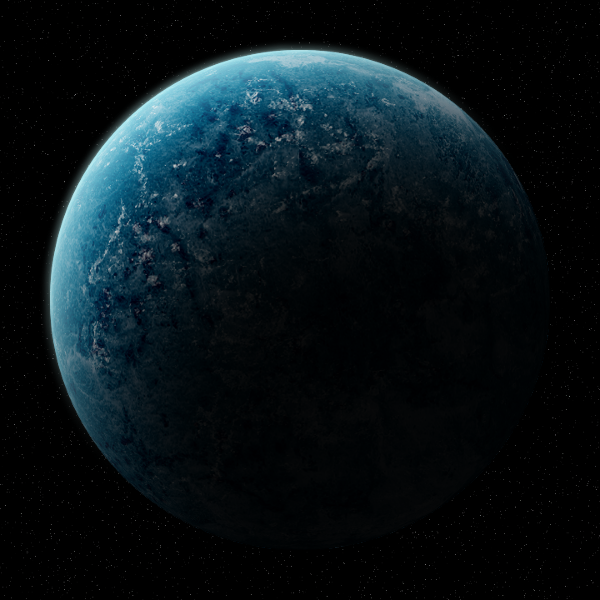
I finally finished your tute Odin. It took me two days cuz all of that smudging and pasting rocks from 3 different images took forever. Anyway, great tute. thanks

Image

_________________
Image


Top
 Post subject: Re: Aliasing in GIMP Sphere Designer
PostPosted: Tue Feb 12, 2013 6:23 pm  (#8) 
Offline
GimpChat Member
User avatar

Joined: Aug 30, 2012
Posts: 2174
Nice molly, looks really good.

_________________
Image


Top
 Post subject: Re: Aliasing in GIMP Sphere Designer
PostPosted: Tue Feb 12, 2013 6:27 pm  (#9) 
Offline
GimpChat Member
User avatar

Joined: Apr 07, 2010
Posts: 14182
Thanks he4rty...that part two was a killer. Never again. I will use the cloud filter instead lol

_________________
Image


Top
 Post subject: Re: Aliasing in GIMP Sphere Designer
PostPosted: Tue Feb 12, 2013 6:46 pm  (#10) 
Offline
GimpChat Member
User avatar

Joined: Nov 16, 2011
Posts: 5127
Location: Metro Vancouver, BC
molly wrote:
Odinbc wrote:
This is a really good tutorial that covers planet edges.
The Ultimate Gimp Planet Tutorial


I finally finished your tute Odin. It took me two days cuz all of that smudging and pasting rocks from 3 different images took forever. Anyway, great tute. thanks

That looks wonderful, a beautiful job Molly :sun

_________________
Image
Gimp 2.8.18, Linux, median user
Gimp Chat Tutorials Index
Spirit Bear (Kermode)


Top
 Post subject: Re: Aliasing in GIMP Sphere Designer
PostPosted: Tue Feb 12, 2013 8:03 pm  (#11) 
Offline
GimpChat Member
User avatar

Joined: Apr 07, 2010
Posts: 14182
I might go to the third part one of these days. I still have all the parts. :pengy :tuxy :proppeng :duck :peng

_________________
Image


Top
 Post subject: Re: Aliasing in GIMP Sphere Designer
PostPosted: Tue Feb 12, 2013 8:11 pm  (#12) 
Offline
GimpChat Member
User avatar

Joined: Jul 17, 2012
Posts: 2769
planetary penguin invasion ? :pshoot

Erisian was right :runpup


Top
 Post subject: Re: Aliasing in GIMP Sphere Designer
PostPosted: Tue Feb 12, 2013 8:40 pm  (#13) 
Offline
GimpChat Member
User avatar

Joined: Sep 22, 2012
Posts: 2089
Location: US
Nice results, molly! Very realistic looking. Yeah, please, make some more planets and moons.


Top
Post new topic Reply to topic  [ 13 posts ] 

All times are UTC - 5 hours [ DST ]


* Login  


Powered by phpBB3 © phpBB Group