Quote:
Please if anyone's using this, how do I make this,
looks reallly cooool.
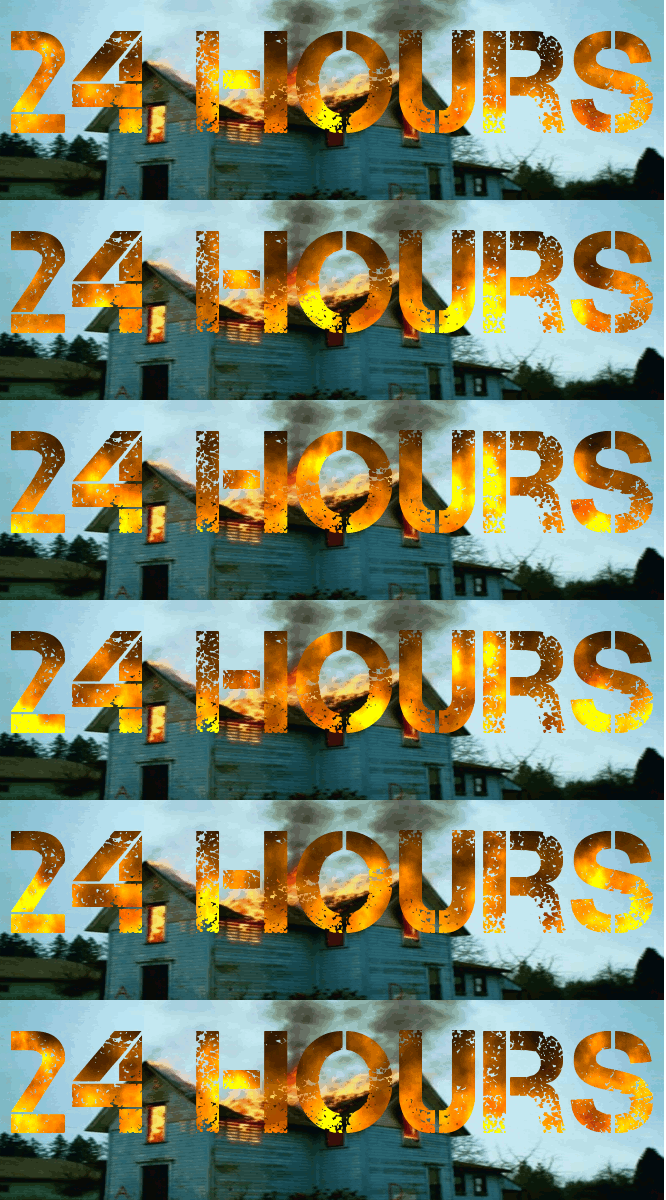
1) The text is done using another fencepost script "Lord of the Rings " also on deviantart
run it to create a new image
OK i paste the script below
; GIMP - The GNU Image Manipulation Program
; Copyright (C) 1995 Spencer Kimball and Peter Mattis
;
; This program is free software; you can redistribute it and/or modify
; it under the terms of the GNU General Public License as published by
; the Free Software Foundation; either version 2 of the License, or
; (at your option) any later version.
;
; This program is distributed in the hope that it will be useful,
; but WITHOUT ANY WARRANTY; without even the implied warranty of
; MERCHANTABILITY or FITNESS FOR A PARTICULAR PURPOSE.  See the
; GNU General Public License for more details.
;
; You should have received a copy of the GNU General Public License
; along with this program; if not, write to the Free Software
; Foundation, Inc., 675 Mass Ave, Cambridge, MA 02139, USA.
;
;
; Creates a chiseled-looking text, similar to the Lord of the Rings Logo.
; In order for the effect to look very realistic, the Ringbearer font
; should be installed on your computer.  This font is readily found on the
; web.  But, the effect looks nice with any font.
;
; Just highlight the text layer and run the script, which is found on the
; Filters Menu > Alpha to Logo > Lord of the Rings....
;
; Script updated on October 3, 2008 to work with GIMP 2.6

; Define the Function

(define (script-fu-lotr-text   image
                               drawable
                               useColor
                               desiredColor
                               blendStyle
                addShadow
                offsetX
                offsetY
                blurRadius
                shadowColor
                opacity
                keepBumpMap
        )

  ;Declare the Variables

   (let* (
        (theSelection 0)
   (bumpMapLayer 0)
   (originalLayer 0)
      (gradientType 0)
      (shadowLayer 0)
   (position 0)
      )

; Set up the script so that user settings can be reset after the script is run

  (gimp-context-push)

; Start an Undo Group so script can be undone in one step

  (gimp-image-undo-group-start image)

; Save any active selections to a channel so script can be run on whole layers and then turn off selection

  (set! theSelection (car (gimp-selection-save image)))
  (gimp-selection-none image)

; Set the active layer

  (gimp-image-set-active-layer image drawable)

; Assign the bumpMapLayer and originalLayer, add the originalLayer above the bumpMapLayer
; & add the layer name to bumpMapLayer.  Lock the transparency for both layers so that
; fills will be added only to non-transparent areas.  Alpha to selection was tried for this
; script, but results weren't as good.  The bumpMapLayer and OriginalLayer are linked for
; later movement around the canvas if so desired.

  (set! bumpMapLayer (car (gimp-image-get-active-layer image)))
  (set! originalLayer (car (gimp-layer-copy bumpMapLayer TRUE)))
  (gimp-image-add-layer image originalLayer -1)
  (gimp-drawable-set-name bumpMapLayer "Bump Map Layer")
  (gimp-layer-set-lock-alpha originalLayer TRUE)
  (gimp-layer-set-lock-alpha bumpMapLayer TRUE)
  (gimp-layer-set-linked originalLayer TRUE)
  (gimp-layer-set-linked bumpMapLayer TRUE)

; Set the foreground/background colors

  (gimp-context-set-foreground '(255 255 255))
  (gimp-context-set-background '(0 0 0))

; Assign values to the Blend Style.  See tutorial for example output of each style.  Dimple
; appears to look the best and is set as the default.  Then fill the bumpMapLayer with the
; chosen fill type

  (if (= blendStyle 0)
      (set! gradientType 6)
  )
  (if (= blendStyle 1)
      (set! gradientType 7)
  )
  (if (= blendStyle 2)
   (set! gradientType 8)
  )

  (gimp-edit-blend bumpMapLayer FG-BG-RGB-MODE NORMAL-MODE gradientType 100 0 REPEAT-NONE FALSE TRUE 2 0.2 TRUE 0 0 1 1)

; Run the Sharpen plugin twice to enhance chisel effect.

  (plug-in-sharpen 1 image bumpMapLayer 50)
  (plug-in-sharpen 1 image bumpMapLayer 50)

; Set bumpMapLayer invisible
  (gimp-drawable-set-visible bumpMapLayer FALSE)

; Set the originalLayer as active

  (gimp-image-set-active-layer image originalLayer)

; If user decides they want to work with the existing color of the text, the text color is left
; unchanged.  Otherwise, the color selected when the script is first run is set as the foreground
; color and used to fill the originalLayer

  (if (= useColor FALSE)
      (begin
      (gimp-context-set-foreground desiredColor)
      (gimp-edit-fill originalLayer FOREGROUND-FILL)
      )
  )


; The bump map plugin is run using the bumpMapLayer to give the originalLayer its chiseled look

  (plug-in-bump-map 1 image originalLayer bumpMapLayer 135 45 5 0 0 0 0 TRUE FALSE LINEAR)

; If the user wants to keep the bumpMapLayer for later use, it will be kept in this step.
; Otherwise, the layer is deleted.

  (if (= keepBumpMap FALSE)
      (gimp-image-remove-layer image bumpMapLayer)
  )

; If the user wants to add a drop shadow, the parameters entered in when the script was first
; run are put into the existing GIMP drop shadow script.

  (if (= addShadow TRUE)
      (script-fu-drop-shadow image originalLayer offsetX offsetY blurRadius shadowColor opacity FALSE)
  )

; Determine the position of the shadowLayer in the stack and link it
; to the bumpMapLayer and OriginalLayer for later movement around the canvas if so desired.

(set! position (car (gimp-image-get-layer-position image originalLayer)))
(set! shadowLayer (aref (cadr (gimp-image-get-layers image)) (+ position 1)))
(gimp-image-set-active-layer image shadowLayer)
(gimp-layer-set-linked shadowLayer TRUE)

; The original selection is reloaded and its channel is deleted

  (gimp-selection-load theSelection)
  (gimp-image-remove-channel image theSelection)

; The originalLayer is made active

  (gimp-image-set-active-layer image originalLayer)

; Closes the undo group

  (gimp-image-undo-group-end image)

; Tells GIMP that a change has been made

  (gimp-displays-flush)

; Resets previous user settings

(gimp-context-pop)
  )
)

; Registers the Script with the PB

(script-fu-register "script-fu-lotr-text"
"<Image>/Filters/Alpha to Logo/Lord of the Rings..."
"Make a chiseled-looking text, similar to the Lord of the Rings"
"Art Wade"
"Art Wade"
"October 3, 2008"
"RGB*"
SF-IMAGE      "Image"           0
SF-DRAWABLE   "Drawable"        0
SF-TOGGLE     "Use existing text color?" FALSE
SF-COLOR      "Desired Text Color" '(213 206 95)
SF-OPTION     "Gradient Blend Style" '("Dimpled" "Angular" "Spherical")
SF-TOGGLE     "Add Drop Shadow?" TRUE
SF-ADJUSTMENT "Offset X"       '(3 -4096 4096 1 10 0 1)
SF-ADJUSTMENT "Offset Y"       '(3 -4096 4096 1 10 0 1)
SF-ADJUSTMENT "Blur radius"    '(5 0 1024 1 10 0 1)
SF-COLOR      "Color"          '(0 0 0)
SF-ADJUSTMENT "Opacity"        '(80 0 100 1 10 0 0)
SF-TOGGLE     "Keep Bump Map Layer?" FALSE
)
2 ) that script create several layer , you should delete that on the bottom that create a background, then you may do Edit/copy visible
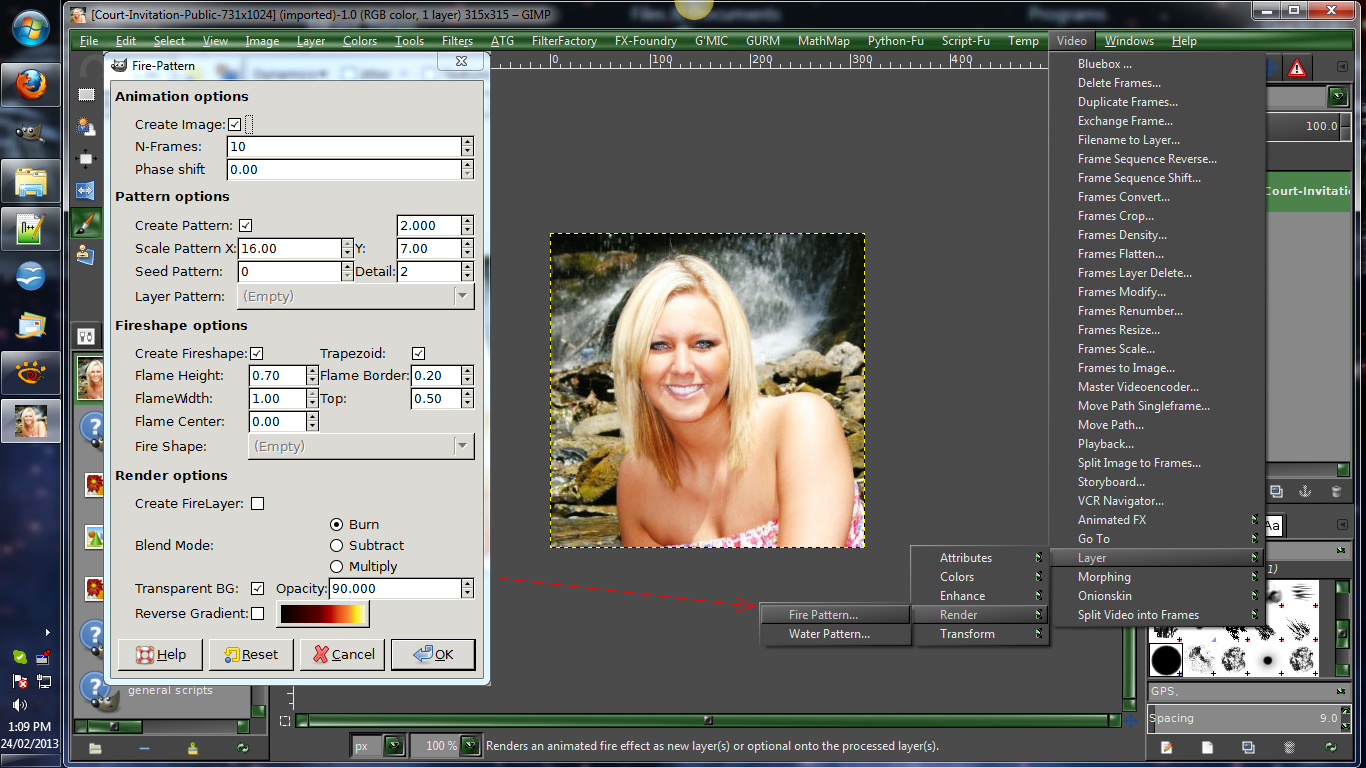
3 ) now run the animated fire script to create yet another image
4) now to speed up the process you may use another script ... that is from Saulgoode called
"sg-combine-bg" that i copy below to make easier
; This program is free software; you can redistribute it and/or modify
; it under the terms of the GNU General Public License as published by
; the Free Software Foundation; either version 2 of the License, or
; (at your option) any later version.
;
; This program is distributed in the hope that it will be useful,
; but WITHOUT ANY WARRANTY; without even the implied warranty of
; MERCHANTABILITY or FITNESS FOR A PARTICULAR PURPOSE.  See the
; GNU General Public License for more details.

; revised December 2010 to honor layer visibility

;; Combine each layer of the image with a copy of the background layer

(define (script-fu-sg-anim-combine-background image)
  ; get visible layers (bottom-to-top)
  (define (get-visibles image)
    (let loop ((layers (vector->list (cadr (gimp-image-get-layers image))))
               (visibles '()) )
      (if (null? layers)
        visibles
        (loop (cdr layers)
              (if (zero? (car (gimp-drawable-get-visible (car layers))))
                visibles
                (cons (car layers) visibles) ) ) ) ) )

  (gimp-image-undo-group-start image)
  (let* ((layers (vector->list (cadr (gimp-image-get-layers image))))
         (visibles (get-visibles image))
         (bg-layer (car (last layers)))
         (orig-sel (car (gimp-selection-save image))) )
    (gimp-selection-none image)
    (map (lambda (x) (gimp-drawable-set-visible x FALSE)) visibles)
    (when (= (car visibles) bg-layer)
      (set! visibles (cdr visibles))
      (gimp-drawable-set-visible bg-layer TRUE) )
    (while (pair? visibles)
      (let* ((layer (car visibles))
             (position (car (gimp-image-get-layer-position image layer)))
             (base-layer 0)
             (layer-name "") )
        (gimp-drawable-set-visible (car visibles) TRUE)
        (set! layer-name (car (gimp-drawable-get-name layer)))
        (set! base-layer (car (gimp-layer-new-from-drawable bg-layer image)))
        (gimp-image-add-layer image base-layer (+ position 1))
        (gimp-drawable-set-visible base-layer TRUE)
        (set! base-layer (car (gimp-image-merge-down image layer CLIP-TO-BOTTOM-LAYER)))
        (gimp-drawable-set-name base-layer layer-name) )
      (set! visibles (cdr visibles)) )
    (gimp-selection-load orig-sel)
    (gimp-image-remove-channel image orig-sel) )
  (gimp-image-undo-group-end image)
  (gimp-displays-flush)
  )

(script-fu-register "script-fu-sg-anim-combine-background"
  "<Image>/Filters/Animation/_Combine background"
  "Combine each layer of the image with a copy of the background layer"
  "Saul Goode"
  "Saul Goode"
  "4/22/2007"
  "*"
  SF-IMAGE    "Image"    0
  )

;; Overlay each layer of the image with a copy of the background layer

(define (script-fu-sg-anim-overlay-background image)
  ; get visible layers (bottom-to-top)
  (define (get-visibles image)
    (let loop ((layers (vector->list (cadr (gimp-image-get-layers image))))
               (visibles '()) )
      (if (null? layers)
        visibles
        (loop (cdr layers)
              (if (zero? (car (gimp-drawable-get-visible (car layers))))
                visibles
                (cons (car layers) visibles) ) ) ) ) )
  (gimp-image-undo-group-start image)
  (let* ((layers (vector->list (cadr (gimp-image-get-layers image))))
         (visibles (get-visibles image))
         (bg-layer (car (last layers)))
         (orig-sel (car (gimp-selection-save image))) )
    (gimp-selection-none image)
    (map (lambda (x) (gimp-drawable-set-visible x FALSE)) visibles)
    (when (= (car visibles) bg-layer)
      (set! visibles (cdr visibles))
      (gimp-drawable-set-visible bg-layer TRUE) )
    (while (pair? visibles)
      (let* ((layer (car visibles))
             (position (car (gimp-image-get-layer-position image layer)))
             (over-layer 0) )
        (gimp-drawable-set-visible layer TRUE)
        (gimp-image-set-active-layer image layer)
        (set! over-layer (car (gimp-layer-new-from-drawable bg-layer image)))
        (gimp-image-add-layer image over-layer -1)
        (gimp-drawable-set-visible over-layer TRUE)
        (gimp-image-merge-down image over-layer EXPAND-AS-NECESSARY) )
      (set! visibles (cdr visibles)) )
    (gimp-selection-load orig-sel)
    (gimp-image-remove-channel image orig-sel) )
  (gimp-image-undo-group-end image)
  (gimp-displays-flush)
  )

(script-fu-register "script-fu-sg-anim-overlay-background"
  "<Image>/Filters/Animation/_Overlay background"
  "Overlay each layer of the image with a copy of the background layer"
  "Saul Goode"
  "Saul Goode"
  "4/22/2007"
  "*"
  SF-IMAGE    "Image"    0
  )
5 ) Last step:
you have already copied the visible of the text:
now in the other image that with the fire animation paste it on top
(NOT using CTRL V or "paste" BUT instead "Paste as new layer")
Now run the last script i posted ...done
 Login
 Register
 Tweets
 FAQ
 Advanced Search






 Thanks for the tip.











 :




 My pleasure!